Workflow Ownership: Who Owns Your Automations?

Table of Contents
- Quick answer: workflow ownership in practice
- What Automation Debt Actually Is
- Workflow Ownership: Who Owns It, and Why the Answer Is Usually Nobody
- Three Weeks of Silent Automation Failure Before Anyone Notices
- Two Things Everyone in the Room Believes That Aren’t True
- The Ownership Audit You Can Run This Week
- The Fix Is Not Another Platform
- Frequently Asked Questions
- One Rule for the Planning Meeting
An operations coordinator builds a workflow in 2024. A spreadsheet export lands in a shared folder, a Zap picks it up, a Slack message goes out, and the CRM updates itself. Two years later she’s running a different team. Then a vendor retires an old trigger format. The Zap keeps running, green the whole way, and quietly discards every event it receives. Nothing alerts anyone. Three weeks after that, a customer asks where their invoice went.
Workflow ownership is the fix. One named person is accountable for the outcome of every live automation, and that person isn’t necessarily whoever built it. Without one, silent failures just run until a customer finds them for you. Working out where you stand takes a spreadsheet, four yes-or-no columns and about a week of asking around. Nobody has to buy anything.
Quick answer: workflow ownership in practice
- Workflow ownership means one named person is accountable for the outcome of each live automation, not just the person who built it.
- Automations fail silently when vendors change APIs, and nothing alerts anyone.
- Automation debt is the cost of workflows built with no owner, documentation, or monitoring.
- A one-week audit of live automations finds the unowned, unalerted, and invisible ones.
- The fix is a designed, documented, monitored connective layer, not another platform.
What Automation Debt Actually Is
Automation debt is the accumulated cost of workflows built fast, with no governance, no documentation and no owner. Each one is defensible on its own. Stack them up and your operation is running on a pseudo-application nobody designed.
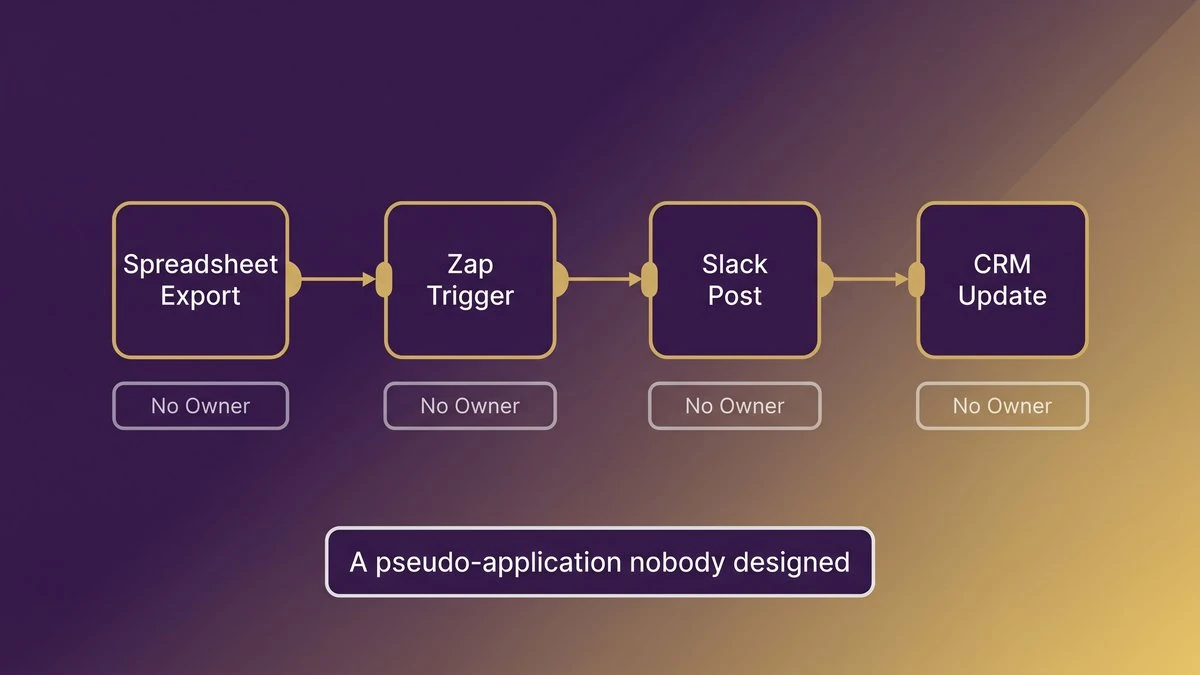
A single chain of automations, from a spreadsheet export to a CRM update, with no owner assigned at any step
Every One of Them Looked Harmless When It Was Built
Take the Friday export. A finance analyst pulls a spreadsheet, a Zap grabs the file, posts it to the account team’s Slack channel and updates a field in the CRM. An afternoon to build, two hours a week saved. Nobody wrote any of it down, because at the time there was nothing much to write down.
Now multiply that by every team. Sales ops has a lead-routing flow. Support built a refund trigger at some point, and HR runs an onboarding checklist that provisions accounts. This is automation sprawl, and it’s rarely anyone’s mistake. Every one of those workflows solved a real problem on the day it shipped.
And the pressure to keep adding them is real. Capital One’s 2026 Mid-Year Snapshot, fielded June 15 to July 2, 2026 among 1,001 U.S. middle market financial decision makers, found that 43% say the ability to realize efficiency from cost discipline has reached its limit. In the same survey, 58% spend roughly $2 on technology tools for every $1 on internal employee training. So the tools keep arriving faster than the people trained to run them.
A Pseudo-Application Nobody Designed
Link enough of those chains together and you have an application. Inputs, business logic, outputs, dependencies: all of it is in there. What’s missing is an architecture diagram, a test suite and a release process.
A boundary, before this goes any further. The automations that matter here are the live ones: still firing, or silently failing to fire, inside workflows your company depends on today. Retired systems and software nobody uses any more are a separate headache.
Workflow Ownership: Who Owns It, and Why the Answer Is Usually Nobody
Builder and owner are two different jobs. The builder got the workflow running. The owner answers for what it produces, which means the invoice that went out, the lead that got routed, the month-end record that either reconciles or doesn’t.
Two Jobs, One Name in the Tool
Builders know how the workflow works. Outcome owners know what it’s for, who depends on it and what a wrong result costs. Most automation platforms only record the first of those two people, which is why the “owner” field in the tool still holds a name from 2024.
One question sorts this out for any workflow. If it produced the wrong output tomorrow, who would have to explain that to a customer? Whoever comes to mind owns the outcome. If the answer is a shrug, you’ve found your first problem, and it isn’t a technical one.
What Happens the Week That Person Changes Roles
The builder gets promoted, moves teams or leaves. The workflow carries on regardless, still running on their personal credentials, inside their personal workspace, with logic only they could ever explain. Engineers call this bus factor. In operations it shows up as the coordinator who “just knows how the Friday thing works.”
Shared workflow ownership works only when it names a role that stays put after people move. The head of billing owns the invoice flow, no matter who builds the next version of it. We’ve covered what this kind of single-person dependency costs at the system level in what happens when the one person who knows leaves.
Three Weeks of Silent Automation Failure Before Anyone Notices
A deprecated endpoint doesn’t announce itself. The workflow keeps running, the platform keeps showing green, and the output quietly stops. Three weeks later it surfaces as a customer asking where their invoice went, or as a reconciliation that won’t close.
How a Deprecated Endpoint Takes Down a Workflow That Never Changed
The mechanism is mundane. A CRM vendor retires its legacy trigger format on a published date. A workflow built two years earlier against internal numeric stage IDs starts receiving events it no longer recognizes, and the filter step throws them away. Nothing errors out, because discarding an event is a perfectly valid result. When an API deprecation breaks an automation, it almost never looks like a crash. Vendors do publish these changes, and Stripe’s public API upgrade log is a good example of what a changelog looks like. But whoever inherited your workflow almost certainly isn’t reading them.
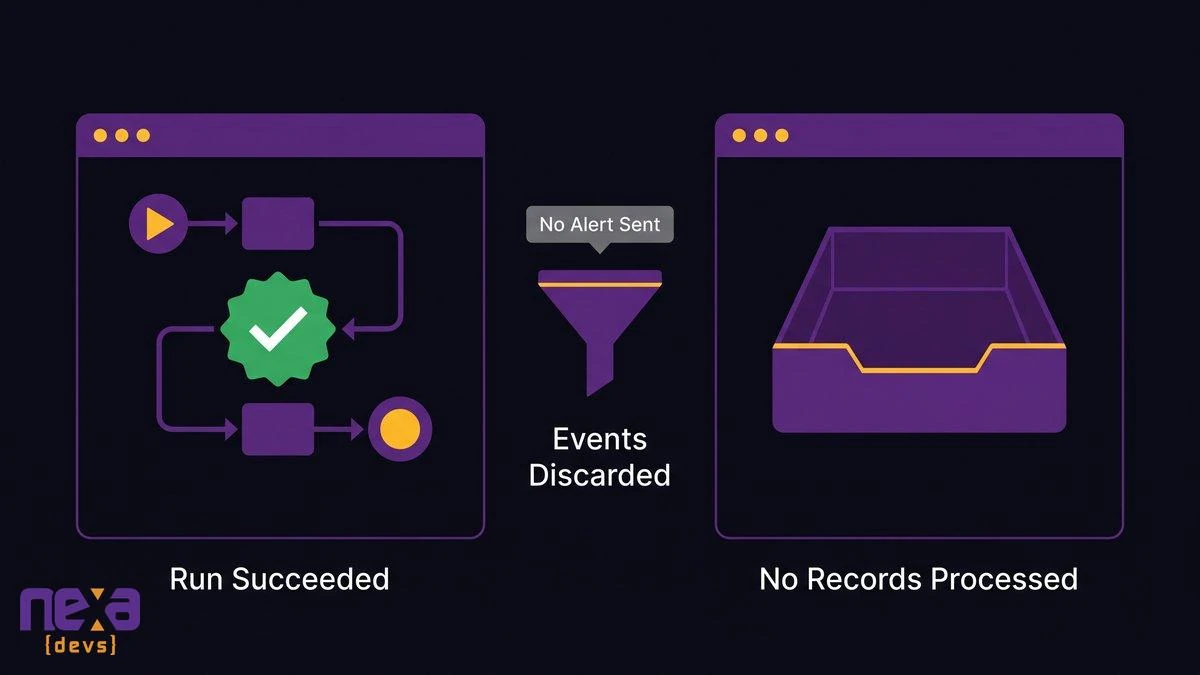
A workflow that reports a successful run while a changed vendor field causes every event to be discarded
Automation error alerting usually covers crashes: a step threw an exception, a login expired. A run that succeeded and did nothing at all trips no alarm anywhere. The human half of this has a name too. Parasuraman and Manzey’s review of automation complacency in Human Factors documents how people stop checking systems that have worked before.
Why the Bill Lands on Operations and Not on the Builder
The builder never gets the call. You do. Month-end close turns up a batch of invoices that never generated, or a total that’s off by an amount nobody can tie to a transaction. Finance asks operations. Operations asks the team. The team asks who built it, and the answer is somebody now working in another department who barely remembers doing it.
Finding the cause takes longer than fixing it, nearly every time. And you’re the one absorbing the escalation, for a system you never approved and couldn’t have diagrammed if someone had asked you to.
Two Things Everyone in the Room Believes That Aren’t True
Both of them feel accurate on the day a workflow ships, and neither survives six months of contact with reality. The first is that the build is the whole cost. The second is that somebody is keeping an eye on it.
Workflow Automation Maintenance Keeps Costing After Launch
Treat the build as a down payment. Third-party APIs add features, deprecate endpoints, rename fields and change what they want for authentication. Platform vendors update their own integrations too, sometimes in ways that change how an existing step behaves. People who run automation stacks for a living set aside a maintenance reserve every year, a slice of the original build cost, for exactly this reason.
Your 2027 plan almost certainly has a line for licenses. It probably has no line for keeping the workflows running on top of them correct. Internal tools maintenance gets funded when a named person owns the outcome and can defend the line item in the room.
That Someone Is Watching
Nobody is watching. Go and check what your platform actually alerts on and you’ll find mostly crashes. A workflow that receives zero events isn’t in error. A workflow that processes ten of twelve records isn’t in error either. The only monitor that catches either one is built around the expected outcome: at least one invoice per business day, a record count that matches the source.
Writing that monitor takes someone who knows what normal looks like for that particular workflow. Which puts you back at the outcome owner.
The Ownership Audit You Can Run This Week
A spreadsheet and five working days will do it, as long as you’re willing to ask uncomfortable questions. No tool purchase, no consultant. A Zapier automation audit, a Make scenario list, a Power Automate flow export: the inventory starts the same way whichever platform you’re on. You don’t need a low-code governance committee to begin, either.
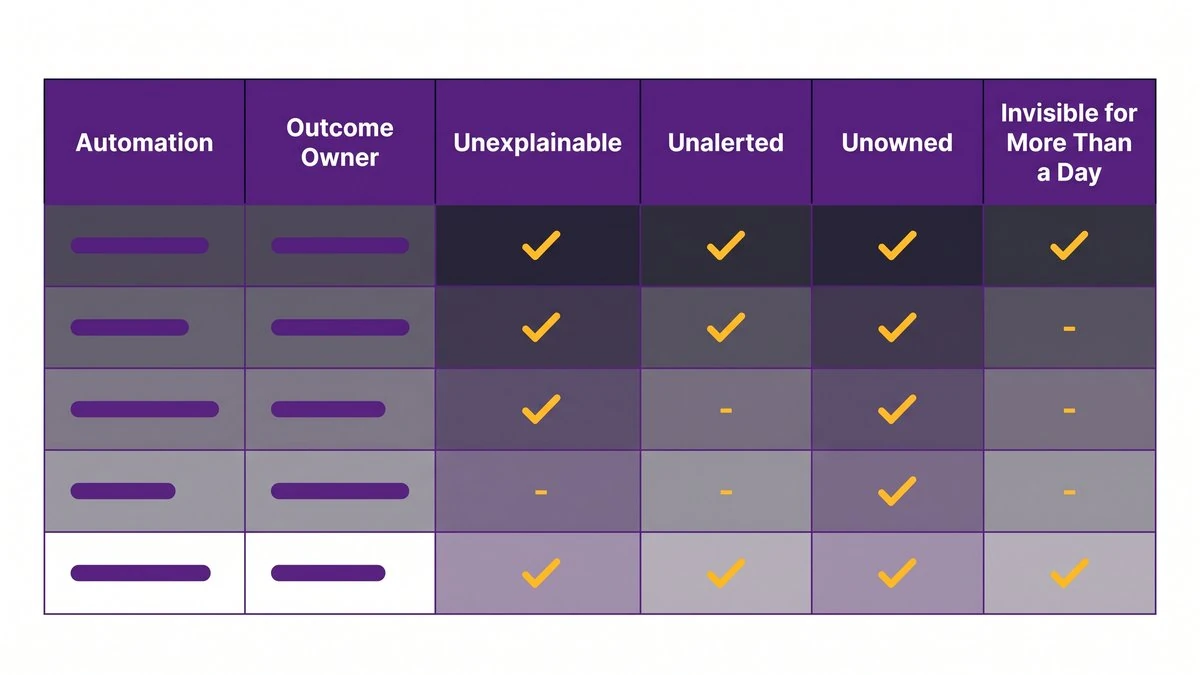
An audit spreadsheet with one row per live automation, an outcome owner column, and four yes-or-no risk flags
List Every Automation That Is Still Firing
Start with the platforms: Zapier, Make, Power Automate, n8n. Then go after the ones that live nowhere, which is where this gets interesting. Scheduled scripts. Spreadsheet macros. Email forwarding rules, CRM workflow rules, and the reports that land in somebody’s inbox every morning without anyone having asked for them. Finish by putting a plain question to each team lead: what happens in your area that nobody touches?
Expect the list to run longer than anyone guessed. Finding that out is most of the value.
Name the Outcome Owner for Each One
One name per row, and it’s the person who would answer for a wrong result, not whoever clicked “publish.” Two names means no name. If the owner on the row is the builder and the builder has since changed roles, change the entry. Ownership that survives only in somebody’s memory won’t survive their next job move.
Then Flag Four Things: Unexplainable, Unalerted, Unowned, Invisible for More Than a Day
Add four yes-or-no columns.
- Unexplainable. Nobody can say in two sentences what it does and why it exists.
- Unalerted. If it fails, or produces nothing at all, no notification reaches a human being.
- Unowned. The owner column is blank, or it holds someone who left the role.
- Invisible for more than a day. Ask when a human would first notice if this stopped at 9 a.m. today. Anything past 24 hours goes on the list.
That fourth column is the one that turns into a real risk register. Any row carrying two or more flags belongs on the redesign list. Everything else gets an owner and an alert, then stays exactly as it is.
The Fix Is Not Another Platform
There are two upsells waiting for you here, and this is an argument for neither. Buying a better automation platform recreates the same ownerless layer in a nicer interface. Ripping out what already works throws away logic that has earned its place.
Keep the Automations That Work
Most of what the audit turns up will be fine, and it should stay. The Friday export that updates the CRM is a good idea. What it needs is an owner, an alert that fires when it produces nothing, and one page explaining what it does and why. Call it an afternoon per workflow, and nobody’s permission required.
Make the Connective Layer Something Someone Designed, Documented, and Monitors
The flagged workflows are a different job. There, the connections between systems have to stop living in personal workspaces and become designed software. Nexa Devs builds APIs and middleware around the workflow a business actually runs. Architecture documentation, decision records and test coverage ship as standard deliverables, and you own all of it whether or not the engagement continues. Ongoing SLA-based support covers the layer afterward, including systems another vendor built.
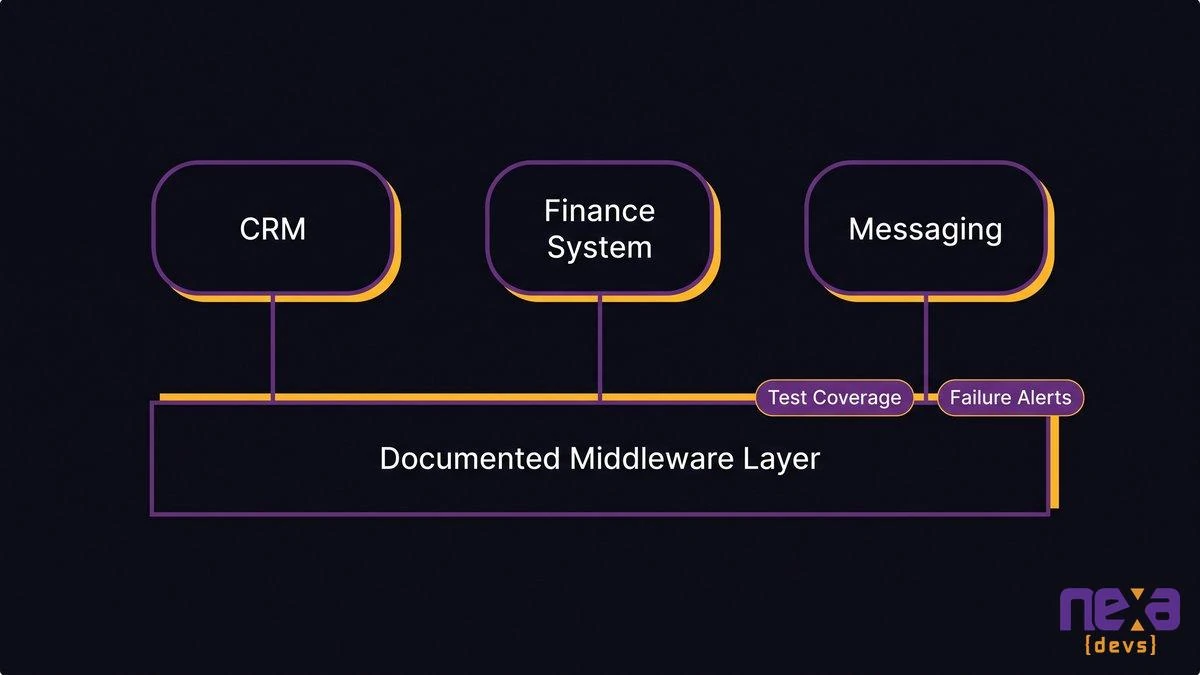
A designed middleware layer sitting between business systems, with documented interfaces, tests, and failure alerts
AI shows up here as a delivery tool rather than a headline. AI-assisted analysis reads an undocumented automation’s steps, filters and field mappings, then reconstructs what the thing actually does. It then generates the test coverage that proves a replacement behaves identically to the original. Because those tests exist before cutover, “identical” is something you watch happen instead of something a vendor promises.
If you’d like a second set of eyes on your flagged list, how an architecture assessment works explains what we’d look at first.
Frequently Asked Questions
Why is automation failing?
Most automations fail because the systems around them change. A vendor deprecates an endpoint, renames a field, or changes authentication, and the workflow keeps running while producing nothing. With no owner and no failure alert, nobody notices until a customer or an auditor does.
What is automation complacency?
Automation complacency is assuming an automated process still works because it always has. Human-factors researchers have documented it for decades. In operations, it looks like nobody checking a workflow that quietly stopped doing its job weeks ago.
What is the biggest challenge in automation?
Keeping it correct after launch. Building a workflow takes an afternoon. Maintaining it as vendors change their APIs, staff change roles, and the business changes its process takes a named owner, documentation, and monitoring. Most companies never assign any of the three.
What is an automation error?
An automation error is any run where a workflow does something other than what was intended. The dangerous kind is silent: the run reports success, but a filtered event or skipped record means the outcome never happened. Crash alerts don’t catch it.
What is the automation paradox?
The more reliable an automated system gets, the less practice people have noticing and fixing its failures. Lisanne Bainbridge described this in her 1983 paper on the ironies of automation. Rare failures get harder to catch because everyone trusts the system.
How do I find every automation my company runs?
List every live workflow across Zapier, Make, Power Automate, scripts, scheduled reports, and spreadsheet macros. Ask each team lead what runs without them touching it. Then name an outcome owner for each. A spreadsheet and one week are enough to start.
One Rule for the Planning Meeting
Take one sentence into the 2027 planning conversation: a workflow without an owner isn’t leverage, it’s a dependency. Your company is running on several dozen of them right now. Some will fail this quarter, and you’ll hear about it from a customer rather than a dashboard.
Run the audit this week. When the flagged list is on your desk and you want it turned into documented, tested, monitored software, book a call with Nexa Devs and bring the spreadsheet.