Legacy System Decommissioning: Why the Shutdown Stalls

Table of Contents
- Quick answer: why legacy shutdowns stall
- The Legacy System Decommissioning Date That Keeps Moving
- Nobody Will Sign Off on a Risk They Cannot Size
- The Four Dependencies That Keep a Retired System Alive
- The Audit You Can Run This Week
- What an Unowned Account Is Actually Telling You
- Security Exposure Builds While the System Stays On
- From Inventory to Shutdown: Re-pointing the Few Consumers That Genuinely Need the Data
- The Deliverable Worth Paying For Is the Map, Not the Shutdown
Last updated: 2026-11-10
Legacy system decommissioning stalls for a reason that has nothing to do with effort: nobody can produce a list of what still reads from the old system. Without that list, no executive will approve switching it off, so the shutdown date moves another quarter.
Your replacement went live. The business case promised the old system would be retired. Months later both are still running, and every conversation about turning the old one off ends with “let’s give it one more cycle.” The delay isn’t IT being slow. It’s a missing document.
This article names the four kinds of hidden dependency that keep retired systems alive, then gives you a diagnostic your team can run this week. By the end, an unsizeable risk becomes a finite list with a named person next to each line.
Quick answer: why legacy shutdowns stall
- Shutdowns stall because nobody can list what still reads from the old system, so nobody will sign off on the risk.
- Four dependency types hold retired systems alive: undocumented jobs and integrations, trusted legacy reports, uncovered exceptions and approvals, and audit records.
- Ninety days of connection and authentication logs turns that unknown into a finite list.
- Accounts with no owner are evidence of dependencies, not clutter.
- The map outlives the shutdown, so the client should own it.
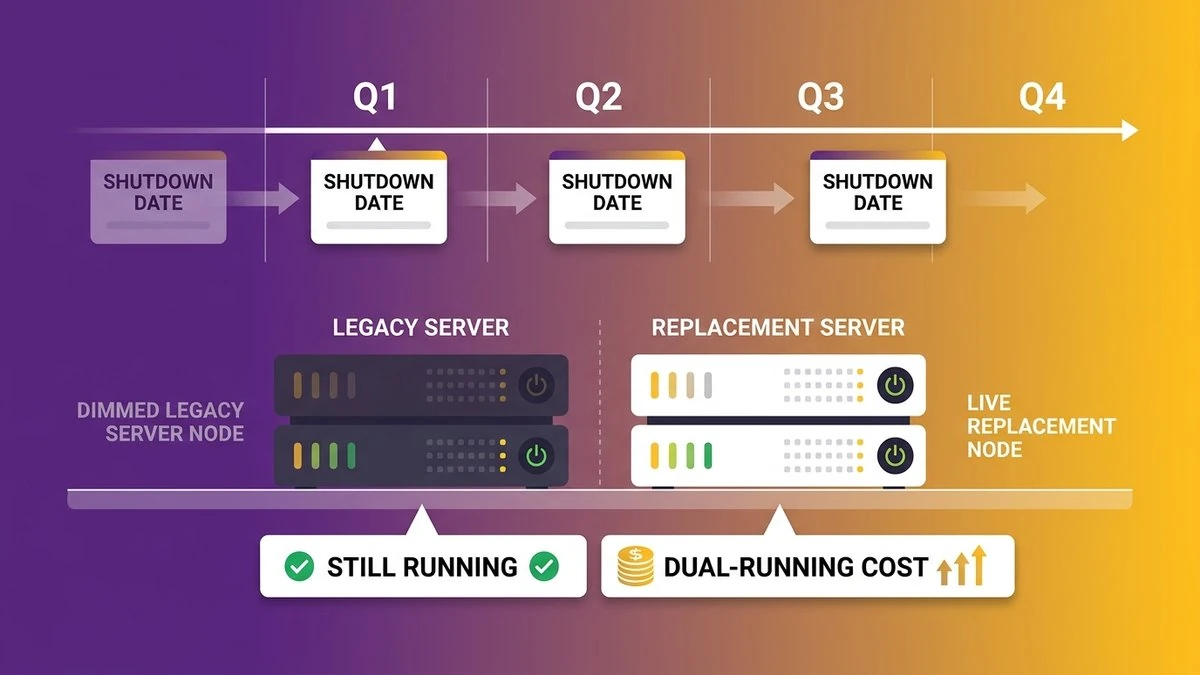 A leadership team reviews a legacy system decommissioning timeline where the shutdown date has been pushed again.
The Legacy System Decommissioning Date That Keeps Moving
The replacement system went live, the old one is still switched on, and the retirement date has slipped at least twice. When that happens, it usually means nobody has been able to say what depends on the old system.
What the business case promised and what the server rack still shows
The approved business case had a line item that read something like “retire legacy platform, Q3.” Nine months after go-live, that line is still open. Finance sees two environments on the books. Operations sees two places to check when a number looks off. Your team has learned to keep both, without anyone asking them to.
Dual-running cost doesn’t pause while the argument continues, so a meter ticks the whole time. That number is easy to quote, and quoting it changes nothing. What needs answering is why a decision that looked simple on the slide won’t get made.
Why every proposed cutover date gets pushed one more quarter
Somebody proposes a date. Somebody else asks a question nobody can answer. The date moves. Then the next quarter-end, the next audit season, the next product launch gives everyone a respectable reason to wait.
Notice what’s missing from that loop: a villain. Nobody is stonewalling. Each person in the room is making a reasonable call given what they can’t see. That’s why pressure alone doesn’t work. You can’t push a team through a gap in their knowledge.
Nobody Will Sign Off on a Risk They Cannot Size
The people delaying your shutdown are refusing to sign for a risk nobody can measure, and that is a defensible position. Switch off a system without knowing what reads from it, and you find out which process broke on a Monday morning, in front of customers.
The question that stops every shutdown meeting: what still reads from it?
Every shutdown meeting reaches the same moment. Someone asks, “What still reads from it?” The room goes quiet, because the honest answer is “we think nothing, but we can’t prove it.”
Think about what you’re asking your IT lead to do. Sign off that nothing depends on a system that has been running for a decade or more, built by people who may have left, wired into processes that grew around it. If they’re wrong, the failure lands on their name. Declining to sign is rational. They’re pricing the risk correctly: unbounded.
Make that reframe in your own head before the next meeting. What you have is a documentation gap, and treating it as a housekeeping backlog sends you after the wrong fix. Hire more hands and the date still won’t move. The missing piece is information, and labor doesn’t substitute for it.
What “decommissioned” is supposed to mean, and why the half-shutdown is the usual outcome
Decommissioning means the system is switched off, access is closed, nothing depends on it, and any records you’re obligated to keep are available somewhere else. Archiving only covers the last part. Application sunsetting, announcing an end date to users, covers none of the technical work.
The half-shutdown is what happens in practice. Users are moved to the new system. The old one stays up “just in case,” read-only, then not even read-only, then forgotten. Nobody is accountable for it, nobody monitors it, and nobody can turn it off. Archon’s decommissioning guide calls this failure mode by name, and anyone who has run a retirement will recognize it.
Even organizations with formal oversight struggle here. The US Government Accountability Office identified 10 critical federal legacy systems that cost about $337 million a year to operate and maintain, and as of June 2019 eight of the 10 agencies had either no documented modernization plan or an incomplete one. In GAO’s May 2023 status update (GAO-23-106821), two agencies still hadn’t completed theirs. Federal budgets look nothing like a mid-market one, so treat those figures as illustration only: if well-resourced agencies ship incomplete retirement plans, a 200-person company with a lean IT team is not failing because it’s careless.
The Four Dependencies That Keep a Retired System Alive
Four kinds of dependency hold a replaced system in place: processes that still call it without anyone noticing, reports the business trusts, workflows that still route through it, and historical records someone may need for an audit. Each one is countable, and each can be handed to someone by name.
TechTarget’s July 2026 reporting, “4 hidden dependencies that keep legacy systems alive” by James Alan Miller, sorts shutdown stalls into these same four categories. Its framework is qualitative and puts no rate on any of it. It still matches what shows up when you inspect a stalled retirement. The scenarios below are illustrative, built to show how each category behaves.
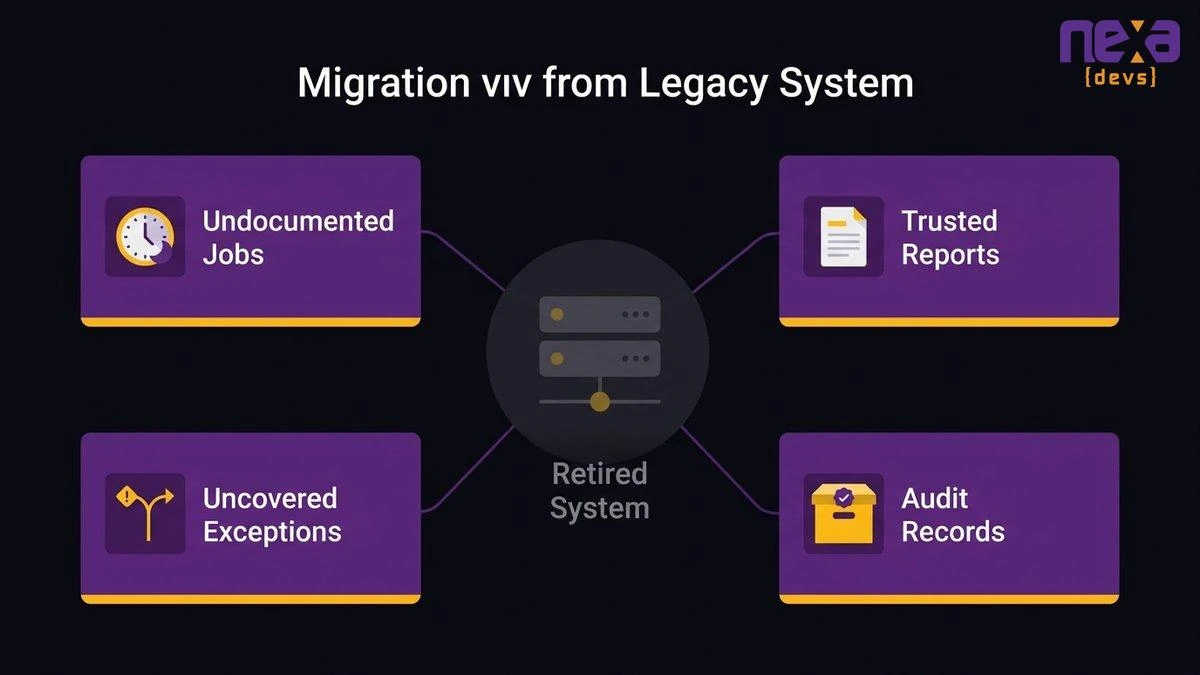 The four categories of hidden dependency that keep a retired system running behind the new one.
Scheduled jobs, manual exports and integrations nobody wrote down
Picture a nightly job that exports yesterday’s orders to a shared folder. A partner’s system picks the file up at 6 a.m. The job was set up eleven years ago by a contractor. It isn’t in any diagram, any ticket, or any onboarding document. The new system doesn’t produce that file, and nobody has noticed because the old one still does.
This is the largest bucket and the hardest to see. TechTarget lists scheduled jobs, manual exports, shared folders, old integrations and local databases as the places this hides. All of them run without anyone watching, which is why they survive. Undocumented dependencies surface three weeks after the shutdown, when a partner calls asking where Tuesday’s file went.
Reports the business trusts more than the new system’s numbers
Your finance director has a monthly report that has been right for years. The new platform produces a similar report, and the totals are off by a small amount nobody has had time to reconcile. So finance keeps running the old one and files the new one in a folder nobody opens.
No log will surface this one, because the dependency is trust rather than technology. Until someone proves the new numbers match, or explains why they differ, people will keep opening the old system to settle arguments. Retiring it without that reconciliation just moves the argument to a worse moment, like a board meeting.
Exceptions and approvals the new process never covered
A new workflow handles the standard case cleanly. But the old system had a path for the rush order, the credit override, the customer who gets net-90 terms because of a handshake from 2016. Somebody built that path into the old system years ago. The new design never asked about it.
Try this with your operations lead: ask what happens when something doesn’t fit the standard flow. If the answer starts with “well, we go into the old system and…” you’ve found one. These routes tend to belong to a single person, usually the one who has handled them for years, which is a knowledge-concentration problem as much as a migration one. Our piece on what one person costs you covers why that concentration gets priced by outsiders.
Historical records that have to stay searchable for audits
Auditors, regulators and the occasional lawsuit can ask for records from years ago. If those records only exist in the old system, switching it off ends your ability to answer. So the shutdown waits until someone decides what must be kept, for how long, and where.
That decision is a data retention schedule, and it belongs to legal and compliance, not IT. The fourth dependency is the easiest to resolve, because it’s a policy question with a bounded answer. Once the schedule exists, legacy data access after decommissioning is an archive problem, and the whole system no longer has to stay up to serve it. We’ll come back to that below.
The Audit You Can Run This Week
You can size the risk in about a week with one request: ninety days of connection logs and authentication records for the old system, every distinct account and job that touched it, and a count of those nobody can map to a named owner. The count is your shutdown risk.
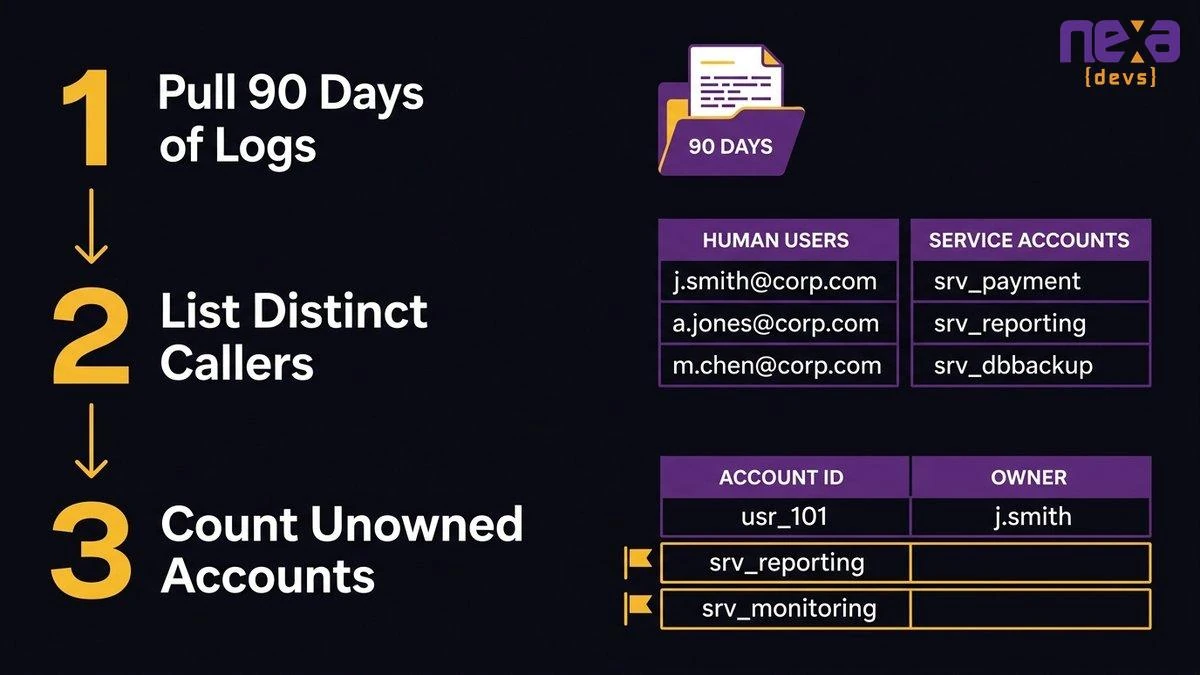 A three-step audit: pull the logs, list every distinct caller, and count the ones with no owner.
Pull ninety days of connection logs and authentication records
Ask your database administrator or infrastructure lead for every authentication record and connection log against the old system for the last ninety days. One sentence, one named person, due Friday.
Why ninety days? It covers at least one month-end close and one quarter-end, which is where the jobs that only run occasionally tend to show up. The method has a limit worth stating plainly: a process that runs once a year, like a year-end tax export, won’t appear in a ninety-day window. Cover that gap by asking the people who run annual processes directly, and by checking the job scheduler for entries with annual schedules.
List every distinct account, job and service that touched the system
Collapse the raw logs into a list of distinct callers. Human users go in one column. Everything else, service accounts, scheduled jobs, integration credentials, reporting tools, goes in another. The human column is usually the shorter worry. The second column is where undocumented dependencies live.
For each distinct caller, record what it did: read, wrote, or both. A caller that only reads is a downstream consumer of your data. A caller that writes means a process is still feeding the old system, which is a more serious finding.
Count the ones nobody can map to a named owner
Now walk the list with the people who should know. For every account or job, can someone name who owns it and what business process it serves? Count the ones where the answer is no.
An invented example, for shape only: suppose the pull returns 30 distinct callers. Twenty-two map to a named person or a documented job within an afternoon. Eight don’t. You now know the size of your problem, and it’s eight lines, not “everything.” Those numbers are made up to show what the result looks like, and your real ones will differ.
The point is the conversion. “We don’t know what depends on it” is unbounded. “Eight unresolved accounts” is a work list.
For each unresolved line, ask three questions of the people closest to it: what business process does this serve, who would notice first if it stopped, and when did it last change? Two of those answers usually exist somewhere. The third, who would notice, is the most useful, because it points you to the person who can confirm whether the dependency is still real. A job that nobody would notice stopping is a strong candidate to cut.
What an Unowned Account Is Actually Telling You
An account with no owner isn’t clutter to be tidied. It’s a finding. Something is still reading from or writing to your old system, and nobody remembers asking it to. That is why the shutdown can’t happen yet.
Each unmapped line ends up in one of three places. Some are dependencies you re-point to the new environment, some are processes you move, and some you cut outright because whatever they served stopped mattering. Somebody has to decide which, and the log alone cannot.
A note on scope. The question here is narrow: what does this account prove about the old system? It’s discovery work for a retirement. Governing the automations you run today is a different discipline with a different owner, and mixing the two is how a shutdown audit turns into a six-month program. Use the list to finish the retirement, then stop.
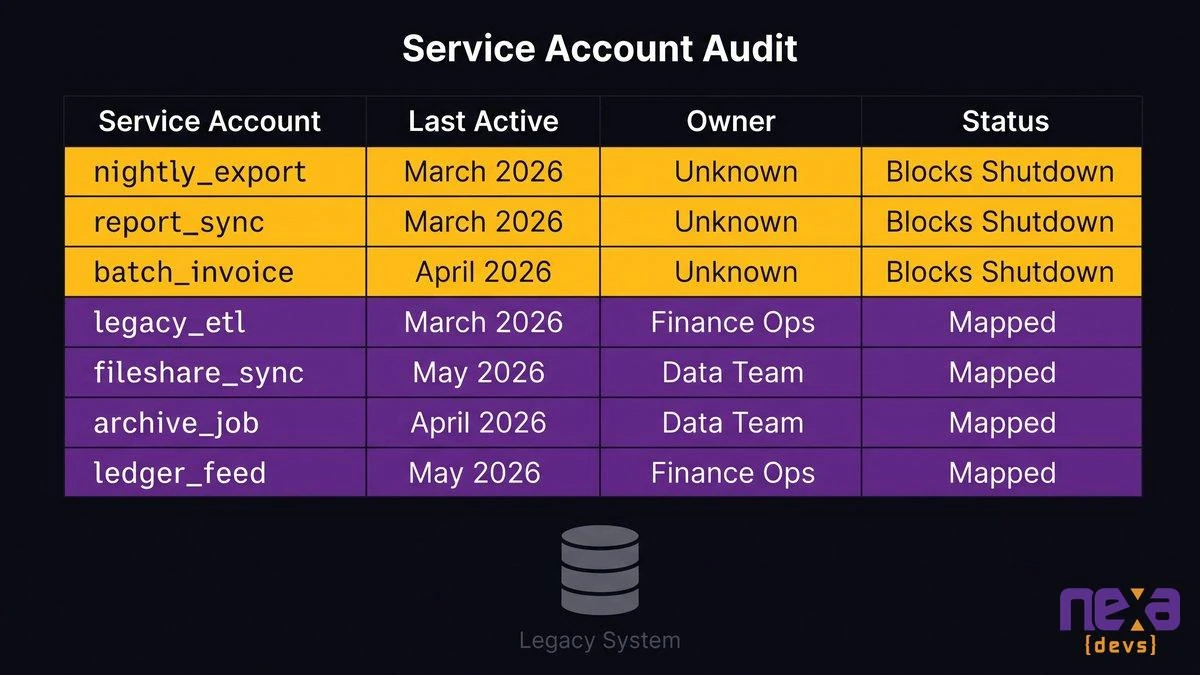 Service accounts with no owner are the specific lines that block the shutdown.
Security Exposure Builds While the System Stays On
A system nobody can switch off is also a system nobody fully understands, which makes it a security and continuity exposure. The documented case below shows how quickly that exposure turns into an outage.
When the only person who understood it has left
The Office of the Victorian Information Commissioner (OVIC), a government information regulator, published a legacy-systems case study that reads like a checklist of this article’s themes. An unsupported legacy reporting system with known faults was hit by ransomware. The data on it became inaccessible. Attempts to recover from backups were unsuccessful. And, in OVIC’s words, “there was only one person in the organisation who knew how to manage the system.”
The result was almost an entire week of outage, and paying the ransom didn’t resolve the problem. Read the full OVIC case study before your next risk review. It’s a single documented incident with no prevalence rate attached, so read it as a picture of what the downside of unknown dependencies looks like when it arrives rather than a claim about how often this happens.
As Thomas Johnson, co-founder at Multiplayer, put it to SDxCentral in October 2024: “you’ve got to know where it lives.” He added that “people who used legacy equipment and software come and go.” The people leave. The system stays.
Why an unsupported system that still holds live dependencies is the worse exposure
Plenty of teams run old software safely. It’s the combination that hurts. When a system is unsupported and still has live dependencies, patching gets risky, because you don’t know what a patch might break. Isolating it is off the table, because something unknown still needs to reach it. And switching it off is the very thing you have been trying to do all along.
So the legacy shutdown risk compounds in a specific way. Each month of delay adds another month in which the one person who understands the dark corners could leave, and the system goes on holding live connections to your business.
The incident side makes the same case. When something breaks in an unmapped system at 2 a.m., the first hour goes to working out what is connected to it before anyone starts fixing it. A map turns that hour into a lookup. Without one, every incident is also a discovery exercise, and discovery under pressure is where mistakes get made. Framed honestly, the choice is between shutting down with a map and running an unmapped system indefinitely.
I’d also push back on the instinct to buy more time with an extended vendor support contract. Support gets you patches. It doesn’t get you a list of what depends on the thing being patched, and the list is the part you’re missing.
From Inventory to Shutdown: Re-pointing the Few Consumers That Genuinely Need the Data
Once the inventory exists, every dependency gets one of three verdicts: re-point it to the new system, replace it with something new, or retire it with the old system. The list has an end, so the work is bounded, and each line gets a person and a date.
Re-point, replace, or retire: deciding one dependency at a time
Take the nightly order file from earlier. The verdict is probably re-point: the partner still needs the data, so the new system or a small integration layer produces that file instead. APIs and middleware are the usual tools here, a thin connection that gives the one remaining consumer what it needs without keeping the old platform alive.
Other lines get different verdicts. The finance report that nobody reconciles gets replaced once someone proves the new numbers match. The rush-order exception gets designed into the new process, or deliberately retired by a business decision someone is willing to own. Not every dependency deserves rescuing. Some should simply end. A report last opened two years ago, an export to a partner you stopped working with: confirm, document the decision, and let them go. Writing down why a line was cut matters as much as writing down why one was kept, because the next person will ask.
This is where Nexa’s approach fits. Our AI-assisted architecture assessment reconstructs the dependency map from the system itself, reading code, scheduled jobs, database objects and integration configuration, rather than from interviews with people who have already forgotten. It’s system dependency mapping that doesn’t rely on memory, and it catches the jobs nobody mentioned. People still validate the findings, but the discovery stops depending on who happens to remember.
Keeping the records accessible without keeping the system running
Records that must be retained don’t require the platform that created them. Decide the data retention schedule with legal and compliance: what you keep, for how long, and who can request it. Then move those records to a place that’s searchable, access-controlled and cheap to run, and prove an auditor’s typical request can be answered from there.
Keeping the old system alive “for the records” is the most common reason a retirement never ends, and it’s the weakest. It leaves you paying to run a full application to serve a few search queries. Archive mechanics vary, and the decisions that matter to you are policy ones: retention periods, who can access the records, and who signs off that the archive works.
We’re also not arguing to re-platform the replacement. The system you moved to is fine. The gap is knowledge of what the old one connected to, which is documentation work rather than engineering work.
Sequencing a controlled shutdown so it can be reversed on the first day
A controlled shutdown sequence moves in small, reversible steps. First, the system goes read-only, which exposes any process that writes to it. Next, you block access at the network level while deleting nothing, and watch for failures over a defined window. Only then do you decommission the host, after a verified backup.
The design principle is that the first day must be reversible. If a forgotten job breaks, you restore access in minutes instead of rebuilding from scratch. That reversibility is what lets a cautious executive say yes, because the risk they’re accepting is now bounded and recoverable.
A practical legacy system decommissioning checklist at this stage has five lines: the signed dependency list, the retention decisions, the validated archive, the rollback plan, and a named person accountable for the monitoring window. OWASP’s SAMM model treats system decommissioning and legacy management as a stream of its own, which tells you how seriously mature security programs take this step. For the broader question of replacing legacy platforms in stages rather than all at once, see our guide to big-bang versus incremental migration.
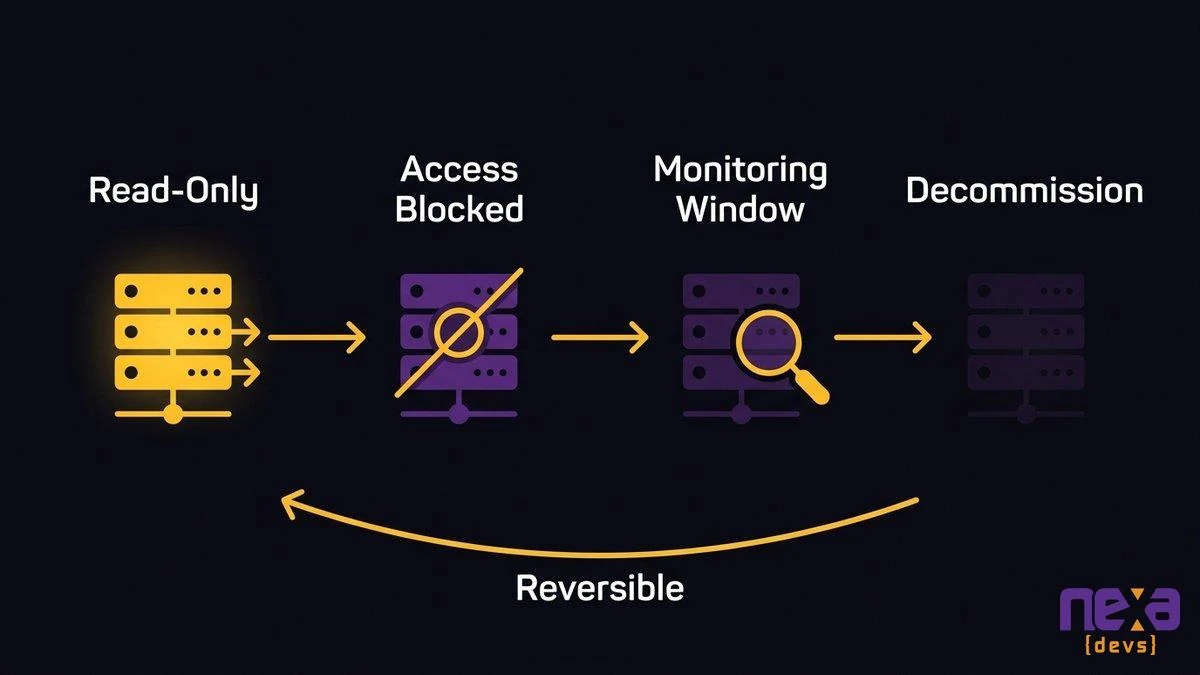 A reversible shutdown sequence: read-only first, then blocked access, a monitoring window, and finally decommission.
The Deliverable Worth Paying For Is the Map, Not the Shutdown
Switching the system off is an event. The dependency map is an asset. If you’re deciding what to pay for, pay for the map and the runbook, because the shutdown is the easy part once they exist and impossible without them.
Who owns the dependency map after the system is gone
If the map lives in a consultant’s laptop or a single engineer’s head, you’ve rebuilt the problem you started with. The dependency map and the decommissioning runbook should be artifacts your company owns: written down, stored where your team can find them, and understandable by someone who wasn’t in the room.
That’s how Nexa treats documentation transfer on every engagement. Architecture diagrams, system design documents and API references are delivered to you and belong to you, whether or not the engagement continues. For a retirement, the map and runbook join that package. Post-shutdown governance is the unglamorous last step: somebody updates the map when the next system changes, so it stays true.
The same gap will block the next retirement
The undocumented dependencies that stalled this shutdown exist for the same reason in every other system you run. Nobody wrote down what the CRM feeds, what the billing platform exports, which spreadsheet quietly depends on which database. The next retirement will hit the same wall.
Mapping beats starting over. A single mapped system is useful, and a habit of mapping every system you replace is better. Done once, the map is a one-off project. Kept current, it turns every future retirement into a routine one. Our view on key-person and knowledge risk explains why that habit is also what a buyer, lender or auditor eventually asks for.
If your replacement is live and your old system won’t die, start with the audit above. And if you’d rather have the map built from the system itself, with documentation your team owns from day one, book an architecture assessment and we’ll show you what’s still reading from it.