ADA Title II Higher Education: The Apps Nobody Audited
Table of Contents
- Quick answer: Title II and campus apps
- What Your Title II Remediation Contract Does Not Cover
- What the April 2026 Extension Changed, and What It Did Not
- ADA Title II in Higher Education: Which Institutions and Systems Are Covered
- Why Crawlers and Overlays Stop at the Login Screen
- The WCAG Criteria Hand-Built Applications Actually Fail
- Nobody Can Send You a VPAT for Software You Wrote Yourself
- Three Honest Paths: Retire, Remediate, or Rebuild the Interface Layer
- Inventory and Triage Before You Budget
- The Conformance Evidence You Need to Produce, and Keep
- Frequently Asked Questions
- Next Step: Build the Application List
Last updated: 2026-11-10
ADA Title II in higher education reaches past your public website. It covers the web applications and mobile apps your institution provides, including the advising queue, the room-booking tool, and the grant-routing form your own developers built. Public entities serving 50,000 people or more must meet WCAG 2.1 Level AA by April 26, 2027. Smaller entities have until April 26, 2028.
Most institutions have the website handled. A vendor owns the CMS cleanup, a team is chewing through the PDF backlog, and a scanner reports a score. The applications behind the login screen sit outside all of it. No vendor sold them to you, so no vendor can hand you a conformance report. That gap has a cause, a predictable set of WCAG failures, and three honest fixes, none of which require an overlay or a new student information system.
Quick answer: Title II and campus apps
- Title II covers the web and mobile apps your institution provides, including software your own developers built.
- WCAG 2.1 Level AA is due April 26, 2027, or April 26, 2028 for entities serving fewer than 50,000 people.
- Crawlers and overlays can’t reach apps behind a login, so coverage reports miss them.
- In-house apps have no vendor VPAT, so most were never assessed.
- Inventory first, then retire, remediate, or rebuild the interface layer.
What Your Title II Remediation Contract Does Not Cover
Picture the IT director’s project binder. A vendor is cleaning up the CMS. A second team is working the PDF backlog. Someone renewed the scanning subscription. Every line item is real, and not one of them touches the advising queue.
The three workstreams already under contract
Most institutions bought CMS cleanup, document remediation, and a monitoring scanner. All three work on content anyone can reach without credentials, which is a sensible place to start. A complaint letter cites public pages first, and public pages are the only part a scanner can see from the outside.
The applications behind the login that no contract names
Now list what staff and students use after they sign in. The advising queue is on that list, and so are the room-booking tool, the grant-routing form, the departmental dashboard, and the student employment portal. Someone on your team built each of them, often years ago, often for a single office, and each one carries real traffic. When a screen reader user can’t submit the grant-routing form, a deadline gets missed and an office gets a phone call.
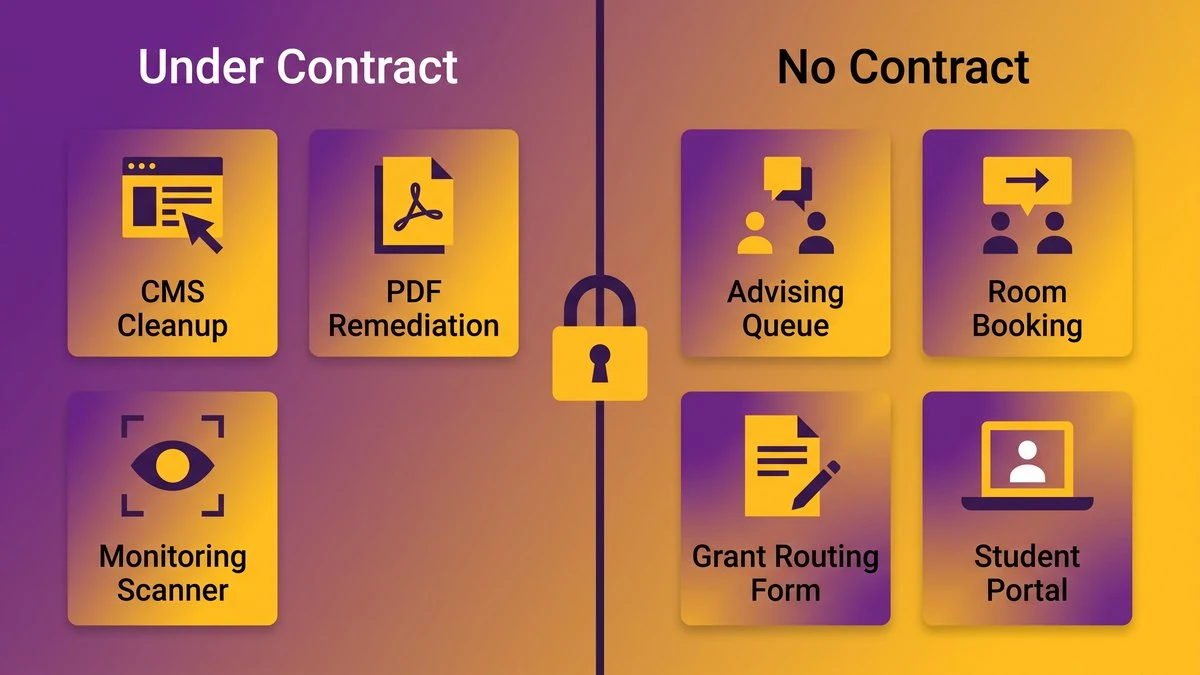
A simple map of a campus portfolio: public pages under contract on one side, internally built applications with no contract on the other
None of those five systems appears in a statement of work. The standard they’re measured against, WCAG 2.1 Level AA, doesn’t care how they were built. Your remediation contract covers one slice of a bigger portfolio.
What the April 2026 Extension Changed, and What It Did Not
The Department of Justice moved two dates and nothing else. The deadlines are now April 26, 2027 and April 26, 2028. The technical standard, WCAG 2.1 Level AA, and the scope of covered content stay as they were.
The two new compliance dates
The DOJ published an interim final rule in the Federal Register on April 20, 2026 (91 FR 20902), four days before the original April 24, 2026 deadline. Public entities serving 50,000 or more people now have until April 26, 2027. Entities serving fewer than 50,000 people, and special district governments, have until April 26, 2028.
Several guides still in circulation print the superseded April 24, 2026 date. If your steering committee’s slides came from one of them, fix the slides. And because this is an interim final rule with a comment period that ran through June 22, 2026, treat the new dates as likely to hold but not guaranteed.
WCAG 2.1 Level AA and the covered scope are unchanged
The rule itself states that it does not alter the substantive requirements adopted in the 2024 final rule. It also says that regardless of the compliance dates, covered entities have an ongoing obligation to make their web content and mobile apps accessible.
Read the extension as a scoping window. A year of runway doesn’t shrink the work. It gives you time to find out how much work there is.
ADA Title II in Higher Education: Which Institutions and Systems Are Covered
Public universities and community colleges fall under Title II. Private institutions fall under Title III, which this rule doesn’t touch. If you’re public, two questions remain: which date applies to you, and how far “web content and mobile apps” reaches.
Population thresholds and what they mean for a regional public or community college
The population tiers attach to the governmental entity rather than to your enrollment. A state university system generally sits under its state, so the 2027 date applies. A community college might fall under a county, a city, or its own special district government, and that last case is where the 2028 date can come into play. Don’t guess. Ask counsel which category you’re in.
Plan to April 2027 regardless. Applications take longer to fix than pages, and a later date is a cushion you’ll be glad to have when the schedule slips.
Why “web content and mobile apps” reads wider than a website
A web application is web content. The rule’s listed exceptions are narrow. Archived content qualifies only if it predates your compliance date, is kept solely for reference, research or recordkeeping in a dedicated archive area, and has not changed since. The other exception covers individualized, password-protected documents and reaches only word processing, presentation, PDF or spreadsheet files about a specific person, property or account. An application behind a login is not a document, so neither exception touches it. If a student or employee uses the application to do something your institution offers, treat it as in scope and let counsel tell you otherwise.
Why Crawlers and Overlays Stop at the Login Screen
A scanner is a visitor with no password. It requests a URL, reads what comes back, and follows links. Authentication ends that trip at the first screen, so your coverage report describes the public half of the portfolio and says nothing about the rest.
How automated remediation works
Crawler-based tools discover pages by following links from public entry points, then test the rendered HTML. Overlay products inject a script into pages your server delivers and adjust how they display in the visitor’s browser. Both depend on reaching and loading the page. Behind a single sign-on redirect, a crawler sees a login form and stops. Some tools can run scripted logins with test accounts, but someone has to build and maintain that setup for each application, and few campuses have.
What a scanner cannot rewrite
Even inside the wall, a tool can only flag what it detects in the markup. It can’t decide whether your error message tells a blind student which field failed, or whether your custom date picker announces itself correctly. Those are decisions in code and design. W3C’s guidance on selecting evaluation tools cautions that tools can assist with accessibility evaluation but can’t determine it alone.
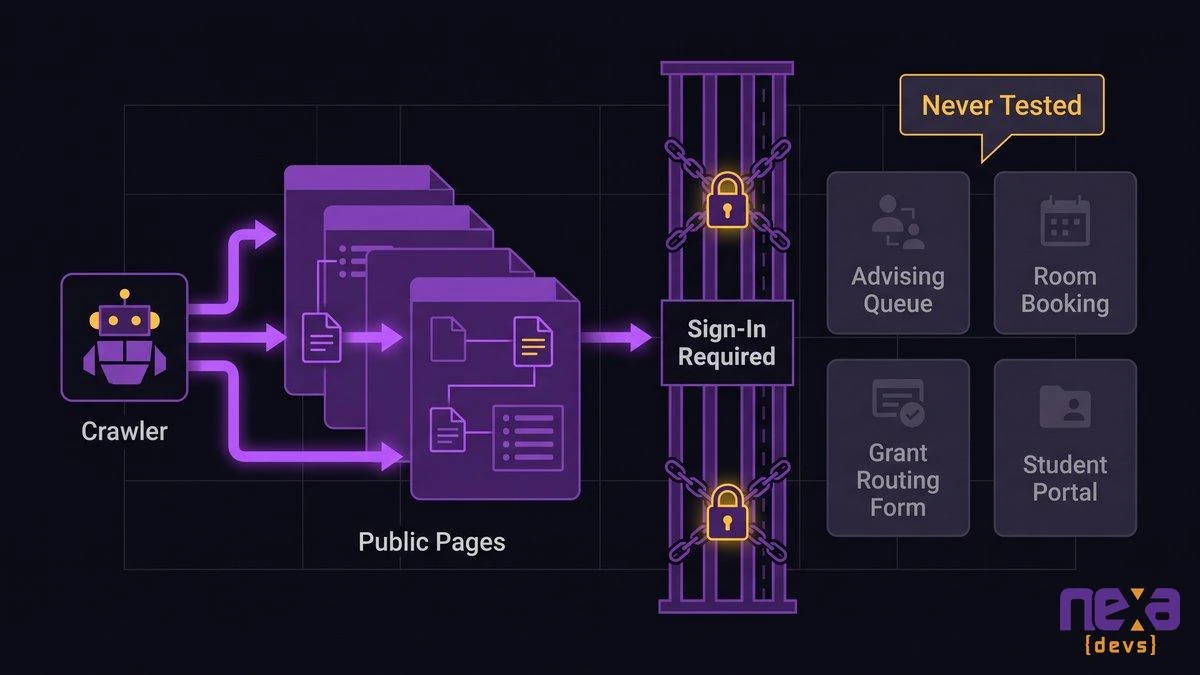
A crawler reaches the public pages, then stops at the sign-in screen, leaving the internal applications behind it untested
We’re not recommending an overlay as the fix. The limit is structural. A script that adjusts display can’t repair a form whose labels were never written.
The WCAG Criteria Hand-Built Applications Actually Fail
Four success criteria cover most of what breaks in homegrown applications: 1.4.3 contrast, 3.3.1 error identification, 3.3.2 labels or instructions, and 4.1.2 name, role, value. All four live in code someone wrote, which is why a content cleanup never touches them.
The WebAIM Million 2026 analysis of one million home pages found missing form input labels on 51% and low contrast text on 83.9%. Those figures come from public home pages rather than internal tools, so treat them as evidence that these defects are common in web interface code generally. They are not a measurement of your portfolio.
1.4.3 Contrast and 3.3.1 Error Identification
1.4.3 requires a 4.5:1 contrast ratio for normal-size text. Internal tools fail it when a developer picked a light gray for placeholder text or a disabled state and nobody measured. 3.3.1 requires that a failed input be identified in text. The classic failure is a form that turns a border red and says nothing else. A screen reader user hears silence, resubmits, and times out.
3.3.2 Labels and Instructions and 4.1.2 Name, Role, Value
3.3.2 asks for visible labels or instructions wherever a field needs input. A placeholder that vanishes when you type doesn’t count. 4.1.2 asks that every interface component expose its name, role, and state to assistive technology. Custom dropdowns, drag-and-drop schedulers, and modal dialogs built from generic div elements are the usual offenders.
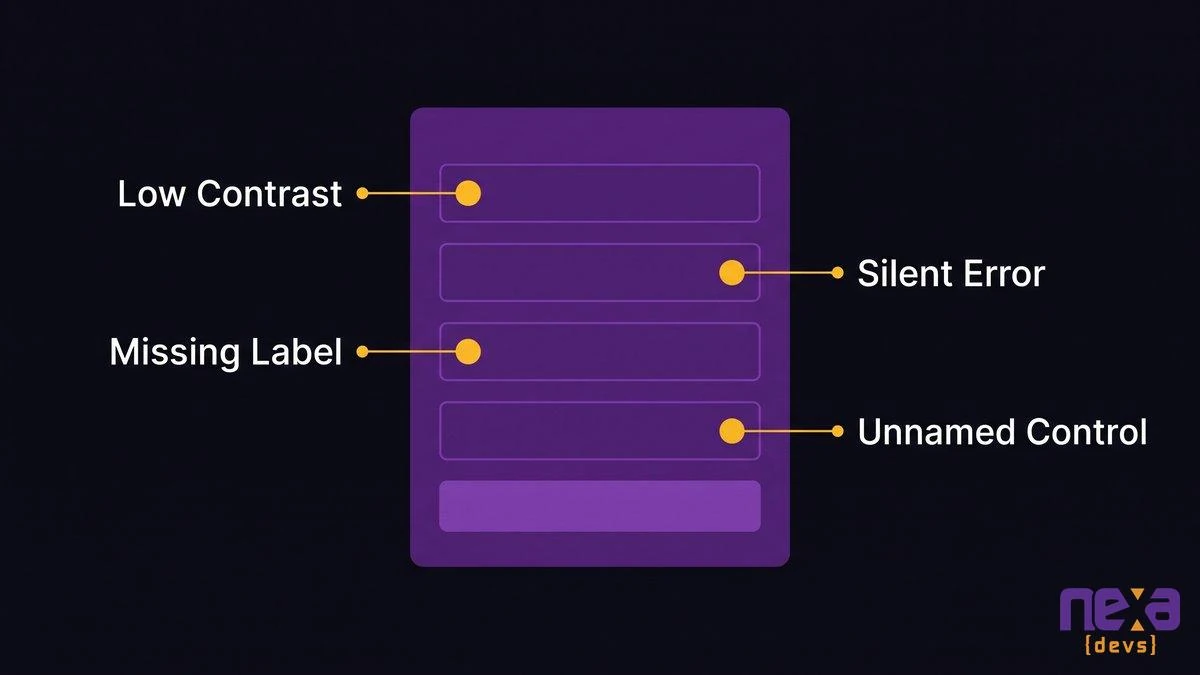
A hand-built form with the four failure points marked: low contrast, silent errors, a missing label, and an unnamed custom control
Give a developer those four criteria and a screen reader, and they can reproduce most of the defects in a single working session. If you’d like a second set of eyes on where to start, our architecture assessment work starts with this kind of inventory.
Nobody Can Send You a VPAT for Software You Wrote Yourself
Campus accessibility governance runs on a purchasing trigger. When someone buys software, the accessibility office asks the vendor for a VPAT. When no purchase happens, no one asks, and the application never enters the process.
A VPAT, short for Voluntary Product Accessibility Template, is the report a vendor completes to document how its product meets standards such as WCAG. The ITI maintains the template.
How campus accessibility governance was built around procurement
A procurement officer gets a request for a scheduling tool. The checklist is clear: collect the VPAT, route it for review, file it in the repository. It works well. It also means the repository records what the institution bought rather than what it runs.
Why these applications are missing from the accessibility repository rather than failing it
A failed product leaves a trail: a VPAT with “Does Not Support” marked and a remediation plan attached. A homegrown application leaves nothing. The developer who built the advising queue was never asked about accessibility, the office didn’t know the queue existed, and no paperwork says anything either way. Absence is the hardest status to defend, because nothing on file names an owner, a test, or a date. If someone asks who certified the queue and against what, the record has no answer.
Three Honest Paths: Retire, Remediate, or Rebuild the Interface Layer
Every in-house application lands on one of three paths. Retire it and move the workflow into a covered commercial system, remediate the codebase you have, or rebuild the interface layer against the system of record. The right path varies by application, and sometimes it involves no custom work at all.
Retire the application and move the workflow into a covered commercial system
If the room-booking tool duplicates a feature your calendar vendor already ships with a current VPAT, retire it. You pay for migration, retraining, and a few edge-case workflows you’ll lose. The part that bites you is quieter. The commercial tool’s VPAT may say “Partially Supports” on the exact screens your staff use, so read it before you commit. For low-traffic tools with a commercial equivalent, retiring beats fixing. Nexa has no work in that scenario, and we’d tell you so.
Remediate the existing codebase
This works when the code is maintainable and the defects cluster in shared components. Fix the label pattern once and forty forms improve. Budget for developer time plus manual testing with assistive technology. What sinks this path is code no one on staff understands. If the original developer left without documentation, you’re fixing blind.
Rebuild the interface layer against the system of record
Keep the data and the business logic where they are. Build a new front end on accessible components that talks to your SIS or ERP through its APIs. This is not an argument to replace the student information system. HEUG’s 2026 SIS Benchmark Report, drawn from 174 responses across 131 institutions, reports 88% running Oracle PeopleSoft. HEUG’s membership skews toward Oracle users, so don’t read that as a sector-wide install base. It does show why the system of record stays put.
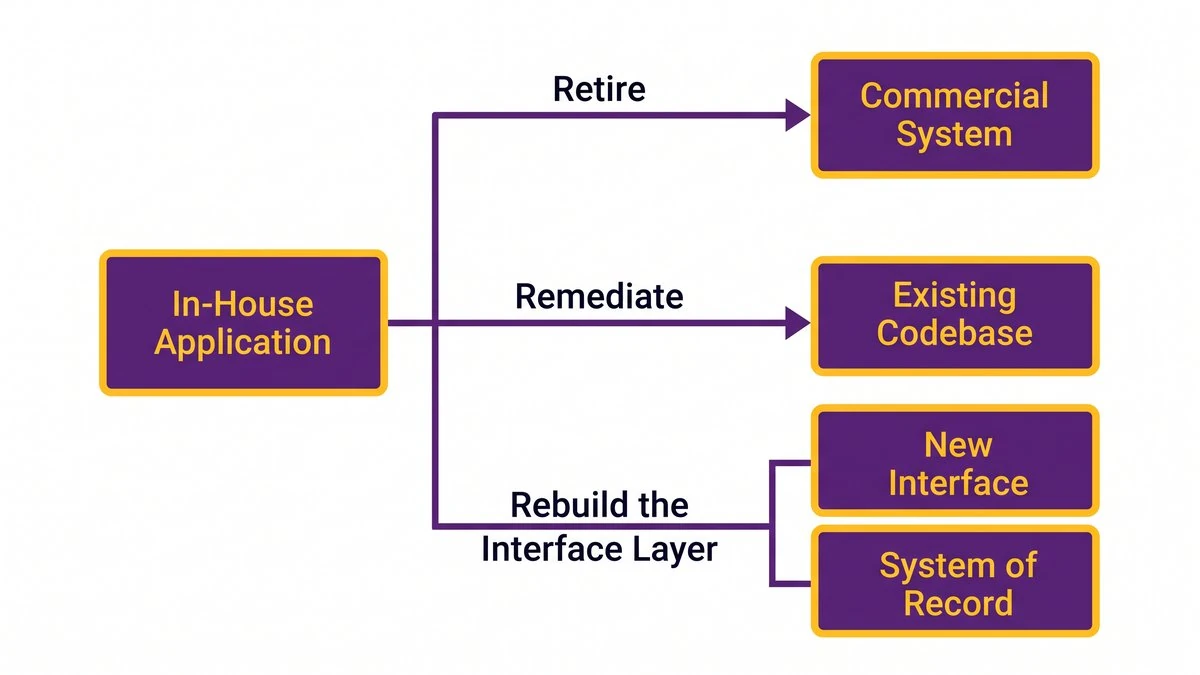
A decision tree showing when to retire an application, when to fix its code, and when to put a new interface on top of the existing system of record
This one costs real engineering plus API access. It falls apart when the API doesn’t expose what the old screens did, which an assessment catches early. Done well, the system of record keeps running through the term while the interface changes above it. Our legacy system modernization practice works this way.
Inventory and Triage Before You Budget
Triage first. You won’t have budget to fix every application, so rank them by exposure and start with the few that block students from enrolling, paying, or getting advised.
An EDUCAUSE QuickPoll of 121 respondents found a plurality, 42%, anticipating IT budget decreases for the 2025-2026 academic year, the one now underway. The poll ran in March 2025 and is the most recent association-published figure available, so it indicates a direction and shouldn’t be taken as a forecast for 2027.
Scoring exposure instead of guessing
Score each application on four questions:
- Who depends on it? A financial aid form carries more exposure than a faculty-only reporting view.
- Is there another way to finish the task? If the application is the only path, it moves up.
- How often is it used, and when? An app that gets hammered during registration week ranks above one touched twice a year.
- How hard is the fix? Shared components make it cheap. A tangle nobody has opened since 2019 doesn’t.
AI-assisted architecture assessment speeds the first pass. It reads codebases, lists screens and form components, and flags likely criterion failures for review. That buys coverage and speed across a portfolio of forty applications. A person with a screen reader still makes the call.
Testing tools and what they reach
Browser-based checkers and engines such as axe-core can test authenticated pages when you run them from a logged-in session or a test pipeline. Public crawlers can’t. The W3C maintains an evaluation tools list worth scanning. Whichever you pick, manual keyboard and screen reader testing covers what the automated pass misses.
Sequencing work around the academic term
Know your freeze windows: registration, aid disbursement, finals. Ship fixes in the gaps, behind feature flags, tested in staging against a copy of production data. Nexa modernizes live systems without disrupting operations during a term, and that sequencing is the reason.
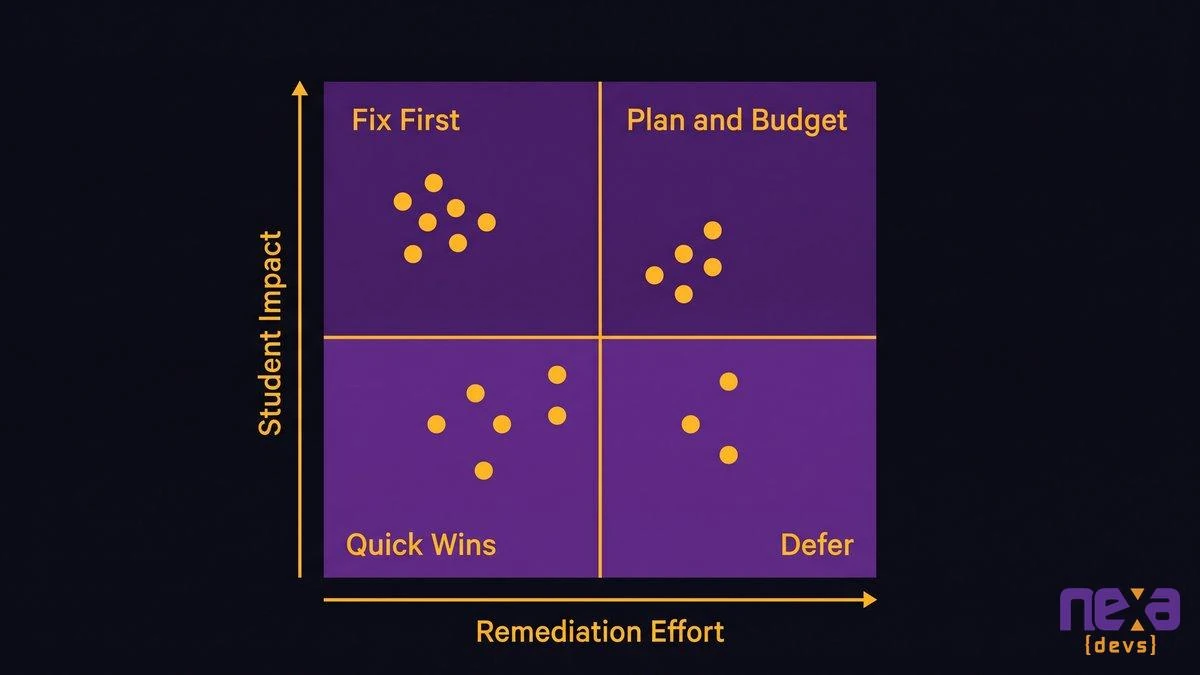
A triage grid placing each campus application by how many students it affects and how hard it is to fix
The Conformance Evidence You Need to Produce, and Keep
If no vendor can certify the software, you certify it yourself and keep the record. A conformance report for your own application has the same shape as a vendor’s: the criteria, a support level for each, the test method, the date, and the tester.
Writing your own accessibility conformance report for software you own
Use the ITI VPAT template the vendors use. Mark each WCAG 2.1 A and AA criterion Supports, Partially Supports, or Does Not Support, with notes pointing to the screens you tested. Reissue it after significant releases. File it in the same repository as your vendor reports, so the application finally appears there.
Documentation transfer and who answers the question in 2029
In 2029 someone will ask who certified this and against what. The person who wrote the report may have left. The report, the test scripts, the architecture diagrams, and the decision records have to belong to the institution. Every Nexa engagement ends with complete documentation owned by the client, whether or not the engagement continues, and for accessibility work the conformance evidence sits in that package.
Long relationships make this practical. Nexa has supported systems at UCLA’s David Geffen School of Medicine for more than ten years, and institutions that last that long need records that outlast staffing changes. The Federal Register language applies here too. The obligation doesn’t end on the compliance date.
Frequently Asked Questions
What is the difference between title 1 and title 2 of the ADA?
Title I covers employment discrimination by employers with 15 or more employees. Title II covers state and local government services, including public colleges, universities, and community colleges. Digital accessibility rules for web content and mobile apps fall under Title II.
Does ADA Title II apply to apps my university built in-house?
Yes. Title II covers the web content and mobile apps a public institution provides, and nothing in the rule exempts software your own developers wrote. Treat any application students or staff use to access a service as in scope.
When is the ADA Title II deadline for public colleges?
April 26, 2027 for public entities serving 50,000 or more people. April 26, 2028 for smaller entities and special district governments. The DOJ moved both dates in an April 20, 2026 interim final rule.
Why can’t an overlay or scanner fix internal applications?
Scanners crawl public pages and stop at the login screen. Overlays adjust display but can’t write a missing label or fix a broken control. Internal application defects live in code that someone has to change.
Which WCAG criteria do custom forms fail most often?
Four come up repeatedly: 1.4.3 contrast, 3.3.1 error identification, 3.3.2 labels or instructions, and 4.1.2 name, role, value. All four are properties of hand-built interface code.
Next Step: Build the Application List
Start with a spreadsheet. List every application your institution built, who owns it, who uses it, and whether it has a conformance report. Most lists start at fifteen and end at forty. That list is the real scope of your Title II work, and nothing in your current contract produces it.
If you want help turning that list into a ranked plan, schedule a call with Nexa Devs. We’ll run the architecture assessment, tell you which applications to retire, and leave your team with documentation they own.