2027 IT Budget Planning: Renewals Eat Modernization
Table of Contents
- Quick answer: renewals versus modernization budget
- Your 2027 Budget Was Approved Before Your Renewals Were Priced
- Committed Versus Discretionary Is Not Run Versus Change
- Why the Modernization Line Pays for Every Renewal Increase
- What the Planning Benchmarks Actually Tell You to Model
- Build the Renewal Calendar: Every Contract, Date, and Dollar
- Can You Trust Your Spending Baseline?
- The Modernization Decision Has to Be Made Before the Calendar Makes It
- 2027 IT Budget Planning: What to Do in the Next Thirty Days
Most 2027 IT budget planning has a hole in it that nobody has found yet. Software renewals reprice on the vendor’s calendar, months after you approved your plan, and the overage has to come from somewhere. Where it comes from is modernization, the one line with no contract sitting behind it. No committee ever votes for that; the money is simply gone by the time anyone looks.
None of what follows asks you to drop a vendor or approve a modernization program this quarter. It asks for one decision, made in the right order: settle what you’re doing about modernization while there’s still budget to settle it with. Let the renewal calendar run first and the question answers itself. Two numbers get you there, and your finance team can produce both of them this week.
Quick answer: renewals versus modernization budget
- Renewals reprice on vendor dates, after your budget is approved, so the overage needs a source.
- The only line with no contract behind it is modernization, so it absorbs the overage by default.
- Split spend into committed and discretionary, not only run and change.
- Build a renewal calendar: contract, date, annual cost, before or after your fiscal year opens.
- Decide on modernization before the calendar does. Start with a small, dated assessment.
Your 2027 Budget Was Approved Before Your Renewals Were Priced
You approve budgets on your own calendar while vendors reprice on theirs, and the two almost never line up. Modernization money disappears in that gap, without anyone choosing to spend it that way.
Forrester’s 2027 Budget Planning Guides found that more than 80% of leaders expect their budgets to increase over the next 12 months, and as many as one-quarter expect growth of 10% or more. Growth makes the problem harder to spot. A budget that’s up looks healthy right until the renewals come back and absorb the increase.
Microsoft offers a clean example of the calendar problem. Its licensing news hub lists a Microsoft 365 packaging and pricing update covering suites and standalone products, effective July 1, 2026. That date landed well after most companies had approved their plans. What it did to your invoice depends on your own contract date, which is also what decides when you find out.
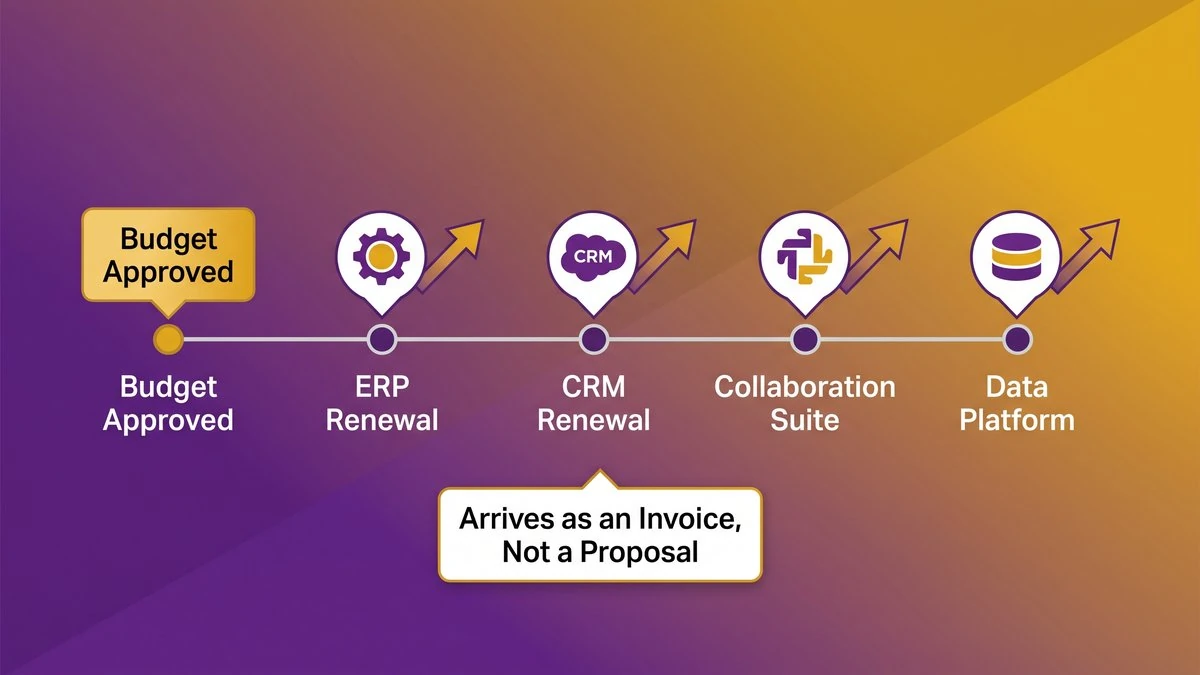
A budget approval date followed by vendor renewal dates that fall after the plan is already set
Picture a 250-person distributor that approved its plan in November. The ERP, the CRM, the collaboration suite and the data platform each renew in a different month, and none of those dates appeared anywhere in the budget deck. Each one shows up later as an invoice rather than a proposal, and invoices don’t go through the planning committee.
Committed Versus Discretionary Is Not Run Versus Change
Run versus change tells you what the spend is for. Committed versus discretionary tells you what can still move, and only the second split predicts what gets cut when a renewal comes back high.
Which run spend has a contract behind it
Most run spend is contractual: SaaS subscriptions, support agreements, cloud commitments, managed-service retainers. A smaller share isn’t. Internal maintenance hours, ad hoc contractor time and month-to-month tooling can all still flex. Tag every run line as committed or open, and the ones that reprice on a date will separate themselves out.
Which change spend has nothing behind it
Change spend is mostly discretionary, and modernization sits at the far end of it: no signed contract, no renewal date, no penalty for slipping a quarter. That flexibility is exactly what exposes it. Nothing contractual sits behind the line, so a variance can be pushed into it.
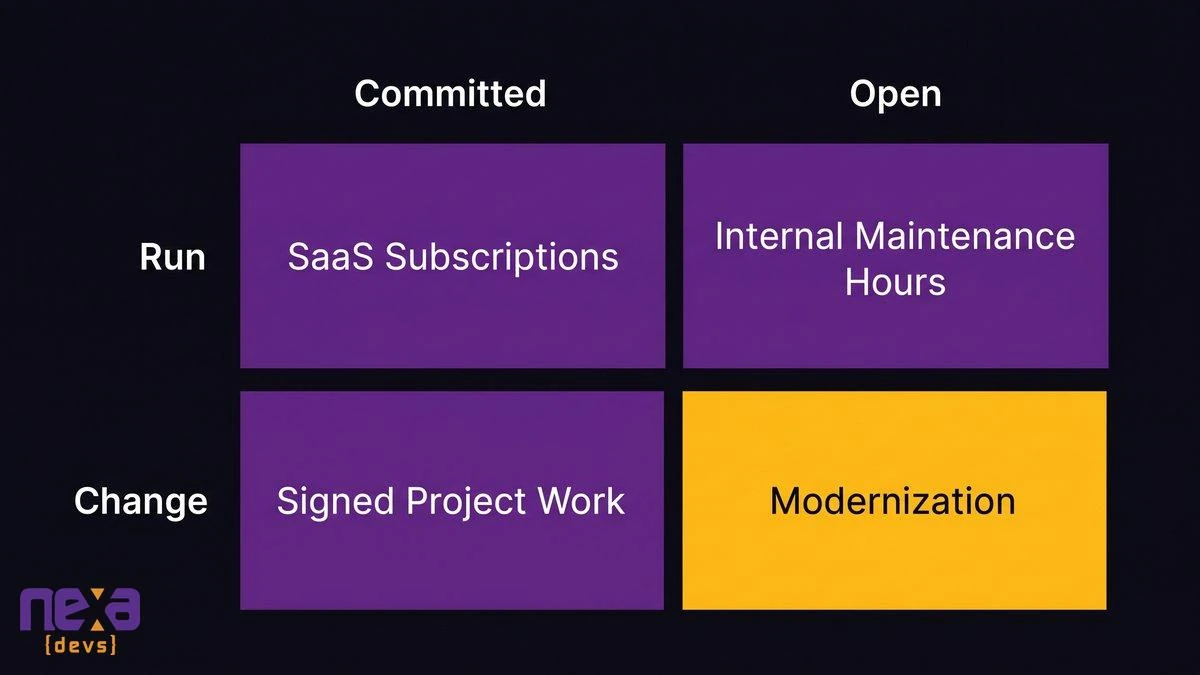
A grid that sorts IT spend by whether a contract sits behind it, not by whether it is run or change
Why the Modernization Line Pays for Every Renewal Increase
Renewal increases get paid out of modernization because it’s the only line with any give in it. Committed contracts can’t flex mid-term and operations have to be funded. The variance lands on modernization by default, and nobody writes the decision down.
The month it happens looks ordinary. A renewal comes back above plan and finance asks where the difference is coming from. The CIO can’t cancel the contract, can’t defer payroll and can’t stop paying for the cloud, which leaves the project that hasn’t started yet. It slips, and the meeting notes record it as “reprioritized.”
Zylo’s 2026 SaaS Management Index found that 61% of IT leaders cut projects due to unplanned SaaS cost increases. The pattern is common enough to show up in survey data.
As Rita Gunther McGrath, a professor at Columbia Business School, told Computerworld in 2013: “The CIO says, ‘That’ll be $5 million.’ The CEO says, ‘Do it for $3 million.’ So it’s patch, patch, patch.” Swap in a renewal for the CEO’s number and you have the same conversation.
Our own position, for what it’s worth: most mid-market modernization programs are never cancelled outright, they’re starved, one renewal at a time. The cost-of-keeping-old-systems argument is one we’ve already made in our piece on the hidden cost of technical debt. Here we’re arguing about timing.
What the Planning Benchmarks Actually Tell You to Model
Treat planning benchmarks as modeling instructions rather than forecasts. The useful ones tell you which assumptions to separate and where to hold a reserve. How a percentage was built matters more than the percentage.
Planning guides love a single renewal-uplift number. Most of those trace back to an advisory firm’s own client reviews, and several come from firms that sell the optimization work. Use any such figure as a placeholder, then replace it with what your own contracts actually did over the last two renewal cycles.
Base list price and usage charges are two separate assumptions
Put them on separate lines. A list-price change arrives on a date and can be negotiated, whereas usage charges move with behavior: AI features, consumption tiers, API calls. Blend the two into one percentage and you lose track of which half you actually control.
Zylo’s index reports that 78% of IT leaders saw unexpected charges tied to AI features or consumption-based pricing in the past year, and the charge nobody modeled is usually the usage one. Splitting the two lines is our own modeling logic rather than a published standard. It holds up anyway: each line has its own owner and its own lever.
Sizing a contingency line for vendor price changes, not just incidents
Most contingency lines are sized for incidents: an outage, a failed hardware batch, a breach response. A price-change reserve behaves differently. You can derive it from the calendar: take the renewals that land after your fiscal year opens, apply your own historical variance to each, and add them up.
You end up with a reserve you can defend in front of a board, built from named contracts instead of a round number someone liked. Leave it unfunded and the variance gets paid anyway, out of modernization, the same as always.
Build the Renewal Calendar: Every Contract, Date, and Dollar
The renewal calendar is one sheet: every software and service contract, its renewal date, its current annual cost, and whether it lands before or after your fiscal year opens. A finance analyst can build it in an afternoon.
What goes in each row
| Column | What to record |
|---|---|
| Vendor and product | The contract as signed, not the brand name |
| Renewal date | From the agreement itself |
| Notice deadline | When you must act to change terms |
| Current annual cost | What you pay today |
| Pricing basis | Seats, usage, flat fee, or tiered |
| Auto-renews | Yes or no |
| Fiscal-year position | Before or after your year opens |
| Committed or open | Contractual or still flexible |
Pull dates from the contracts, not from vendor portals or procurement memory. Notice windows are written into the agreement and often close weeks or months before the renewal date, so record both.
Which renewals land after your fiscal year opens
Those are the exposed ones. Anything renewing before the year opens already sits in your baseline, priced and known. Month seven is a different animal: that renewal becomes a variance you hear about only once the budget is set. Sort the sheet by that column first. The top of the list is where your reserve and your negotiation effort belong.
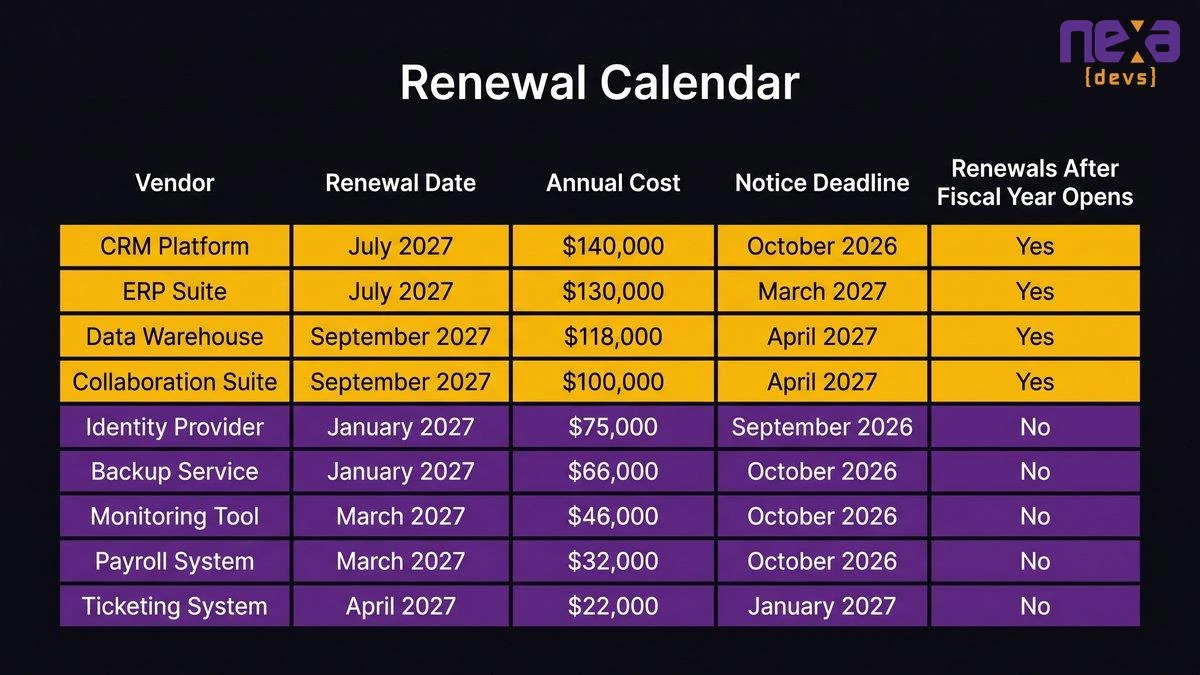
A sample renewal calendar sorted so the renewals after the fiscal year opens appear first
Can You Trust Your Spending Baseline?
Only if you can match every contract to a ledger line and every ledger line to a contract. Most baselines can’t pass that test. They’re built from last year’s ledger, and a ledger records what was paid, not what’s committed.
Run the matching test. Take the renewal calendar and look for each contract’s cost in the ledger. A contract with no ledger line is shadow spend; a ledger line with no contract is either open spend or a subscription somebody forgot to cancel, and both are worth finding. Tidiness was never the useful question. What you need to know is what’s contractually committed, and when it reprices.
A baseline with an unmatched contract has a surprise in it. Ask your controller one thing: which three vendors would hurt most if they repriced this year?
The Modernization Decision Has to Be Made Before the Calendar Makes It
Decide first. Afterward there’s nothing left to decide with. Once the renewals are paid, discretionary spend is whatever happens to remain. Replacing a vendor is a separate question, and nobody is asking you to buy modernization this quarter, only to choose early.
A dated, scopeable architecture assessment fits inside a budget cycle
An AI-assisted architecture assessment is a fixed-scope spend with a date on it. It isn’t competing with a multi-year program, so you can approve one inside a budget cycle, before renewals land. What comes back is a read on which systems your renewals are propping up, which ones have a credible exit, and which should stay exactly where they are.
Cognizant’s October 2025 research, a survey of 1,000 business and technology leaders at Global 2000 organizations, concluded that tech debt savings will cover less than even half of the modernization cost burden for most businesses. Cognizant sells modernization services, so treat that as a published finding rather than a verdict. The practical use of it is simple. Modernization needs its own named line, and a named line is harder to raid.
Phasing incremental modernization against the renewal calendar
Modernization of live systems happens incrementally, so the spend can be phased against the renewal calendar instead of against one big approval. Move a workload off a system the quarter before its notice window closes and you’ve changed what you’re negotiating over. Where the renewal is fair and the exit is expensive, leave the system alone. Our guide to incremental versus big-bang migration covers how to sequence those moves.
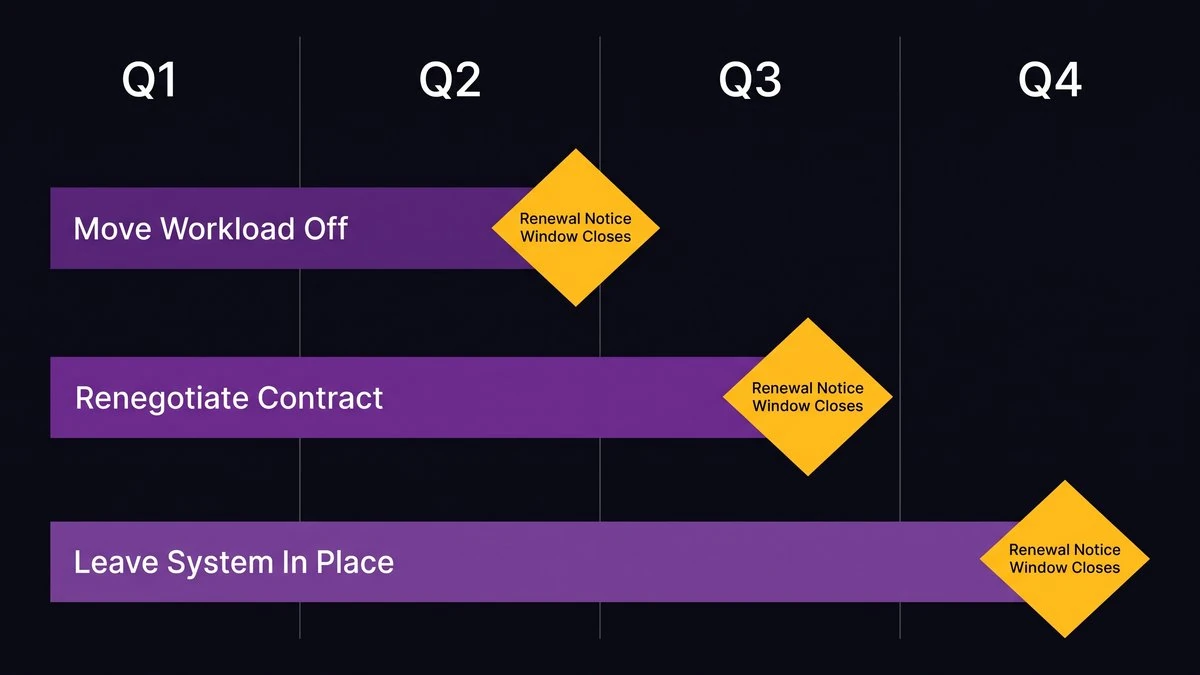
An incremental modernization plan with each phase timed against a renewal notice date
Transferable documentation removes the vendor premium
A vendor charges a premium when it’s the only party that understands the system. Architecture documentation, decision records and API references transfer to you as standard in a Nexa Devs engagement, and that shrinks the premium. You can read your own architecture, and so can the next engineer you hire or the next vendor you evaluate. Our post on documentation ownership in outsourced development sets out exactly what transfers and why. In a renewal conversation, being able to read the system is a stronger card than any discount argument.
2027 IT Budget Planning: What to Do in the Next Thirty Days
Produce two numbers by month’s end: the renewal calendar and the committed-versus-discretionary split. Everything else in your 2027 IT budget planning follows from them, and neither needs a consultant, a vendor or a new tool.
- Week one. Finance pulls every contract and builds the calendar. Sort by fiscal-year position, exposed renewals first.
- Week two. Tag every run and change line as committed or open, then total each side. The open total is your real room to maneuver.
- Week three. Match contracts to the ledger with your controller and name the three vendors that would hurt most. Set a price-change reserve from your own renewal history.
- Week four. Mark which modernization decisions must come before which notice deadlines. If a notice window is closing on a system you’re unsure about, scope a dated assessment now.
Then take one sentence to the board. The question isn’t whether we can afford to modernize in 2027, it’s which of these lines we can still choose, and for how much longer.
If you’d like a dated, scopeable starting point, schedule a call with Nexa Devs and we’ll walk through your renewal calendar with you.