by Sarah Mitchell | Aug 11, 2026 | Healthcare
EMR Lab Integration: Fixing the Gap Without a Rebuild
A hospital’s EMR and its lab system are supposed to talk to each other without help: an order goes out, a result comes back, and nobody touches it in between. EMR lab integration is the technical work that makes that happen, connecting your EMR to your LIS, radiology system, and referral network through HL7 or FHIR interfaces so data moves without a human retyping it. When that connection breaks, or was never built cleanly in the first place, the workflow doesn’t stop. It moves to your staff, one keystroke at a time.
This plays out every day wherever LIS EHR integration happens by hand: rekeyed results, duplicate patient records, and manual bridges that hold together right up until volume climbs past what they can carry. Below, we walk through why the gap exists, what it costs a hospital operationally, and how mid-market providers close it with incremental integration middleware rather than a full EMR replacement.

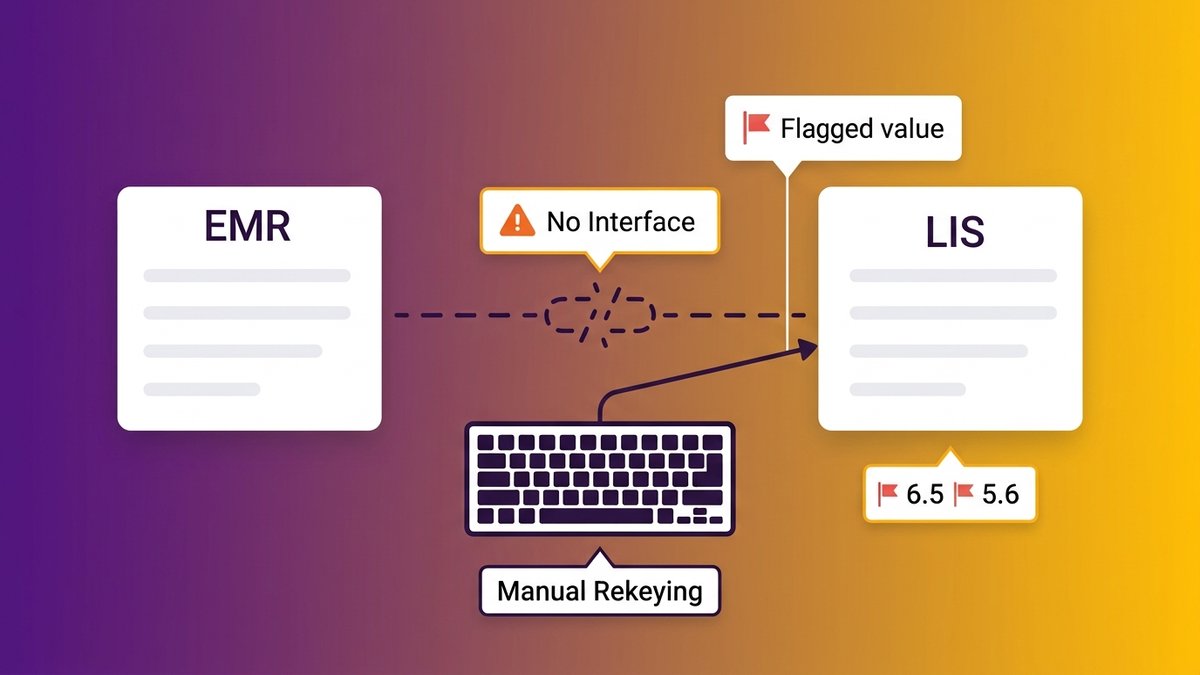
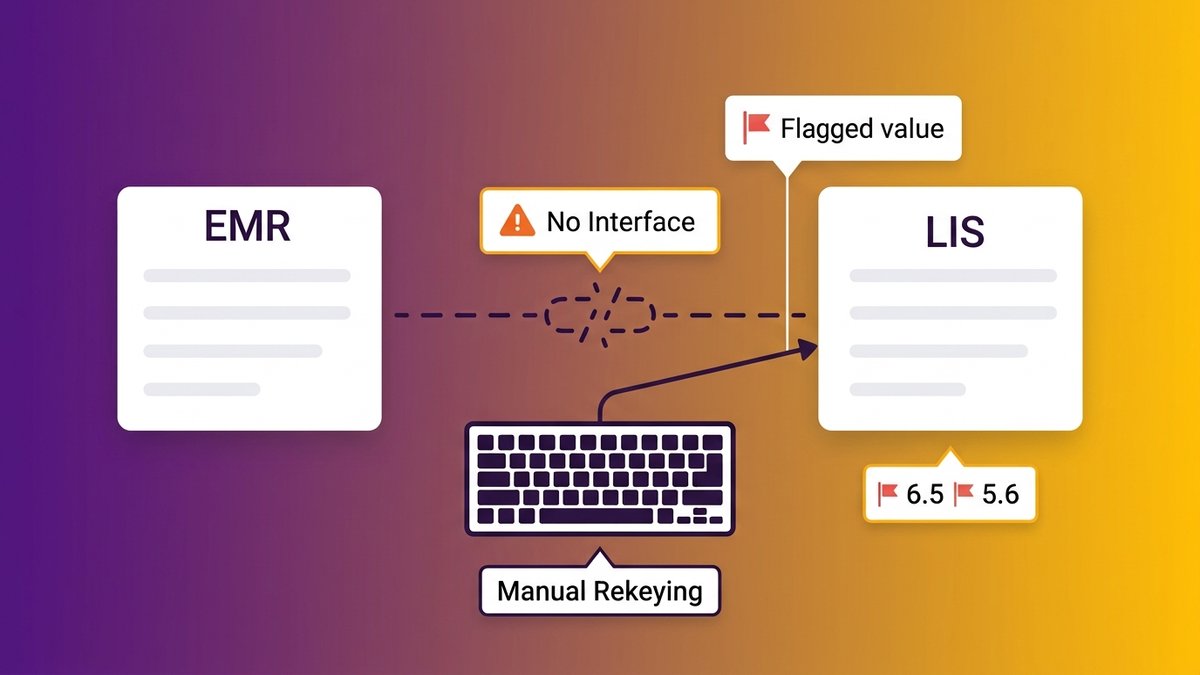
A clinical staff member manually re-entering lab results because the EMR and LIS have no clean data connection.
When Your EMR Can’t Talk to Your Lab System, the Workflow Runs on People
A lab tech at a 200-bed regional hospital finishes a results batch at 4:45 pm. The LIS has no clean feed into the EMR, so she opens both screens and retypes fifteen results by hand before her shift ends.
Multiply that by every shift, every department, and every system that was never designed to exchange data with the one beside it, and you start to see the real shape of the integration gap. Nobody filed it as a missing feature or put it in a budget. It just quietly turned into a permanent staffing cost.
Rekeying lab results by hand between systems
Manual rekeying isn’t a minor inconvenience. Every retyped value is a chance for a transposed digit, a missed decimal, a result attached to the wrong encounter. A potassium level of 6.5 entered as 5.6 doesn’t get flagged by either system, because neither system knows the number came from a human instead of an interface. The clinician downstream trusts the chart. The chart is only as accurate as the last person who typed into it.
How duplicate patient records multiply when systems don’t reconcile
When the EMR and LIS can’t reconcile patient identity automatically, staff build workarounds: a new record here, a manually matched chart there. CertifyHealth’s analysis of ONC data found that only 43% of hospitals report routine engagement across all four interoperability domains: send, find, receive, and integrate. The other 57% are living with some version of this gap, and duplicate records are one of its most visible symptoms.
What happens to the patient record when two systems disagree about who the patient is? Usually, both versions survive. A lab result posts to the wrong MRN, a medication history splits across two charts, and the clinician making a decision at 2 am is working from an incomplete picture without knowing it’s incomplete. That’s not an efficiency problem. That’s a patient-safety problem.
The Hidden Operational Cost: Manual Bridges That Break Under Load
Manual bridges hold up fine on a slow Tuesday. Add a flu surge, a new referring clinic, or a lab acquisition, and the same workaround buckles within days, because a human process doesn’t scale the way an interface does.
Where the workarounds fail during volume spikes
The failure pattern is predictable. Volume climbs, the same two or three staff members who know the manual process are already at capacity, and results start queuing. A result that should post in seconds sits in someone’s inbox for forty minutes, then two hours, then it’s the end of shift and nobody’s sure what’s been transcribed and what hasn’t.
Aalpha’s 2025 research, citing Gartner, puts the figure at up to 75% of hospital IT budgets consumed by maintaining legacy systems rather than fixing the workflow gaps sitting on top of them. That number isn’t abstract for a COO staring at a stack of overtime approvals during a bad flu season.
Rework, delayed results, and staff burnout as measurable operational drag
Every rekeyed result that turns out wrong needs to be caught, traced, and corrected, which means someone re-does the work a second time. Delayed results delay clinical decisions. And the staff holding the bridge together, the ones who know which spreadsheet tracks what and which fax needs a follow-up call, are the same staff a COO can’t afford to lose. anchor text “hidden cost of running critical systems on manual workarounds”
None of this shows up on a single line item. It shows up as unplanned overtime, as a nurse manager pulled off the floor to reconcile a chart, as the quiet turnover of the two people who understood the workaround well enough to keep it running.
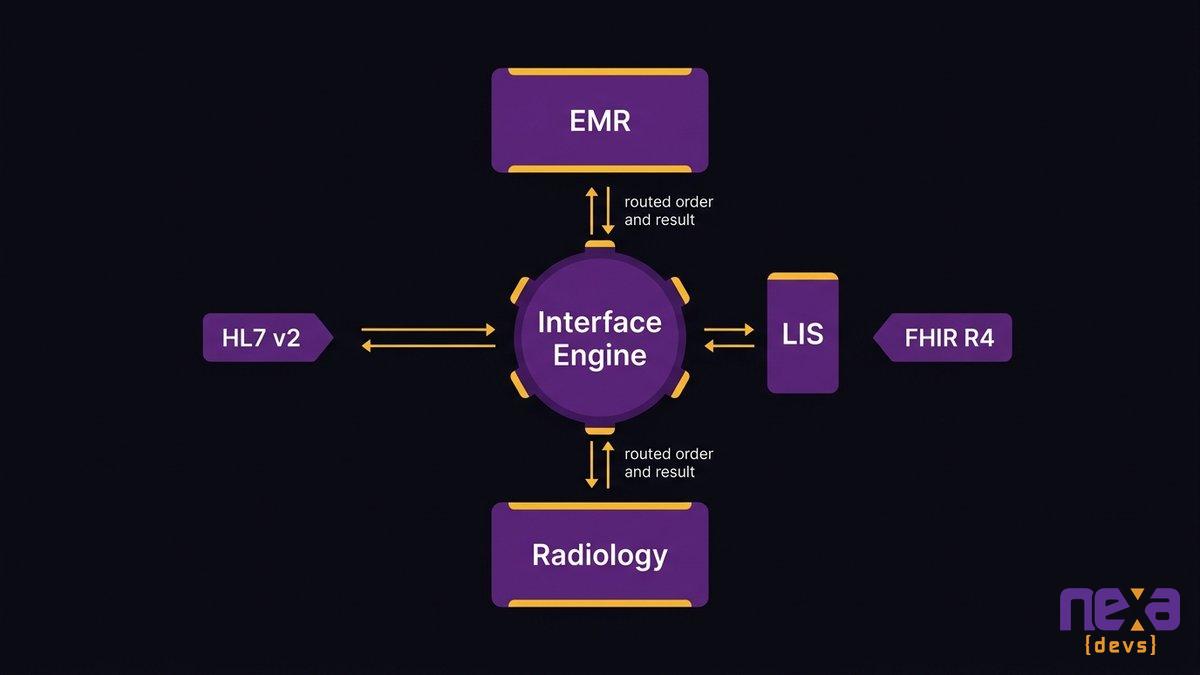
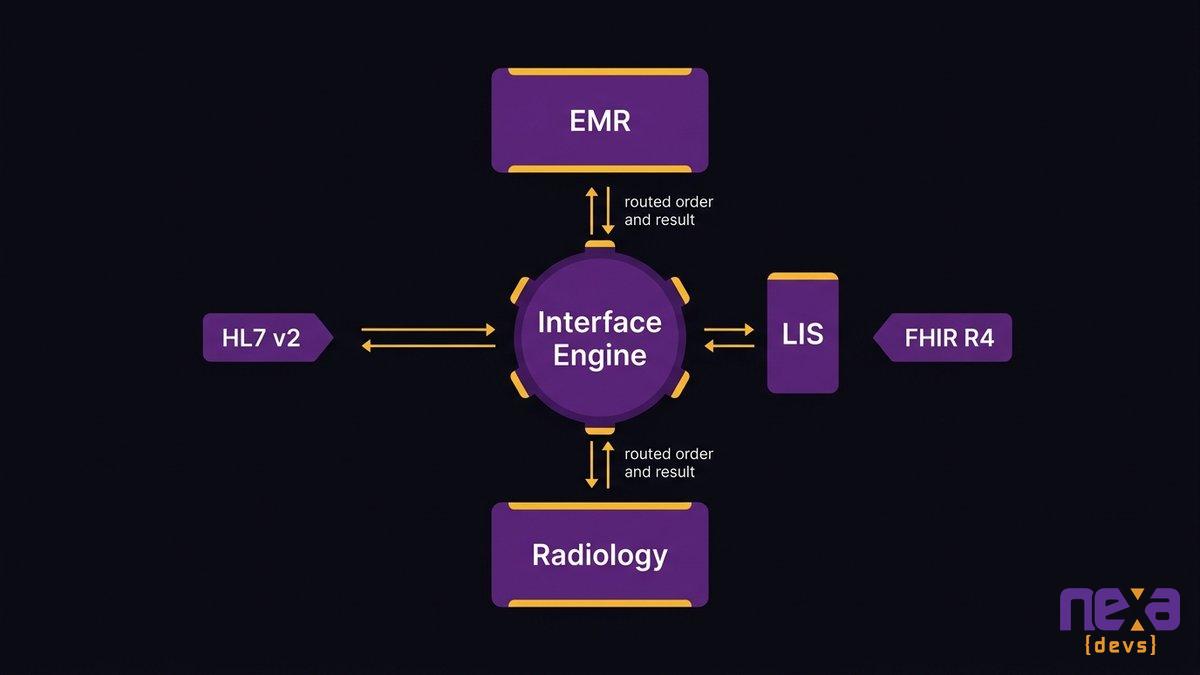
A simplified view of an interface engine routing lab orders and results between the EMR, LIS, and radiology systems.
Why the Systems Don’t Talk: HL7, FHIR, and the Interface Layer Underneath
HL7 v2 is a decades-old messaging standard built around pipe-delimited text segments rather than a modern API. FHIR R4 is newer, built on REST and JSON. Most hospitals run both side by side, which is completely normal.
HL7 v2 messaging vs. FHIR R4 APIs
HL7 v2 still carries most day-to-day electronic lab ordering and results traffic, and it works well enough, as long as every endpoint implements the same optional fields the same way. In practice, endpoints rarely do. FHIR R4 adds a standardized, resource-based API layer on top, useful for real-time queries, patient portals, and newer applications that were never built to parse pipe-delimited segments.
Invene’s research, citing HIMSS data, found that 67% of CIOs name interoperability as their biggest digital transformation barrier. The regulatory direction backs that up: the CMS-0057-F final rule requires impacted payers to implement four FHIR APIs, covering patient access, provider access, payer-to-payer exchange, and prior authorization, by January 1, 2027. So FHIR has stopped being a future consideration. Every serious health IT investment is already heading in its direction.
Point-to-point interfaces vs. a middleware/interface-engine approach
Point-to-point interfaces connect exactly two systems, one custom build at a time. Add a fourth lab partner or a new referral network, and you’re commissioning another custom interface, tested and maintained separately from every other one you already have. An HL7 interface engine sits in the middle instead, translating once and routing to every connected system from a single, maintainable layer.
Where legacy interfaces fall short of current interoperability requirements
Interfaces built a decade ago were often scoped narrowly: this lab, this EMR, this one message type. They weren’t built to add a fifth radiology partner or expose data through a modern API, so every new connection becomes a bespoke project instead of a configuration change. That architecture problem is what shows up downstream as overtime, rekeying, and burnout.
What Closing the Loop Actually Buys You: Orders and Results That Flow
A closed order-to-result loop means an order placed in the EMR reaches the LIS in seconds, and the result posts back to the right chart without anyone touching a keyboard in between. Every hospital should start from that baseline. It is not a premium feature a vendor gets to upsell later.
Closing the loop buys three things a COO and a CTO both care about, for different reasons. Fewer manual steps means fewer chances for a transcription error to reach a clinician. Faster turnaround means a result that matters at 2 am actually shows up at 2 am, not during morning rounds. And clean, structured clinical data exchange means the reporting your leadership team relies on reflects what actually happened in the systems, rather than what someone remembered to type in after the fact. That is clinical workflow integration doing its job quietly in the background.
None of this requires exotic technology. The Office of the National Coordinator for Health IT has published a working definition of interoperability for over a decade: the ability of systems to exchange and use information without special effort on the part of the user. “Without special effort” is the entire point. If your staff is putting in special effort every shift, the loop isn’t closed yet, no matter what your EMR vendor’s marketing page says.
Incremental Integration Middleware vs. Ripping Out the EMR
Rip-and-replace is the wrong first move for almost every mid-market provider chasing a lab integration fix. It’s also the most expensive one, and it solves a problem you don’t actually have.
Connecting LIS, radiology, and referral systems without replacing the core EMR
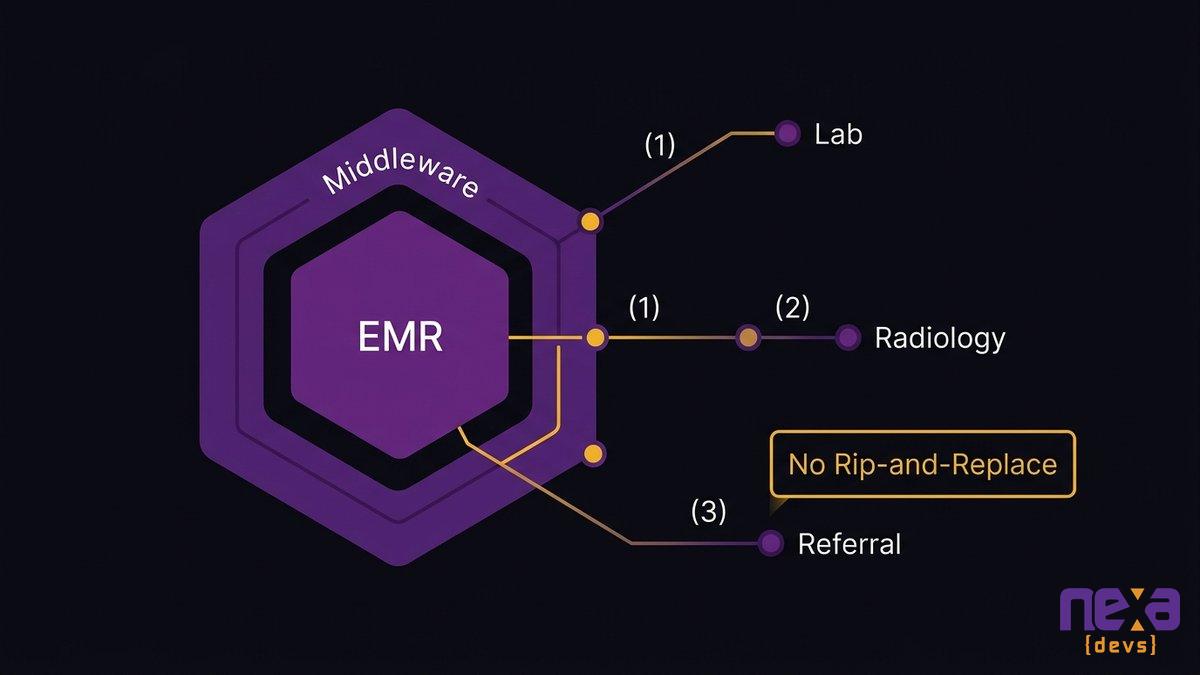
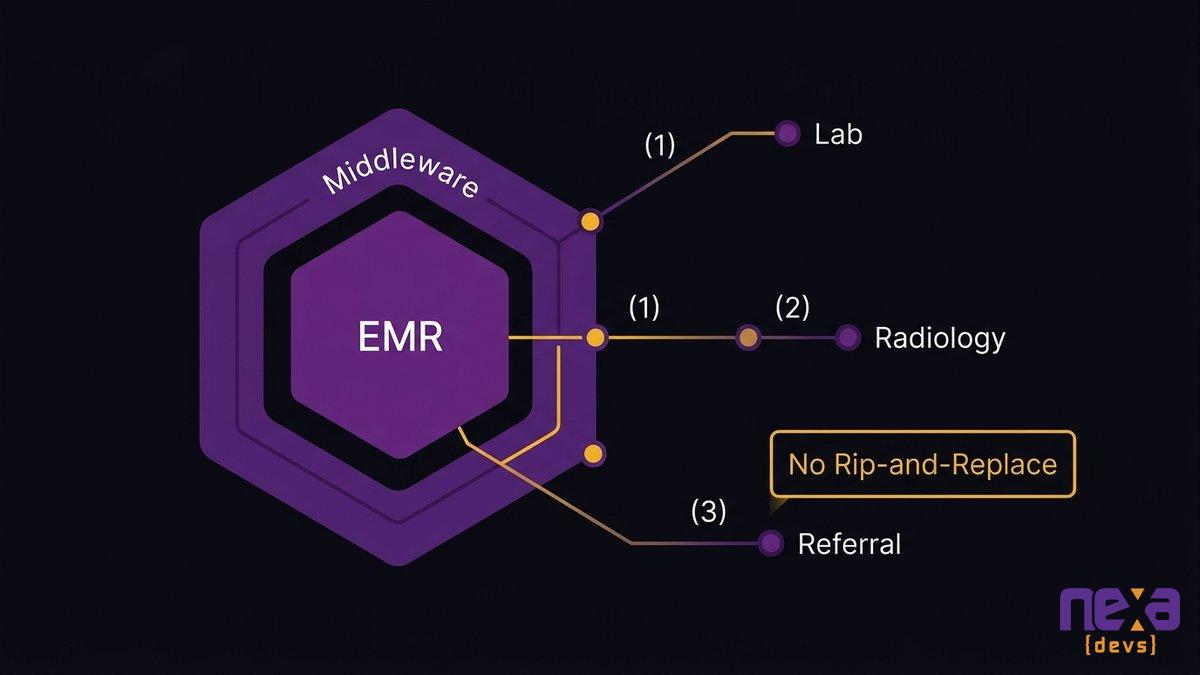
Your EMR usually isn’t the broken part. The connections around it are. A phased healthcare API middleware build, an interface engine or FHIR facade layered over your existing EMR, connects the LIS, radiology, and referral systems you already depend on without touching the system your clinical staff has spent a decade learning to trust.
As Ashwin Ballal, CIO at Freshworks, states: “Legacy systems have become so complex that companies are increasingly turning to third-party vendors and consultants for help, but the problem is that, more often than not, organizations are trading one subpar legacy system for another.” A full EMR replacement carries exactly that risk, at a much higher price and on a much longer timeline.
A phased rollout that de-risks the change
Hypertrends’ 2026 research puts a full EHR replacement at a mid-size health system between $50 million and $200 million, spanning three to five years. The same research found that big-bang modernization projects, the ones that try to replace everything at once, fail more than 70% of the time. A phased rollout does the opposite: connect the highest-friction system first, usually the lab, prove the pattern works, then extend it to radiology and referral networks on a timeline that doesn’t require betting the department’s budget on a single go-live date.
A phased middleware rollout connecting the EMR to lab, radiology, and referral systems one interface at a time.
Getting It Right: Security, Compliance, and Documentation You Own
PHI moves through every interface you build. That makes security and compliance design requirements you settle at the first architecture diagram, long before anyone gets to a post-launch checklist.
Protecting PHI and staying compliant during and after integration
Every connection point, EMR to LIS, LIS to a reference lab, referral system to a specialist’s portal, is a place PHI can leak if access controls, encryption, and audit logging aren’t built in from the start. According to ANI Solutions, information blocking penalties under ONC enforcement can reach up to $1 million per violation for health IT developers. A penalty that size is a strong argument for building the integration correctly the first time, with security reviewed at every interface as you go rather than bolted on once everything is already live.
Why owning the interface documentation matters for a mid-market provider
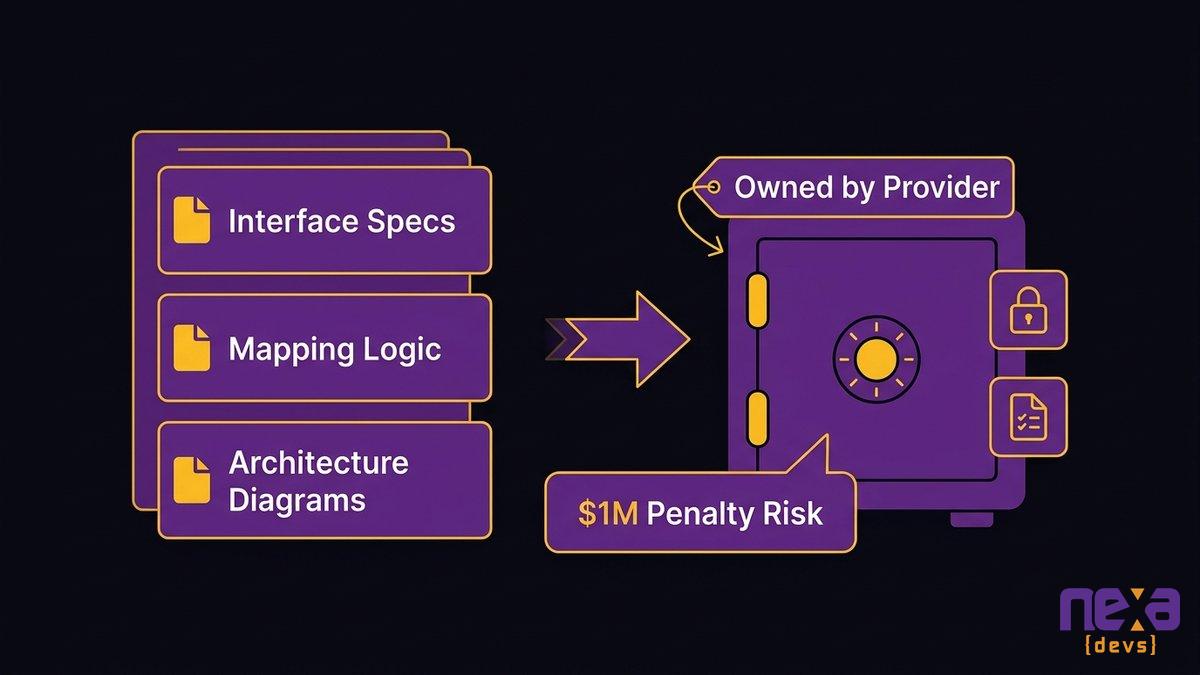
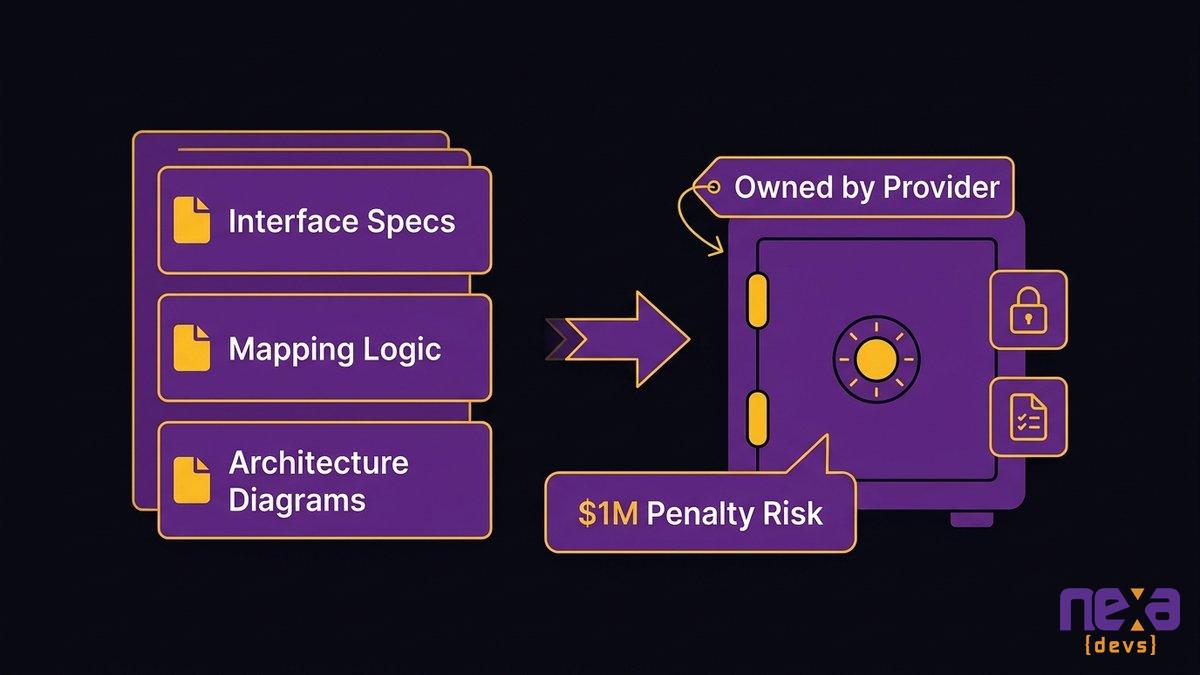
Ask who currently understands your existing interfaces well enough to modify one without breaking three others. If the honest answer is one person, or one vendor who won’t hand over specifications, you already have a second, quieter integration gap: a knowledge gap. Complete interface documentation, message specs, mapping logic, and architecture diagrams, transferred to and owned by your organization, closes that gap permanently. anchor text “how EHR interoperability compliance requirements reshape your integration roadmap” It also means the next vendor, or the next hire, doesn’t start from zero.
A COO and CTO reviewing complete interface documentation that stays with the organization instead of a vendor’s files.
Choosing an Integration Approach That Fits a Mid-Market Provider
Most mid-market providers don’t need a platform vendor selling a new EMR for what is really a hospital system integration problem. They need a partner who can map their specific EMR, LIS, and referral network, then build the interfaces in a sequence that doesn’t stall clinical operations.
Three things separate an integration partner worth hiring from one that isn’t. First, a phased plan that connects your highest-friction system first, before it promises anything about the rest. Second, documentation you own outright at every milestone, handed over as you go and never held back until project close. Third, a real track record in environments where a mistake carries clinical consequences, the kind of work an e-commerce shop relabeled for healthcare has never actually done.
Nexa Devs has maintained an embedded engineering relationship with UCLA’s David Geffen School of Medicine for more than ten years, building and supporting systems in a regulated, high-stakes clinical environment where documentation and reliability aren’t optional. That kind of track record is the credibility anchor mid-market providers should be asking every integration vendor to match. If a firm can operate inside an academic medical center’s compliance requirements for a decade, a mid-market hospital’s LIS and referral network is a problem they’ve already solved a version of.
Nearshore, AI-augmented delivery, applied to the analysis, build, and testing phases of an integration project, means that phased middleware rollout can move faster than a traditional staffing model without cutting corners on documentation or testing coverage. The goal isn’t a faster rip-and-replace. It’s a shorter path from “our systems don’t talk to each other” to an integration layer that runs quietly in the background, the way it should have from the start.
Ready to connect your EMR to the lab, radiology, and referral systems it should already be talking to, without a rip-and-replace? Talk to Nexa Devs about building your integration roadmap. We build the HL7/FHIR middleware layer, with documentation you own, in environments where the stakes are real.
FAQ
What is an EMR integration?
An EMR integration connects your electronic medical record system to other clinical systems, like a lab, radiology, or referral platform, so data moves automatically between them. It typically uses HL7 or FHIR interfaces to send orders out and bring results back without staff manually re-entering information.
How does EMR integration with a lab system work?
An order placed in the EMR is sent through an HL7 or FHIR interface to the lab’s LIS. The lab processes the test and sends the result back through the same interface, where it posts directly into the patient’s chart. No manual re-entry is needed if the interface is built correctly.
What is the difference between HL7 and FHIR for lab integration?
HL7 v2 is an older, message-based standard most labs and EMRs still use for day-to-day order and result traffic. FHIR R4 is a newer, API-based standard built for real-time data access. Most hospitals run both together. FHIR doesn’t replace HL7 v2, it adds a modern layer on top of it.
Do we have to replace our EMR to fix a broken lab integration?
No. Most lab integration problems live in the interface layer, not the EMR itself. Incremental middleware or an interface engine can connect your existing EMR to the LIS, radiology, and referral systems without a full replacement, at a fraction of the cost and disruption.
What causes duplicate patient records in healthcare systems?
Duplicate records usually happen when systems can’t automatically reconcile patient identity across an integration gap. Staff create workaround records to keep care moving, and those records diverge over time. Clean, well-built interfaces with consistent patient matching logic are the fix, not manual reconciliation after the fact.
by Sarah Mitchell | Aug 6, 2026 | AI & Innovation Hub
AI-Ready Data: Why Most AI Pilots Never Ship
A mid-market CTO in Ohio watched her team’s AI pilot nail the demo in March. The chatbot pulled customer records, flagged at-risk accounts, and answered questions her sales team used to escalate to a manager. Leadership loved it. Six months later, the pilot is still a pilot. It never touched production, because production data lives in four systems that don’t talk to each other, and nobody budgeted time to build the connections.
The chatbot was never the weak link. The data was. That is the pattern behind most stalled pilots: what decides whether a project reaches production is the state of the data underneath, well before the choice of model enters into it. And the work to fix it looks a lot more like integration and engineering than anything people picture when they hear “AI project.” It’s the same discipline a team would bring to any systems job: assess what you have, connect it, clean it, and document it so the next project doesn’t start from zero.
Quick answer: why AI pilots stall
1. AI-ready data is information that’s clean, connected across systems, and governed so AI tools can actually use it.
2. Most AI pilots stall because no one built the API and middleware layer that connects the data the AI needs.
3. Gartner projects 60% of AI projects will be abandoned by 2027 due to a lack of AI-ready data.
4. Data quality is the top inhibitor to AI deployment for mid-market firms, cited by 34% of leaders, per the RSM US Middle Market AI Survey.
5. The fix is engineering, not a better model: build the connective layer once and document it for every future project.
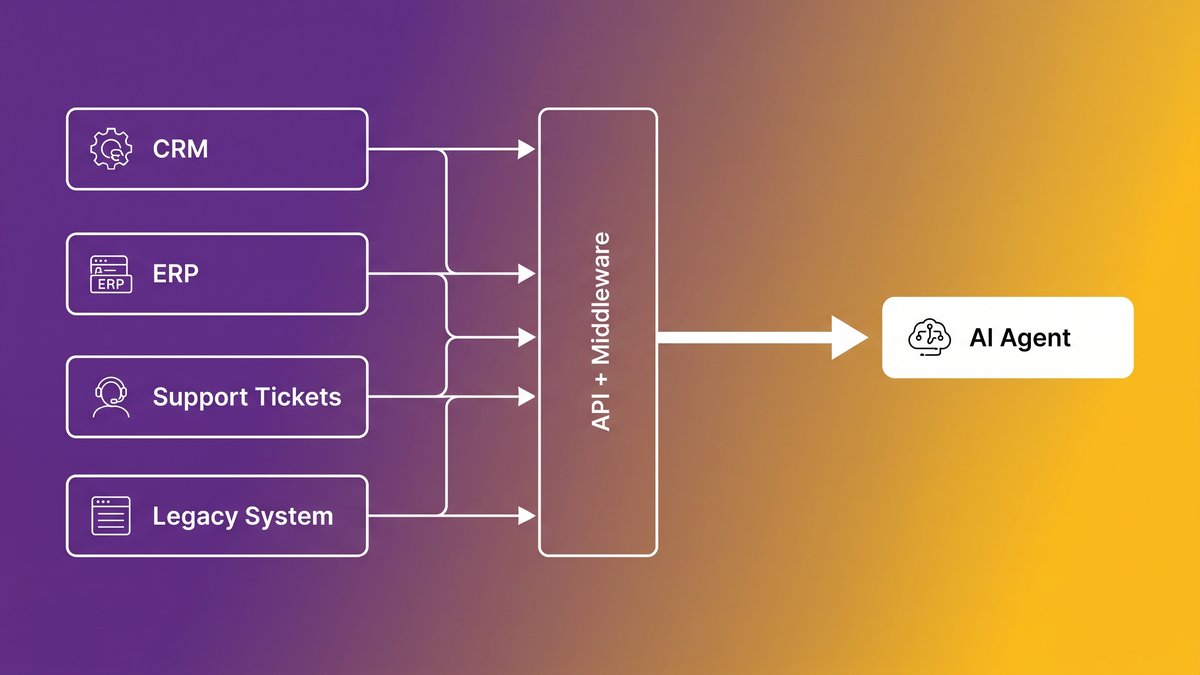
What an AI-ready data pipeline looks like once disconnected systems are wired together
The Real Reason Your AI Pilot Died Between the Demo and Production
Your pilot didn’t die because the model picked a wrong answer. Something more mundane killed it: nobody built the plumbing between the systems holding your data and the tool trying to read it.
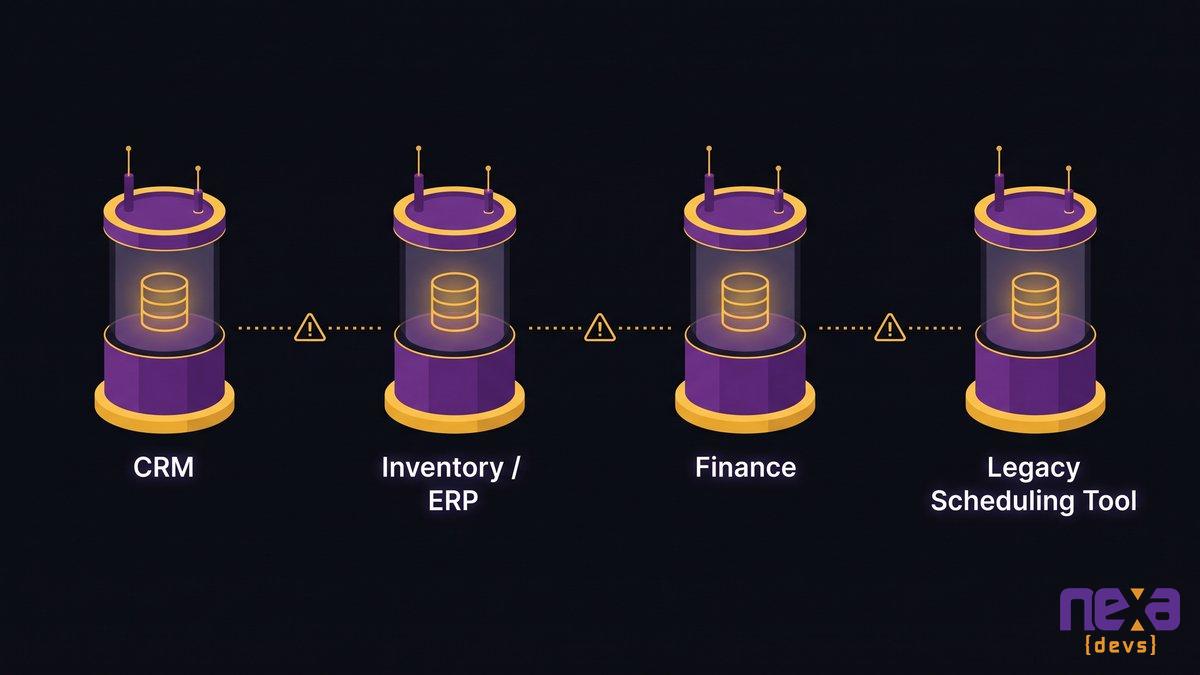
Most demos run on a curated sample: a clean CSV export, a handful of test records, maybe a snapshot someone pulled by hand from the CRM. Production data quality sits a long way from demo data quality, because production means live inventory in one system, customer records in another, support tickets in a third, and a homegrown scheduling tool nobody has touched since 2019. The AI that impressed everyone in March needs all four, updated in real time, in a format it can parse. That AI pilot data infrastructure rarely gets built during the pilot phase, because pilots are scoped to prove the model works, not to prove the organization can feed it.
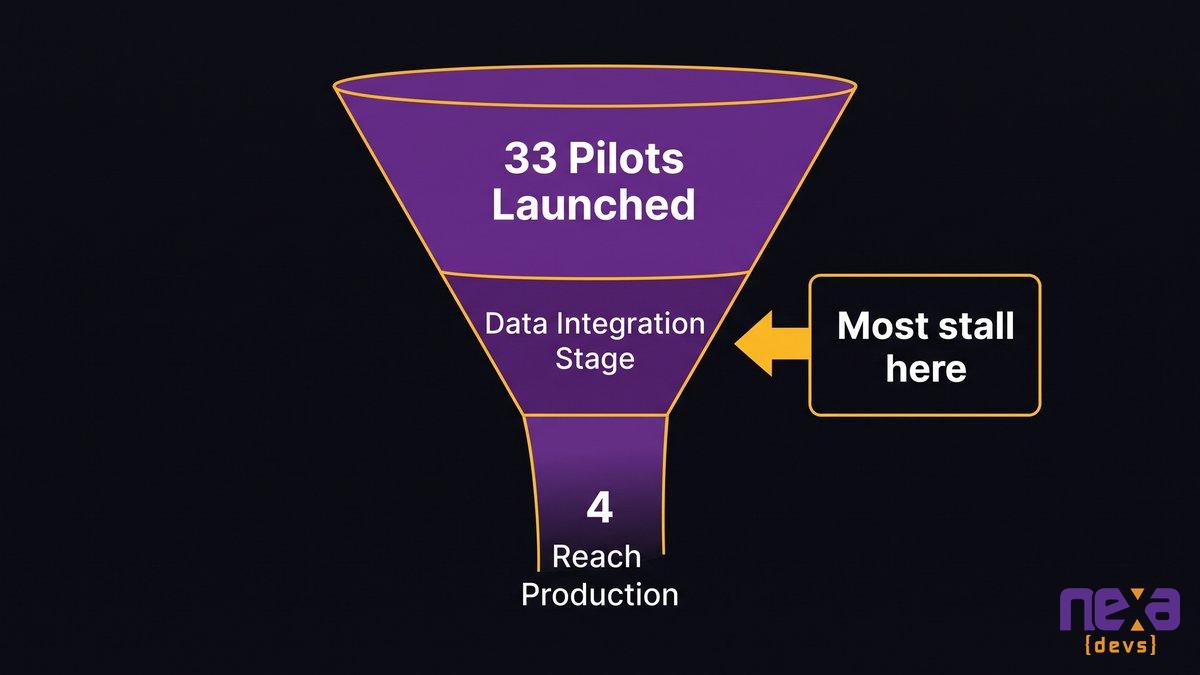
McKinsey’s research found 62% of organizations experiment with AI agents, but only 23% successfully scale them past that stage. IDC’s tracking tells a similar story: for every 33 AI pilots launched, only 4 reach production. Both numbers point to the same gap. The model works in isolation; the organization around it doesn’t.
A funnel showing how AI pilots narrow from demo to production, with most stalling at the data integration stage
The gap shows up well beyond Ohio, beyond chatbots, beyond any one vendor’s model. Across the mid-market it plays out the same way: the demo works because someone hand-fed it clean data, and production fails because nobody automated that feed. legacy infrastructure as the real AI bottleneck
AI Readiness Isn’t a Model Problem, It’s a Data Foundation Problem
Buying a better model fixes a data problem about as well as a faster car fixes a traffic jam. The bottleneck sits one layer down, in what the model can actually reach.
Every mid-market leader has sat through the same pitch: switch to a newer model, buy the enterprise AI platform, add another SaaS layer. None of it addresses why the last pilot stalled. Pick any frontier model and it performs identically on your data whether that data is clean or a mess, because the model never sees the mess. It sees whatever gets handed to it. If what gets handed to it is incomplete, duplicated, or three systems out of sync, the model produces confident, wrong, or useless answers regardless of how good it is.
CTOs already know this. It’s the CEO and the board who need convincing, because “buy a better tool” is a much easier budget line than “spend two quarters building integration middleware nobody outside engineering will ever see.” Gartner’s research backs the harder truth: that unglamorous work is what “AI-ready” actually has to mean before anything ships. Data your systems can produce reliably, in a shape the AI can consume, updated on a schedule the business can trust.
why legacy infrastructure blocks AI deployment
What AI-Ready Data Actually Means
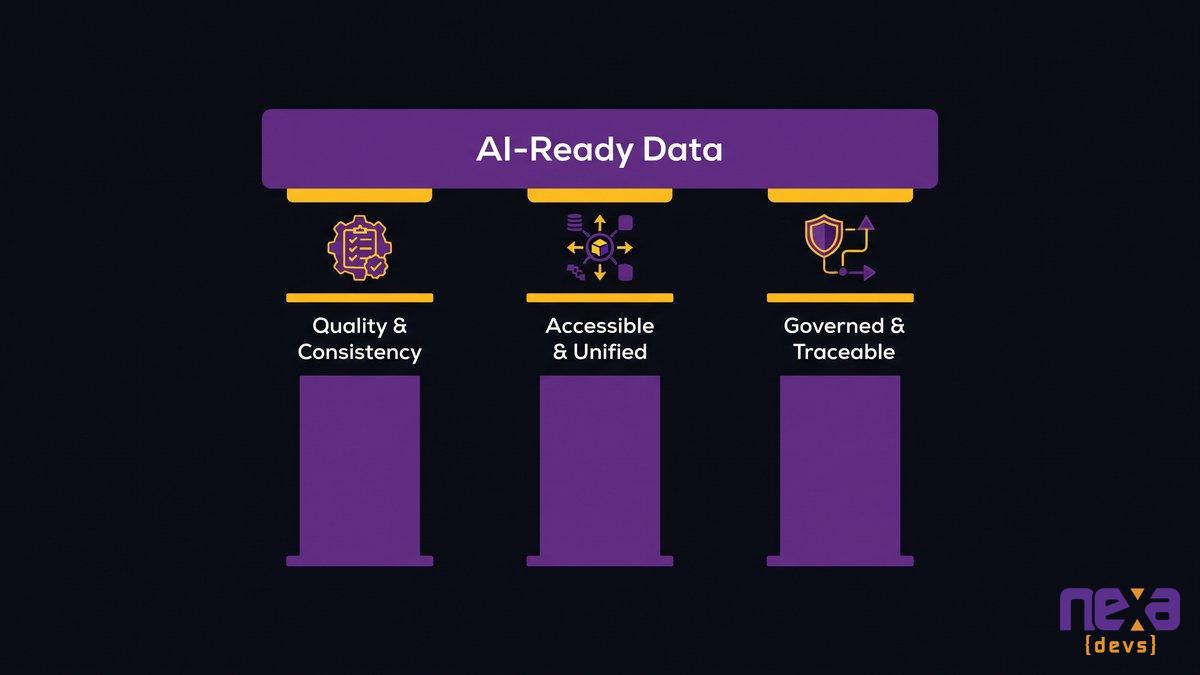
Four conditions decide whether your data can support AI, and none of them mention artificial intelligence at all.
Quality, completeness, and consistency
The data has to be accurate, deduplicated, and formatted consistently across every system it lives in. A customer record spelled three different ways across three databases is more than a minor annoyance. An AI agent will misread it, merge it wrong, or drop it entirely. This is the clean data for AI piece most teams underestimate, because the work is tedious rather than technically hard.
Accessible and unified across systems
An AI tool can only use data it can reach. That means APIs, not screen-scraping. It means a common schema, not four teams each naming the same field something different. If your customer data lives in a system with no API and no export beyond a nightly CSV, that data is stranded, not accessible.
Governed, secure, and traceable
Every AI-ready dataset needs a clear answer to three questions: who can access it, where did it come from, and can you prove that when a regulator or a customer asks. Data governance for AI, tracking lineage and metadata so you know which system is the true source of a given field, does real work here. It keeps an AI feature from turning into a liability the moment it touches anything sensitive.
The three conditions that determine whether data can actually support an AI system
None of this is abstract data-governance theory. These are engineering requirements the AI depends on to work at all, the same way an engine depends on real fuel in the tank.
Why Mid-Market Data Isn’t Ready: Silos, Legacy Systems, and Quality Gaps
Data quality and availability are the top inhibitors to AI deployment for mid-market organizations, cited by 34% of respondents, ahead of security concerns, legacy integration, and talent gaps. The RSM US Middle Market AI Survey puts security and privacy at 30%, legacy systems integration at 28%, and talent gaps at 28%. Every one of those numbers traces back to the same root cause: disconnected systems that were never designed to share information.
Disconnected systems and data silos
Most mid-market companies didn’t set out to build silos. They accumulated them, one system at a time, over ten or fifteen years of solving whatever problem was in front of them that quarter. The CRM went in during one hiring wave. The inventory system came from an acquisition. Finance runs on something the original controller picked in 2014, and nobody’s had the appetite to replace it since.
As Jesper van den Bogaard, CEO at Factor Blue, describes it: “We need to process manufacturing, but the invoice is here, the order data is there, and we’re manually passing information around, with data scattered across different systems.” That isn’t a hypothetical. It’s Tuesday for most mid-market operations teams, and it’s the exact condition that makes data silos AI integration impossible until someone deliberately builds the connections.
Legacy stack the AI can’t reach
Some of that data sits behind systems that predate modern APIs entirely: an on-premise ERP with no export beyond scheduled batch reports, a scheduling tool built in-house a decade ago with zero documentation. An AI agent can’t query a system with no interface to query. It can only wait for someone to build one.
Poor data quality and missing lineage
Even connected data often can’t be trusted. Duplicate customer records, three different date formats across systems, no record of which system was the original source of truth. An AI model grounded on that data fails quietly rather than loudly, producing answers that look right until someone downstream catches the error.
How data silos form across CRM, ERP, and legacy systems in a typical mid-market company
The Business Cost of Skipping the Data Layer
Gartner projects that by 2027, 60% of AI projects will be abandoned because the organizations behind them lack AI-ready data. Read that as a budget statistic, not a technology one, because every abandoned project already burned months of engineering time, a vendor contract, and a line item the CFO approved on the promise of a return.
The mid-market irony is that adoption looks healthy on paper. According to the RSM US Middle Market AI Survey, 86% of middle-market organizations have partially or fully integrated AI into their operations, and 97% report satisfaction with what they’ve built. What does that 97% actually measure, if most of what they’ve built never left pilot stage? Those numbers describe pilots and point solutions, not scaled, production-grade systems the whole business depends on. A chatbot that answers 40% of support tickets correctly still counts as “integrated AI,” and it still isn’t something you’d bet the quarter on.
The real cost shows up in three places: engineering hours spent building against data that keeps changing shape, the opportunity cost of every quarter spent re-litigating the same integration problem, and the trust cost when a pilot leadership championed publicly quietly disappears. None of that shows up on a line item labeled “data infrastructure.” It shows up as delay, and that AI readiness gap, the distance between what mid-market teams have and what production AI actually needs, is the thing competitors with a working data layer are already closing. The hidden tax of technical debt
How to Build an AI-Ready Data Foundation
Building an AI-ready data foundation follows a sequence: assess what you have, clean and connect it, then govern it. Skip a step and the AI project you build on top inherits every gap you skipped.
Assess the current data landscape
Start by mapping where your critical data actually lives, not where the org chart says it should live. Most mid-market assessments turn up at least one system nobody remembered was still load-bearing: a spreadsheet a single analyst maintains, a database an acquired company brought along five years ago. You can’t connect what you haven’t found.
Clean, standardize, and connect the data
This is the unglamorous middle. Deduplicate records, agree on one schema per data type across systems, and build the APIs and middleware that let previously disconnected systems exchange data automatically, instead of through a person copying and pasting between tabs. It’s slower than buying a tool. It’s also the only part of this process that actually removes the bottleneck instead of working around it. A full data platform migration is rarely the right first move for a mid-market team; building the connective layer over what you already have almost always beats replacing it outright.
Establish governance, security, and monitoring
Once data moves automatically between systems, you need to know who can see it, whether it’s still accurate six months later, and what happens when a source system changes its schema without warning. Monitoring catches the quiet failures: the field that started returning null, the API that silently changed its date format. Without it, you find out your AI-ready data stopped being AI-ready when a customer complains, not before.
The Engineering Underneath: APIs, Middleware, and Modernizing the Stack
This is where the actual engineering happens, and it’s mostly invisible to everyone outside the team doing it. Three things get built, and none of them are the AI model itself.
Connecting disparate systems with APIs and middleware
The core work is building the connective tissue: APIs that expose data from systems that never had one, middleware that translates between formats so the CRM and the ERP can finally agree on what a “customer” is. This is the same data pipeline modernization discipline that’s existed in enterprise software for two decades, applied now with AI as the reason it finally gets funded. Martin Fowler’s writing on the strangler fig pattern describes the incremental version of this well: replace and connect one piece at a time, never the whole stack at once. Nexa builds this layer as custom infrastructure scoped to the client’s actual systems, rather than dropping in a generic connector that half-works.
Embedding AI into existing systems instead of bolting on a pilot
A pilot bolted onto data it can’t reach will always be a demo. AI embedded into the systems people already use- the CRM, the internal ops tool, the scheduling platform- reaches production because it runs on the same data pipeline the business already depends on, so there’s no separate sandbox anyone has to remember to feed.
Cleaner architecture and higher test coverage from the start
AI-augmented delivery changes what gets produced during this build, not just how fast. Generating tests alongside code as a continuous practice, running structured QA throughout the sprint rather than at the end, and producing architecture documentation as a standard deliverable means the data layer that comes out the other side is maintainable by someone other than the person who wrote it. That’s the difference between infrastructure and a demo that happened to work once.
Owning the Data Layer, Not Another Black Box
Ask what happens if the vendor who built your data layer disappears tomorrow. If the honest answer is “we’d be stuck,” you haven’t fixed the data problem. You’ve relocated it.
Nexa transfers complete documentation at project close: architecture diagrams, API references, data lineage records, test coverage reports. Not as an optional add-on, but as standard practice regardless of whether the engagement continues afterward. The client owns the data foundation outright, which means the next engineer, whether they’re Nexa’s or someone the client hires directly, can actually understand what’s running and why. Why documentation is the real competitive advantage
Ownership matters more for a data layer than almost any other part of the stack, because a data layer nobody understands is worse than no data layer at all. It fails silently, it resists change, and it becomes the reason the next AI initiative stalls the same way the last one did. Building the connective tissue is half the job. Making sure the client still understands it in two years is the other half, and it’s the half most vendors skip.
Mid-market data readiness never arrives as a checklist you buy off a vendor’s landing page. You build it, document it, and keep it. Once it’s in place, every AI project after the first one starts from a working foundation instead of another six-month integration slog.
FAQ
What is an AI-ready data model?
An AI-ready data model is a data structure built so AI systems can read, interpret, and act on it without manual cleanup. It uses consistent schemas, clear metadata, and documented relationships between fields, so a model or agent can query it directly instead of waiting for someone to reformat a spreadsheet first.
How do I know if my data is ready for AI?
Check three things: can every system holding relevant data expose it through an API, is the data consistent enough that the same customer or product looks identical across systems, and can you trace where each piece of data originated? If any answer is no, your data isn’t ready yet.
How do I get my data ready for AI?
Start with an assessment of where your critical data actually lives, then build the APIs and middleware that connect those systems automatically. Clean and standardize formats as you connect them, and add governance and monitoring so the connections stay accurate over time.
Why do AI pilots fail even with a good model?
Pilots usually run on a small, manually cleaned dataset that doesn’t reflect production. When the AI needs live data from multiple disconnected systems, there’s often no pipeline feeding it automatically, so the project stalls waiting for integration work nobody scoped during the pilot phase.
by Sarah Mitchell | Aug 4, 2026 | Healthcare
EMR Lab Integration: Fixing the Gap Without a Rebuild
A hospital’s EMR and its lab system are supposed to talk to each other without help: an order goes out, a result comes back, and nobody touches it in between. EMR lab integration is the technical work that makes that happen, connecting your EMR to your LIS, radiology system, and referral network through HL7 or FHIR interfaces so data moves without a human retyping it. When that connection breaks, or was never built cleanly in the first place, the workflow doesn’t stop. It moves to your staff, one keystroke at a time.
This plays out every day wherever LIS EHR integration happens by hand: rekeyed results, duplicate patient records, and manual bridges that hold together right up until volume climbs past what they can carry. Below, we walk through why the gap exists, what it costs a hospital operationally, and how mid-market providers close it with incremental integration middleware rather than a full EMR replacement.
A clinical staff member manually re-entering lab results because the EMR and LIS have no clean data connection.
When Your EMR Can’t Talk to Your Lab System, the Workflow Runs on People
A lab tech at a 200-bed regional hospital finishes a results batch at 4:45 pm. The LIS has no clean feed into the EMR, so she opens both screens and retypes fifteen results by hand before her shift ends.
Multiply that by every shift, every department, and every system that was never designed to exchange data with the one beside it, and you start to see the real shape of the integration gap. Nobody filed it as a missing feature or put it in a budget. It just quietly turned into a permanent staffing cost.
Rekeying lab results by hand between systems
Manual rekeying isn’t a minor inconvenience. Every retyped value is a chance for a transposed digit, a missed decimal, a result attached to the wrong encounter. A potassium level of 6.5 entered as 5.6 doesn’t get flagged by either system, because neither system knows the number came from a human instead of an interface. The clinician downstream trusts the chart. The chart is only as accurate as the last person who typed into it.
How duplicate patient records multiply when systems don’t reconcile
When the EMR and LIS can’t reconcile patient identity automatically, staff build workarounds: a new record here, a manually matched chart there. CertifyHealth’s analysis of ONC data found that only 43% of hospitals report routine engagement across all four interoperability domains: send, find, receive, and integrate. The other 57% are living with some version of this gap, and duplicate records are one of its most visible symptoms.
What happens to the patient record when two systems disagree about who the patient is? Usually, both versions survive. A lab result posts to the wrong MRN, a medication history splits across two charts, and the clinician making a decision at 2 am is working from an incomplete picture without knowing it’s incomplete. That’s not an efficiency problem. That’s a patient-safety problem.
The Hidden Operational Cost: Manual Bridges That Break Under Load
Manual bridges hold up fine on a slow Tuesday. Add a flu surge, a new referring clinic, or a lab acquisition, and the same workaround buckles within days, because a human process doesn’t scale the way an interface does.
Where the workarounds fail during volume spikes
The failure pattern is predictable. Volume climbs, the same two or three staff members who know the manual process are already at capacity, and results start queuing. A result that should post in seconds sits in someone’s inbox for forty minutes, then two hours, then it’s the end of shift and nobody’s sure what’s been transcribed and what hasn’t.
Aalpha’s 2025 research, citing Gartner, puts the figure at up to 75% of hospital IT budgets consumed by maintaining legacy systems rather than fixing the workflow gaps sitting on top of them. That number isn’t abstract for a COO staring at a stack of overtime approvals during a bad flu season.
Rework, delayed results, and staff burnout as measurable operational drag
Every rekeyed result that turns out wrong needs to be caught, traced, and corrected, which means someone re-does the work a second time. Delayed results delay clinical decisions. And the staff holding the bridge together, the ones who know which spreadsheet tracks what and which fax needs a follow-up call, are the same staff a COO can’t afford to lose. anchor text “hidden cost of running critical systems on manual workarounds”
None of this shows up on a single line item. It shows up as unplanned overtime, as a nurse manager pulled off the floor to reconcile a chart, as the quiet turnover of the two people who understood the workaround well enough to keep it running.
A simplified view of an interface engine routing lab orders and results between the EMR, LIS, and radiology systems.
Why the Systems Don’t Talk: HL7, FHIR, and the Interface Layer Underneath
HL7 v2 is a decades-old messaging standard built around pipe-delimited text segments rather than a modern API. FHIR R4 is newer, built on REST and JSON. Most hospitals run both side by side, which is completely normal.
HL7 v2 messaging vs. FHIR R4 APIs
HL7 v2 still carries most day-to-day electronic lab ordering and results traffic, and it works well enough, as long as every endpoint implements the same optional fields the same way. In practice, endpoints rarely do. FHIR R4 adds a standardized, resource-based API layer on top, useful for real-time queries, patient portals, and newer applications that were never built to parse pipe-delimited segments.
Invene’s research, citing HIMSS data, found that 67% of CIOs name interoperability as their biggest digital transformation barrier. The regulatory direction backs that up: the CMS-0057-F final rule requires impacted payers to implement four FHIR APIs, covering patient access, provider access, payer-to-payer exchange, and prior authorization, by January 1, 2027. So FHIR has stopped being a future consideration. Every serious health IT investment is already heading in its direction.
Point-to-point interfaces vs. a middleware/interface-engine approach
Point-to-point interfaces connect exactly two systems, one custom build at a time. Add a fourth lab partner or a new referral network, and you’re commissioning another custom interface, tested and maintained separately from every other one you already have. An HL7 interface engine sits in the middle instead, translating once and routing to every connected system from a single, maintainable layer.
Where legacy interfaces fall short of current interoperability requirements
Interfaces built a decade ago were often scoped narrowly: this lab, this EMR, this one message type. They weren’t built to add a fifth radiology partner or expose data through a modern API, so every new connection becomes a bespoke project instead of a configuration change. That architecture problem is what shows up downstream as overtime, rekeying, and burnout.
What Closing the Loop Actually Buys You: Orders and Results That Flow
A closed order-to-result loop means an order placed in the EMR reaches the LIS in seconds, and the result posts back to the right chart without anyone touching a keyboard in between. Every hospital should start from that baseline. It is not a premium feature a vendor gets to upsell later.
Closing the loop buys three things a COO and a CTO both care about, for different reasons. Fewer manual steps means fewer chances for a transcription error to reach a clinician. Faster turnaround means a result that matters at 2 am actually shows up at 2 am, not during morning rounds. And clean, structured clinical data exchange means the reporting your leadership team relies on reflects what actually happened in the systems, rather than what someone remembered to type in after the fact. That is clinical workflow integration doing its job quietly in the background.
None of this requires exotic technology. The Office of the National Coordinator for Health IT has published a working definition of interoperability for over a decade: the ability of systems to exchange and use information without special effort on the part of the user. “Without special effort” is the entire point. If your staff is putting in special effort every shift, the loop isn’t closed yet, no matter what your EMR vendor’s marketing page says.
Incremental Integration Middleware vs. Ripping Out the EMR
Rip-and-replace is the wrong first move for almost every mid-market provider chasing a lab integration fix. It’s also the most expensive one, and it solves a problem you don’t actually have.
Connecting LIS, radiology, and referral systems without replacing the core EMR
Your EMR usually isn’t the broken part. The connections around it are. A phased healthcare API middleware build, an interface engine or FHIR facade layered over your existing EMR, connects the LIS, radiology, and referral systems you already depend on without touching the system your clinical staff has spent a decade learning to trust.
As Ashwin Ballal, CIO at Freshworks, states: “Legacy systems have become so complex that companies are increasingly turning to third-party vendors and consultants for help, but the problem is that, more often than not, organizations are trading one subpar legacy system for another.” A full EMR replacement carries exactly that risk, at a much higher price and on a much longer timeline.
A phased rollout that de-risks the change
Hypertrends’ 2026 research puts a full EHR replacement at a mid-size health system between $50 million and $200 million, spanning three to five years. The same research found that big-bang modernization projects, the ones that try to replace everything at once, fail more than 70% of the time. A phased rollout does the opposite: connect the highest-friction system first, usually the lab, prove the pattern works, then extend it to radiology and referral networks on a timeline that doesn’t require betting the department’s budget on a single go-live date.
A phased middleware rollout connecting the EMR to lab, radiology, and referral systems one interface at a time.
Getting It Right: Security, Compliance, and Documentation You Own
PHI moves through every interface you build. That makes security and compliance design requirements you settle at the first architecture diagram, long before anyone gets to a post-launch checklist.
Protecting PHI and staying compliant during and after integration
Every connection point, EMR to LIS, LIS to a reference lab, referral system to a specialist’s portal, is a place PHI can leak if access controls, encryption, and audit logging aren’t built in from the start. According to ANI Solutions, information blocking penalties under ONC enforcement can reach up to $1 million per violation for health IT developers. A penalty that size is a strong argument for building the integration correctly the first time, with security reviewed at every interface as you go rather than bolted on once everything is already live.
Why owning the interface documentation matters for a mid-market provider
Ask who currently understands your existing interfaces well enough to modify one without breaking three others. If the honest answer is one person, or one vendor who won’t hand over specifications, you already have a second, quieter integration gap: a knowledge gap. Complete interface documentation, message specs, mapping logic, and architecture diagrams, transferred to and owned by your organization, closes that gap permanently. anchor text “how EHR interoperability compliance requirements reshape your integration roadmap” It also means the next vendor, or the next hire, doesn’t start from zero.
A COO and CTO reviewing complete interface documentation that stays with the organization instead of a vendor’s files.
Choosing an Integration Approach That Fits a Mid-Market Provider
Most mid-market providers don’t need a platform vendor selling a new EMR for what is really a hospital system integration problem. They need a partner who can map their specific EMR, LIS, and referral network, then build the interfaces in a sequence that doesn’t stall clinical operations.
Three things separate an integration partner worth hiring from one that isn’t. First, a phased plan that connects your highest-friction system first, before it promises anything about the rest. Second, documentation you own outright at every milestone, handed over as you go and never held back until project close. Third, a real track record in environments where a mistake carries clinical consequences, the kind of work an e-commerce shop relabeled for healthcare has never actually done.
Nexa Devs has maintained an embedded engineering relationship with UCLA’s David Geffen School of Medicine for more than ten years, building and supporting systems in a regulated, high-stakes clinical environment where documentation and reliability aren’t optional. That kind of track record is the credibility anchor mid-market providers should be asking every integration vendor to match. If a firm can operate inside an academic medical center’s compliance requirements for a decade, a mid-market hospital’s LIS and referral network is a problem they’ve already solved a version of.
Nearshore, AI-augmented delivery, applied to the analysis, build, and testing phases of an integration project, means that phased middleware rollout can move faster than a traditional staffing model without cutting corners on documentation or testing coverage. The goal isn’t a faster rip-and-replace. It’s a shorter path from “our systems don’t talk to each other” to an integration layer that runs quietly in the background, the way it should have from the start.
Ready to connect your EMR to the lab, radiology, and referral systems it should already be talking to, without a rip-and-replace? Talk to Nexa Devs about building your integration roadmap. We build the HL7/FHIR middleware layer, with documentation you own, in environments where the stakes are real.
by Sarah Mitchell | Jul 23, 2026 | Outsourcing Software Development
Vendor Lock-In in Custom Software: The Knowledge Hostage Problem
Call your developer. Ask for a small change to the internal system they built two years ago. Get back a quote. Pay it. Two months later, ask for another change. Get another quote.
That’s not a vendor relationship. That’s a ransom.
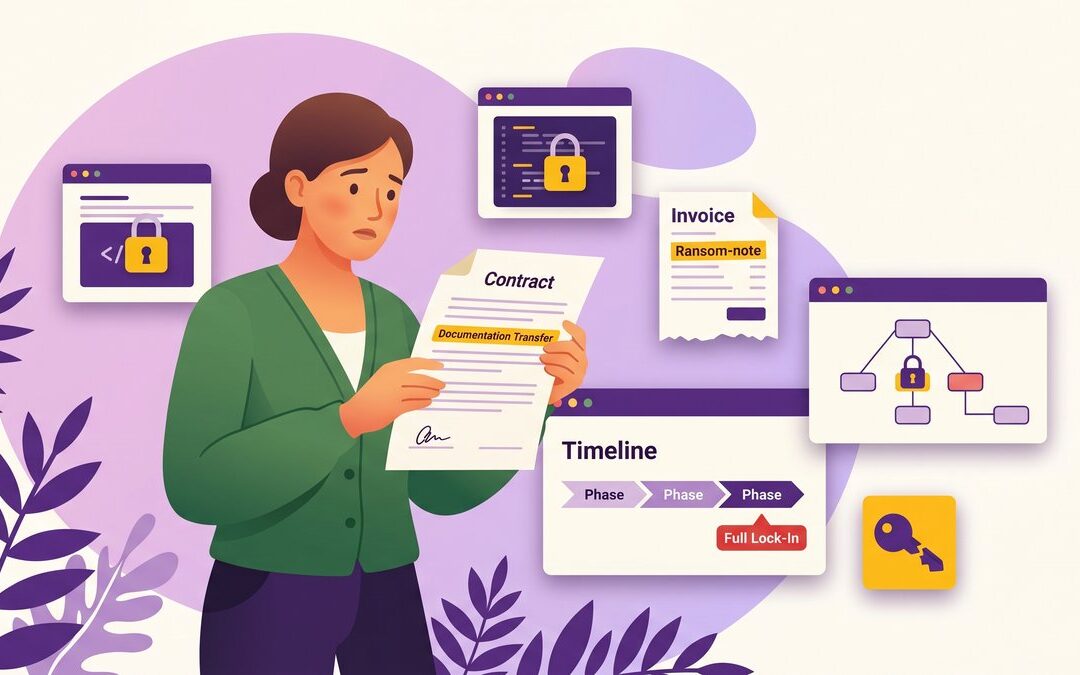
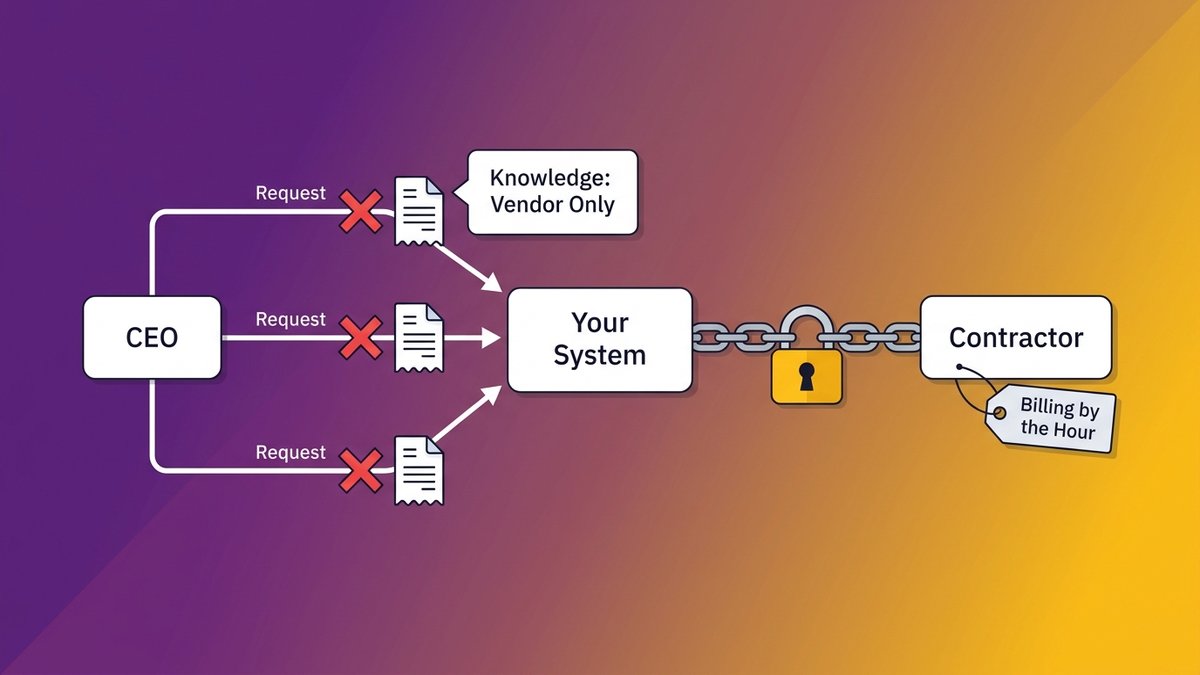
Vendor lock-in in custom software development is rarely about platform dependencies or proprietary licenses. For most mid-market companies, it’s simpler and more personal than that: one contractor or one small agency built something your operations depend on, and they kept the knowledge needed to maintain it. The system works fine. The hostage situation is invisible until the moment you need something to change.
A diagram showing how undocumented software creates ongoing contractor dependency, the core pattern of vendor lock-in in custom software development
By the time most CEOs recognize the problem, they’re already three change requests deep and funding someone else’s business with no exit in sight.
The Moment the Contractor Becomes the Gatekeeper
Your contractor finished the project. You signed off. You got the deliverable. And for six months, maybe twelve, everything ran fine.
Then you needed a change.
Two years in: the only person who can modify your system is billing by the hour
A mid-market operations director contacted their original development agency about adding a new data field to their customer-facing dashboard. Simple request. Two weeks later: a $14,000 quote and a four-week timeline. The operations director pushed back. The agency was apologetic but firm: the system’s architecture had interdependencies only they understood. Someone else could theoretically do the work, but it would take them months just to map what already existed.
The operations director paid. What else could they do?
This is not a technology problem. The software works. The code runs. But the map of the system, the understanding of why it was built the way it was built, never left the agency’s team. And that map is worth exactly as much as the agency charges you to use it.
Why this isn’t a technology problem: it’s a knowledge transfer problem
Vendors hold your system hostage through one mechanism: retained understanding. They know how the pieces connect. They know why a decision made in 2022 affects the behavior you’re seeing in 2026. They know which section of the codebase has workarounds baked in from a week when the original developer was moving too fast.
None of that lives in your files. It lives in their heads.
As Pragmatic Coders puts it directly: legal IP ownership is not the same as practical operational control. You can hold the title to a building you can’t enter. Owning source code without the institutional knowledge to modify it is exactly that situation.
Institutional knowledge loss in software development
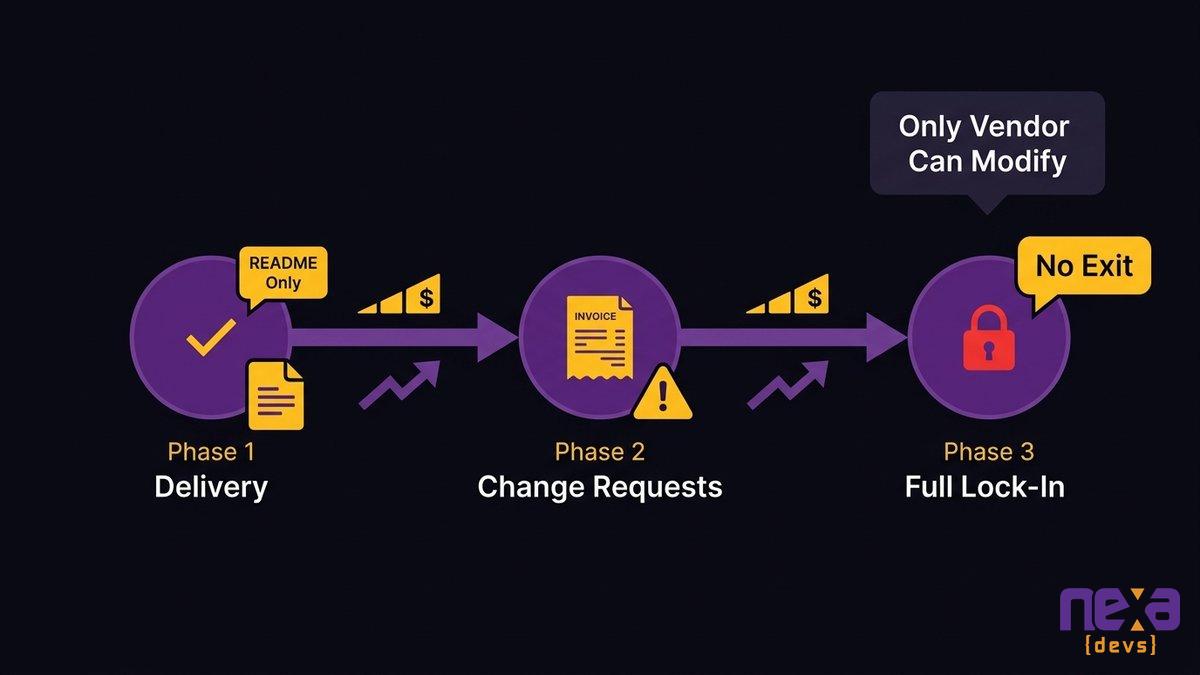
How the Knowledge Hostage Pattern Builds Over Time
The dependency doesn’t arrive on the day the project closes. It compounds.
Phase 1: The project delivers, but the knowledge stays with the vendor
Delivery day feels like completion. You’ve received the software. The system is live. The project manager closes the ticket. But the documentation, if it exists at all, is typically a README file and a few API endpoint descriptions. The architecture decision records, the reasoning behind structural choices, the onboarding guides that would let a new developer get productive in under a week: those were never in scope. Nobody asked for them.
That omission is the seed of every hostage situation that follows.
Phase 2: Every change request is a ransom payment
The first change request is usually small. A new field. A different report format. A permissions adjustment. You submit it expecting a few hundred dollars and a quick turnaround. The quote comes back at five times your estimate, with a timeline that suggests your developer is approaching this like an archaeological dig.
They’re not slow. They’re re-learning a system they built 18 months ago, because they never documented it either.
The third change request tends to be when the pattern becomes unmistakable. You’ve now spent more on post-delivery modifications than you anticipated, the invoices arrive faster when you push on scope, and you’ve started rationing change requests to avoid the cost.
Rationing changes to your own software. Think about what that means operationally.
Three-phase progression of knowledge hostage dependency: initial delivery, first change requests, full lock-in
Phase 3: The system becomes unmaintainable without them
By the third year, the situation has shifted from expensive to structural. The original developer has moved to a new company, or the agency has been acquired, or the key engineer who built your system is now billing at a rate your budget can’t absorb on a regular basis. You can’t replace them without a months-long handover process. You can’t hire internally because no developer wants to inherit a system with zero documentation. You can’t rebuild because the business depends on the current system staying live.
This is where Dreamix’s research on vendor transitions lands: documentation gaps, undocumented dependencies, and lost configuration details create expensive problems months after transition completion. The timeline on that phrase is significant. The problems don’t arrive when the vendor leaves. They arrive when you try to move without them.
Warning Signs Your Current Vendor Relationship Creates Lock-In
You don’t need a technical background to spot these. They’re business signals.
Undocumented architecture decisions that only the original developer knows
Ask your current vendor for the architecture decision records for your system. If they’re unfamiliar with the term, or if the answer is “that’s all in the developer’s head,” you have your answer. If a new engineer joined tomorrow, how long would it take them to understand why the system was built the way it was? Days is acceptable. Weeks is a warning. Months is a hostage situation.
No repository access or infrastructure credentials in your name
Your source code repository should be in your name. Your infrastructure credentials, hosting accounts, and deployment configurations should be accessible to you without requesting access from the vendor. If you’d need to ask your contractor for permission to log in to the platform your system runs on, you’re not in control of your own software.
Scope creep that only the original vendor can scope
When you need a change, can any qualified developer estimate the work? Or does every quote require your original vendor because only they understand the system well enough to scope it? If competitive pricing is impossible because no outside firm can evaluate the work, your vendor dependency is already structural. You’ve lost negotiating leverage without noticing.
What Vendor Lock-In Is Actually Costing You
The cost isn’t a one-time switching expense. It’s recurring.
The hourly billing that never ends
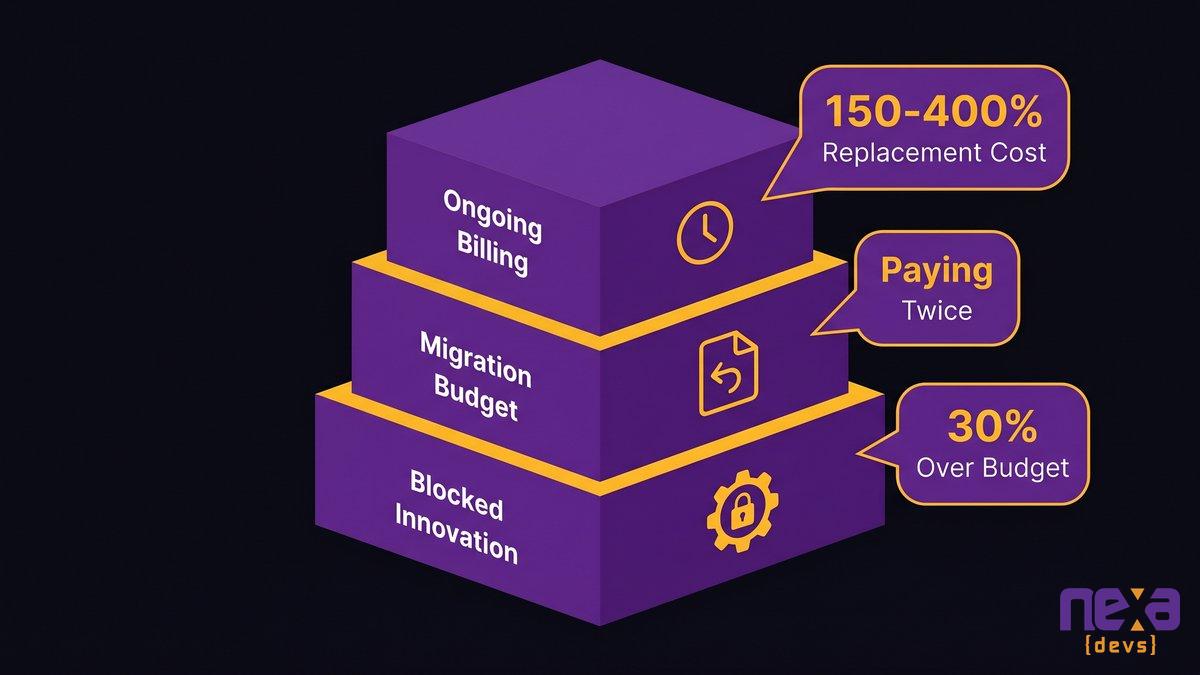
Contractors who retain system knowledge bill for every access to that knowledge. Every change. Every question. Every “can you just check why this is happening?” support request. ClearlyAcquired’s research on key-person replacement costs shows that high-level technical talent, when lost, costs 150 to 400 percent of the salary equivalent to replace, with projects delayed 6 to 12 months during the transition.
Your external contractor is in a stronger position than an employee with that kind of knowledge, because they have no employment relationship to end. They can raise rates. They can deprioritize your requests. They can decline future work entirely while leaving you with a system you can’t modify without them.
The migration budget you will eventually pay
At some point, the relationship becomes untenable. The rates increase past what your budget can absorb, or the contractor becomes unavailable, or the system needs a level of change that requires outside input. At that moment, a migration becomes unavoidable, and the migration budget is inflated precisely because documentation was never transferred.
Without architecture records, runbooks, and decision histories, the first phase of any migration project is reverse-engineering what was already built. You’re paying twice for the same understanding: once when the system was built, and again when you need to document it to move.
The innovation you can’t pursue because the system can’t change
This is the cost that doesn’t appear on any invoice. Your competitors are adding features. They’re integrating AI capabilities. They’re modifying their operational systems to respond to changing market conditions. You’re doing none of those things, because every change to your system requires a negotiation, a quote, and a payment to someone who holds the only map.
Data migration projects exceed budgets by an average of 30 percent due to undocumented complexity, according to IDC research. That figure is for planned migrations. Unplanned ones, the kind forced by a vendor relationship becoming untenable, run higher.
Three cost layers of vendor lock-in: ongoing hourly billing, eventual migration cost, and opportunity cost of blocked innovation
Why IP Ownership Clauses Don’t Protect You From This
Most CEOs believe their contracts protect them. Specifically, most believe that an IP ownership clause, a work-for-hire provision, or a full transfer of rights means they’re protected from vendor dependency.
They’re not.
You can own the code and still be hostage to the person who understands it
Owning the source code gives you the right to use it, modify it, and have others work on it. It does not give you the knowledge of how it works. Those are separate things. When the contract says you own all intellectual property created under the engagement, it transfers ownership of the artifact, not the understanding.
You might own the blueprint for a custom-built machine and still require the original machinist to explain which parts are load-bearing. Ownership is not comprehension.
What “full IP transfer” really means, and what it leaves out
A full IP transfer clause typically covers: source code ownership, license rights, and the right to modify and redistribute the deliverable. It does not typically cover: architecture decision records, runbooks for operational tasks, onboarding guides for new developers, deployment configuration details, or the reasoning behind structural choices made during development.
The gap between what IP clauses cover and what you actually need to operate the software independently is exactly the gap that makes contractor knowledge so valuable to the contractor and so damaging to you.
Vendor lock-in in software development
The fix isn’t a better IP clause. Ownership of the source files without a transfer of the documentation that makes them navigable leaves you in the same position.
The Fix Is Contractual, Not Technical: Requiring Documentation Transfer at Delivery
Documentation transfer as a delivery condition is the structural prevention mechanism. Not a process improvement. Not a vendor relationship guideline. A contract requirement, with payment held until it’s met.
What mandatory documentation transfer looks like in a statement of work
In a statement of work, documentation transfer should appear as a distinct deliverable with acceptance criteria, not as a goodwill gesture at project close. The language should specify what must be delivered, in what format, and that final payment is withheld until the documentation passes review by an independent technical party.
This removes the vendor’s incentive to withhold. Documentation retained after delivery is leverage. Documentation required before final payment is just part of the job.
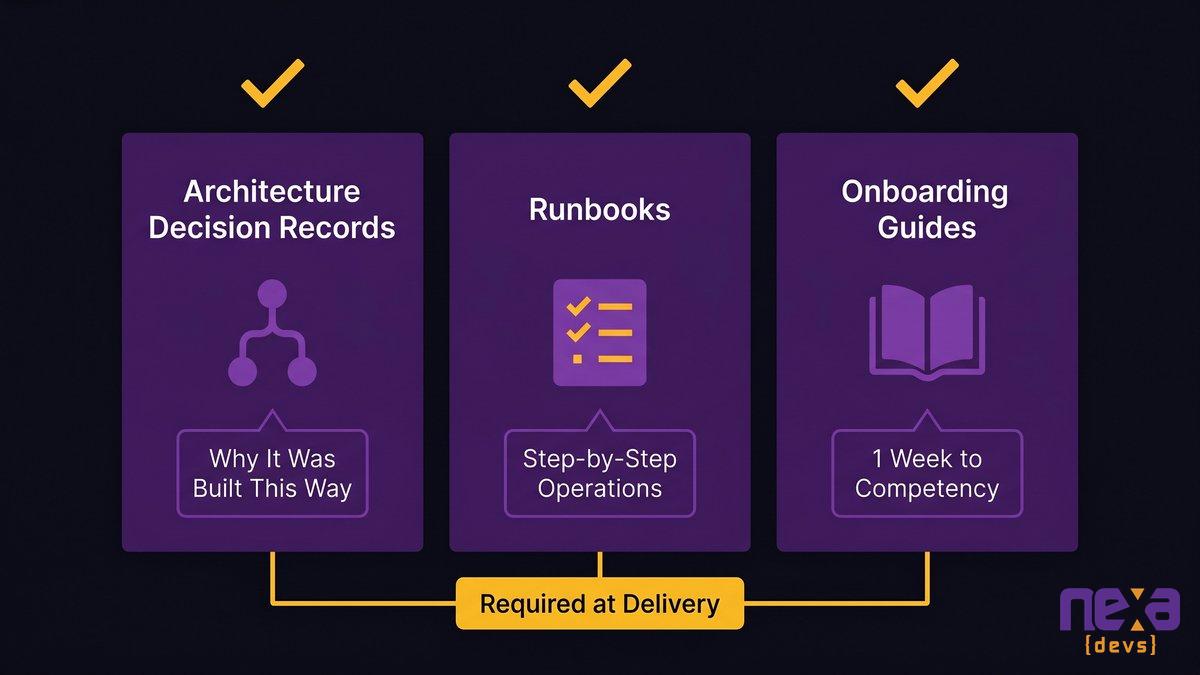
Architecture decision records, runbooks, and onboarding guides: what to require
Three categories of documentation are non-negotiable for operational independence:
Architecture Decision Records (ADRs): Written explanations of why the system was built the way it was. Not what was built, but why specific choices were made, what alternatives were considered, and what trade-offs were accepted. A new developer reading an ADR should understand a major structural decision in 15 minutes.
Runbooks: Step-by-step instructions for operational tasks. How to deploy a new version. How to troubleshoot the three most common failure modes. How to restore from backup. How to add a new user with the appropriate permissions. Runbooks convert operational knowledge from “the developer knows how” into written procedures anyone can follow.
Onboarding guides: Documentation that lets a new developer get productive on the codebase in a defined timeframe. The target is one week to basic competency, not one month to minimal function.
These are standard deliverables in any engagement model where the client actually owns the outcome. If your current or prospective vendor presents these as premium add-ons, treat that as diagnostic information about the relationship they’re offering.
Three-category documentation framework: Architecture Decision Records, Runbooks, and Onboarding Guides as the components of complete documentation transfer
How to verify delivery before the final invoice
Verification doesn’t require a technical background. Ask a developer you trust, or a qualified third party, to perform a 90-minute test: give them only the documentation provided and ask them to map the system architecture, identify the three most important operational procedures, and estimate how long a new developer would need to get productive. If they can’t do those three things from the documentation alone, the documentation hasn’t been transferred in any meaningful sense.
Withhold the final invoice until this test passes.
How Mid-Market CEOs Can Audit Their Current Vendor Exposure
If you’re already in a vendor relationship, prevention isn’t available. But assessment is.
Five questions to ask your current development vendor today
These five questions require no technical knowledge. The answers will tell you exactly where you stand.
1. Can you send me our architecture decision records?
The expected answer is a document, not a conversation. If the answer is a phone call or a meeting, the ADRs don’t exist in written form. That’s a documentation gap.
2. Where is our source code repository, and who has admin access?
The expected answer names a platform (GitHub, GitLab, Bitbucket) and confirms your organization has admin-level access. If the vendor controls the repository, you don’t fully own your software yet.
3. If your team were unavailable for 30 days, could someone else make a change to our system?
This question directly tests the bus factor of your vendor relationship. The expected answer is yes, with a reference to existing documentation. An honest “probably not easily” confirms the dependency.
4. Do we have the deployment credentials and hosting configuration in our name?
Your system should run on infrastructure you control. If your vendor controls the deployment environment, you need them operational to keep your system running, not just to change it.
5. What would a handoff to a new vendor require, and how long would it take?
A vendor with complete documentation can answer this question concretely and quickly. “We could hand off in four weeks with two weeks of overlap” is a good answer. “It would be complex” is diagnostic.
What to do if the answer to any of them is “only they know”
If any of these answers confirm a dependency, the conversation with your vendor should start immediately. Request a documentation sprint, scoped and priced as a standalone engagement. The purpose of that sprint is to produce the three categories of documentation above, in a form that lets an independent developer navigate the system without guidance.
If your vendor resists this request, or quotes a figure that feels disproportionate to the size of the system, you have further confirmation of the dependency. The resistance itself is information.
Outsourcing software development documentation
What a Vendor Relationship Built Around Knowledge Ownership Looks Like
The engagement model that eliminates the knowledge hostage pattern has one structural characteristic: documentation transfer is built in from the start, not offered at the end.
In practice, this means three things.
Architecture decision records are written in real time, as decisions are made, not assembled at project close. The ADR for a major architectural choice is written the week that choice is made, reviewed by the client’s technical representative, and stored in a repository the client owns. By the time the project closes, the ADRs are current because they were never deferred.
Documentation is a delivery condition, not a project artifact. Every sprint has a documentation task alongside the feature work. Runbooks are written when procedures are established, not when the project is ending. Onboarding guides are tested against a real new developer, not declared complete by the team that wrote them.
And the ongoing relationship is structured around knowledge accumulation, not knowledge retention. A vendor partner who earns recurring revenue through documented, transferable work (system evolution, feature development, SLA-based support) has no incentive to retain knowledge as leverage. Their value is in what they build next, not in controlling access to what they built before.
This is the difference between a development partner and a gatekeeper. One makes you less dependent with each engagement. The other makes you more dependent, by design.
As Ashwin Ballal, CIO at Freshworks, observed: adding vendors and consultants often compounds the problem, bringing in new layers of complexity rather than resolving the old ones. The pattern Ballal describes is the vendor dependency cycle: each new engagement is supposed to solve the last vendor’s lock-in, and instead creates its own.
The structural solution isn’t finding a better vendor relationship to be locked into. It’s requiring documentation transfer as a non-negotiable condition of doing business, so the relationship becomes genuinely yours to exit, continue, or evolve on your terms.
Work with a Partner Who Doesn’t Keep the Map
Vendor lock-in in custom software development is a structural problem with a structural fix. It doesn’t require a better vendor personality or a more trusting relationship. It requires a contract that makes documentation transfer a condition of payment.
Nexa Devs delivers complete documentation packages to every client at project completion: architecture diagrams, system design documents, API references, and test coverage reports. All of it is unconditionally transferred and client-owned. That’s not a premium tier. It’s how every engagement works.
If you’re currently in a vendor relationship and want to assess your exposure, we’re happy to walk through the five-question audit with you directly. Schedule a Consultation
FAQ
How to deal with vendor lock-in?
Address it contractually before the engagement starts. Require documentation transfer as a delivery condition, with final payment held until architecture decision records, runbooks, and onboarding guides pass independent review. For existing relationships, commission a documentation sprint to produce what should have been delivered at project close.
What are the disadvantages of vendor lock-in?
Three compounding costs: ongoing hourly billing for every change (you’re paying for retained knowledge, not just labor); an inflated migration budget when the relationship ends; and blocked innovation as change requests become financially prohibitive. The third cost typically exceeds the first two combined.
What does ‘lock-in’ mean in a custom software context?
In custom software, lock-in doesn’t require a proprietary platform. It requires one condition: the people who built your system retained the understanding of how it works and never transferred it. You own the code. They own the map. Every time you need to navigate it, you pay them.
What are examples of lock-in contracts?
In custom software development, lock-in often doesn’t appear in the contract at all. It lives in what the contract doesn’t require. Contracts without mandatory documentation transfer clauses, without client-owned repositories from day one, or without acceptance criteria tied to deliverable completeness routinely produce vendor dependency even when they include full IP transfer language.
How do you protect your company when working with an outside software contractor?
Require three things in writing before signing: a client-controlled source code repository from day one, documentation transfer as a named deliverable with acceptance criteria, and final payment contingent on independent verification that documentation meets operational completeness standards.
What contract clauses prevent a consultant from holding your software knowledge hostage?
Documentation-transfer clauses with acceptance criteria, milestone-linked payment tied to knowledge transfer at each phase, and a definition of ‘complete documentation’ that references architecture decision records, runbooks, and onboarding guides specifically. Generic IP ownership clauses without these additions do not prevent knowledge hostage.
by Sarah Mitchell | Jul 21, 2026 | Business and Technology, Uncategorized
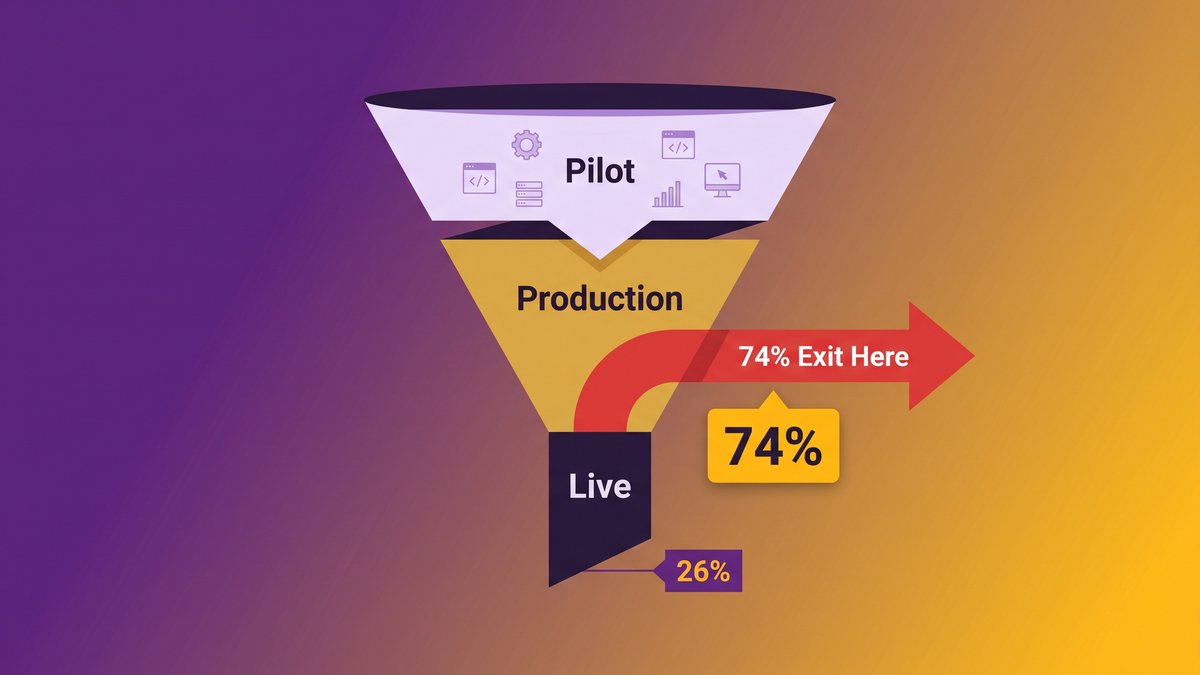
Enterprise AI Agents Production Failure: Why 74% Roll Back (And What the 26% Did Differently)
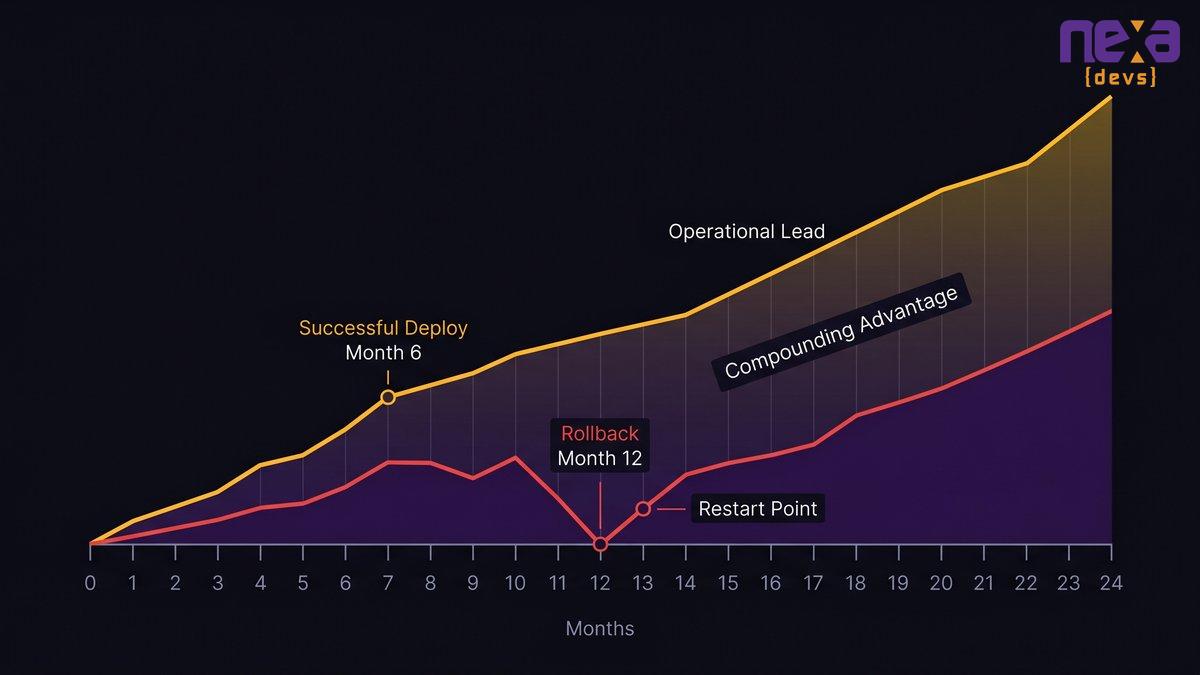
Your AI pilot worked. The demo ran clean. The board approved the rollout. Twelve months later, you’re restarting from scratch, explaining to the same board why you’re spending the budget again.
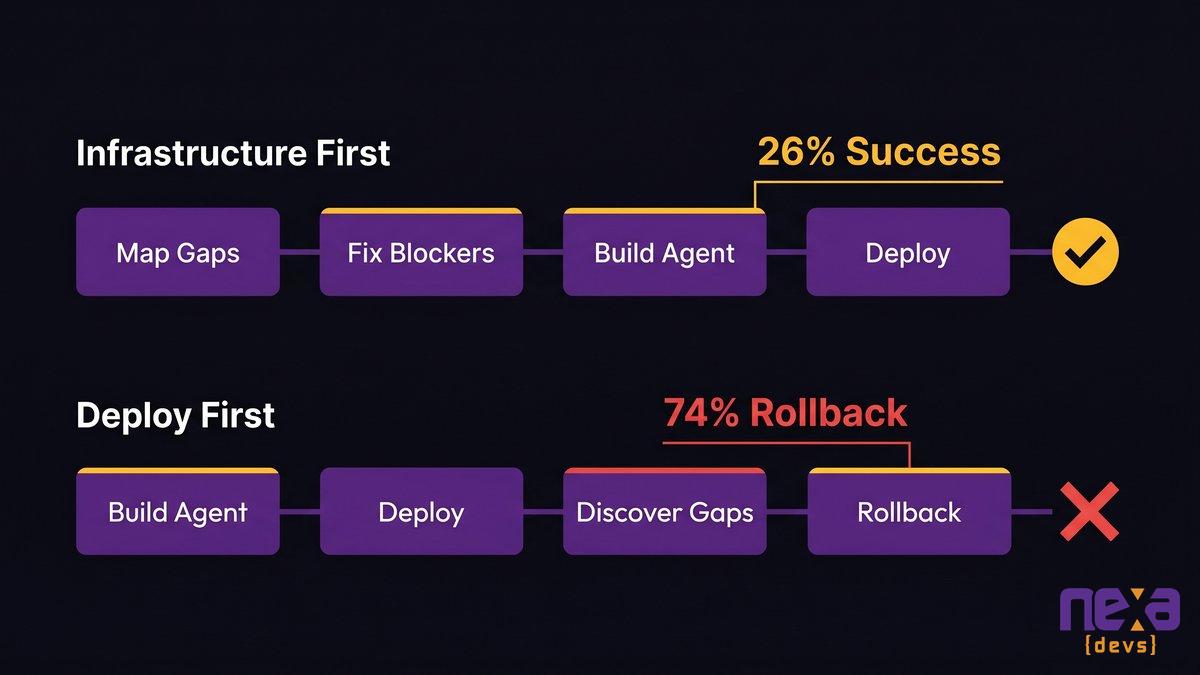
That story is playing out across the industry. The rollback epidemic in enterprise AI is real, documented, and accelerating as investment outpaces infrastructure. The question isn’t whether it happens. It’s why it keeps happening to companies with good models, good intentions, and real budgets. That answer is what separates the 26% that reach production from the 74% that don’t.
Quick answer: why enterprise AI agents fail production
- 74% of enterprises have already rolled back or shut down a customer-facing AI agent after deployment, according to Sinch’s AI Production Paradox report (May 2026).
- The model is almost never the problem. Data fragmentation, integration complexity, and governance gaps kill deployments long before the AI logic fails.
- Mid-market companies face a structurally harder path than large enterprises: less IT staff, fragmented legacy stacks, and no dedicated AI governance function.
- The 26% that succeed deploy infrastructure-first: data quality, integration architecture, governance ownership, and observability in place before the agent goes live.
- Fixing the rollback cycle starts with a pre-deployment audit, not a better model selection.
Most AI deployments never survive the jump from sandbox to production. The gap isn’t the model; it’s the surrounding infrastructure.
The 74% Rollback Problem Nobody Warned You About
Three-quarters of enterprises have already pulled an AI agent out of production. That number demands an explanation, and the explanation isn’t what most people expect.
In May 2026, Sinch published its AI Production Paradox report, surveying 2,527 senior decision-makers across 10 countries. The headline finding: 74% of enterprises had already rolled back or shut down a customer-facing AI agent after deployment due to a governance failure. Not a forecast. Live deployments that went live and then got pulled.
What the Sinch AI Production Paradox report actually found
The 74% figure applies specifically to customer-facing AI communications agents, not every category of enterprise AI deployment. The scope matters. Customer-facing agents represent the category most enterprises deployed first: chatbots, virtual assistants, automated response systems. These are the highest-visibility, lowest-tolerance-for-failure deployments in the portfolio. They failed at nearly three in four.
Two other numbers from the same report tell the rest of the story: 62% of enterprises already have AI agents live in production, and 98% are increasing AI investment. Rollback is not a retreat from AI. It’s a sign that companies are deploying faster than their foundations can support.
Why the 81% rate among mature-governance organizations is the most important number
The paradox in the report’s title comes from this: organizations with fully mature governance frameworks roll back their AI agents at a rate of 81%, four points higher than average.
Better governance doesn’t prevent rollbacks. It surfaces failures that less mature organizations miss entirely. The agent is underperforming, producing errors, or creating compliance exposure. Organizations with weak governance often never find out. Organizations with strong governance catch it and pull the plug.
That’s the uncomfortable reading of the data. When a company with a rigorous governance framework still rolls back four in five agents, the problem isn’t how you manage the agent. The problem is what the agent runs on when it reaches production.
The Real Villain: It Was Never the Model
A failed AI deployment tends to generate blame in a predictable direction: the model isn’t accurate enough, the prompt engineering needs work, the AI vendor oversold the capability. Most of the time, that diagnosis is wrong.
Post-mortems from hundreds of failed deployments point elsewhere entirely. RAND Corporation’s analysis found that more than 80% of AI projects fail, double the rate of equivalent non-AI IT projects. The gap isn’t because AI models are twice as unreliable. It’s because AI agents expose infrastructure weaknesses that traditional software tolerates or hides.
What post-mortems across hundreds of failed deployments actually show
An AI agent operates differently from a traditional application. A conventional system runs a defined workflow and fails gracefully when it can’t complete a step. An AI agent reasons over inputs, selects from available tools, takes sequential actions, and compounds errors across each step. It doesn’t just execute. It decides.
When an agent decides badly, the cause is almost always upstream of the model. Inconsistent data produces inconsistent reasoning. Undocumented APIs produce unpredictable behavior. Undefined scope boundaries lead to scope creep at runtime. Observability gaps mean the agent was failing for weeks before anyone noticed.
The model is the starting point, not the variable. Data fragmentation, integration complexity, and governance gaps are the three killers. All three are infrastructure problems, not AI problems.
The demo-to-production gap: why controlled pilots create false confidence
A sandbox environment is built to succeed. Data is clean and consistent. API endpoints are stable. The test workflow is bounded and well-defined. The team running the test is paying close attention.
Production is the opposite of all that. Real data carries three years of inconsistent formats from three different input systems. Vendors update APIs without notifying you. Edge cases the pilot never saw arrive on day one. The business pressure that funded the deployment now expects results, so boundary creep begins immediately.
Pilots measure whether the model produces reasonable outputs in controlled conditions. They don’t measure whether your infrastructure can support an agent running at production volume, on production data, with production-level consequences when it gets something wrong.
Why Mid-Market Companies Face a Harder Production Path
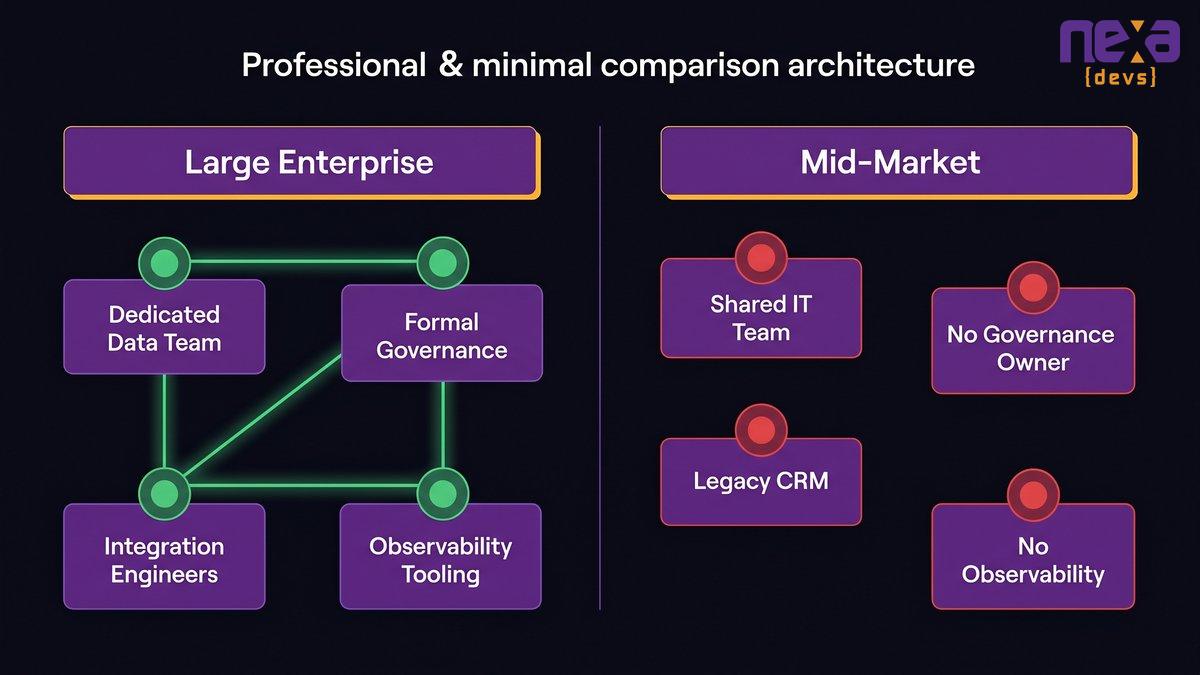
A Fortune 500 company deploying an AI agent does so with a dedicated data engineering team, a formal AI governance function, infrastructure engineers on staff, and a budget specifically for data remediation before the agent goes live. Mid-market companies don’t have any of that.
This isn’t a criticism. It’s a structural reality that changes the risk calculus entirely.
The infrastructure gap that large enterprises can budget around, and the mid-market cannot
Large enterprises can assign a team to clean data before the deployment begins. A formal discovery sprint documents API dependencies. A governance committee reviews every agent action boundary. Dedicated observability tooling surfaces model drift in real time.
A mid-market company with a 12-person engineering team and a CRM from 2009 starts from a completely different position. Those 12 engineers are already running at capacity, maintaining existing systems. The CRM’s API documentation is three years out of date. Nobody owns the governance question because there’s no dedicated function to own it. The starting conditions are different. The deployment risk reflects that.
Fragmented legacy stacks, limited IT capacity, and the missing governance function
Most mid-market companies running custom internal software have stacks that grew by accretion over a decade. A core system from 2012 talks to a module from 2018 via a middleware layer that one developer wrote and then left. The CRM exports to a spreadsheet that feeds a reporting tool. Data lives in six places, and none of them agree.
An AI agent trying to reason over that environment hits what the underlying architecture has been accumulating for years: undocumented dependencies, inconsistent schemas, and connections that were never designed to be interrogated at machine speed.
The agent isn’t failing because it’s a bad agent. It’s failing because no previous system ever tried to operate across the full stack at once.
Why only 31% of AI use cases reached full production in 2025
ISG’s State of Enterprise AI Adoption Report (2025) found that only 31% of AI use cases reached full production in 2025. The remaining 69% stalled in pilot, got deprioritized, or were explicitly rolled back.
The reasons vary by company. The pattern doesn’t. Organizations that invested in infrastructure readiness before deployment consistently outperformed those that deployed first and addressed problems reactively. Mid-market companies, working with fewer resources available for pre-deployment work, made up a disproportionate share of that 69%.
How AI agents require infrastructure readiness before deployment
The mid-market AI deployment challenge isn’t ambition or budget alone. It’s the structural gap between what agents require and what most mid-market stacks provide.
The 5 Infrastructure Failures That Trigger Rollbacks
These five failure modes show up in failed AI agent deployments with enough consistency that they’re predictable. None of them are model problems. Each one is a pre-deployment readiness gap that should have been addressed before the agent went live.
Data fragmentation: when the agent trains on clean data but runs on chaos
Agents trained on curated datasets encounter production data that looks nothing like what they trained on. The customer record has three conflicting email addresses. The transaction history has gaps from a 2019 system migration. The product catalog has duplicates from a vendor feed that was never reconciled.
The agent doesn’t crash. It reasons. When the data is inconsistent, the reasoning compounds that inconsistency across every action it takes. The output looks like a model problem. The actual cause is years of data hygiene debt that nobody addressed because no prior system ever demanded clean data at this resolution.
Integration complexity: what legacy ERPs and undocumented APIs do to agent reliability
AI agents need to call external systems to act. Those calls depend on stable, documented, accessible APIs. Most mid-market internal stacks don’t have them.
The ERP from 2014 has a proprietary API requiring a middleware layer to query. The CRM was updated last quarter, and the field names changed without notice. The inventory system exposes a REST endpoint that returns different schemas depending on whether you query by product ID or SKU. An agent in this environment encounters a different system than the one the development team tested against.
The integration layer isn’t just a technical dependency. It’s the most fragile part of the deployment, and it’s almost always underdocumented.
Governance gaps: why rollback procedures and audit trails get built after the crisis
Governance documentation, approval workflows, escalation paths, and rollback procedures are almost never built before an AI agent goes live. They get built after the first incident that required them and didn’t have them. That sequence is expensive.
The Sinch report found that 84% of AI engineering teams spend at least half their time on safety infrastructure rather than improving the product. That time is reactive, not planned. It’s the cost of skipping governance before deployment. For organizations willing to do the work before go-live, a properly specified governance framework is the single highest-leverage pre-deployment investment available.
Scope overreach: the organizational pressure that turns a bounded agent into an unreliable one
A bounded agent with a narrow, measurable function can be tested, validated, and monitored. An agent with an expanding scope that grows under organizational pressure can’t reliably be any of those things.
The pressure is predictable. An agent that performs well in a narrow use case gets noticed. Business stakeholders request expanded functionality. Scope grows without a corresponding investment in testing the new boundaries. The agent that was reliable at one task becomes unreliable across six, and the reliability failures are harder to diagnose because the failure surface expanded faster than the observability tooling tracking it.
Observability gaps: why you don’t know the agent is failing until customers do
Traditional software fails predictably: an error gets thrown, a log gets written, an alert fires. AI agents fail differently. An agent can produce plausible-sounding but incorrect outputs for weeks without triggering any conventional error monitoring.
Without purpose-built observability, tracking confidence scores, escalation rates, output quality against expected patterns, and comparison against fallback responses, you don’t know the agent is degrading. Your customers know first.
What Separates the 26% That Succeed
The 26% isn’t a lucky group. They made different decisions before the deployment began.
What separates them isn’t model selection, vendor choice, or team size. It’s sequence. Organizations that succeed treat infrastructure readiness as the prerequisite, not the follow-on activity.
The 4 pre-deployment readiness pillars: data, integration, governance, observability
Every successful production AI agent deployment has four things in place before the first live request.
Data readiness: A defined, consistent data contract for every source the agent will consume. Not “clean data” as an aspiration. A documented contract specifying format, refresh frequency, ownership, and validation rules for each input source.
Integration architecture: A map of every system the agent will read from or write to. Documented API contracts, rate limits, authentication requirements, and failure behaviors. Validation that those APIs are stable enough for production use before the agent depends on them.
Governance ownership: A named owner assigned before go-live. That person approves scope changes, reviews escalation logs, and has the authority to trigger a rollback. A governance framework without a named owner is a document. Not a control.
Observability and rollback: Monitoring built specifically to track AI output quality, not just system availability. Defined thresholds that escalate to human review. A rollback procedure that’s documented and tested before the agent goes live.
The infrastructure-first sequencing that most companies get is backward
Most failed deployments follow the same sequence: build the agent, deploy the agent, discover the infrastructure gaps, patch while live, and eventually roll back to restart.
The minority that succeeds reverses it: map infrastructure gaps first, address the blockers before building the agent, build against a stable foundation, deploy with observability already in place.
This resequencing sounds obvious when stated plainly. The organizational pressure driving most deployments pushes in the other direction. Leadership approved an AI initiative with a timeline. The team needs to show results. Infrastructure work doesn’t look like progress. The pilot already worked, so what exactly needs fixing?
That pressure is the proximate cause of most rollbacks.
AI infrastructure readiness assessment for mid-market companies
Infrastructure-first sequencing isn’t the obvious choice under deadline pressure. It’s the choice that separates the 26% from the 74%.
A Pre-Deployment Readiness Audit for Mid-Market Leaders
Before any AI agent build begins, run this audit. The questions are blunt by design. A “no” on any of the first four items is a build blocker, not a risk to manage.
Data readiness: the 5-question audit before any agent build begins
- Can you name every data source the agent will consume, with a documented owner for each?
- Is there a validation process that runs before data reaches the agent, or will the agent encounter raw production data directly?
- Have you identified fields that are inconsistently formatted across sources, and do you have a resolution plan?
- Do you know how often each data source updates, and does the agent’s operational logic account for staleness?
- Is there a record of how data quality has changed in the last 12 months for each source?
If you answered no to two or more of these questions, data remediation is your first deliverable, not the agent.
Integration architecture: mapping what your agent will actually touch in production
List every API endpoint the agent will call. For each one, document: who owns it, when it was last updated, what the failure behavior is when it’s unavailable, and whether the development environment accurately reflects production. Then call every one of them under production-like load conditions before the agent goes live. An API that works in testing but rate-limits under production traffic is a deployment stopper you’d rather find before go-live.
Governance ownership: who approves, who audits, who pulls the plug
Three questions. Who approves changes to the agent’s operational scope? Who reviews the escalation log weekly? Who has the authority and the procedure to execute a rollback within 24 hours? If any answer is “the team” rather than a named person, you don’t have governance ownership. You have a document with nobody responsible for following it.
Rollback and observability: designing for failure before you deploy
Define your rollback procedure before the agent is live. Write it down, test it in staging, and confirm the relevant personnel know where to find it. Then build monitoring that tracks escalation rate to human agents, output quality against a held-out validation set, and comparison of agent responses against your defined acceptable range. Test alerting by deliberately triggering failure conditions in staging. If your first real test of the rollback procedure is a production incident, you didn’t prepare for failure. You waited for it.
AI readiness assessment guide for mid-market CEOs and CTOs
The Cost of the Rollback Cycle
The first rollback is expensive. The second is more expensive, and not only financially.
Sunk costs: why failed projects cost most of their budget in the final 30% of the timeline
AI agent projects follow a consistent spending pattern. Requirements, architecture, and model selection take up a relatively small share of the budget. The large expenditures arrive at deployment: infrastructure preparation, integration work, testing, and the operational resources needed to support a live system. By the time a rollback decision gets made, most of the project budget is already gone. The cost of the failure isn’t the cost of the bad decision. It’s every good decision that preceded it and now has nothing to show for it.
Board credibility and the compounding cost of repeated pilots
One failed AI deployment is a learning experience. Two is a credibility problem. Three is a pattern that follows the CEO or CTO into every budget conversation that comes after.
Boards approved AI investment because they were told results were achievable. Each rollback resets not just the timeline but the internal credibility of the people advocating for AI investment. The cost isn’t just the sunk budget. It’s how much harder the next initiative is to fund.
Gartner predicts that over 40% of agentic AI projects will be canceled by the end of 2027, not because the models fail but because of systemic architectural oversights. The organizations on their second and third restart are contributing to that number.
The competitive opportunity cost while competitors in your industry succeed
Organizations in the 26% don’t just recover their investment. They extend it. A competitor whose AI agent handles customer escalations reliably is building an operational lead while you’re resetting your roadmap.
The competitive gap between the 26% and the 74% isn’t static. Every quarter a successful deployment runs while a failed one gets rebuilt, the distance grows. This is the argument for getting infrastructure right before deployment, not for delaying investment. The cost of doing it correctly the first time is almost always less than the cost of the rollback cycle it prevents.
The rollback cycle doesn’t just cost money. It costs the compounding operational advantage your competitors are accumulating while you’re restarting.
If your AI initiative is in flight or you’re planning the next one, the pre-deployment audit in this post is the right starting point. If your team needs help mapping infrastructure gaps before you build, get in touch with the Nexa Devs team.
FAQ
Why do most enterprise AI projects fail?
Most enterprise AI projects fail because of infrastructure problems, not model problems. Data quality, integration complexity with legacy systems, and missing governance frameworks are the three most common root causes. The model is rarely the variable. The data it runs on and the systems it connects to determine whether a deployment survives.
Why do AI models fail in production?
AI models appear to fail in production when the production environment differs significantly from the environment where they were tested. Inconsistent data formats, undocumented API changes, scope expansion beyond the tested boundaries, and missing observability tools all make production performance worse than pilot performance. The model logic often works correctly. The surrounding infrastructure creates the failures.
Why do 90% of AI projects fail?
Estimates vary by scope and definition, but the core finding is consistent: AI projects fail at roughly twice the rate of equivalent non-AI IT projects, according to RAND Corporation. Compounding agent errors, infrastructure dependencies, and the gap between controlled pilots and live production all drive the elevated rate.
What does production-ready mean for an AI agent?
A production-ready AI agent has four things in place before go-live: a validated data contract for every input source, tested integration architecture for every system it calls, named governance ownership with rollback authority, and observability tracking output quality in real time. An agent meeting all four can be fixed when it degrades. One that doesn’t gets rolled back.
How do you prevent AI agent rollback after deployment?
Preventing rollback requires infrastructure work before deployment. Audit data quality and establish validation before the agent touches production data. Test every API dependency under production load. Assign named governance ownership before go-live. Build monitoring that catches degradation before a customer complaint does. Most rollbacks are preventable if the pre-deployment audit finds the blockers first.
What is the 10-20-70 rule for AI?
The 10-20-70 rule allocates AI project effort: roughly 10% to the model itself, 20% to data and integration work, and 70% to the organizational change, governance, and operational readiness needed to sustain a live deployment. The split reflects a hard truth: model selection is the smallest part of a successful deployment.