by Sarah Mitchell | Aug 27, 2026 | Business and Technology
Institutional Knowledge Loss: The Two-Week Handover Myth
Institutional knowledge loss is what happens when the people who understand how your systems actually work leave, and nobody else can explain the decisions buried in the code. Two weeks of notice feels like plenty of time to hand things off. It seldom is. The knowledge that keeps your internal systems running lives inside one person’s head, accumulated over years of decisions that went undocumented as they were made. So when that person resigns, the clock that matters runs on a different question than fourteen days: how much of that knowledge you can still reconstruct once they’re gone. For most companies the honest answer is: not much.
This piece walks through why the standard handover fails as a matter of structure rather than effort, and what actually closes the gap: documentation your business owns from day one, paired with a partner accountable for keeping it current.
Quick answer: institutional knowledge loss risk explained
- A two-week notice period cannot transfer years of undocumented decisions. The timeline itself is the structural problem, not the effort behind it.
- Most critical system knowledge is tacit, meaning it’s the “why,” not the “what.” Handover sessions capture task lists, not reasoning.
- Bus factor of one, where one person’s exit could stall the system, is a board-level risk, not an IT inconvenience.
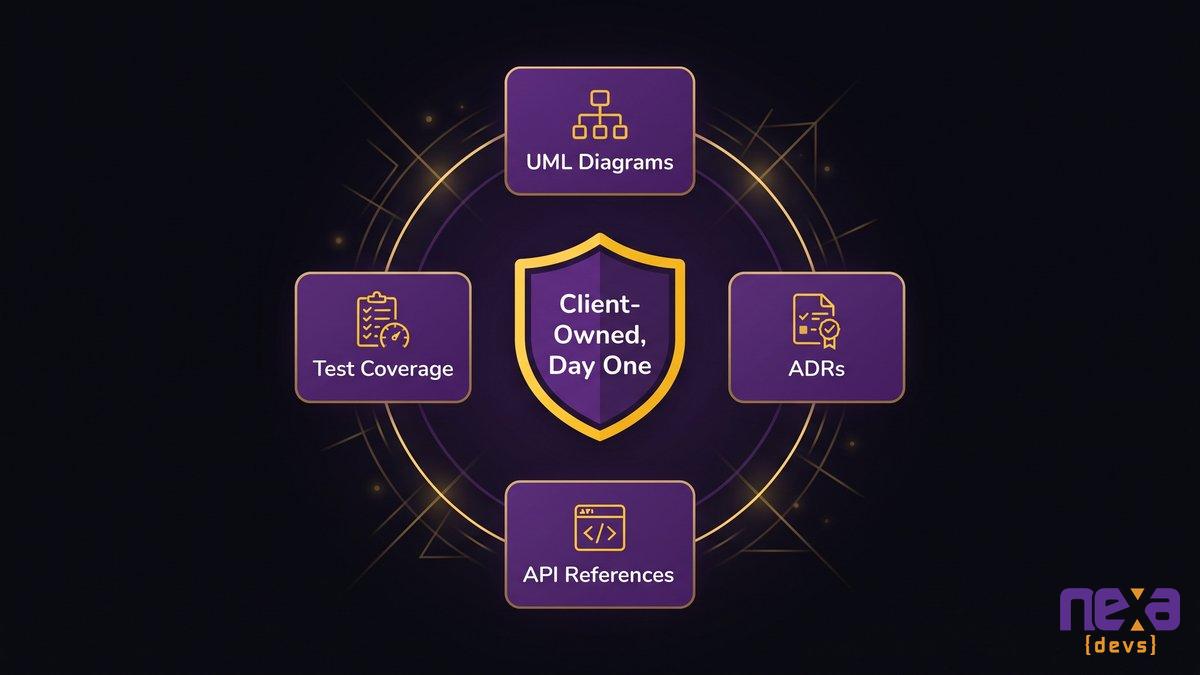
- Owned documentation, including UML diagrams, ADRs, API references, and test coverage, delivered on day one removes the single point of failure.
- Long-term embedded partnerships accumulate knowledge continuously, so it never depends on any one person’s exit timeline.
What Really Leaves When Your Key Developer Gives Notice
Your best engineer just gave notice. She built the order-routing system three years ago, patched it through two acquisitions, and is the only person who knows why a specific validation rule exists. In fourteen days, that reasoning walks out with her, whether or not she runs a handover session.
Every mid-market company carries at least one version of this story, and there’s usually no villain in it. An ordinary technical hire becomes the sole owner of critical context, without anyone ever deciding it should work that way. The system runs. The dashboards look fine. Then the resignation letter lands, and the company discovers it doesn’t actually understand what it depends on.
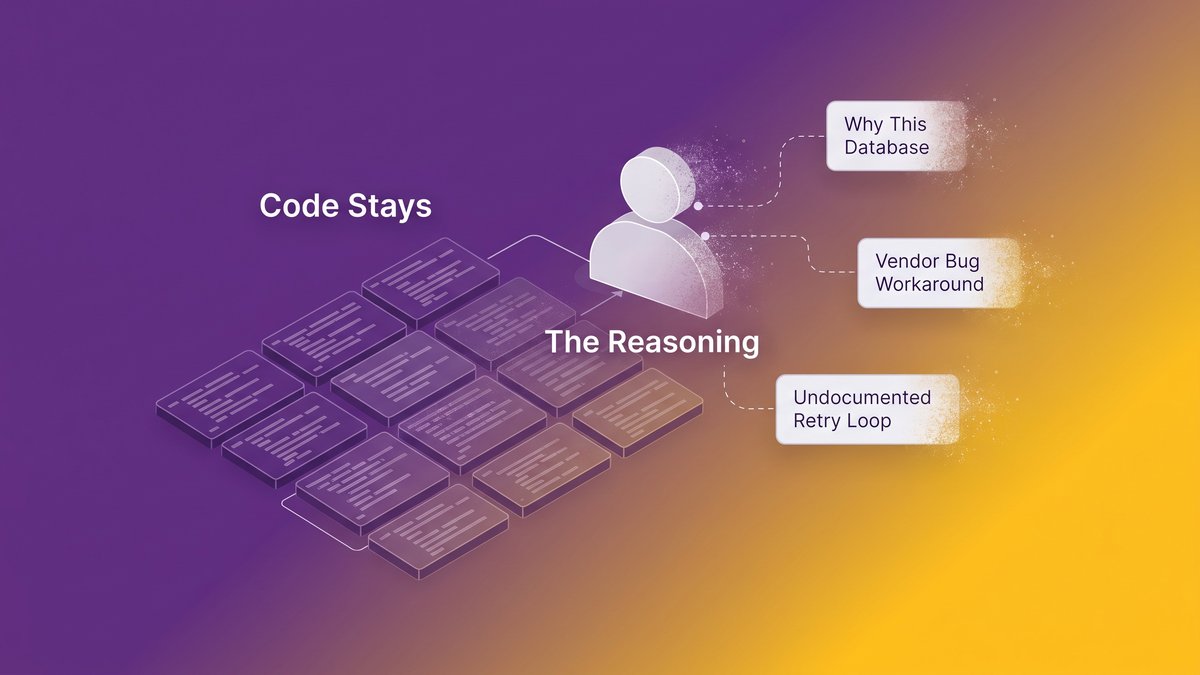
The code stays on the server. What walks out the door is the reasoning behind it: why the team chose that database over the obvious alternative, why a workaround exists for a vendor bug from three years ago, why a particular integration has a retry loop nobody remembers writing a ticket for. That reasoning lives in one head, recorded in no commit message, and that head just handed in a resignation letter.
So what does that actually cost the business?

A single resignation can strand years of undocumented system context overnight.
The True Cost of Losing the Only Person Who Understands Your System
Replacing a senior technical hire costs more than the recruiting fee. ClearlyAcquired’s analysis of key-person risk puts the full cost, including lost productivity and delayed projects, at 150% to 400% of the departing employee’s salary, and new hires typically need 16 to 20 weeks to reach full productivity on a system they didn’t build.
The replacement and rehiring bill
That range holds up for most mid-market companies. SHRM found in 2023 that 72% of organizations have at least one employee whose sudden departure would meaningfully disrupt operations. That’s nearly three out of four companies running on a dependency nobody has priced. A CFO can calculate the cost of a data breach or a missed SLA. Few have calculated the cost of one resignation letter arriving on the wrong Tuesday.
The rehiring bill itself is the easy part to model: recruiting fees, signing bonuses, the six-figure total agencies quote for senior engineering talent in a competitive market. Boards ask about it because it shows up on an invoice.
The productivity drag while the system sits half-understood
The harder cost to model is what happens between the departure and the new hire’s full ramp-up. Delivery slows. Bug fixes take longer because nobody’s certain what a change might break elsewhere. Feature work gets deprioritized in favor of keeping the lights on. Projects on a six-week timeline stretch to four months. The new team is competent; they’re just rebuilding understanding from scratch, one production incident at a time.
Nearshore staffing, retention bonuses, and better exit interviews all treat symptoms. Each leaves the actual mechanism untouched: knowledge concentrated in one person with no second copy anywhere.
Why Two Weeks Can’t Move Years of Tacit Knowledge
A handover session captures what a system does. It struggles to capture why. That gap, more than any lack of effort, is the real reason two weeks falls short.
Tacit vs. documented knowledge: what a handover session actually captures
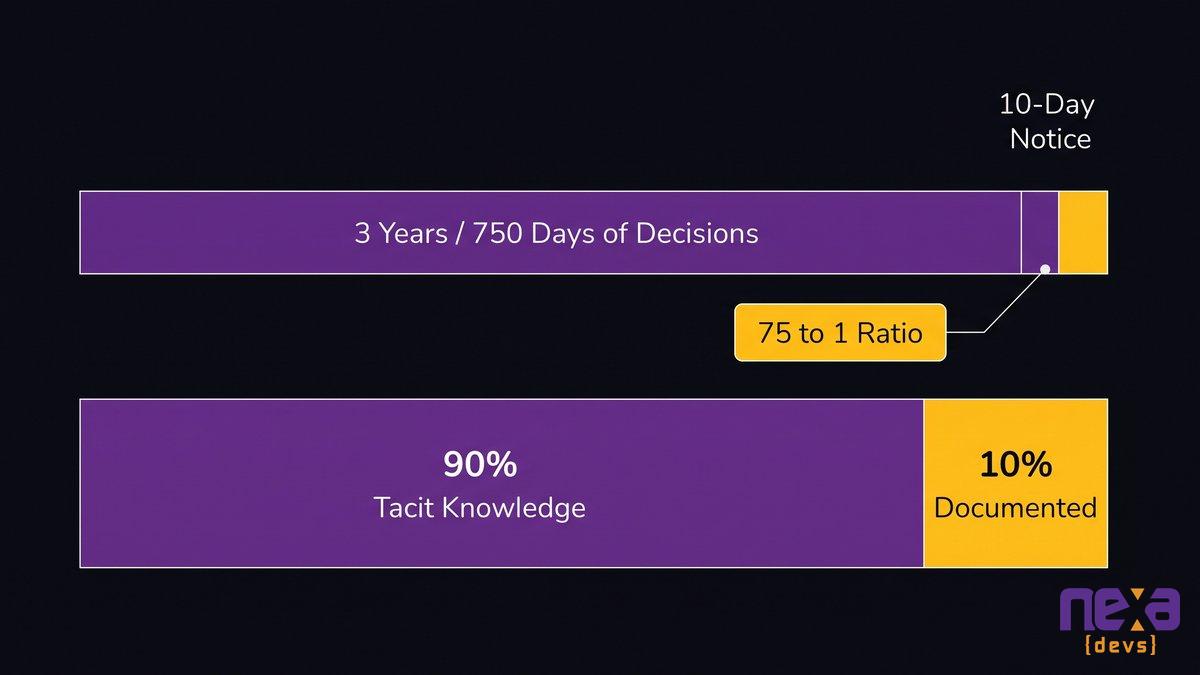
Knowledge researchers split what people know into two buckets: explicit knowledge, the kind you can write down, and tacit knowledge, the kind that lives in judgment and experience. Some call it tacit knowledge. Others call it tribal knowledge. Either term points at the same gap. Analysis from docs.bswen.com puts roughly 90% of organizational knowledge in the tacit category, with only about 10% ever making it into a document, wiki, or code comment. A handover session is built to transfer explicit knowledge: task lists, credentials, a walkthrough of the deployment pipeline. It was never designed to transfer judgment.
Ask a departing engineer why the checkout flow retries a payment call three times instead of once, and you’ll get a story rather than a spec: a vendor outage from eighteen months ago, a support ticket, a Slack thread that no longer exists. That story is the actual knowledge. It’s also exactly what a fourteen-day countdown has no room for. Skip the transfer entirely and what’s left behind is a documentation black hole: a system nobody can safely change without archaeology first.
The math of the notice window: why the timeline itself is the problem
Do the arithmetic honestly. A system built over three years represents roughly 750 working days of accumulated decisions. A two-week notice period offers ten. Even a motivated, well-organized departing employee working eight focused hours a day on nothing but knowledge transfer cannot compress a 75-to-1 ratio into something coherent. And most departing employees spend only a fraction of those ten days on handover anyway. They’re finishing sprints, closing tickets, and, understandably, checking out mentally before their last day arrives.
This is arithmetic at its core, and no offboarding checklist, however thorough, changes the ratio. how tacit knowledge becomes a business continuity risk covers the mechanics of that gap in more depth if you want the fuller picture.
Years of accumulated decisions cannot compress into a ten-day countdown.
Why Offboarding Checklists and Handover Sessions Fall Short
Offboarding checklists are underpowered for the problem they’re being asked to solve.
A good checklist recovers credentials, transfers domain ownership, and documents where the deployment scripts live. That matters. What it reaches is the slice of knowledge that was already explicit and recoverable. The Dreamix team, which studies vendor and team transitions, found that documentation gaps, undocumented dependencies, and lost configuration details create expensive problems months after a transition looks complete on paper. The checklist gets signed off, everyone moves on, and the actual cost shows up later, during an incident nobody can diagnose quickly.
Mentorship programs and pairing sessions run into the same ceiling from a different direction. They shine at onboarding new hires over months. Compressing years of context into ten working days under deadline pressure sits well outside what they can do, especially with the departing employee mentally already at their next job.
So keep the checklist; just treat it as hygiene rather than insurance. Succession planning for a codebase is a different job entirely.
Bus Factor of One: Naming the Real Risk on Your Balance Sheet
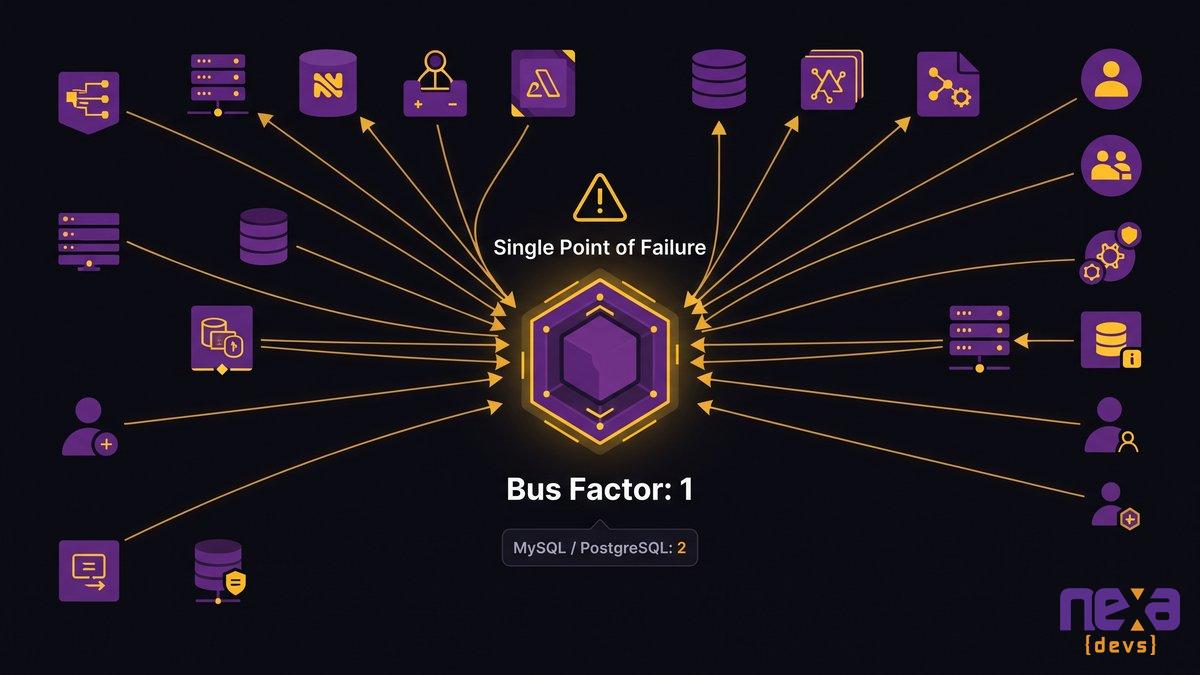
Bus factor measures how many people could disappear from a project before it stalls completely. For most internal systems at mid-market companies, that number is one, and almost nobody has put it on a risk register.
Engineers use the term casually, but it maps cleanly onto a concept every CEO already understands: single point of failure. A single point of failure in your data center gets a redundancy plan and a line item in the infrastructure budget. A single point of failure sitting in one engineer’s head usually gets nothing, because it’s invisible until the resignation letter arrives.
The JetBrains Bus Factor Explorer, tracked by LinuxSecurity.com in March 2026, found that even mature, heavily used open-source databases like MySQL and PostgreSQL carry a bus factor of just two. Those are projects with corporate backing, thousands of contributors, and decades of documentation discipline. If a bus factor of two is worth publishing research about at that scale, a bus factor of one on your internal claims-processing system belongs on the board agenda, not buried in a line nobody mentions during the quarterly review.
As Kamila Hankiewicz, Founder and CEO, states: “Your mission as a founder should be to make yourself replaceable, company progress should not depend on you being present. We all know terror corporate stories of backbone architecture written in the ’80s and ’90s in a language nobody uses anymore, so nobody dares to change anything in it.”
That instinct applies just as directly to whoever built your internal order system in 2019. Irreplaceable knowledge concentrated in one head, however talented that person is, represents a structural decision your business made without ever choosing to make it. This kind of single-developer risk rarely gets named out loud until it’s already a crisis, which is exactly why it deserves a name before that happens.
A bus factor of one means one departure is enough to stall the entire system.
The Structural Fix: Knowledge That Lives in Owned Documentation
The fix removes the handover from the critical path entirely, rather than trying to run it better, so no single resignation can take institutional knowledge with it.
What complete documentation includes: UML diagrams, ADRs, API references, test coverage
At Nexa Devs, complete documentation is a standard deliverable on every engagement, not an add-on billed separately or produced only when a client asks. That means UML architecture diagrams showing how the system actually fits together, Architecture Decision Records explaining why specific technical choices were made and what alternatives were rejected, API references built from Swagger and Postman so integrations stay traceable, and test coverage reports showing what’s actually verified versus assumed to work.
An ADR is the piece most internal teams skip, and it’s the one that matters most. A diagram shows you the system’s shape. An ADR shows you the reasoning: why the team picked a message queue over direct calls, what tradeoff they accepted, what would have to change for that decision to stop making sense. That’s the tacit knowledge from earlier in this piece, captured while the reasoning is still fresh instead of reconstructed under deadline pressure after someone’s already gone.
Why day-one, client-owned documentation changes the equation
Timing is the whole point. Documentation produced on day one, as the system is built, captures decisions while they’re being made. Documentation attempted during a two-week exit tries to reconstruct decisions from memory, under pressure, from someone who’s mentally already gone. One approach is a contemporaneous record. The other is an oral history assembled in a hurry.
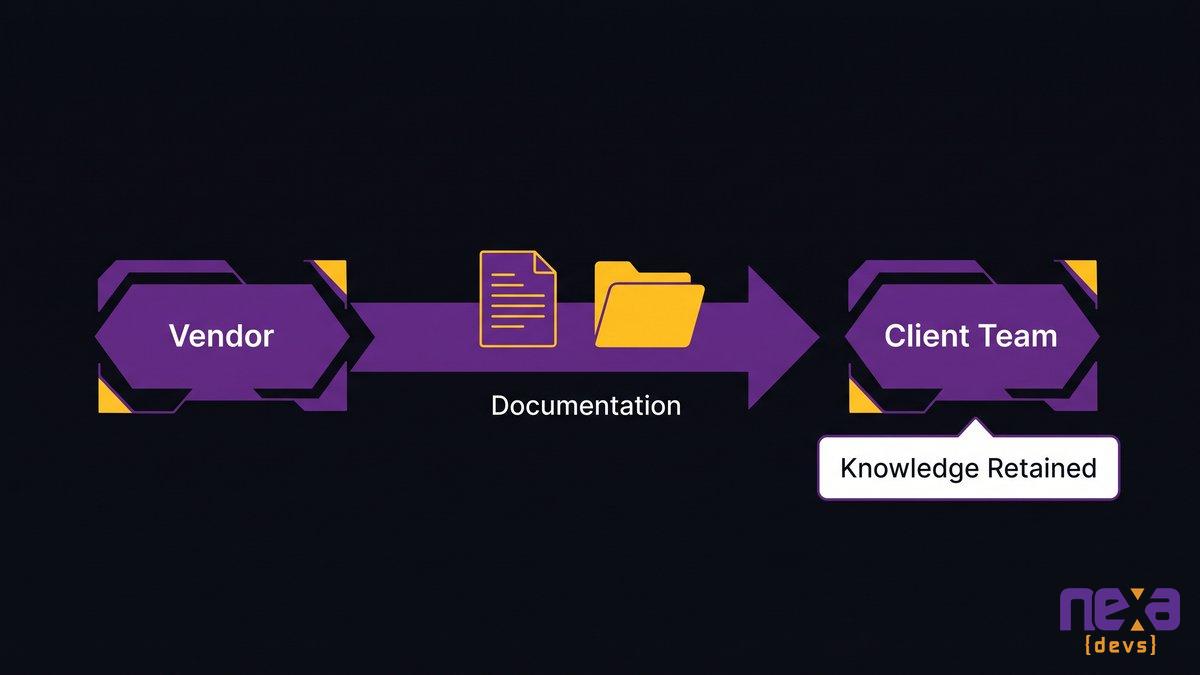
Ownership matters just as much as timing. We’ve written before about why documentation is the real competitive advantage in outsourced software development, and the same principle holds here: at Nexa, documentation transfers unconditionally to the client, regardless of whether the engagement continues afterward. That single condition changes what the documentation actually is. A file a vendor can revoke access to was never really an asset. A file the company owns outright, one that survives any person’s departure, any vendor relationship ending, any reorganization, is the real thing.
Day-one documentation captures system reasoning before anyone has a reason to leave.
From One Head to an Accountable Partnership
Documentation solves the knowledge problem. On its own, it leaves the accountability problem open, because a document doesn’t answer the phone when something breaks at midnight.
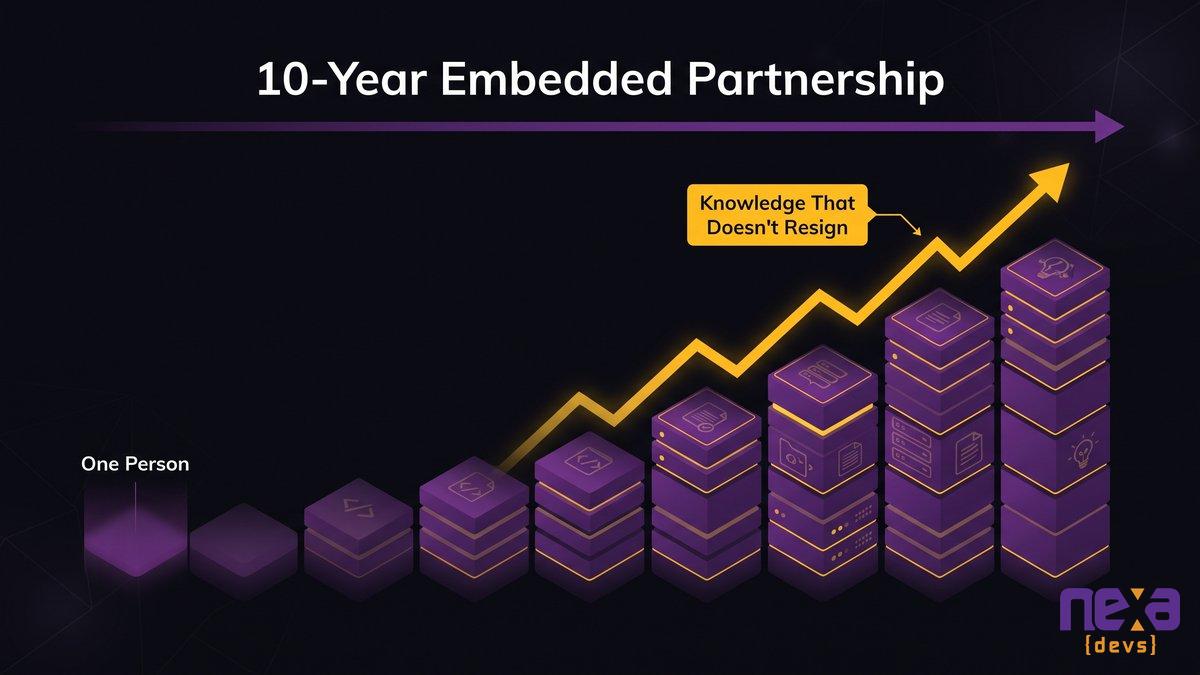
That’s why the structural fix needs a second half: an embedded partner accountable for the system over years, not a vendor who delivers and disappears. Nexa Devs has maintained an embedded engineering relationship with UCLA’s David Geffen School of Medicine for more than 10 years, supporting research and clinical systems in one of the more demanding compliance environments in the country. That kind of tenure reads as more than a testimonial line. It’s evidence that knowledge can accumulate inside a partnership the same way it once accumulated inside a single employee, except the partnership doesn’t resign, retire, or get recruited away by a competitor offering more money.
An SLA-based relationship changes the incentive structure completely. A project vendor gets paid at delivery and has little ongoing reason to keep documentation current. A staff-augmented contractor gets paid by the hour and has every incentive to make themselves indispensable rather than replaceable. An accountable long-term partner gets paid to keep the system healthy and legible for as long as the relationship runs, which puts current documentation squarely in their financial interest.
Ten years at a single institution doesn’t happen by accident. It’s what you get when documentation and accountability are both built into the model from the start, instead of bolted on after the first key-person crisis.
A decade-long partnership accumulates knowledge the same way an employee once did.
Making Knowledge an Owned Asset, Not a Personal Liability
Institutional knowledge is either an asset your company owns or a liability sitting in someone else’s head with an unknown expiration date. There’s no third option worth planning around.
Every company in this piece’s opening scenario made the same unconscious choice: they let critical knowledge accumulate in a person instead of in a system the business controls. Call it a default, the thing that happens when nobody deliberately architects against it. Fixing it starts from a simple refusal: the business’s continuity should not depend on any one person’s decision to stay, however good that person is at their job.
The reframe is simple to state and genuinely hard to execute without a partner built for it: documentation is IP, not paperwork. An ADR explaining a five-year-old architecture decision has real value the day someone needs to change that system. A UML diagram that reflects reality, not the plan from two years ago, has real value the day a new team member needs to get productive fast. Test coverage reports have real value the day someone asks whether a change is safe to ship. None of that value depends on any specific person still being at the company. Researchers who study key-person dependency risk describe exactly this exposure, and pricing it before it becomes a crisis is the whole point.
The two-week handover was never built to save you, whatever anyone hoped it would do. What actually protects a mid-market company gets built in from day one: documentation the business owns outright, and a partner accountable for keeping that knowledge current long after any individual person, including any one Nexa engineer, moves on.
If your business depends on one person’s willingness to stay, that dependency is a risk you haven’t priced yet. Book an architecture assessment and we’ll show you exactly where it’s concentrated.
FAQ
What does loss of institutional knowledge mean?
Institutional knowledge loss happens when the accumulated experience, context, and decision-making history inside an organization disappears because the people who held it leave without transferring it. It’s the “why” behind how systems and processes work, not just the “what,” and it rarely gets written down before someone walks out the door.
How to transfer knowledge from one person to another?
Effective knowledge transfer happens continuously, not at exit: pair the person with a colleague early, document decisions as they’re made through tools like Architecture Decision Records, and record the reasoning behind choices, not just the steps. Waiting until someone resigns to start is already too late for most of what matters.
How to give handover after resignation?
Start immediately, prioritize the highest-risk systems first, and record explanations on video or in writing rather than relying on a single meeting. Accept that a resignation-triggered handover will only capture a fraction of what the person knew. That’s a limitation of timing, not effort, so plan for the gap it leaves.
What are the four stages of knowledge transfer?
Most knowledge transfer models move through four stages: identifying who holds critical knowledge and where the risk concentrates, capturing that knowledge in documented form, transferring it through mentoring or structured review, and validating that the receiving person or system can actually apply it correctly under real conditions.
What is an example of institutional knowledge?
A common example is a senior engineer knowing why a specific workaround exists in a payment system, tied to a vendor outage years earlier, even though no documentation records it. Another is knowing which client relationships require manual exceptions to standard process. Neither shows up in a manual until someone writes it down.
by Sarah Mitchell | Aug 25, 2026 | Business and Technology
Sidecar Core Banking: Modernize Without Rip-and-Replace
A mid-market bank’s core system runs the general ledger, the teller platform, and every regulator’s audit trail. Pull it out wrong, and thousands of accounts go dark for a weekend. That fear is exactly why so many banks keep patching a core built in the 1990s instead of touching it.
Sidecar core banking exists to take that fear off the table. Instead of asking whether to rebuild the whole core or swap it in one cutover, it asks a better question: what if the new core ran next to the old one? A sidecar core is a modern banking core deployed in parallel with the legacy system, migrating one product line or customer segment at a time while the old core keeps running everything else. No weekend blackout, and no single date the whole institution has to ride on.
You can’t order sidecar core banking as a Nymbus feature or a Temenos SKU off a price sheet. It’s an engineering discipline: build new core services around what already works, prove each migration segment with production data, and expand only once the last phase held. Rip-and-replace earned its reputation as a career-ending bet, and the sidecar model is what grew up to replace it.
Quick answer: sidecar core banking modernization explained
- A sidecar core is a modern banking core built and run next to your legacy system, so daily operations stay live while new capability comes online.
- It’s an engineering discipline, not a packaged product: banks migrate one product line or segment at a time and prove results before scaling further.
- The strangler-fig approach avoids both failure modes at once: a multi-year rebuild that bets the institution, and permanent lock-in to a single vendor.
- Staying core-agnostic through the transition means you can still switch vendors later without a rebuild.
- Complete documentation transfer at every phase means the bank owns every new component, not the vendor.
The Rip-and-Replace Trap: Why Full Core Replacement Bets the Whole Institution
Full core replacement asks a bank to bet three to five years of stability on a single cutover date. Miss that date and you’ve spent millions with nothing shippable to show for it. Hit it and you still have to migrate every account, every integration, and every regulatory report in one irreversible move. This is the incremental-modernization-versus-full-transformation debate playing out with real money on the table, and for a community bank, core conversion risk is existential in a way it simply isn’t for a top-20 institution with a spare balance sheet.
The IBM Institute for Business Value studied banks that attempted full core modernization and found less than half reported meaningful gains on the business benefits they set out to achieve. Worse, 73% said managing costs actually got harder after the attempt, not easier. For a program meant to make costs more predictable, that is the exact opposite of the promised result.
Jouk Pleiter, CEO and founder of Backbase, described pitching incremental transformation on stage and hearing the same reaction for over a decade: “Love the vision. Feels like boiling an ocean.” He was right. Full replacement is boiling an ocean, and mid-market banks don’t have the budget, the bench, or the risk tolerance for a multi-year boil. Every quarter the project runs, the bank is also running its old core in full, doubling maintenance cost and audit surface with zero customer-facing improvement until the very end.
What Sidecar Core Banking Actually Is (And What It Isn’t)
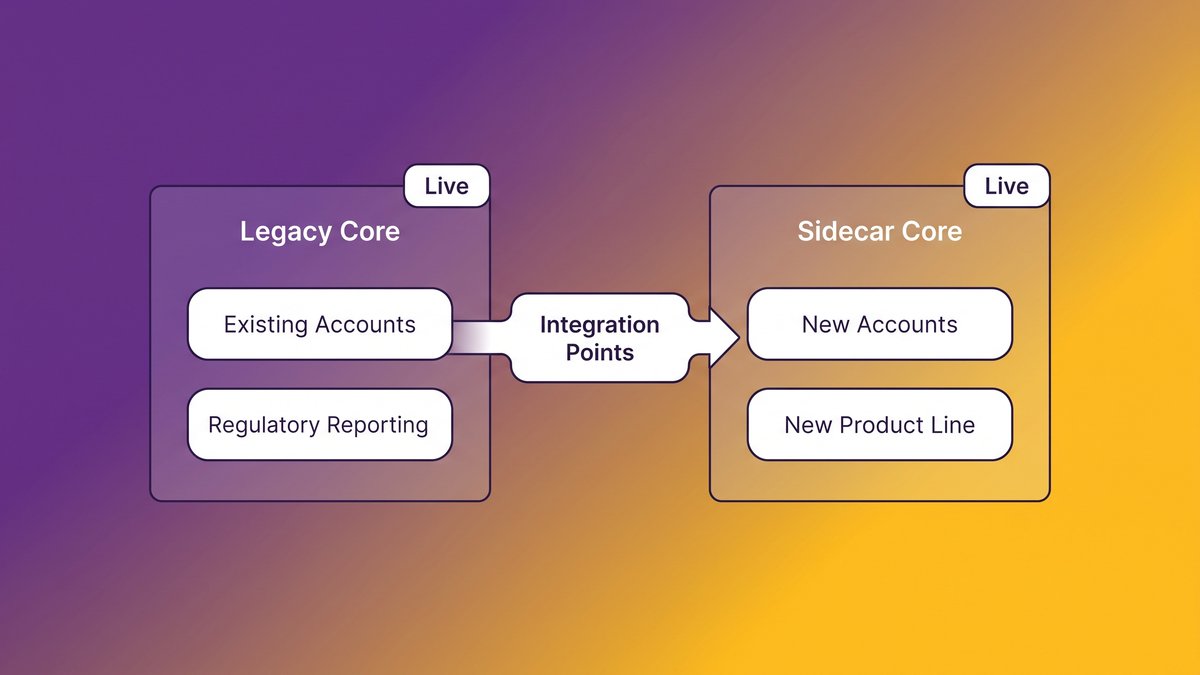
A sidecar core is a new, modern core banking platform that lets you run legacy and modern core in parallel, handling a defined slice of business instead of the whole institution at once. Picture a second engine bolted to the side of the first rather than swapped in for it. The legacy core keeps processing everything it always has: existing accounts, existing statements, existing regulatory reporting. The sidecar core takes on new accounts, a new product line, or a specific customer segment, built on modern, API-first, composable core architecture from day one.
Running the New Core Alongside the Legacy System in Parallel
Money and data move between the two systems through defined integration points, not a single flag-day cutover. If the sidecar handles digital-only checking accounts, every new account for that product opens on the modern core while every existing account keeps running on the legacy platform, until and unless the bank decides to migrate it. Both systems stay live and both stay auditable. The bank controls exactly how much risk it’s carrying at any given moment, because it can stop expanding the sidecar’s scope at any phase without disrupting anything already running.
A Di:,scipline, Not a Product: Why the Sidecar Is an Engineering Approach
Most vendor pitches get this part wrong. They sell the sidecar as a piece of software you install, when it’s really a sequencing discipline: a set of engineering decisions about which components move first, how they integrate with what’s already there, and how each phase gets proven before the next one starts. You can build a sidecar core on almost any modern technology stack. The platform is close to beside the point. What carries the whole thing is the discipline of moving in small, provable, reversible increments instead of one enormous irreversible one.
Diagram showing sidecar core banking architecture running in parallel with a legacy core system.
The Real Cost of Standing Still: What Legacy Cores Quietly Take From You
A legacy core bleeds money quietly. Its share of the budget creeps up year after year, and leadership usually spots the pattern too late to get ahead of it. Accenture found that 70% of the average bank’s IT budget now goes to keeping existing technical debt alive rather than building anything new, according to reporting from The Financial Revolutionist.
The CEO View: Budget Drain and Lost Competitiveness
For the CEO, this shows up as a budget that keeps growing without growing capability. Every dollar spent keeping a 1990s core alive is a dollar that doesn’t go to a new product line, a new market, or the AI-powered service your competitors already shipped last quarter. Boards notice when the technology budget rises every year and the product roadmap doesn’t move, and that’s a harder conversation than any single project failure. For a deeper breakdown of how that budget drain compounds over time, see the hidden tax technical debt is costing you.
The CTO View: No Real-Time Rails, Blocked AI and Integration Work
For the CTO, the cost is architectural. Legacy cores built for nightly batch processing can’t support real-time payments, real-time fraud detection, or the API calls a modern AI agent needs to check a balance or flag an anomaly. Every integration turns into custom middleware bolted onto a system that was never designed to be queried in real time. According to the Open Mainframe Project, the average COBOL programmer maintaining that system is 58 years old, and roughly 10% of that workforce retires every year. The talent that understands the old core is aging out faster than most banks are modernizing around it.
The Strangler-Fig Path: Migrating One Product Line at a Time
Strangler fig modernization works one product line at a time. It starts with whichever line is causing the most operational pain today, often retail deposits or a digital-only account product, and moves that single slice onto the new core first. Commercial lending and treasury management stay put until their turn earns its way up the list.
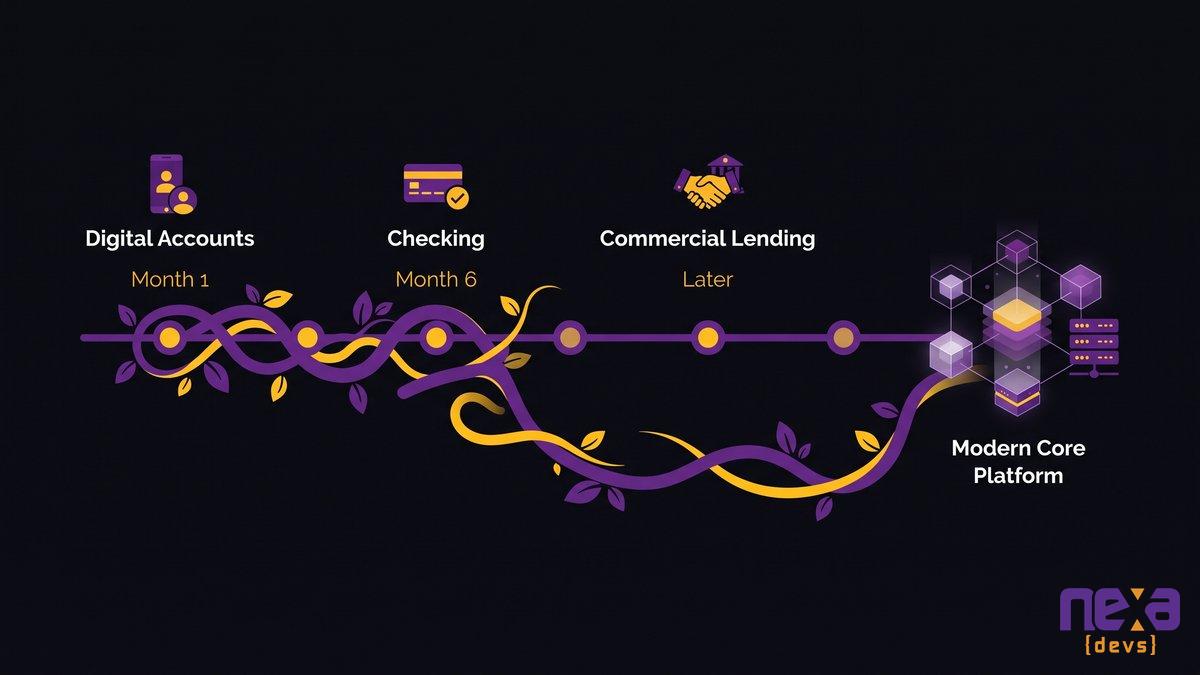
The pattern takes its name from the vine that grows around a host tree until it can stand on its own, and it works the same way here. The new core wraps around one function of the legacy system, proves it can carry that function reliably under real transaction volume and real audit scrutiny, and only then takes on the next one. A bank might migrate new digital account openings in month one, move existing low-balance checking accounts in month six, and leave commercial lending on the legacy core for another two years, because the risk-to-reward ratio doesn’t justify touching it yet.
Each phase produces its own data: transaction volumes, error rates, customer complaints, regulator questions. That data becomes the business case for the next phase instead of a consultant’s slide deck. If a phase underperforms, the bank stops there. Nothing downstream breaks, because nothing downstream depended on that phase completing.
Strangler-fig migration timeline showing one banking product line moving onto a modern core at a time.
Staying Core-Agnostic: Escaping the Packaged-Vendor Lock-In Trap
Nobody feels locked in on signing day. The trap springs about two years later, once switching costs more than staying, no matter how bad staying has gotten. A core-agnostic strategy is how a sidecar migration avoids repeating that mistake with a new vendor instead of the old one.
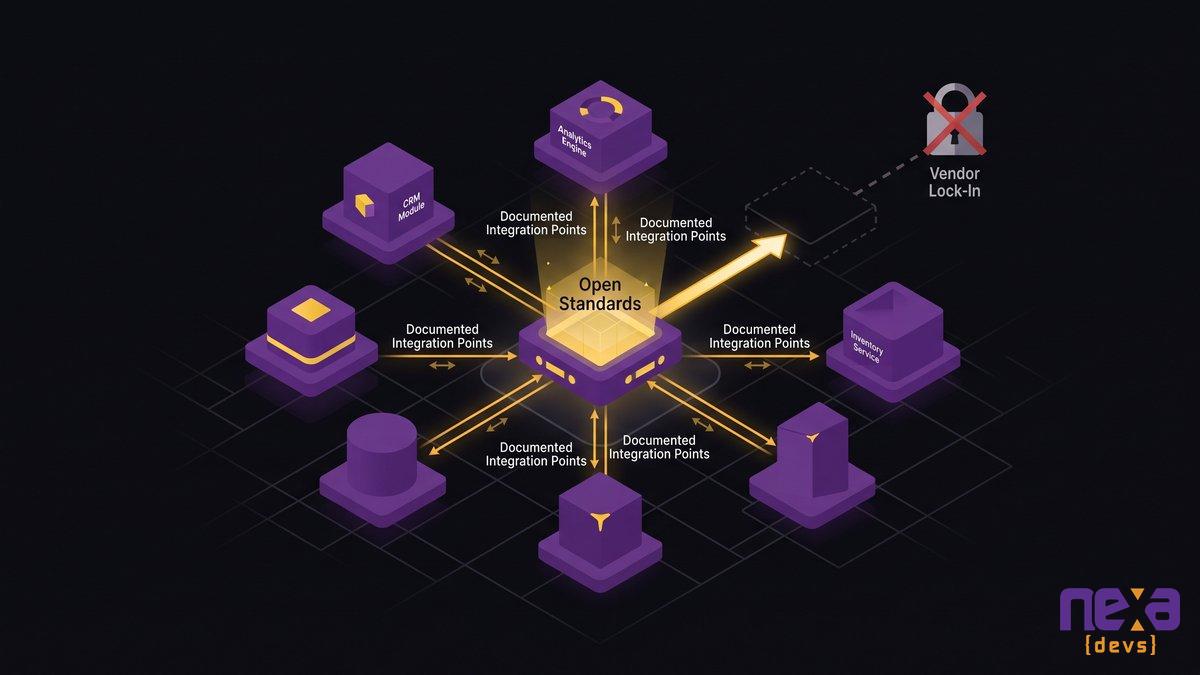
Staying core-agnostic during a sidecar migration means choosing integration standards and data formats that don’t need a specific vendor’s proprietary tooling to read or move. It means every new component gets built so it could, in theory, be swapped for a competing product without a rebuild. Most packaged core vendors don’t want that flexibility built in, because flexibility is exactly what erodes their renewal position.
As Ashwin Ballal, CIO at Freshworks, states: “Legacy systems have become so complex that companies are increasingly turning to third-party vendors and consultants for help, but the problem is that, more often than not, organizations are trading one subpar legacy system for another.” A sidecar built around one vendor’s closed stack simply relocates the lock-in. Build it on open standards and documented integration points instead, and the bank gets real negotiating power the next time a renewal comes up, because leaving is actually possible.
Core-agnostic architecture diagram showing open integration standards replacing single-vendor lock-in.
Prove It With Data Before You Scale: The Digital-Brand-First Playbook
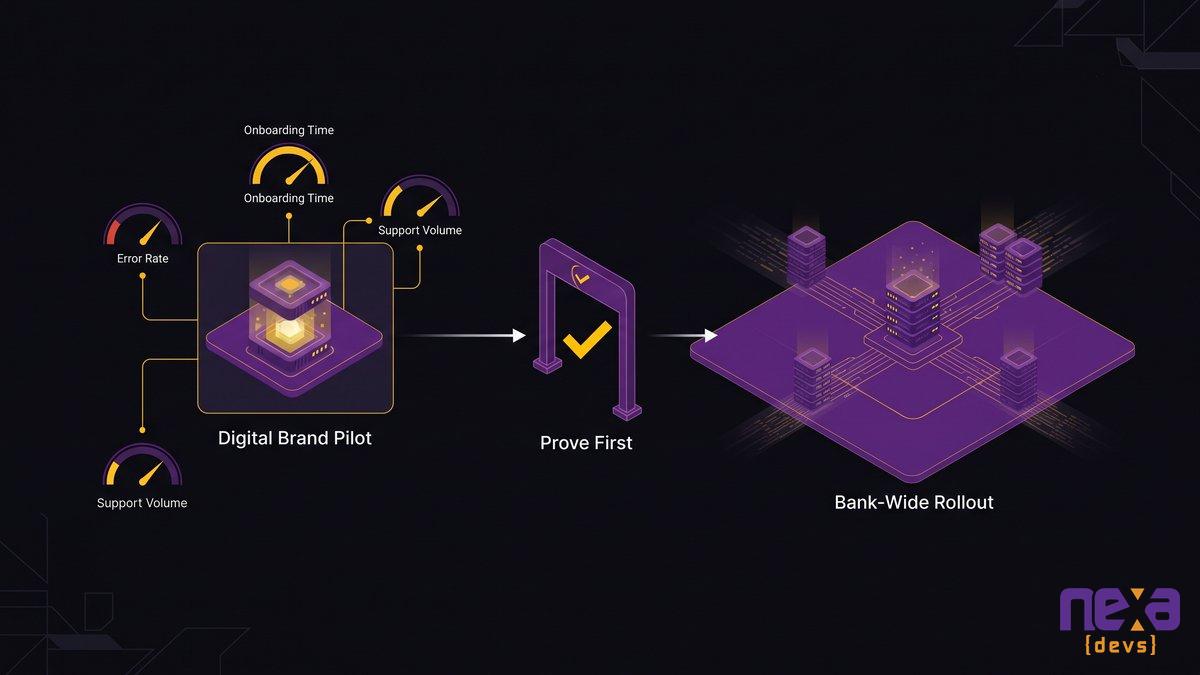
PeoplesBank proved a modern core could work without ever touching its main system. It launched ZYNLO, a digital-only brand, on modern infrastructure first, and let the results speak before committing the whole institution. Nymbus, the vendor behind ZYNLO’s platform, reports the digital brand gathered more than $163 million in deposits before PeoplesBank committed to a fuller core transition. That figure comes from vendor marketing material rather than an independent audit, so treat it as directional, not a benchmark to build a business case on.
The pattern matters more than the exact number. Launch the new core on a contained, lower-stakes surface first: a new digital brand, a new product line, a new customer segment, somewhere failure is recoverable and success is measurable. Track the metrics that actually predict readiness for a wider rollout, like transaction error rate, customer onboarding time, integration latency, and support ticket volume. If those numbers hold for two or three quarters under real production load, you have a genuine business case for expanding scope. If they don’t, you’ve contained the damage to one product line instead of the whole bank.
Digital-brand pilot launching on a modern sidecar core before a full bank-wide rollout.
Owning What You Build: Documentation Transfer and Long-Term Independence
Every sidecar migration produces new architecture diagrams, new API references, and new integration logic. One question determines whether this modernization solves the lock-in problem or just relocates it: who owns that documentation when the project ends?
Plenty of vendors and system integrators treat documentation as a professional courtesy, something you get if you ask nicely during the handoff meeting. Complete documentation transfer, meaning UML architecture diagrams, API references, test coverage reports, and sprint records, needs to be a contractual deliverable rather than a favor. Without it, the bank has traded a legacy black box for a modern one with better marketing.
This is where a long-term embedded partner earns its keep. When the same team that built the sidecar phase in year one is still accountable in year three, institutional knowledge doesn’t evaporate the way it does when a project-based vendor delivers, invoices, and moves on to the next client. The documentation exists because the relationship outlasts any single phase, not because a contract clause forced a one-time export.
How to Begin a Sidecar Modernization Without Disrupting Live Operations
Start with an architecture assessment, not a vendor RFP. Map the legacy core’s dependencies, integration points, and data flows before deciding what moves first.
A useful first phase is small enough to fail safely and specific enough to produce real data: a single new product, a single customer segment, a single geography. Set the success criteria before you build anything, not after. Define what “this phase held” actually means in numbers, an acceptable error rate, acceptable latency, acceptable support volume, and give yourself a real decision point instead of quietly expanding scope because the team is already there.
Assign a single accountable owner for the sidecar program, someone who reports both the wins and the failures to the same audience, so the board sees an honest picture instead of a curated one. Mid-market banks that get this right treat the first sidecar phase as a pilot with a hard stop-or-scale decision, not the opening move of an open-ended rebuild. If you’re weighing this against a specific FedNow, real-time payments, or compliance deadline, our core banking modernization roadmap walks through how to sequence that decision.
The rip-and-replace era sold banks on speed. What most institutions actually needed was control. A sidecar core hands that control back, one product line at a time.
Rip-and-replace still sounds decisive in a board meeting. It’s also how banks end up three years and eight figures into a project with nothing live to show for it. If you’re weighing a sidecar approach against your own core’s constraints, schedule an architecture assessment with Nexa Devs and we’ll map the first phase that’s actually worth building.
FAQ
What is a sidecar core?
A sidecar core is a modern banking core that runs next to your existing legacy system instead of replacing it. New accounts or a single product line move onto the sidecar while everything else keeps running on the old core, so nothing goes offline during the transition.
What is progressive modernization in banking?
Progressive modernization means upgrading a bank’s technology in small, sequenced phases instead of one large rebuild. Each phase gets tested in production before the next one starts, so risk stays contained and the bank can stop or adjust at any point without losing what it already built.
What is composable core banking?
Composable core banking breaks the core into independent, interchangeable components, like payments, deposits, and lending, that connect through open APIs. Banks can swap or upgrade one component without touching the others, which is what makes a sidecar strategy technically possible in the first place.
What is the difference between monolithic and composable architecture?
A monolithic core bundles every banking function into one tightly coupled system, so changing one part risks breaking others. A composable architecture separates functions into independent services that connect through APIs, so you can update, replace, or scale one piece without touching the rest.
Are banks still using COBOL?
Yes. Most large and mid-size banks still run core functions on COBOL systems built decades ago. The programmers who maintain that code average 58 years old, with roughly 10% retiring every year, which is turning COBOL dependency into a real staffing risk, not just a technical one.
What is core modernization?
Core modernization is the process of upgrading a bank’s central operating system, the platform that handles accounts, transactions, and ledgers, to modern technology. It can mean a full replacement, but for most mid-market banks it means an incremental approach like a sidecar or strangler-fig migration instead.
What is an EMR integration?
An EMR integration connects your electronic medical record system to other clinical systems, like a lab, radiology, or referral platform, so data moves automatically between them. It typically uses HL7 or FHIR interfaces to send orders out and bring results back without staff manually re-entering information.
How does EMR integration with a lab system work?
An order placed in the EMR is sent through an HL7 or FHIR interface to the lab’s LIS. The lab processes the test and sends the result back through the same interface, where it posts directly into the patient’s chart. No manual re-entry is needed if the interface is built correctly.
What is the difference between HL7 and FHIR for lab integration?
HL7 v2 is an older, message-based standard most labs and EMRs still use for day-to-day order and result traffic. FHIR R4 is a newer, API-based standard built for real-time data access. Most hospitals run both together. FHIR doesn’t replace HL7 v2, it adds a modern layer on top of it.
Do we have to replace our EMR to fix a broken lab integration?
No. Most lab integration problems live in the interface layer, not the EMR itself. Incremental middleware or an interface engine can connect your existing EMR to the LIS, radiology, and referral systems without a full replacement, at a fraction of the cost and disruption.
What causes duplicate patient records in healthcare systems?
Duplicate records usually happen when systems can’t automatically reconcile patient identity across an integration gap. Staff create workaround records to keep care moving, and those records diverge over time. Clean, well-built interfaces with consistent patient matching logic are the fix, not manual reconciliation after the fact.
by Sarah Mitchell | Aug 20, 2026 | AI & Innovation Hub
AI Code Review Bottleneck: Why Teams Ship Slower With AI
Your engineering team rolled out AI coding assistants across the board. Velocity metrics look great in standups. Then you check the pull request queue and it’s three times longer than it was in January. That gap between how fast development feels and how fast code actually ships is the AI code review bottleneck: AI-generated code arrives faster than your reviewers can verify it, so the constraint in your delivery pipeline shifts from writing code to checking it. Slowing AI adoption does nothing about it. The gap closes only when the review system gets redesigned so verification keeps pace with generation. Most teams still have review bolted onto the tail end of a pipeline built for a slower era, and that design is exactly what buckles under AI-scale volume.
The root cause here is systemic, and it won’t yield to another tool. Teams that add more AI coding tools without rebuilding how requirements, tests, and review work together end up with more code and the same review capacity they had a year ago. The organizations that get real throughput gains treat generation and verification as one connected system, built and tested together from the first sprint.
Quick answer: AI code review bottleneck explained
- AI speeds up writing code, not verifying it, so pull requests outpace reviewer capacity.
- Review time keeps climbing as AI adoption grows, because merge rates rise faster than review capacity does.
- Adding reviewers or rushing review doesn’t fix a throughput mismatch. It just moves the backlog.
- The real fix: build verification into requirements, tests, and review so it scales with generation, not after it.
- Track delivery flow, not coding speed. That’s where the actual bottleneck shows up.
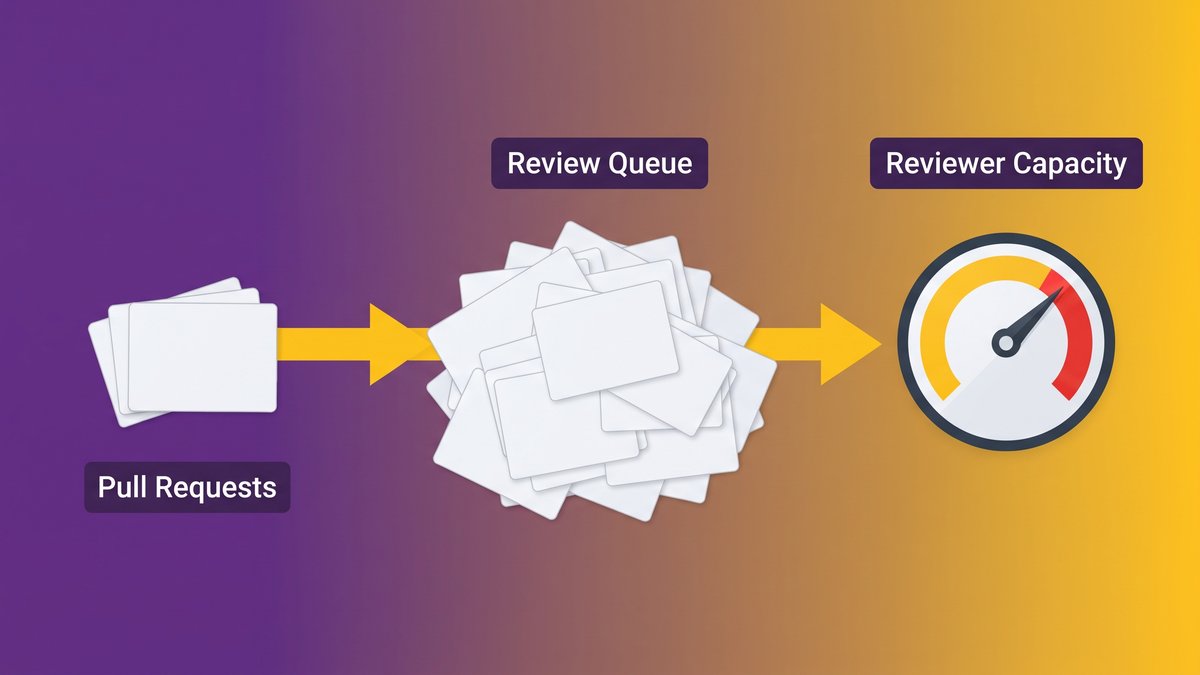
A pull request queue stacking up faster than reviewers can clear it
The velocity illusion: why AI makes teams feel faster while they ship slower
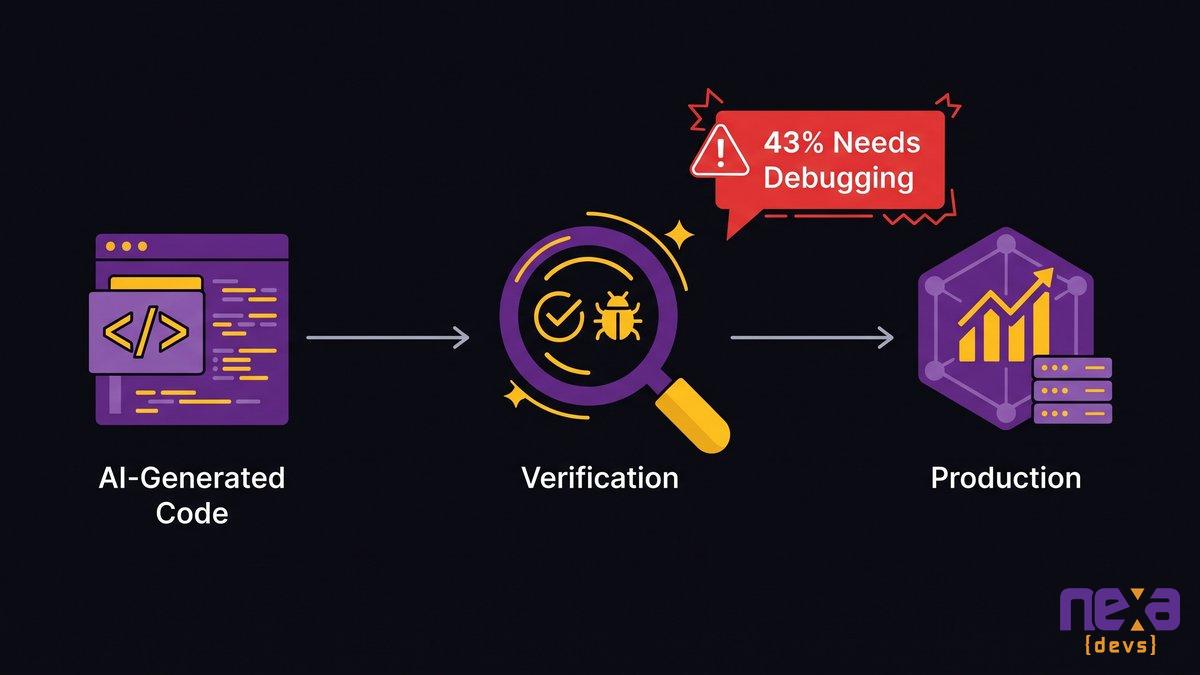
VentureBeat reports that 43% of AI-generated code changes need manual debugging in production, even after clearing QA and staging. Code passes every gate on the way in and still breaks on the way out. Engineers have a name for that: the velocity illusion.
So which is the real story here, the speed you feel or the speed you ship?
Ask a developer how AI changed their week and most say the same thing: a feature that used to take two days now takes an afternoon. Ask a CTO whether the team shipped three times more verified features last quarter and the answer is almost always no. Both experiences are true at once. They just describe different parts of the pipeline.
The gap between perceived speed and measured delivery
Coding speed and shipping speed used to move together closely enough that nobody bothered to separate them. AI broke that link. A developer using an AI assistant can draft, refactor, and generate boilerplate in a fraction of the previous time. None of that touches the step that actually gates a release: someone with context has to read the diff, understand what changed, and decide whether it’s safe to merge. That step hasn’t gotten faster just because the code arrived quicker.
Where the saved coding time quietly goes
The hours a team saves on drafting have to land somewhere, and where they land is downstream. Reviewers spend more time per pull request reconstructing intent from a diff that came out of a model instead of a colleague’s head. QA spends more time chasing edge cases in code nobody on the team wrote line by line. The net time saved across the full delivery cycle is smaller than the time saved on typing alone, and for some teams it’s negative.
The AI code review bottleneck didn’t disappear, it moved
Every queueing system runs on one rule: if arrivals outpace processing capacity, the queue grows without limit no matter how efficient any single step becomes. Pull request review is living out that rule right now.
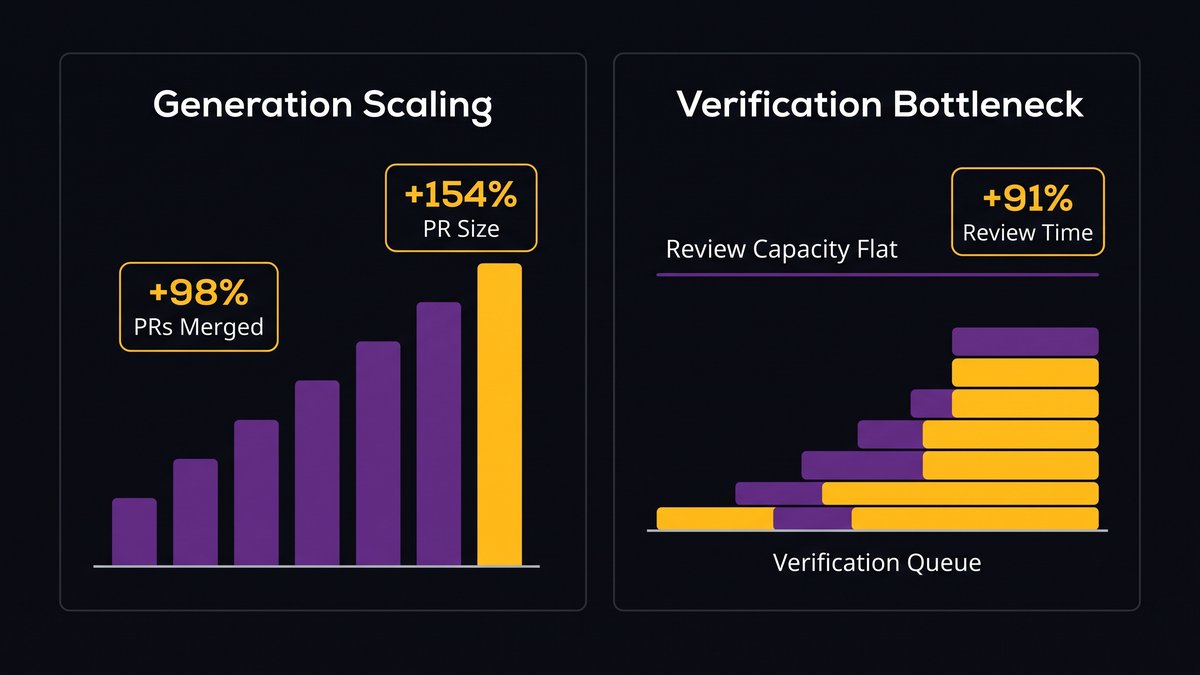
Faros AI’s analysis of 10,000 developers found that teams with high AI adoption merge 98% more pull requests while PR review time increases 91%, and average PR size grows 154%. So reviewers absorb a triple hit: more pull requests, bigger ones, and all of it from a source that never explains its own reasoning.
Generation scaled overnight; verification capacity didn’t
Rolling out an AI coding assistant is a one-sprint decision. Growing senior review capacity by the same multiple takes months of hiring, if it happens at all, because most mid-market engineering teams don’t have three extra senior engineers sitting idle waiting for a review queue to appear. Generation capacity scaled overnight while verification capacity stayed flat.
Why review queues explode once AI is writing the code
LinearB’s 2026 Software Engineering Benchmarks Report found agentic AI pull requests wait 5.3 times longer for a reviewer to pick them up, and AI-assisted PRs wait 2.47 times longer, compared with unassisted work. Reviewers work the same as they always have. What changed is arrival rate, which crossed the point where the queue stops draining between sprints and starts carrying over.
A review queue growing week over week as AI-generated pull requests outpace reviewer throughput
Why AI-generated code is harder to review, not easier
Volume alone is manageable. The trouble is code that shows up with no explanation behind it.
A pull request from a colleague usually arrives with context you already share: a Slack thread about the tradeoff, a half-remembered conversation from standup, an assumption about why the retry logic looks the way it does. A pull request generated by an AI assistant shows up as a finished artifact with none of that. The reviewer has to reverse-engineer intent from the diff, with nothing already communicated to lean on.
No intent trail: reviewers reconstruct decisions from a finished diff
Senior reviewers describe the same experience across teams: reading an AI-generated diff takes longer than reading an equivalent human diff, because there’s no design conversation to fall back on. Every unusual choice, an odd exception handler, a nonstandard data structure, has to be evaluated cold rather than confirmed against something the reviewer already knows.
Plausible-but-wrong code and the trust tax it creates
The more experience teams get with AI-generated code, the less they trust it. The Stack Overflow 2025 Developer Survey found trust in AI accuracy has dropped to 29%, even as adoption climbed. Plausible-looking code that fails on a case the model never considered costs more reviewer time to catch than code that’s obviously wrong, because obviously wrong code gets rejected fast. Plausible-but-wrong code gets a slow, careful second look, every time.
Why “review faster” and “just hire more reviewers” don’t fix it
Push reviewers to move faster and defect-escape rates climb. Add reviewers and onboarding overhead eats the gain for months. Neither response touches the actual constraint.
These are the two reflexes almost every CTO reaches for first, and both fail against the same math. Rushing review lowers the bar for what gets caught before merge, and the queue stays exactly as long as it was. Teams that push this lever hardest are the ones who watch production incidents climb even while their review dashboards look green. Hiring more reviewers helps eventually, but a new senior engineer needs months to build the codebase context that makes their judgment worth anything. During that ramp-up, the queue keeps growing anyway.
This mirrors a much older idea from operations management: in any system with a hard constraint, Theory of Constraints thinking says pushing harder on a bottleneck rarely fixes it, redesigning what feeds it does. There’s a third option nobody reaches for first because it means touching the whole pipeline instead of one stage of it: reduce how much verification work review has to do by catching problems earlier, before a diff ever reaches a human reviewer’s queue. Redesigning the system that feeds review takes more work up front than patching the review stage, but it’s the option that actually holds up.
Measure delivery flow, not coding speed
CircleCI’s 2026 State of Software Delivery report, analyzing more than 28 million CI workflow runs across 22,000-plus organizations, found feature-branch throughput up 59% year over year while main-branch throughput fell about 7% and main-branch success rates dropped to 70.8%.
Those three numbers tell the whole story. Feature branches are full of AI-assisted work moving fast. The main branch, the place where code actually becomes a shipped, verified feature, is moving slower and succeeding less often. If your dashboards only track commits opened, PRs raised, or lines generated, you’re measuring the branch that’s lying to you.
The metric that matters is throughput of verified, merged, deployed work: cycle time from first commit to production, and how often a main-branch build actually passes. Frameworks like Google’s DORA metrics exist precisely because coding activity and delivery performance aren’t the same thing, and mid-market teams adopting AI need that distinction now more than enterprise teams did five years ago. A team that generates twice the code but ships the same number of verified features a quarter later has gotten louder, not faster.
The real fix: scale verification with generation across the whole SDLC
Verification has to run through every phase that produces risk. Bolting it onto the end of a single “code review” stage is why the queue keeps growing in the first place.
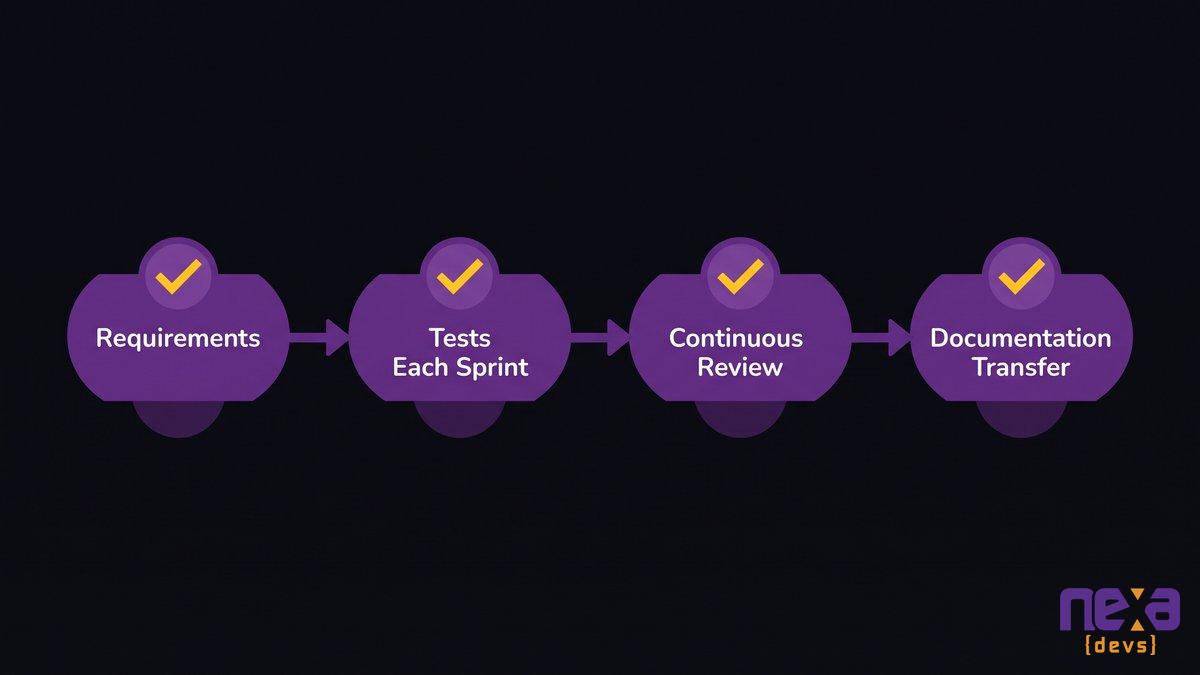
What that takes is four structural changes, and not one of them is a new tool.
AI-assisted requirements and design that catch ambiguity before code exists
A vague requirement produces a plausible-looking implementation of the wrong thing, and that’s exactly the failure mode reviewers struggle to catch, because the code works, it just solves the wrong problem. Running requirements and system design through AI-assisted analysis before a single line gets written surfaces ambiguity while it’s still cheap to fix. A missing edge case in a spec costs a paragraph to resolve. The same gap discovered in review costs a rewritten pull request.
Tests written alongside code every sprint, not bolted on at the end
When tests get written after the fact, usually under deadline pressure, they tend to confirm what the code already does instead of what it should do. Writing AI-generated unit and integration tests in the same sprint as the code, as a continuous practice rather than a phase-gate, means a reviewer isn’t the only check standing between a plausible bug and production. This is one of the few places automation can absorb real review load instead of adding another tool to the stack. OWASP’s Software Assurance Maturity Model frames this same principle for security specifically: verification built into every phase beats verification bolted onto the last one.
Continuous code review throughout the lifecycle instead of one end-of-line gate
A single review gate at the end of a sprint is where arrival-rate math breaks a team, because every pull request from two weeks of work lands in the queue at once. Reviewing continuously, as work lands rather than as a batch, spreads the same total review load across the sprint instead of concentrating it at the worst possible moment.
Documentation transfer so review isn’t gated on one person’s head
Review capacity is about more than headcount. What really counts is how many people understand the system well enough to review changes to it with confidence. Nexa Devs treats complete documentation, architecture decision records, system design docs, API references, as a standard deliverable rather than an optional extra, specifically because review that depends on one person’s memory doesn’t scale past that person’s calendar. The relationships that have run longest, including a decade-plus engagement with UCLA David Geffen School of Medicine and eight years with TSB, work because institutional knowledge is written down and transferable, not because one engineer never left. For a closer look at how documentation practices change vendor risk, see “why documentation is the real competitive advantage in outsourced engineering”.
For a deeper walkthrough of how these four pieces connect into one delivery system, see “how an AI-augmented SDLC works end to end”.
How requirements, tests, and review connect across every sprint instead of gating at the end
What to automate and what human judgment must still own
Static analysis catches syntax and known vulnerability patterns. It doesn’t catch a wrong assumption about how a payment retries under a network partition. Knowing which is which is what the job really comes down to.
Automate what’s mechanical and repeatable: linting, type checking, security scanning, test coverage thresholds, and policy checks against your own architectural rules. The NIST Secure Software Development Framework lays out this same division for secure development at a policy level: standardize the mechanical checks so human reviewers aren’t burning hours on them. These are exactly the checks reviewers waste time catching manually and exactly the checks a well-configured pipeline never gets tired of running. Every hour a reviewer doesn’t spend catching a missing null check is an hour available for the judgment call that actually needs a human.
Reserve human judgment for architecture fit, business-logic correctness, and risk: does this change interact badly with a system three services away, does the behavior match what the business actually needs, is the blast radius of a bug here acceptable. No automated check can evaluate whether a change is the right change. Only a person with context can make that call, and protecting enough of their time to make it well is the point of redesigning the system in the first place.
Governing the generation ceiling: how much AI code is safe to ship
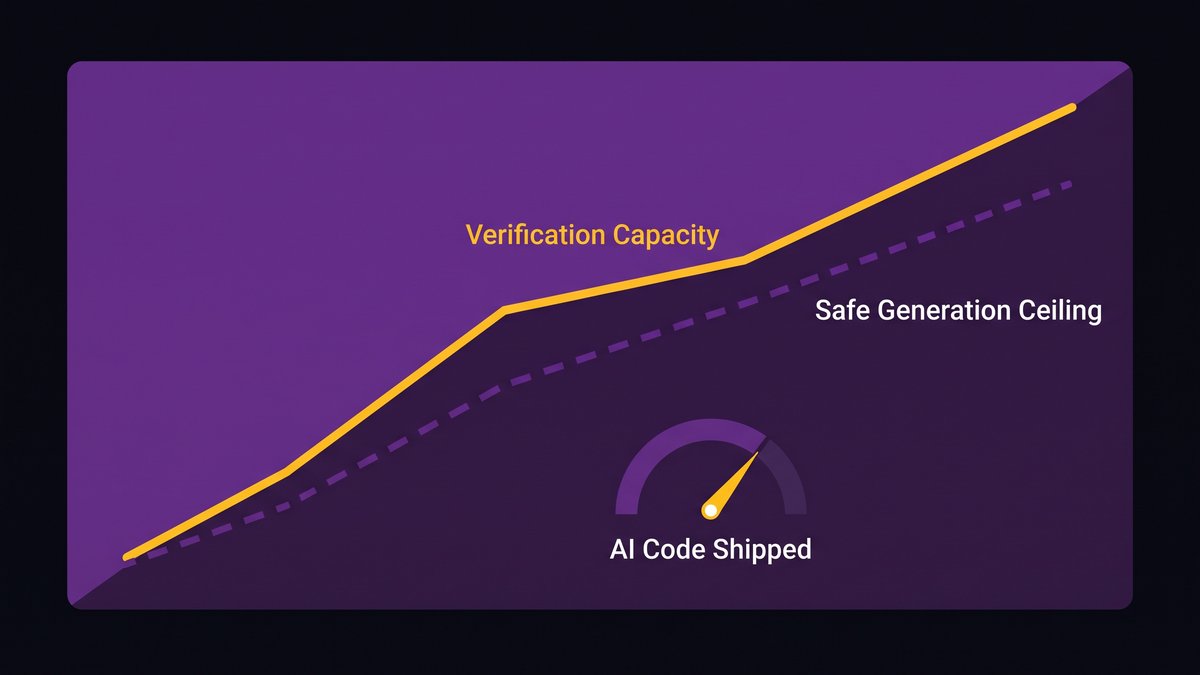
There’s no universal percentage that tells you how much of a codebase is safe to let AI write. There’s only the ceiling your verification system can actually support.
Teams that treat the generation ceiling as a fixed number, capping AI at some fraction of commits and calling it governance, are solving the wrong variable. The ceiling has far less to do with AI’s capability than with how much verified, reviewed, tested code your pipeline can absorb per sprint without the queue growing. Raise verification capacity and the safe ceiling rises with it. Leave verification flat while you add more AI generation, and all you’ve built is a bigger backlog with better marketing.
As Skylar Roebuck, CTO at Solvd, states: “Traditional modernization tends to over-index on protecting how things work today rather than building for what’s next. AI capability is compounding rapidly, and the real risk for mid-market companies is delay.”
Compliance-heavy environments make this concrete: a healthcare or financial services team can’t treat a fixed generation percentage as a governance answer, because the question an auditor actually asks is whether every change, however it was produced, went through equivalent verification. The NIST AI Risk Management Framework frames governance the same way, as a property of the whole system rather than a cap on any one input. Build generation and verification to scale together, and the ceiling question mostly answers itself: ship as much AI-generated code as your verification pipeline can actually stand behind.
Raising verification capacity is what actually raises the safe AI generation ceiling
The takeaway for engineering leaders
Adding AI to your development process without rebuilding review, testing, and requirements alongside it produces exactly what you’re seeing: faster typing, slower shipping, and a growing sense that something in the pipeline is quietly breaking. Nexa Devs builds AI-assisted requirements analysis, continuous AI-generated testing, ongoing code review, and complete documentation transfer into every engagement, so generation and verification scale together from the first sprint instead of the review stage absorbing the entire cost of AI adoption later.
Ready to see what a review pipeline built for AI-scale generation actually looks like for your team? Schedule an architecture assessment with Nexa Devs and find out where your verification capacity is actually breaking, before your next sprint proves it for you.
FAQ
What is the productivity paradox in AI coding assistants?
The AI coding productivity paradox is the gap between how fast developers feel while using AI and how fast their team actually ships verified code. AI cuts the time to write code, but pull requests pile up faster than reviewers can check them, so delivery slows even though typing speed goes up.
Does AI make coders more productive?
Yes, for the writing-code part of the job, but the gain gets offset downstream. VentureBeat reports 43% of AI-generated code changes still need manual debugging in production even after passing QA, so the time saved drafting code gets partly spent again during review and testing.
Is AI writing 90% of code?
Not typically, no. Most credible industry estimates put AI-authored code well under half of new commits at a typical mid-market engineering organization. The 90% figure usually describes aggressive early-adopter teams or narrow greenfield projects, not the norm.
What is the 40/20/40 rule in software engineering?
The 40/20/40 rule is a rough time-allocation guideline: spend about 40% of a project’s time on planning and requirements, 20% writing code, and 40% on testing and verification. Verification deserves at least as much investment as writing code, not less.
What is the 30% rule in AI?
There’s no single agreed definition, but the phrase usually refers to industry benchmarks showing AI now generates roughly a third of new code at organizations with mature AI adoption. Treat it as a rough adoption signal, not a governance target.
by Sarah Mitchell | Aug 18, 2026 | Business and Technology
Pull up your software subscription report, then count how many of those logins your team actually touched last month. When the first number embarrasses the second, you’re looking at SaaS sprawl: a mid-market company paying for far more software than any team uses, adopted app by app until nobody in the building can name the full list.
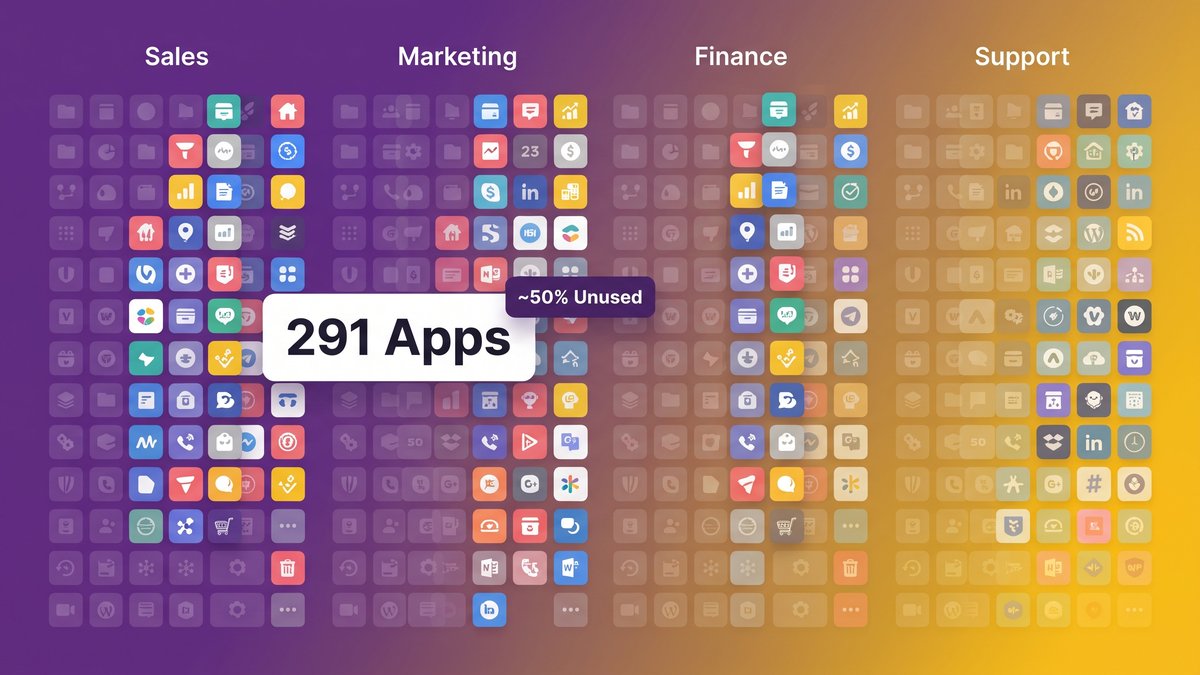
The average mid-market company manages 291 SaaS applications, according to SuccessKnocks’ spend-management research, and roughly half of those licenses sit unused month after month. Finance flags the wasted spend first, and that framing understates the damage. What all those redundant apps quietly replaced was one coherent way of working, now split into dozens of disconnected pieces held together by manual handoffs and spreadsheets nobody fully trusts.
For a COO, that gap is more than a procurement nuisance. It’s why your ops team burns hours a week moving data by hand, why a straightforward report takes three people and two afternoons, and why the numbers in Monday’s deck don’t quite match Thursday’s. Trimming a few unused seats fixes none of that. Fixing SaaS sprawl for real means asking why the stack got this tangled in the first place, then building something that fits how your team actually works instead of layering on one more app.
Overlapping software icons across departments illustrating how SaaS sprawl accumulates in mid-market operations
The 291 figure that opened this piece deserves a closer look before we get to the fix.
You’re Licensing 291 Apps and Running Your Operation on a Fraction of Them
Mid-market companies license an average of 291 SaaS applications and use meaningfully fewer than half of them day to day, according to SuccessKnocks’ spend-management research. That gap is too wide to write off as a rounding error. It’s an entire shadow stack your team pays for and rarely opens.
Ask a COO how many tools their organization runs, and you’ll get a number that’s confidently wrong. Finance sees the invoices. IT sees whatever routes through single sign-on. Neither one sees the trial someone in marketing started in February and forgot to cancel, or the project tracker one team adopted because the company-wide tool never fit how they plan their work. Repeat that pattern across every department for a few years, and 291 stops sounding like an outlier.
The uncomfortable part isn’t the count. It’s how few of those apps the operation actually depends on. If your team could lose 150 licenses tomorrow and nobody would notice for a week, the stack was never really designed. It accumulated, one reasonable purchase at a time, until reasonable stopped describing the whole.
How a stack accumulates like that is worth understanding on its own terms, and it points at where the real fix has to land.
What SaaS Sprawl Actually Is (and Why the Usual Definition Misses the Point)
SaaS sprawl is the accumulation of software subscriptions across an organization until nobody, IT included, has a complete or current picture of what’s running, who owns it, or whether it’s still needed. That’s the definition every vendor blog on the subject repeats.
Most explanations stop there and treat sprawl as a governance lapse: too many people with a company card, not enough policy, too little oversight from IT. The framing isn’t wrong, exactly. It just quits one layer too shallow, and quitting there leads straight to a fix that doesn’t hold.
Every app in a sprawling stack was purchased on purpose, by someone solving a real problem right in front of them. Sales needed a way to track deals that the CRM made painful. Ops needed a lightweight tool for vendor onboarding that the ERP module never handled well. Nobody sets out to create sprawl. They buy software because the system they already have doesn’t fit the job in front of them.
That distinction matters because it changes where you go looking for the fix. A governance problem gets solved with a stricter approval policy. A fit problem gets solved by building something that matches how the work actually happens, which is the argument the rest of this piece makes.
Why the Stack Keeps Ballooning: It’s Not Lax Procurement, It’s That No System Fits the Work
The stack didn’t grow because your team ignored the rules. It grew because no single system covered how three different departments needed to work, so each one solved its own gap on its own schedule with its own tool.
Freemium and Trial Entry Make Every New Tool Feel Free
A lot of sprawl starts at zero dollars. Someone signs up for a free tier to solve an immediate problem, no procurement conversation required and no invoice to justify. Three months later the free tier isn’t enough, a card gets added, and a tool nobody formally approved is quietly billing every month.
Multiply that across a workforce with company cards and self-serve signup, and the stack grows one small, individually reasonable decision at a time. Torii’s 2026 SaaS Benchmark research, reported by CIO Dive, found that more than 61% of applications discovered inside organizations were never formally approved by IT, out of an average enterprise footprint of 2,191 applications. Mid-market stacks run smaller, but the same pattern shows up at every scale. Sprawl comes from hundreds of small decisions nobody tracked, never a single big one.
Marketing needs campaign tracking. Support needs a ticketing system. Finance needs a forecasting tool the ERP handles badly. Each purchase makes sense in isolation, solves a genuine gap, and gets approved because it’s cheap relative to the value it delivers to that one team.
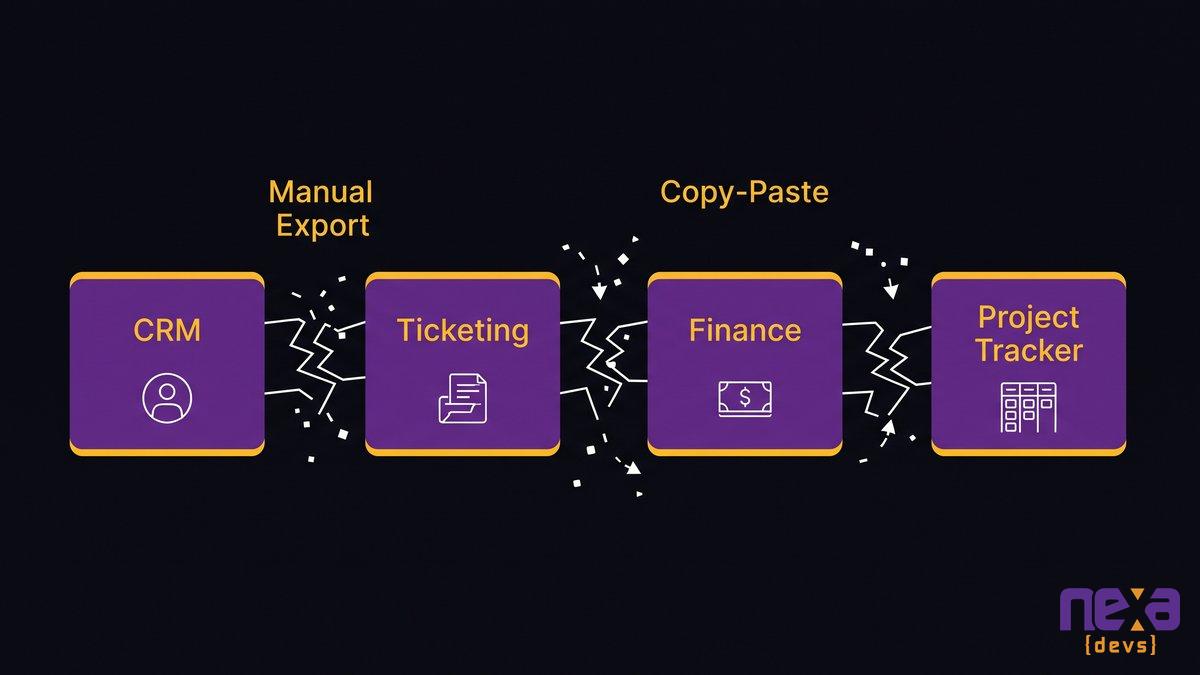
What nobody evaluates is the seam it creates: the manual export from the ticketing tool into the spreadsheet finance uses for revenue forecasting, the copy-paste from the CRM into the project tracker because the two were never built to talk. Individually, every purchase is a rational decision. Collectively, they produce an operation where information moves between systems by hand, and the person doing that moving is the real cost nobody priced into the buying decision.
Diagram showing how department-by-department SaaS purchases create disconnected seams across a mid-market operation
The Real Cost Isn’t the Wasted Licenses
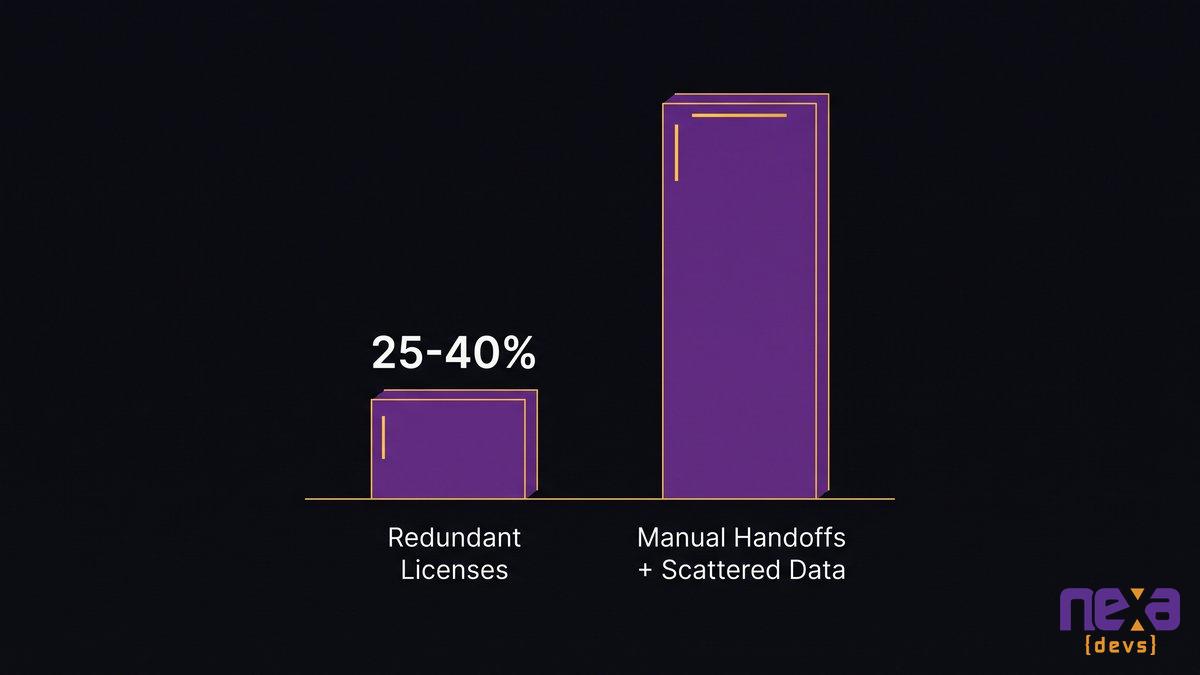
Redundant licenses are the cost your finance team can see on a spreadsheet. The cost they can’t see as easily, fragmented workflows and manual handoffs between systems that don’t talk, is usually bigger and always more expensive to keep ignoring.
Redundant and Unused Spend: The Visible 25-40%
Start with the number everyone quotes. For mid-market companies, 25% to 40% of SaaS spend goes toward tools that are redundant or sitting idle, the highest waste rate of any company size segment, per SuccessKnocks’ analysis of mid-market spend patterns. On a stack running six or seven figures a year in subscriptions, that range is real money.
It’s also the easiest part of the problem to fix, which is exactly why most companies stop there. Cancel the unused seats, fold two overlapping project tools into one, and call the sprawl problem handled. But it isn’t solved. It’s trimmed.
Every disconnected pair of tools in your stack needs a human being to bridge the gap between them. Someone exports a report from one system and imports it into another. Someone else checks two dashboards every Monday because neither one shows the whole picture. And somewhere a third person re-keys the same customer record into three places, because the CRM, the billing tool, and the support platform were never built to share it.
None of that shows up as a subscription line item. It shows up as hours, spread across a team that could be doing something the business actually needs instead.
As Jesper van den Bogaard, CEO at Factor Blue, states: “We need to process manufacturing, but the invoice is here, the order data is there, and we’re manually passing information around, with data scattered across different systems.” That description fits far more mid-market operations than the vendors selling into them tend to admit.
Data Scattered Across Systems That Don’t Integrate
When the same customer or transaction lives in five systems that don’t sync, nobody trusts a single version of the truth. Reports pull from whichever system is easiest to export from, not the one that’s most accurate.
So the numbers in Monday’s leadership deck sometimes contradict the numbers in Thursday’s board update, not because anyone made a mistake, but because two people ran two exports from two systems that were never reconciled. This is the cost that never earns a line item. It’s also the one that erodes trust in every operational decision built on top of the data, which for a COO is close to the whole job.
Chart contrasting the visible cost of redundant SaaS licenses against the larger, unmeasured cost of manual handoffs and scattered data
Why a Consolidation Audit Only Trims the Edges
A SaaS audit is worth running. On its own, though, it solves less than it looks like it solves.
The standard playbook is well established: inventory every app, flag the duplicates, cut what nobody logged into last quarter, negotiate better terms on what’s left. Every step is useful. None of it touches why the duplicates existed in the first place.
Six months after a successful audit, the license count usually creeps back up. Not because anyone got careless, but because the underlying condition that produced the sprawl, no single system fitting how the team actually works, never went away. The audit removed the symptoms. The condition that generates them keeps producing new workarounds the moment the old ones get cut.
As Ashwin Ballal, CIO at Freshworks, states: “Legacy systems have become so complex that companies are increasingly turning to third-party vendors and consultants for help, but the problem is that, more often than not, organizations are trading one subpar legacy system for another. Adding vendors and consultants often compounds the problem, bringing in new layers of complexity rather than resolving the old ones.” Ballal was describing legacy infrastructure specifically, but the pattern applies just as cleanly to a stack rebuilt through consolidation alone. Swap five overlapping tools for two slightly less overlapping ones, and you’ve bought time, not a structural fix.
The same logic runs through The hidden tax of accumulated technical debt, where patching a system’s symptoms without touching its root cause produces the same relapse pattern a year later.
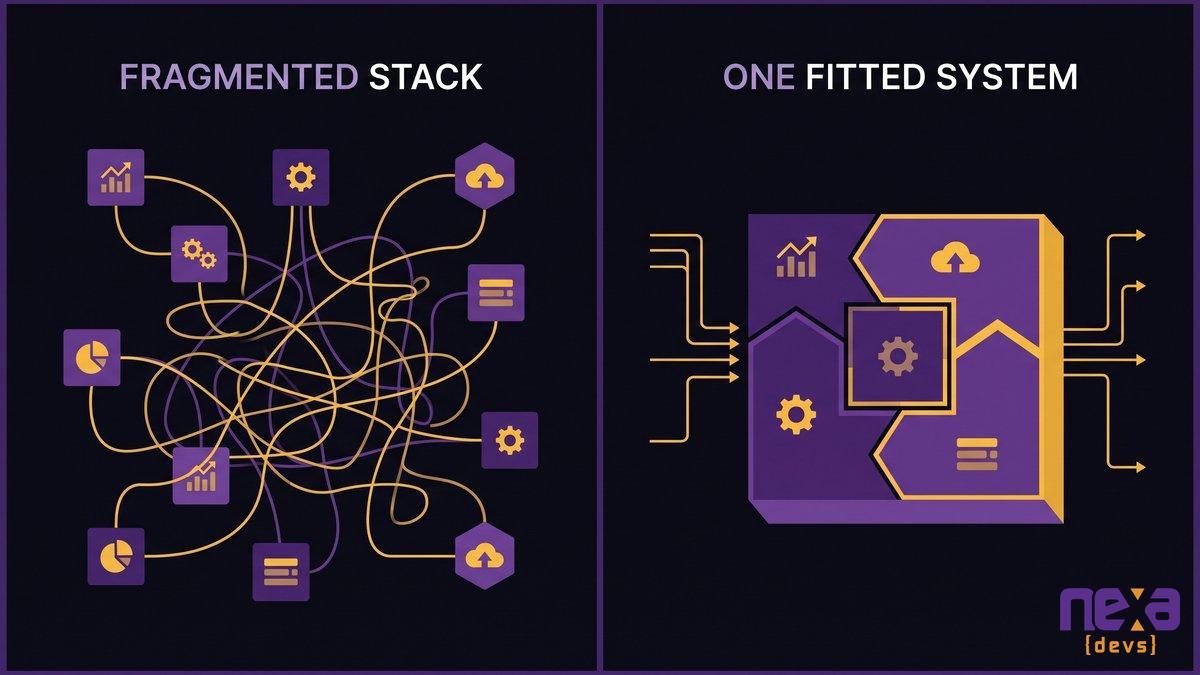
The Fix Is One Fitted System, Not One More App
Buying one more platform to unify the others just adds a subscription to an already crowded stack. What actually holds is a system built around your specific workflow, one your team owns outright instead of renting piece by piece.
That’s the difference between adding a vendor and replacing the layer that made vendors necessary in the first place. It’s also the argument most SaaS-sprawl advice skips entirely, because most of that advice comes from companies selling the next subscription.
Scope the System to the Real Workflow, Not the Org Chart
Most software, whether it’s an off-the-shelf SaaS tool or an internally commissioned build, gets scoped around departments: a finance module, a sales module, an ops module. Real work doesn’t move that way. An order travels from sales to fulfillment to finance to support, crossing every department boundary the software was organized around.
Scoping a system to the actual path work takes, rather than to the org chart that approved the budget, is what eliminates the handoffs sprawl created. It’s also why a generic platform struggles here: it was built for a department, not for your specific sequence of steps. The ERP implementation failure pattern runs on the same mismatch, packaged software forcing your workflow to bend around its structure instead of the other way around.
Replace the Workaround Layer Instead of Adding to It
Ask what your team is actually doing in that spreadsheet nobody officially owns, or in the manual weekly export three people dread. The workaround exists because something the team needs isn’t available anywhere in the current stack.
A fitted system replaces that workaround directly. The report that took an afternoon becomes a dashboard that updates itself. The data re-keyed by hand becomes a single record every connected tool reads from. This is the difference between consolidation, which removes duplicate tools, and replacement, which removes the reason the duplicates and the workarounds existed at all.
The market is already moving this direction. Retool’s 2026 Build vs. Buy Report found that 35% of teams have already replaced at least one SaaS tool with a custom build, and 60% had shipped software outside their own IT department’s formal oversight in the past year. Mid-market operations aren’t choosing between SaaS and nothing anymore. They’re choosing between more disconnected subscriptions and one system built to fit.
Comparison showing a fragmented multi-app workflow next to a single fitted system covering the same operational process
Owning the System You Run On
Every SaaS app in your stack comes bundled with someone else’s decisions, documentation you’ll never see, and a renewal date you don’t control. Owning your own system flips all three.
Nexa Devs delivers full documentation on every engagement: architecture diagrams, system design records, API references, and test coverage reports, transferred unconditionally at project close. That’s the antidote to the version of sprawl nobody talks about, which isn’t too many apps so much as too many black boxes you’re paying to run and still can’t fully see inside.
Ownership, in practice, means:
- Complete documentation transferred at delivery, not held as leverage for future change requests
- A system scoped to your actual workflow, not a department template you have to work around
- Ongoing support under an SLA, so evolution doesn’t require finding a new vendor every time priorities shift
None of that eliminates every third-party tool from your stack. Payroll, email, and a handful of specialized platforms will keep making sense to rent. What it eliminates is the default reflex: buying another app every time a workflow doesn’t fit, instead of asking whether the operation deserves a system built for it the first time.
The spreadsheet-run operations that break at scale problem and the SaaS sprawl problem are the same story told from opposite ends. One is too little tooling stretched too far. The other is too much tooling that never quite fit. Both get solved the same way, with a system built around the work rather than the other way around.
Stop Renting Workarounds. Build the System That Fits.
SaaS sprawl isn’t a discipline problem you fix with a stricter approval process. It’s what happens when the tools available never quite matched how your team works, year after year, purchase after purchase.
Nexa Devs builds custom internal systems scoped to your actual operational workflow, backed by AI-augmented delivery across the full development lifecycle and complete documentation your team owns from day one. We support systems we didn’t build too, so a fitted replacement doesn’t require starting from zero.
If your stack has grown past what anyone can fully account for, talk to us about what a system built for your actual workflow would look like. ,Schedule a consultation
FAQ
What is SaaS sprawl?
SaaS sprawl is when a company accumulates far more software subscriptions than its teams actually use, spread across departments with no single system tracking what’s active, who owns it, or whether it duplicates something already in the stack.
Is SaaS really dead or just evolving?
SaaS as a category isn’t disappearing, but buying patterns are shifting. Mid-market companies are moving away from adding a new point solution for every workflow gap and toward fewer, better-integrated systems, including custom-built ones designed around their actual operations.
How much SaaS spend goes to waste in mid-market companies?
Industry estimates put redundant or underused SaaS spend at 25% to 40% of the total software budget for mid-market companies, the highest waste rate of any company size segment. On a stack running into six or seven figures annually, that range represents real, recoverable money.
How do you fix SaaS sprawl?
Start with an inventory audit to cut clearly unused licenses, but treat that as a first step, not the fix. The lasting fix replaces the fragmented tools your team relies on with one system scoped to your actual workflow.
What causes SaaS sprawl in growing companies?
Sprawl grows because individual teams solve individual problems with individual tools, and no single system covers the full workflow that crosses departments. Freemium and trial signups add tools without a procurement conversation.
by Sarah Mitchell | Aug 13, 2026 | Outsourcing Software Development
Body Shop Outsourcing Is Collapsing: What Replaces It
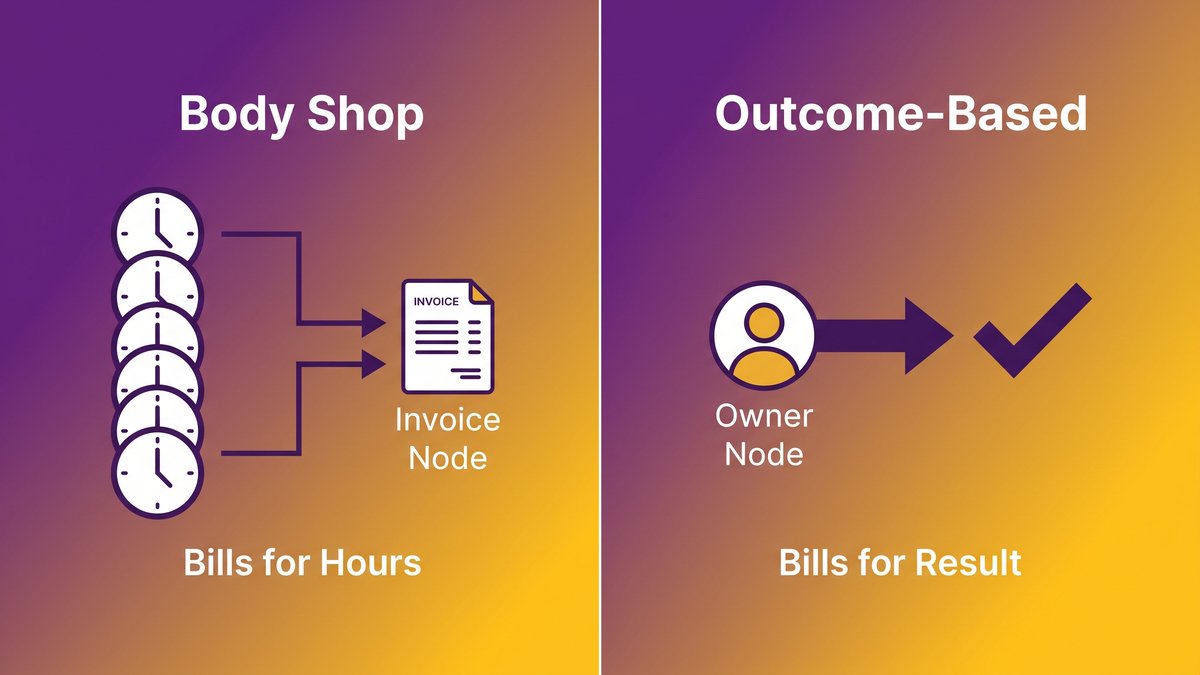
Pull up your last outsourcing invoice. A dozen line items, each billed by the hour, and probably not one of them tied to whether the release actually shipped. Paying for seats instead of results has a name in this industry: body shop outsourcing. It ran as the default IT outsourcing model for two decades, and in 2026 the economics that once made it work quietly stopped adding up.
Agentic AI now generates working code faster than any per-seat billing model ever planned for. Typing speed stopped being the bottleneck. What’s hard to find now is someone who owns whether that code is correct, tested, and still readable eighteen months from now. Body-shop vendors sell the one thing that just got commoditized: raw developer-hours model capacity. Below, I walk through why the model is breaking, what’s taking its place, and how to spot whether your current vendor already crossed the line without telling you.
Quick answer: body shop outsourcing model collapsing
- Body shop outsourcing means paying for developer hours, not a finished outcome, and it’s losing ground fast in 2026.
- Agentic AI now generates code faster than any contractor pool, so a markup on headcount no longer buys an advantage.
- The scarce resource shifted to owned outcomes, verification, and documentation the client actually keeps.
- Outcome-based and dedicated-delivery models are replacing body shops because one vendor owns the whole result.
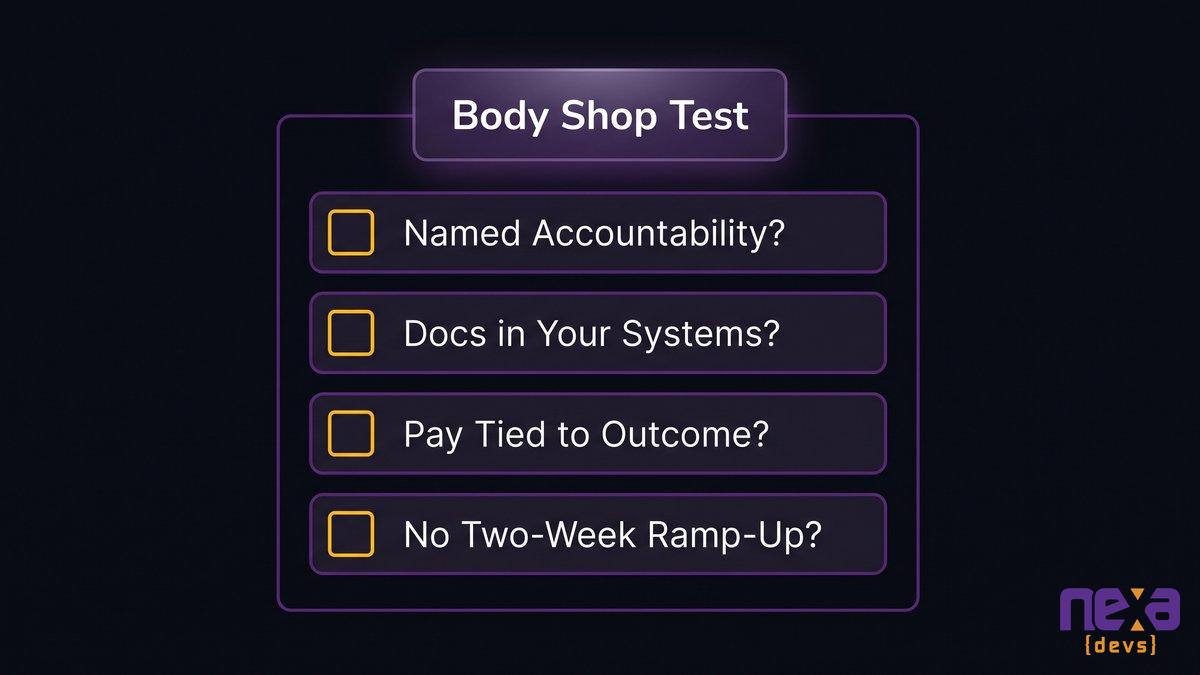
- If nobody can name who’s accountable or where the documentation lives, you’re still renting a body shop.
A side-by-side look at how body shop outsourcing bills for hours while outcome-based delivery bills for a finished result.
What an IT “Body Shop” Really Is (And Why You’re Probably Renting One)
A body shop sells hours, not software: billed by the seat, marked up for the work of finding warm bodies who can code. You rent capacity by the hour, and no one at the vendor carries responsibility for whether the work ships.
The term comes from staffing agencies that treat developers like inventory: place a body, bill the hour, move to the next contract. In IT outsourcing, the body-shop vendor recruits contractors to your spec, invoices for their time, and calls the engagement done. Whether the code works, whether anyone documented it, whether a human can maintain it after the contract ends, none of that lands on the invoice.
Picture a mid-market fintech team that watched three different “senior engineers” cycle through the same feature over four months. Each one relearned the codebase from scratch, and the vendor billed every hour of it, because under a developer-hours model, relearning is billable time like anything else.
This is a different animal from staff augmentation done well, and different again from a Staff augmentation arrangement that keeps real oversight in place. What sets a body shop apart is the thing it never owns: the outcome. The vendor tracks one number, hours logged, and leaves the question of whether the sprint produced value sitting with no one.
The Bill You’re Actually Paying: Churn, No Accountability, and Knowledge That Walks Out the Door
DemandSage’s 2026 research puts it at 20 to 25 percent, the share of outsourcing relationships that fall apart inside the first two years, usually for the same structural reason: nobody owned the result.
The invoice looks cheap until you tally what it leaves out. A body-shop contract prices the hour and nothing else: not the ramp-up when a contractor rotates off mid-sprint, not the rework when the next one reads the ticket differently, not the three weeks your internal team burns reverse-engineering undocumented code after everyone’s gone. A blended delivery arrangement, part staff augmentation and part dedicated ownership, tends to inherit the accountability gaps of both rather than the strengths of either.
No single owner of the outcome
Ask a body-shop vendor who owns it when a release slips, and you’ll get a roster of names where you wanted a single one. Time-and-materials outsourcing can’t assign outcome ownership by design, because the vendor gets paid whether or not the work ships. The Deloitte Global Outsourcing Survey found that 55 percent of failed engagements never tracked benefits against the original goal at all. Nobody watched whether the spend produced value, since nobody’s contract hinged on it.
Ashwin Ballal, CIO at Freshworks, frames the deeper version of this: “Legacy systems have become so complex that companies are increasingly turning to third-party vendors and consultants for help, but the problem is that, more often than not, organizations are trading one subpar legacy system for another… Adding vendors and consultants often compounds the problem, bringing in new layers of complexity rather than resolving the old ones.” Rotating contractors through a body-shop contract is just the staffing flavor of the same trap.
The knowledge leaves when the contractor does
Contractors billed by the hour have no contractual reason to write anything down. Documentation doesn’t register as billable progress, so it quietly doesn’t happen. When the engagement wraps, or a contractor jumps to a higher-paying gig mid-project, the knowledge of why the system works the way it does walks out with them. Your internal team inherits code it has to relearn from scratch, which is the very expense the outsourcing deal was supposed to spare you.
For a deeper look at how documentation practices separate a real delivery partner from a body shop in disguise, see outsourcing software development documentation.
Verification, not code generation, has become the scarce skill agentic AI can’t replace.
Why Agentic AI Just Broke Body-Shop Economics
VentureBeat’s 2026 survey found that 43 percent of AI-generated code changes still need manual debugging in production, even after clearing QA. Most of the case against body shops sits in that one number: writing code got cheap, and checking it got expensive.
For the CTO: raw coding capacity is no longer the bottleneck; verification is
Agentic AI software development tools now turn out working code faster than any team of hourly contractors. A body shop’s core product is developer-hours spent typing, and that’s precisely the capacity agentic AI commoditized first. The part that stayed expensive is reviewing the output, catching the 43 percent that needs fixing before production, and judging whether a generated solution actually fits the system’s architecture. A body shop was built to sell hours, and judgment like that never came in the package.
For the CEO: a markup on headcount no longer buys an advantage
You used to pay a body shop a markup because sourcing, vetting, and managing contractors was slow and costly. Agentic AI ate into more than the coding; it took a bite out of the sourcing problem too, since fewer raw hands now produce the same volume of code. The companies that already switched can see it on the ledger: moving from shaky time-and-materials outsourcing to dedicated managed services saves an average of 15 percent, according to research from Information Services Group (ISG). Paying a markup on commodity capacity means spending against the wrong scarcity.
What Actually Became Scarce: Owned Outcomes, Verification, and Retained Knowledge
The scarce resource in software delivery has shifted. For years it was raw coding capacity, warm bodies who could turn a spec into working code. Now the shortage sits in three places a body shop was never built to supply: someone who owns the result, someone who verifies it’s correct, and documentation that stays put when the contract ends.
Owned outcomes come down to a single accountable party rather than a rotating cast of contractors, each on the hook only for their own logged hours. Verification is the review and testing muscle that catches what agentic AI gets wrong, the same 43 percent VentureBeat found breaking in production. Retained knowledge is documentation that transfers to the client no matter what happens to the relationship, so the next engineer, yours or the vendor’s, doesn’t open the project at zero.
Gartner projects that more than 40 percent of agentic AI projects will be canceled by 2027, cited via Modus Create’s analysis of the AI ambition gap. Many of those cancellations trace to one root cause: nobody built the verification and knowledge-retention layer the pilot needed to reach production, never mind scale.
All three point to the same requirement: a vendor with a structural incentive to own what happens after the code ships, not only what happens while the meter runs. The industry calls this software delivery ownership, and it runs directly counter to what a developer-hours model was built to provide.
Complete documentation transfer keeps institutional knowledge with the client instead of the vendor.
What’s Replacing the Body Shop: Outcome-Based and Dedicated-Delivery Models
Outcome-based delivery and dedicated-delivery models drop the hourly meter. One bills for the result, the other assigns a single accountable owner to the whole engagement, and both close the accountability gap a body shop structurally can’t.
Outcome-based delivery: the vendor owns the result, not the timesheet
In an outcome-based outsourcing arrangement, payment attaches to a defined deliverable: a working feature, a passing test suite, a system that meets an agreed spec. That flips the vendor’s incentive. Hours spent without shipping the outcome now cost the vendor money instead of earning it. That one change in the incentive structure fixes more body-shop accountability than any volume of vendor management the client can throw at it.
A dedicated development team puts one lead on the hook for the whole team’s output, in place of a rotating pool of contractors each covering only their own hours. When something breaks, one person owns the fix. Swap a contractor out and the lead runs the transition, so institutional knowledge doesn’t reset with every staffing change. This is the delivery architecture built for engagements measured in years rather than sprints, which happens to be the horizon most mid-market internal systems live on.
For a closer comparison of how dedicated delivery stacks up against staff augmentation on the accountability question specifically, see our breakdown of dedicated team vs. staff augmentation accountability.
How to Tell If Your Vendor Is Still a Body Shop
Pull your last three vendor invoices. If every line item is an hour and nobody signed up to guarantee what those hours produced, you’re renting a body shop no matter what the contract calls it.
Run your current engagement against four questions:
- Who is accountable if the release slips: a named lead, or a list of contractors each covering their own hours?
- Where does the documentation live after this sprint: in your systems, or only in someone’s head?
- Does the vendor’s payment change if the outcome doesn’t ship, or only if the hours aren’t logged?
- Could a new engineer, yours or theirs, pick up this codebase tomorrow without a two-week ramp-up?
Dreamix’s research on vendor transitions found that documentation gaps and undocumented dependencies breed expensive problems months after a handoff wraps, which is exactly what surfaces when the honest answer to that second question is “nowhere.” If two or more of your answers point the wrong way, you’re paying body-shop prices for body-shop accountability, even if the sales deck said “dedicated team.”
A quick four-question test for spotting body-shop billing hiding behind different language.
Choosing a Delivery Model That Owns the Result
Choosing a delivery model comes down to one structural question: who’s accountable when something breaks? Body-shop pricing was never built to answer it.
A body shop can still earn its keep on a short, well-scoped task where the deliverable is small enough that ownership barely registers: patch a script, cover a two-week gap, staff a proof of concept nobody’s betting the business on. Step outside that narrow lane and the model that owns the outcome wins, because agentic AI already wiped out the cost advantage body shops used to trade on. Body shops were never the villains here; they’re just running out of reasons to exist for anything that matters.
Nexa Devs is built around that model: AI-augmented delivery that produces the outcome rather than just the hours, paired with nearshore execution in U.S. time zones and complete documentation transfer that’s unconditionally yours when the engagement ends, whether or not you renew. The system stays understandable after the contract closes, because the knowledge doesn’t leave with a rotating contractor. That’s what a structural answer looks like for a model already running out of runway.
If you want a second opinion on whether your current vendor is still running a body shop under a different name, talk to our team about what an outcome-owning engagement actually looks like.
FAQ
What is body shop outsourcing?
Body shop outsourcing is a software delivery model where a vendor bills a client for developer hours, or seats, instead of a finished outcome. The vendor supplies contractors and invoices their time. Nobody at the vendor is contractually accountable for whether the work actually ships or works.
How is body shop outsourcing different from staff augmentation?
Staff augmentation done well still embeds a contractor into your team with real oversight and accountability. A body shop goes further: minimal vetting, no ownership of results, and billing that’s purely hours-based. In practice, poorly managed staff augmentation often collapses into a body shop anyway.
What is replacing the body shop model in software outsourcing?
Outcome-based delivery and dedicated-delivery teams are replacing body shops. Both tie the vendor’s incentive to a result instead of hours logged, assign one accountable owner, and typically include documentation transfer so knowledge doesn’t leave when a contractor does.
How do I know if my vendor is still running a body shop?
Check three things: whether a named person is accountable for missed deadlines, whether documentation lives in your systems instead of a contractor’s head, and whether the vendor’s payment depends on the outcome shipping, not just on hours logged.
Is body shop outsourcing still worth it in 2026?
For small, well-defined, short-term tasks, body shop outsourcing can still work fine. For anything strategic or ongoing, agentic AI has erased its main cost advantage, and outcome-based or dedicated-delivery models now deliver more accountability for a comparable price.