by Sarah Mitchell | Sep 22, 2026 | Business and Technology
Switching Development Vendors: A Transition Playbook
Switching development vendors rarely goes wrong because the new team can’t read the code. The code is the easy part. Projects come apart when nobody owns the transition, access stays scattered for weeks, and the incoming team inherits a system nobody can fully explain. If you’re planning to switch development vendors, the repository is the part you don’t need to worry about. Everything it doesn’t say is where the risk lives.
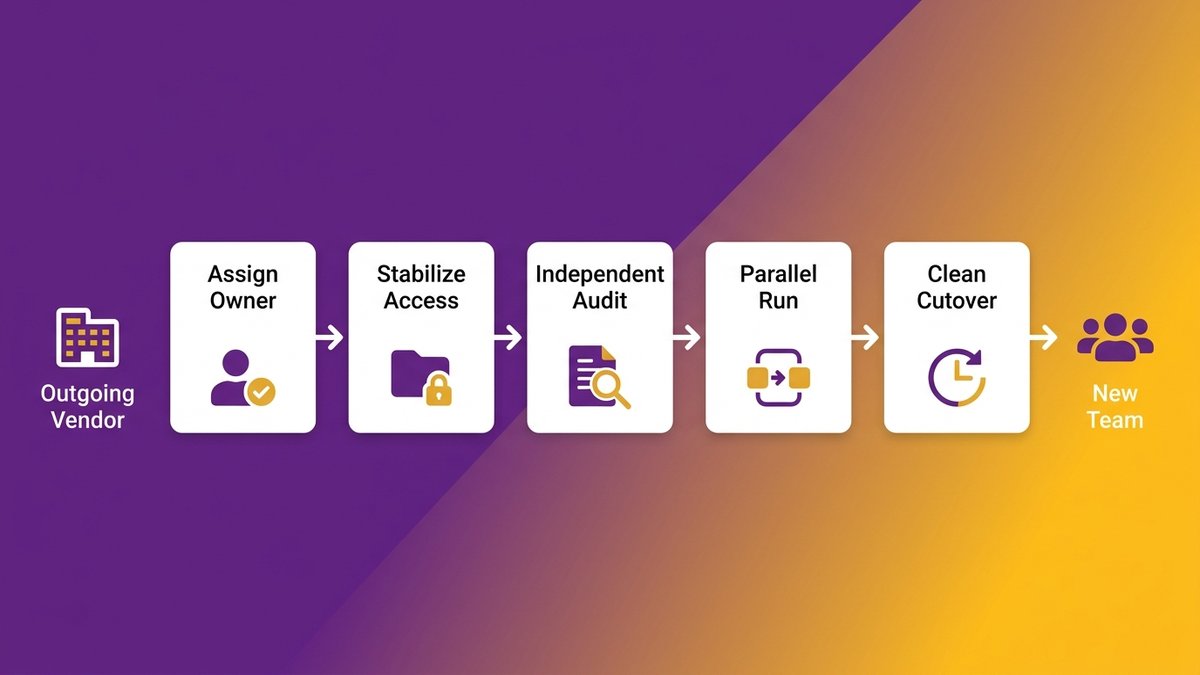
A controlled vendor transition follows a specific sequence: assign ownership before you give notice, stabilize access and integrations in the first two weeks, commission an independent audit to set a baseline, run knowledge transfer through live walkthroughs instead of a document dump, prove the new team can ship with a parallel run, and only then cut over with the old vendor’s access fully revoked. Skip a step and you’re no longer running a transition; you’re gambling with a system your business runs on.
This is different from a project rescue, where a vendor has already failed or disappeared. This playbook covers a proactive vendor transition plan you control from the start, including the compliance continuity work regulated mid-market teams can’t afford to skip.
Quick answer: switching development vendors safely
- Assign one transition owner and secure documentation, IP, and access before you give notice.
- Stabilize every credential, repo, and integration in the first two weeks; missed integrations fail silently.
- Commission an independent audit and capture a performance baseline before day one.
- Run live knowledge-transfer walkthroughs, not document dumps, and require a parallel run before cutover.
- Cut over only after the parallel run succeeds, then revoke the outgoing vendor’s access completely.

A structured transition plan turns a vendor switch from a gamble into a sequence you can verify.
What Actually Breaks When You’re Switching Development Vendors (Hint: It Isn’t the Repository)
A mid-market healthcare accreditation platform switched vendors in 2025. The outgoing firm handed over a complete code export within a day of the notice period ending. Three weeks later, certificate generation started producing documents the client’s own regulators rejected, and a document-management integration was failing silently while nobody noticed until customers complained.
The repo transfers cleanly; the undocumented operational context does not
Every switching-development-vendors project treats code handover as the asset worth protecting. It’s actually the piece that moves with the least friction. A configuration value buried in a deploy script, a rate limit negotiated verbally with a vendor two years ago, the reason a batch job runs at 3 a.m. instead of 9 p.m., none of that ships with a git clone. A transition plan that only accounts for the codebase is planning for the easy 20 percent of the risk.
The failure modes: stalled workflows, silent integration breaks, rejected outputs
Three failure patterns show up again and again in a bad vendor transition: a workflow stalls because nobody knows which service owns a step, an integration breaks quietly because nobody mapped it before cutover, or an output gets rejected downstream (a claim, a certificate, a compliance report) because a validation rule never made it into anyone’s documentation. DemandSage’s 2026 research puts a number on how often this goes wrong: 20 to 25 percent of outsourcing relationships fail within their first two years, and a mismanaged transition is a common thread behind that figure.
As Ashwin Ballal, Chief Information Officer at Freshworks, states: “Legacy systems have become so complex that companies are increasingly turning to third-party vendors and consultants for help, but the problem is that, more often than not, organizations are trading one subpar legacy system for another.” A poorly run vendor switch does exactly that. It replaces one black box with a different one, just with a fresh contract.
If your vendor has already gone dark instead of giving notice, this playbook won’t cover that scenario in full; see vendor handoff checklist for a disappeared vendor for the recovery-specific version.
Establish Governance and Ownership From Day 0
Ownership isn’t something you negotiate at the end of a vendor transition. It’s the first decision, made before you send the notice email, or you’ll spend the next 90 days negotiating for things you already own.
Who owns documentation, IP, and access the moment the transition begins
Name one person internally, not a committee, who owns the transition from day zero. That person confirms the client, not the outgoing vendor, holds the source repository, the documentation, the deployment credentials, and the IP assignment on file. The Deloitte Global Outsourcing Survey found that 55 percent of failed vendor engagements never tracked benefits against the original goal at all, and an ownerless transition is usually where that gap starts.
Pragmatic Coders’ research on vendor lock-in makes the distinction sharp: legal ownership of IP and practical operational control are not the same thing. A contract that says you own the code means nothing if the outgoing vendor is the only one who can deploy it.
What to require from the incoming partner in writing
Before the incoming partner starts work, put a transition-out clause in the contract itself: unconditional documentation transfer regardless of whether the engagement continues, a client-owned repository from day one, and a named point of contact accountable for the timeline. This clause is what answers the fear every CTO and COO carries into a vendor switch: trading one black box for another. Nexa Devs runs every engagement this way by default: complete documentation transfer to the client at project completion, with no dependency on renewal.
For the deeper legal mechanics of ownership versus access, see vendor lock-in and IP ownership.
Stabilize Access and Secure the Codebase in the First Two Weeks
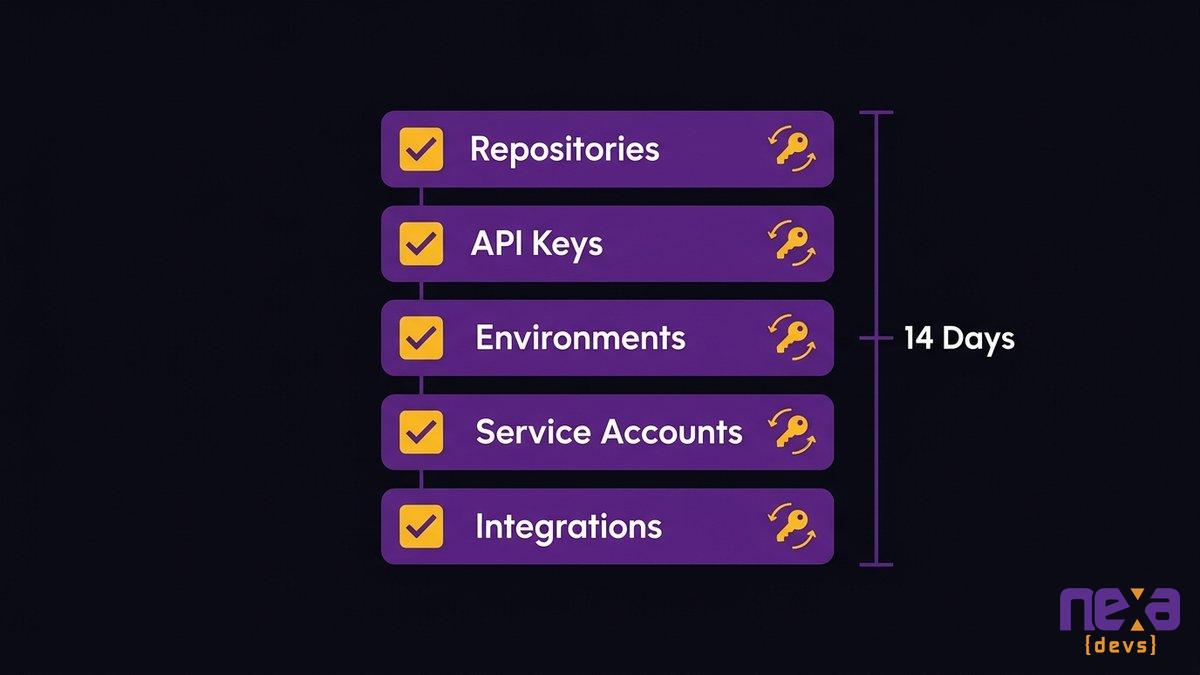
Fourteen days. That’s the window before scattered credentials turn into a security incident, and it’s the first real deadline in any vendor transition plan.
Inventory credentials, repos, environments, and third-party integrations
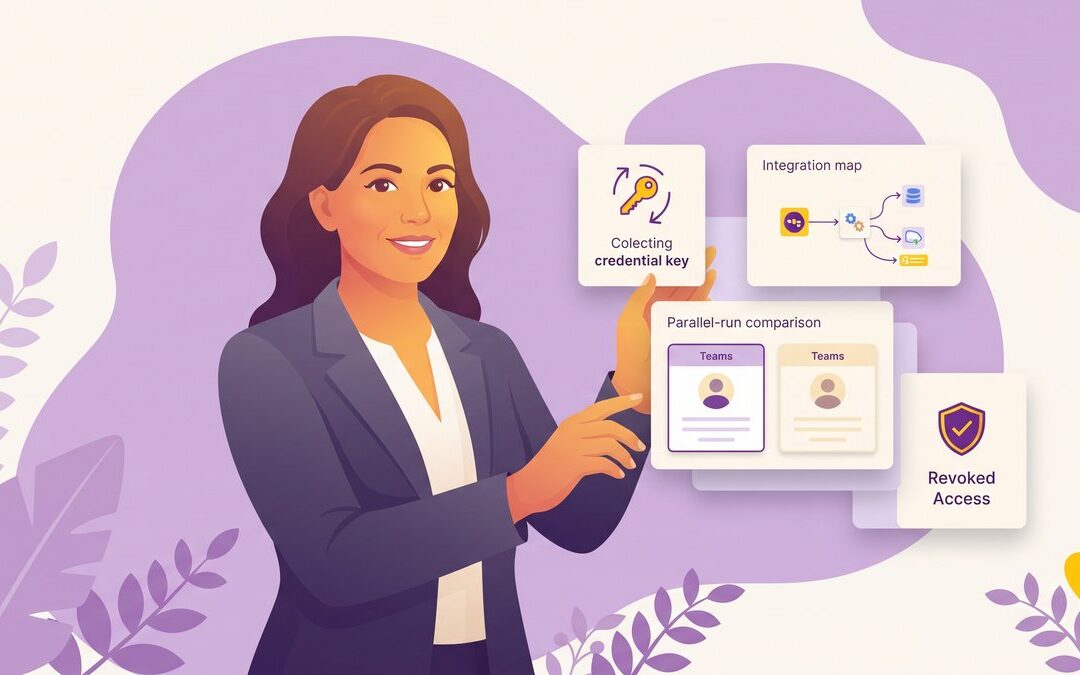
Build a single inventory in the first week: every repository, every environment (dev, staging, production), every API key, every third-party service account, and who currently holds the password. Most mid-market teams find at least one credential nobody remembers issuing. Rotate every credential the outgoing vendor touched, not just the obvious ones, and confirm the new owner is your named transition lead, not the incoming vendor by default.
Following NIST’s guidance on credential lifecycle management during this window keeps the rotation defensible if a regulator or auditor ever asks who had access and when.
Protect IP and map every integration before anything moves
Integration mapping is the step most transition plans skip, and it’s the one that produces the silent failures. List every system the outgoing vendor’s code talks to: payment processors, EHR systems, CRM platforms, reporting tools, and any middleware nobody remembers building. For each one, confirm who owns the credential, what the failure mode looks like, and who gets paged if it breaks during cutover.
A vendor transition that maps integrations before day 15 catches the failures a document review never would. This is also where source code escrow earns its keep as a fallback, not a substitute for the inventory itself.
Every credential, repo, and third-party integration gets inventoried and rotated in the first two weeks.
Commission an Independent Codebase Audit and Capture a Baseline
You cannot prove a new vendor is performing without a number to measure against. An independent codebase audit, run before day one, gives you that number: test coverage, deployment frequency, defect rate, and a documented list of what’s actually broken.
What a usable audit must include
A usable audit covers four things: architecture and dependency mapping, test coverage by module, security exposure (outdated packages, exposed credentials, unpatched CVEs), and a prioritized list of known defects with severity ratings. Skip any of the four and the incoming vendor inherits blind spots the outgoing one already knew about and never disclosed. Run the audit independently, not through either vendor, so the findings don’t get shaped by whoever benefits from a rosier picture.
Setting velocity and quality targets before Day 1
Capture baseline numbers before the new team touches a single line: current deploy frequency, mean time to resolve a production incident, and defect escape rate. ClearlyAcquired’s research on key-person risk in technical transitions found that replacing high-level technical talent typically costs 150 to 400 percent of salary and delays projects six to twelve months. A documented baseline is what keeps that delay from becoming indefinite.
This is also where a partner’s willingness to take on a system in rough shape matters. Not every vendor will commission an honest audit of a codebase it didn’t write, especially a degraded one. Nexa runs this audit process on systems it didn’t build, including ones in poor condition, because the point of the exercise is an accurate baseline, not a sales pitch.
Run Structured Knowledge Transfer With Mandatory Live Walkthroughs
A document dump is not knowledge transfer. It’s a PDF nobody reads until the first outage, by which point the person who could have explained it is already gone.
Live walkthroughs and recorded audits, not a document dump
Structured knowledge transfer means scheduled, recorded sessions where the outgoing team walks the incoming team through the system live: here’s why this workaround exists, here’s the integration that breaks if you touch it wrong, here’s the report nobody documented because everyone just knew how to run it. Record every session. The incoming team will need to rewatch the fifth one after the first three make sense. A single handoff document, however thorough, can’t answer a follow-up question. A live walkthrough can.
AI-assisted documentation reconstruction to accelerate capture
AI-assisted documentation tools can speed up the capture side of this process: transcribing walkthrough sessions, mapping dependencies from the codebase itself, and drafting a first-pass architecture document the incoming team edits instead of writing from scratch. Skylar Roebuck, Chief Technology Officer at Solvd, frames the broader point well: “AI capability is compounding rapidly, and the real risk for mid-market companies is delay.” The same logic applies here. AI speeds up the mechanical part of documentation capture, but it doesn’t replace the live walkthrough where someone explains why a system works the way it does.
For a deeper methodology on reconstructing documentation for a system that was never properly documented, see AI-assisted documentation reconstruction for black-box systems.
Prove the New Team Can Ship With a Parallel Run Before Cutover
A parallel run answers one question the sales deck can’t: can this team actually ship on your system, under your constraints, before you’ve cut off the only team that still can?
Parallel-run structure and exit criteria
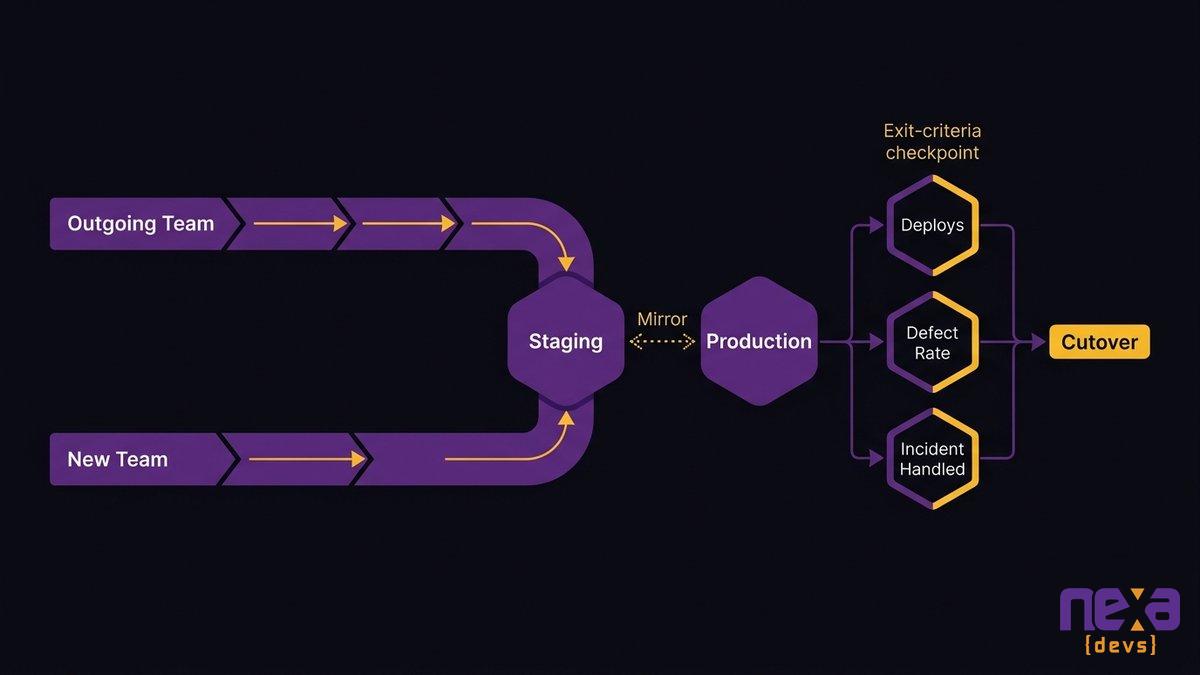
Run the new team alongside the outgoing one for two to six weeks, working real tickets, deploying to a staging environment that mirrors production, with the outgoing team available for questions but not doing the work. Set exit criteria before the parallel run starts, not during it: a minimum number of successful deployments, a defect rate at or below baseline, and at least one incident handled independently. Vague criteria like “feeling comfortable” get replaced by a slipping deadline every time.
The evidence that says you are ready to cut over
Cutover readiness comes from evidence, not a gut feeling. Score it against the baseline the independent audit captured: deploy frequency at or above baseline, defect rate at or below it, and every priority-one workflow tested end to end by the new team without help. If the new team hasn’t hit those numbers, extend the parallel run. A short delay here costs far less than a cutover that fails in production while the old vendor’s access is already gone.
A parallel run gives you evidence the new team can ship before the old one leaves.
Execute a Clean Cutover and Revoke the Outgoing Vendor’s Access
Cutover day has one job: make the new team’s access permanent and the old vendor’s access gone, in that order, on the same day.
Cutover readiness checklist
Think of the following as your vendor offboarding checklist, the list that has to be complete before the old vendor’s access disappears:
- Every parallel-run exit criterion met and documented
- Documentation package handed over and confirmed readable by the incoming team, not just delivered
- DNS, deployment pipelines, and monitoring alerts pointed at the new team
- A rollback plan in case cutover reveals a gap the parallel run missed
- A named person on call for the first 72 hours post-cutover
Revoking access and closing out the old engagement
Revoke every credential the outgoing vendor held on cutover day, not the following week. Rotate API keys, remove repository access, disable service accounts, and confirm nobody outside your organization can deploy to production. Get written confirmation the outgoing vendor has deleted any copies of your code, data, or credentials outside your systems.
Mid-market teams skip this step most often, usually because the relationship ended amicably and revoking access feels unnecessary. Do it regardless. A clean cutover means the client owns everything and depends on nobody outside the organization to keep the system running.
Maintain Compliance Continuity Throughout the Transition
Compliance doesn’t pause for a vendor transition. Auditors don’t care that you switched development vendors mid-cycle. They care whether your controls stayed documented the entire time.
HIPAA, SOC 2, and PCI-DSS continuity during handover
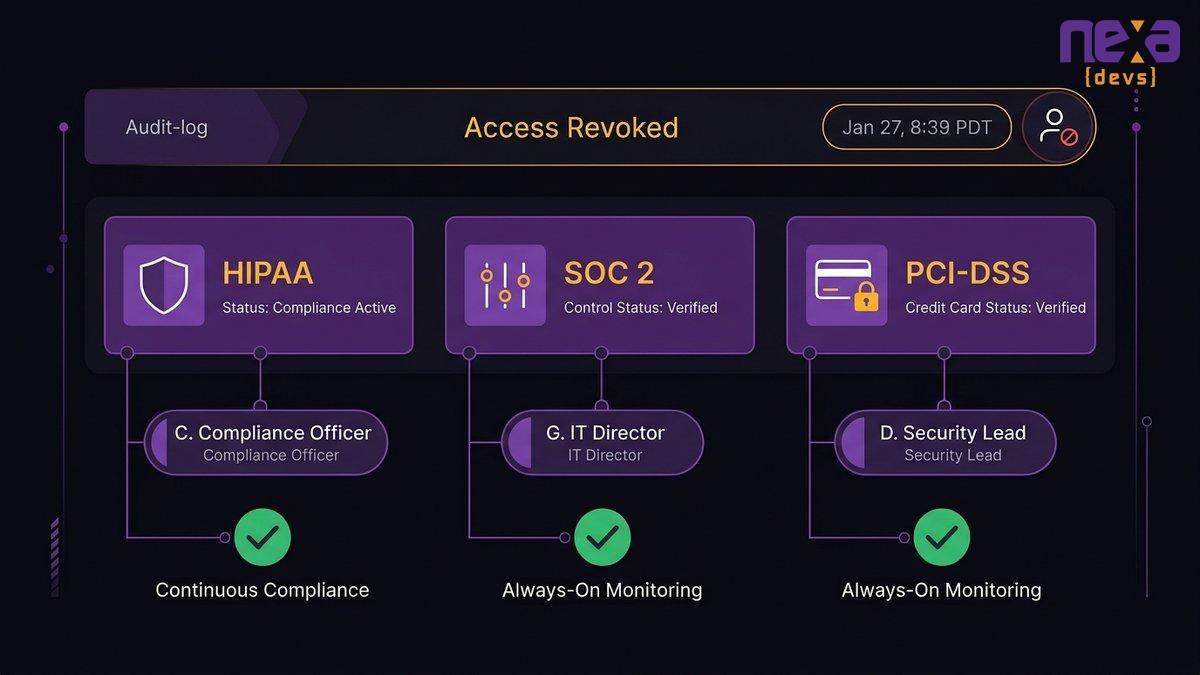
If the system you’re transitioning touches protected health information, cardholder data, or falls under a SOC 2 report, name a compliance owner alongside the transition owner, and confirm they’re the same conversation, not two separate ones. According to the U.S. Department of Health and Human Services, HIPAA’s security rule requires documented access controls and audit logging regardless of who operates the system, which means the outgoing vendor’s access needs to be logged as revoked, not just assumed gone.
Documenting controls so an audit never lapses
Map every control in your current compliance scope to a named owner before the transition starts, and update that mapping the day each control’s ownership changes hands. The PCI Security Standards Council’s requirements for access control and vendor management don’t pause for an internal staffing change, and an auditor reviewing the transition period will ask who owned each control on any given day. A gap in that mapping is the difference between a clean audit and a finding that costs months to remediate.
Compliance controls need documented continuity, not just a handoff email, when vendors change.
Switching development vendors carries real risk, but the risk is manageable with the right sequence: governance from day zero, stabilized access, an independent audit, live knowledge transfer, a parallel run that proves capability, and a cutover that revokes every outside credential. Handled in that order, a vendor switch stays a controlled project you can verify at every step. Handled out of order, it becomes the outage you didn’t see coming.
Nexa Devs runs this exact playbook for mid-market teams switching vendors, including teams inheriting systems in poor condition with degraded documentation. Complete documentation transfer happens on day one, not at project close, and it stays yours whether or not the engagement continues. For a deeper look at what complete documentation transfer actually includes, see outsourcing software development documentation.
If your current vendor relationship has already gone sideways rather than reaching a clean end, talk to our team about running an independent audit and a transition plan built around what your system actually needs.
FAQ
What should be included in a transition plan?
A vendor transition plan should name a single owner, inventory every credential and integration, set an independent audit baseline, schedule live knowledge-transfer walkthroughs, define parallel-run exit criteria, and include a cutover checklist that revokes the outgoing vendor’s access completely.
Can you provide an example of a transition plan?
A typical 90-day transition plan runs like this: days 1 to 14 lock down governance and access, days 15 to 45 run the independent audit and knowledge-transfer walkthroughs, days 46 to 75 run a parallel run against baseline metrics, and days 76 to 90 execute cutover and revoke the old vendor’s access.
How long does a vendor transition take?
Most mid-market vendor transitions take 60 to 90 days from notice to full cutover. Complex systems with multiple integrations or compliance requirements, like healthcare or fintech platforms, often need the full 90 days to run a proper parallel run before cutting over safely.
Do I need source code escrow when switching vendors?
Source code escrow protects against a vendor disappearing without warning, but it doesn’t replace an active transition plan. Escrow gives you a static code copy. It doesn’t give you the operational knowledge, documentation, or working access a live knowledge transfer provides.
What’s the difference between a vendor transition and a project rescue?
A vendor transition is planned: you choose the timing and run each phase in sequence. A project rescue happens after a vendor has already failed or disappeared, so the audit and access recovery happen under pressure, often without the outgoing vendor’s cooperation.
by Sarah Mitchell | Sep 17, 2026 | Business and Technology
The Business-Critical Spreadsheet Nobody Owns
Every department has one. A workbook on a shared drive that quietly runs procurement, scheduling, or the monthly ops report your leadership team reads every Monday. Call it what it is: unowned software your team depends on daily, built by one person who never set out to write your department’s core system.
The risk is simple to state. The file behaves like production software, but nobody manages it like production software. There’s no version control, no backup owner, and no documentation beyond what lives in one person’s head. When that person is out sick, promoted, or gone for good, the workflow keeping your team running walks out with them.
This isn’t really a spreadsheet problem. It’s an operational continuity problem wearing a spreadsheet’s clothes, and most COOs don’t see it clearly until the person who built it is already halfway out the door.
The business-critical spreadsheet nobody owns: how a personal file became production software
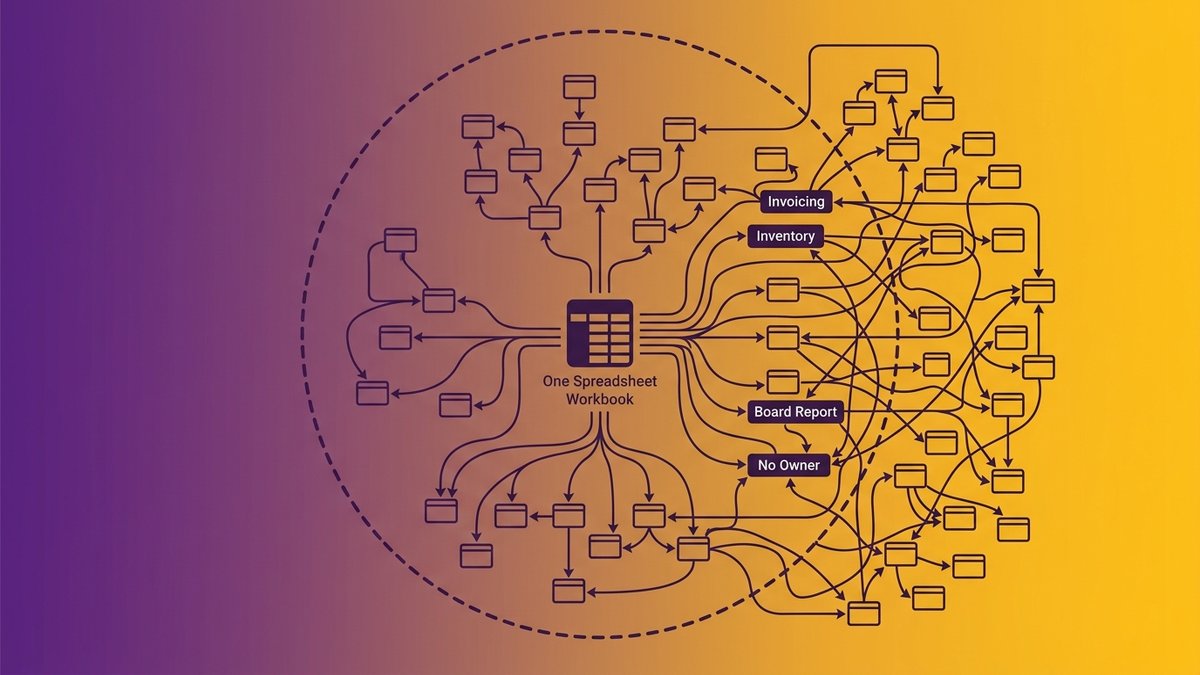
Someone in ops built a tracker two or three years ago to solve one afternoon’s problem. Today it runs invoicing, inventory counts, and the report your CEO pulls up before board meetings. Nobody remembers approving that promotion.
It always happens the same way. A spreadsheet doesn’t get selected as business-critical infrastructure through a procurement process, a security review, or an IT sign-off. It earns the role gradually, one added tab and one new formula at a time, until the day someone realizes the whole department would stall without it. By then, walking it back feels riskier than living with it.
A department spreadsheet with dozens of interconnected tabs, showing how a business-critical spreadsheet grows past what any one person can safely maintain
Compare that to how actual production software gets built. Code goes through review before it ships. Changes are tracked and reversible. Someone other than the original author can read it and understand what it does. A spreadsheet running your department has none of that, even though it carries the same weight. It has become the system of record without ever earning the discipline a system of record requires.
The European Spreadsheet Risks Interest Group has studied this for two decades, and the finding holds across industries: a personal tool crosses into “everyone relies on it” territory long before anyone treats it with the rigor that status demands. Nexa Devs sees this constantly in mid-market ops teams. The file usually isn’t badly built. It’s just being asked to do a job it was never designed to hold.
Bus factor of one: the key-person risk hiding in your most critical file
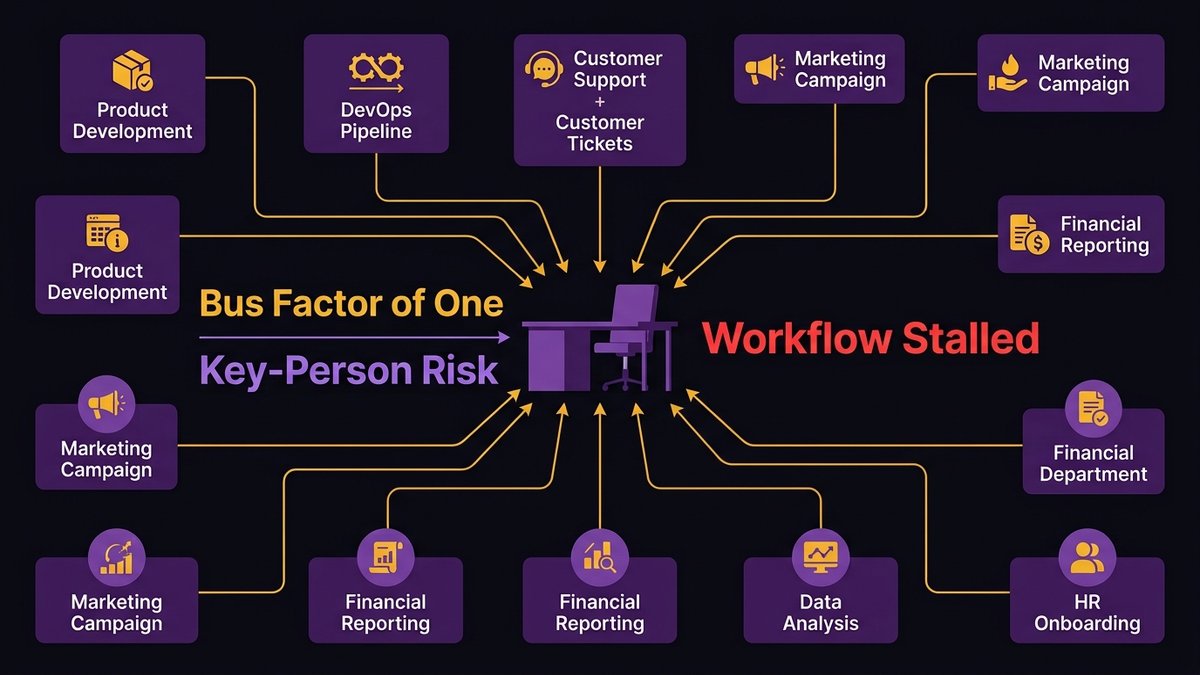
Ask who else on your team can open your master spreadsheet and rebuild it from scratch. If the honest answer is nobody, you’re running a bus factor of one on a system your department can’t function without.
“Bus factor” comes from software engineering, and it measures something specific: the number of people who could disappear before a project stalls out completely. Even mission-critical open-source databases like MySQL and PostgreSQL, software running inside millions of companies, carry a bus factor of roughly two. Most department spreadsheets don’t even clear that bar. One person wrote the formulas, one person knows what the color coding means, one person remembers why row 40 has a manual override nobody else is supposed to touch.
Ryan Steil, CEO of Rhodium Digital, has watched this play out across client engagements: “Clients running $30 million operations on spreadsheets, duct-taped middleware, or an overworked Excel genius who holds the entire reporting process together through brute force and caffeine.” That genius is a real person on your payroll, and their knowledge has never been written down anywhere you could hand to someone else.
An empty desk representing the operational gap left when the one person who understands a critical spreadsheet is suddenly unavailable
What happens the week that person is out or leaves
The first missed day is manageable. Someone covers, badly, and the team apologizes to whoever’s waiting on the report. The real damage shows up when the absence stretches past a week: a parental leave, a resignation, a sudden illness. Formulas break silently. Nobody notices a dropped row until a customer calls asking where their order went.
Research cited by SHRM found that 72% of companies have at least one employee whose sudden departure would meaningfully disrupt operations. That isn’t a rare edge case. It describes most of the organizations reading this, right now, today.
Why “just have someone else learn it” doesn’t work
Cross-training sounds like the obvious fix until you actually try it. A spreadsheet’s real logic rarely lives in the formulas. It lives in the judgment calls: which exceptions get manual overrides, which numbers get quietly adjusted before the report goes out, which tab is safe to ignore. None of that is written anywhere. ClearlyAcquired’s research on key-person risk puts the cost of replacing that kind of embedded technical knowledge at 150 to 400% of salary, with new hires needing months to reach full productivity even after they’re hired. Cross-training assumes there’s a backup to build, when the real work is extracting tacit knowledge that was never designed to leave one person’s head.
What it’s actually costing you: errors, rework, and missed SLAs
A single mistyped formula can misstate a quarter’s numbers before anyone catches it. Put bluntly, that’s what a business-critical spreadsheet costs you, and it happens more often than your team probably realizes.
Academic auditing research going back decades, the kind EuSpRIG has built its entire body of work around, consistently finds error rates in active spreadsheets far higher than most finance and ops leaders expect. The exact percentage varies by study, but the direction never does: spreadsheets with real complexity, the ones with nested formulas and cross-tab dependencies, are error-prone by design, not by accident. JPMorgan’s 2012 “London Whale” incident traced part of a multi-billion-dollar trading loss back to a spreadsheet copy-paste error buried inside a risk model nobody had properly reviewed. The exact figures attributed to that error vary by source, but the incident itself is well documented.
You don’t need a trading floor for this to bite. Picture a mid-market operations team where the weekly inventory reconciliation runs through a shared workbook with six linked tabs. One dragged formula, and the whole week’s reorder quantities are off. Someone catches it Thursday. Now the team is rebuilding two days of work while the warehouse waits on a decision it should have had Monday. Multiply that by every department running the same setup, and the hours add up fast. It’s not one dramatic failure that sinks a business-critical spreadsheet. It’s the slow bleed of rework hours, missed handoffs, and preventive maintenance quietly skipped because nobody flagged the schedule change buried three tabs deep.
Why “just add more automation” makes it worse
More automation on top of a spreadsheet doesn’t remove the dependency. It adds another layer that still depends on the same one person to maintain, and now that person has two systems to hold in their head instead of one.
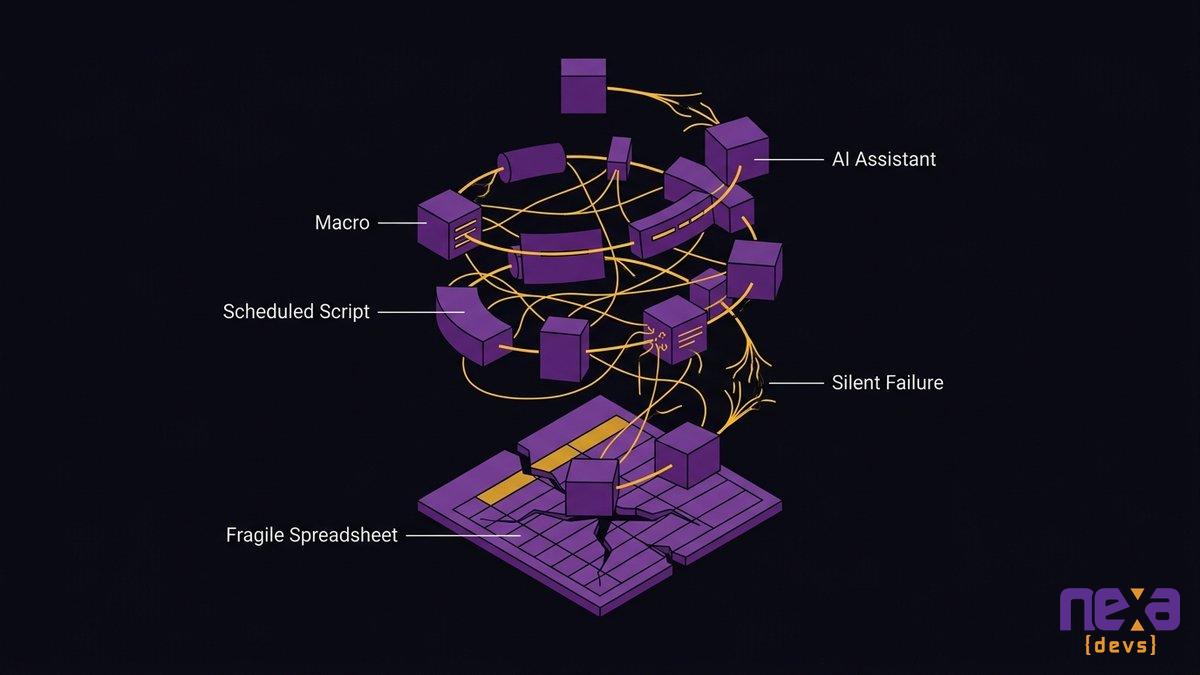
This is the trap most ops teams fall into, and it’s an understandable one. The spreadsheet is straining, so someone bolts on a macro, then a script that pulls data automatically, then a scheduled email that fires off the report. Each addition feels like progress. Each one is actually another point of failure stacked on the original single point of failure.
The workaround-on-a-workaround spiral
The pattern plays out predictably. The macro breaks when the source file’s column order changes. The scheduled script fails silently over a holiday weekend and nobody notices for three days. The automated email keeps sending, but it’s sending last week’s numbers because the underlying refresh quietly stopped working. None of these tools were built with monitoring, alerting, or a fallback plan, because none of them were built as software. They were built as patches on a patch.
We’d argue this is the single most expensive mistake a COO can make with a struggling spreadsheet: treating “add more automation” as a cheaper alternative to “replace the system.” It’s rarely cheaper. It just defers the cost and adds interest.
Where shadow automation and AI quietly enter
This is where AI tools have started showing up in ops workflows, usually without IT’s knowledge. An employee plugs a spreadsheet into an AI assistant to auto-generate a summary, or builds a lightweight automation using a no-code tool that connects to the same fragile file. It’s not malicious. It’s the same instinct that built the original spreadsheet: solve today’s problem with whatever’s on hand. But every one of these additions deepens the exact dependency it was meant to relieve, and now the knowledge required to maintain the system is spread across even more disconnected tools.
A tangle of connected automation scripts and AI tools all feeding off the same fragile spreadsheet, illustrating the workaround-on-a-workaround spiral
Why controls and governance don’t fix the underlying problem
Spreadsheet controls, version locking, sign-off workflows, contain the symptom. They don’t touch the reason the file exists in the first place.
Most organizations that take spreadsheet risk seriously eventually build a governance layer: an inventory of critical files, required approvals before major changes, periodic audits. These aren’t bad ideas. They genuinely reduce the odds of a catastrophic single error slipping through unnoticed. What they don’t do is answer the actual question a COO should be asking, which is why a spreadsheet is running a core department process instead of purpose-built software.
Controls manage risk within the workaround. They don’t remove the workaround. You can lock down who’s allowed to edit the master file and still have a system with a bus factor of one, because the underlying problem was never the lack of a sign-off process. It was that the real system, whatever platform your team is supposed to be using, doesn’t fit how the work actually happens. Read our breakdown of why spreadsheet-run operations break at scale Governance is worth doing. Just don’t mistake it for a fix.
Replacing the workaround layer with a system built around the workflow
The fix isn’t another SaaS subscription that promises to replace Excel. It’s a system designed around how your team actually works, not around a generic template built for a different company’s workflow.
That distinction matters more than it sounds like it should. Most off-the-shelf platforms fail the same way the spreadsheet eventually will: they don’t match the specific exceptions, approval chains, and edge cases your operation has accumulated over years. Teams end up building a new spreadsheet workaround around the new software within eighteen months. Same problem, prettier interface.
The starting point isn’t “what software should we buy.” It’s mapping what the spreadsheet is actually doing today, including the undocumented exceptions and manual overrides nobody wrote down. Nexa Devs starts every internal system engagement right here: AI-assisted requirements analysis surfaces the workflow logic buried in the file before a single line of code gets written, so the replacement system is built around how your team really operates, not around a guess at how it should.
Documentation and ownership you keep
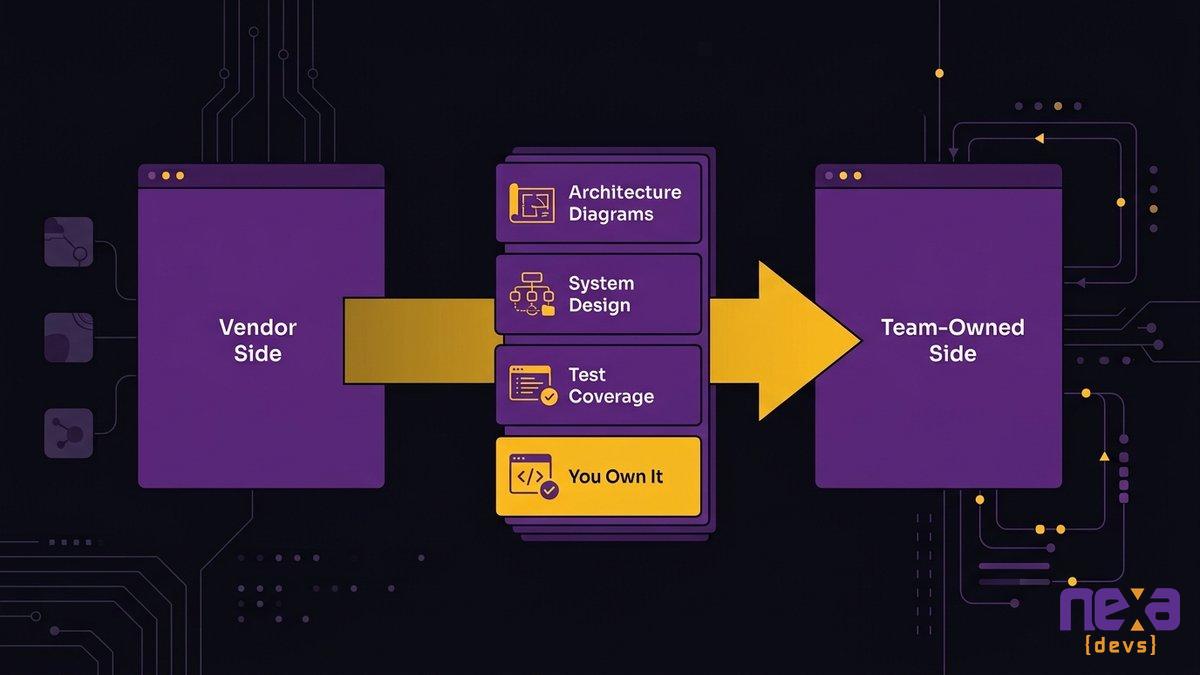
The difference between Nexa’s approach, the spreadsheet, and a typical outsourced project shows up clearly here. Nexa delivers complete documentation, architecture diagrams, system design records, test coverage reports, unconditionally, whether or not the engagement continues afterward. That documentation belongs to your team from day one. Instead of trading a workaround only one person understands for a black box only one vendor understands, you own the system, fully, the same way you’d own a building instead of renting one you can’t ever quite leave.
A team reviewing a complete system documentation package, showing the ownership handoff that replaces a single person’s tacit knowledge
A phased cutover that doesn’t break operations
Nobody wants to flip a switch and hope the new system holds. A responsible cutover runs the replacement alongside the existing spreadsheet for a defined period, department by department, verifying each piece against the old process before retiring it. See how AI-augmented delivery shortens modernization timelines The spreadsheet doesn’t disappear on day one. It gets replaced piece by piece, with each piece proven before the last workaround gets turned off.
Is this slower than a big rewrite done all at once? Sometimes, by a few weeks. It’s also the difference between a modernization project and an outage you have to explain to your board.
FAQ
What is a business-critical spreadsheet?
It’s a spreadsheet that quietly became your department’s system of record, running scheduling, reporting, or invoicing without documentation, backup ownership, or version control. Nobody planned it that way. One person built a workaround, and the workaround became infrastructure your team can’t run without.
What is key-person risk in a spreadsheet?
Key-person risk is what happens when only one employee truly understands how a critical file works. If they’re out, promoted, or gone, nobody can maintain, update, or fully explain the spreadsheet your operation depends on.
Why doesn’t adding automation fix spreadsheet dependency?
Automation built on top of a spreadsheet still depends on the same person to maintain it. You’re not removing the single point of failure. You’re adding another layer that also breaks when that person leaves.
Can documentation alone solve spreadsheet risk?
No. Documentation helps someone understand the file, but it doesn’t fix why the spreadsheet exists in the first place: a workflow the real system doesn’t support. You need a system built around that workflow, not better notes on the workaround.
How do you replace a business-critical spreadsheet without disrupting operations?
Map the actual workflow first, not just the spreadsheet’s columns. Then build the replacement in phases, running it alongside the spreadsheet until each piece is verified, with full documentation handed to your team at every step.
by Sarah Mitchell | Sep 15, 2026 | Custom Software Development
SIS Migration in Higher Education: Modernize First
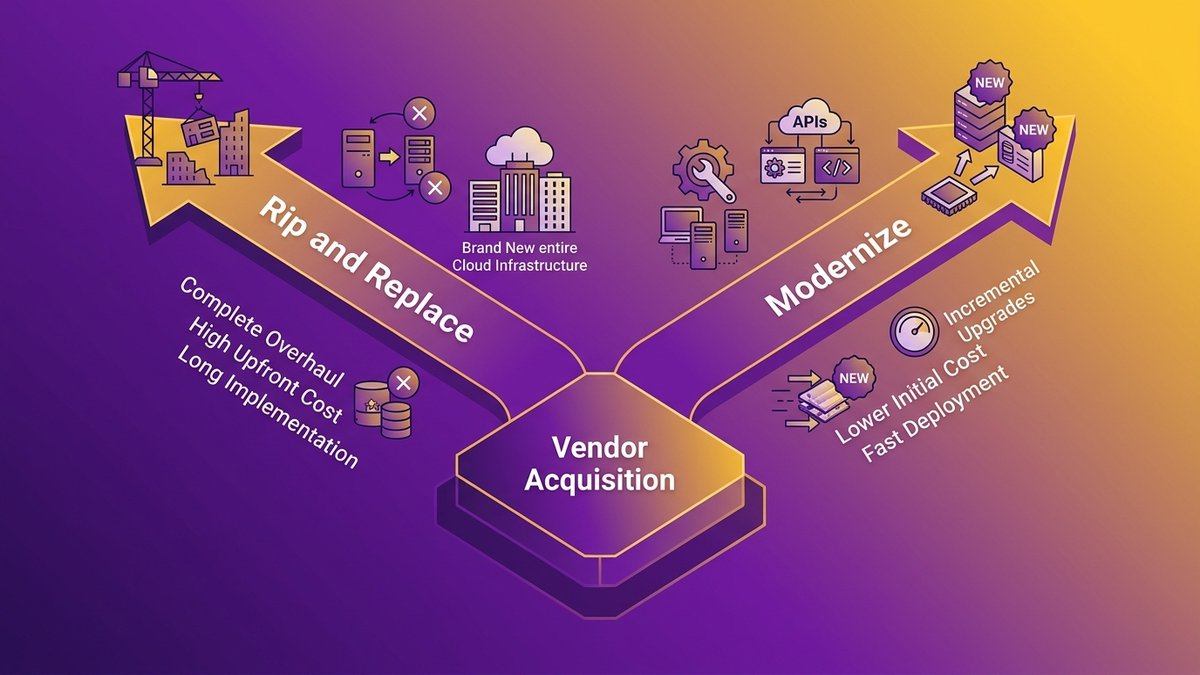
Anthology’s SIS and ERP business now belongs to Ellucian, and more than 260 higher education institutions woke up to a new vendor roadmap they never voted on. If your campus is one of them, the SIS migration higher education path you’re being handed by default runs 18 to 36 months and rarely holds to budget. That default isn’t your only option.
You can modernize and extend the systems your institution already owns, build an integration layer that keeps admissions, finance, and student records running through the transition, and come out the other side owning your data and your documentation instead of renting access to someone else’s platform.
This guide is for the IT Director or CTO who just learned their vendor’s roadmap changed hands, and for the President or CFO who has to approve whatever comes next.
Quick answer: modernize your SIS, don’t replace
- Ellucian’s acquisition of Anthology doesn’t force your institution into a full SIS replacement. It’s a decision point.
- Rip-and-replace SIS migrations run 18 to 36 months. Standard timelines rarely survive first contact with a real campus budget cycle.
- An integration and data layer keeps admissions, finance, and records running while you evaluate options on your own schedule.
- Modernizing systems you already own incrementally often costs less and disrupts less than a forced platform swap.
- Complete documentation transfer during any migration work stops the institution from trading one vendor lock-in for another.
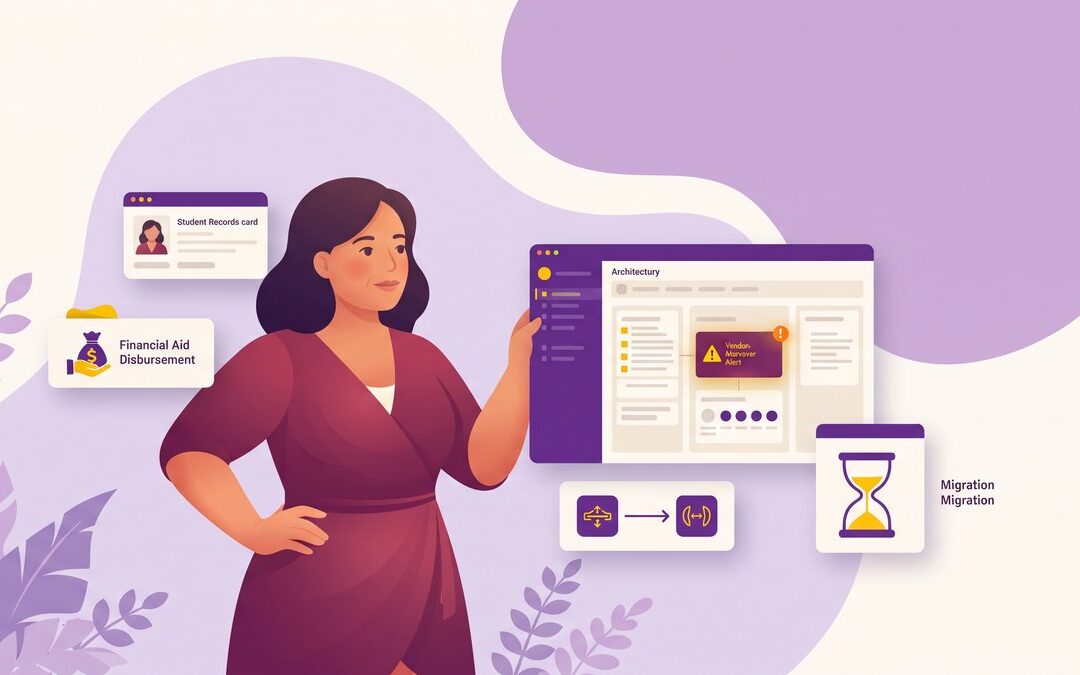
A mid-size university IT team reviewing what a vendor acquisition actually changes on campus
What the Anthology-to-Ellucian Consolidation Actually Means for Your Campus
Ellucian completed its acquisition of Anthology’s student information system and ERP business, folding in more than 260 institutions that had no vote in the matter. ERP Today reported it straight from the deal announcement page. If your campus ran Anthology Student, PowerCampus, or another product in that portfolio, your roadmap, your support contract, and your renewal terms all sit inside a different company now.
Anthology had been working through financial restructuring before the deal closed , and Ellucian picked up ownership of the ERP and SIS lines as part of that process. The question that matters for your institution isn’t the deal mechanics but whether your specific product sits on a roadmap Ellucian intends to keep funding, sunset gradually, or fold into its own SaaS platform on a timetable you don’t control.
PowerCampus customers in particular should ask their account team directly: is this product still on an active development roadmap, or is it being positioned as a migration path into Ellucian’s newer SaaS offering? Get that answer in writing. Don’t assume silence means stability.
The Rip-and-Replace Default: Why Standard SIS Migration in Higher Education Costs Years and Millions
A rip-and-replace SIS migration doesn’t start with a kickoff meeting. It starts with a vendor timeline that assumes your institution has years of runway and a budget line nobody’s touched yet.
The 18-to-36-Month Timeline Institutions Are Quietly Signed Up For
The standard phased approach vendors describe (data audit, cleansing, vendor selection, data mapping, test migration, parallel running, go-live) sounds orderly on a slide. In practice, a mid-size university runs this across multiple academic terms, because you can’t cut over admissions or financial aid processing in the middle of a semester. Most institutions default to this path anyway, mostly because nobody hands them an alternative framework until the vendor conversation is already underway.
Where the Budget Actually Goes (and Why It Overruns)
The education ERP market is projected to grow from $23.13 billion in 2026 to $41.18 billion by 2030, a 15.5% compound annual growth rate, according to Research and Markets. That growth comes from institutions signing new platform contracts, not from efficiency gains on old ones. Budget overruns on rip-and-replace projects typically come from three places: data remediation nobody scoped upfront, integration rebuilding for systems the vendor never audited, and staff retraining that gets underestimated by half. hidden tax of technical debt
Migration Is a Choice, Not a Sentence: A Decision Framework for Replace vs. Modernize
A vendor acquisition creates urgency. It doesn’t create an obligation. Your institution gets to decide whether the systems underneath your operations are actually failing, or whether you’re being pushed onto an acquirer’s rails on a timeline that serves their integration roadmap more than your campus.
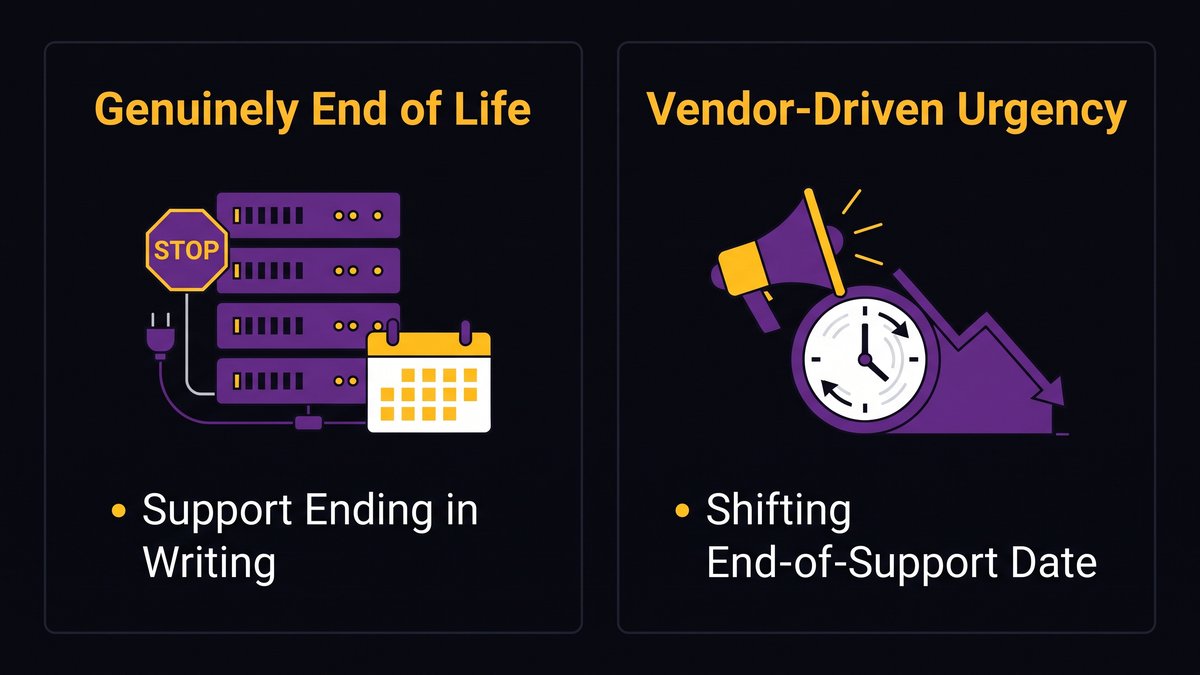
Signs Your Systems Are Genuinely at End of Life
- Your vendor has confirmed, in writing, that support and security patches are ending on a specific date
- Core compliance requirements (FERPA reporting, financial aid processing rules) can no longer be met without custom workarounds
- The system can’t integrate with anything built after roughly 2015 without a consultant on retainer
Signs You’re Being Pushed Onto the Acquirer’s Rails Prematurely
- The “end of support” date keeps moving whenever you ask for specifics
- Your current system still meets FERPA, financial aid, and reporting requirements without modification
- The proposed replacement timeline was set by the vendor’s integration roadmap, not by an assessment of your actual systems
A simple framework campus IT leaders can use to separate genuine end-of-life systems from vendor-driven urgency
Which one are you actually looking at? Most mid-size institutions, when they run this checklist honestly, find they’re closer to the second list. EDUCAUSE publishes ongoing research on higher ed IT decision-making that’s worth reviewing before you commit either way.
Where Forced Migrations Actually Break: Data, Integrations, and Institutional Knowledge
Ask any registrar what happens the week after a legacy SIS goes dark, and you’ll hear about the spreadsheet that quietly reconciled financial aid disbursements for six years. That spreadsheet was never in the migration scope document. It never is.
Data Migration and Data Quality
Years of manual corrections, duplicate student records from merged systems, and inconsistent course numbering all get inherited by whatever replaces your SIS. A rushed migration doesn’t clean that up. It just moves the mess to a new platform with a shinier interface.
The One-Off Integrations Holding Admissions, Finance, and Records Together
According to ListEdTech, 19% of higher education institutions run a homegrown grant management system, compared with just 1 to 5% for most other administrative categories, the highest homegrown share of any system type on campus. Those tools rarely show up in a vendor’s migration scope document, and they’re exactly the integrations that break first when a platform changes underneath them.
The person who knows why the financial aid export runs at 2 a.m. instead of during business hours usually isn’t in the migration planning meetings. When that person retires or leaves mid-project, the reason leaves with them. 1EdTech maintains interoperability standards that can reduce how much of this knowledge lives only in one person’s head, but only if your integration layer is built to use them.
The Integration and Data Layer That Keeps Your Campus Running Through the Transition
An integration layer has one job during a vendor transition: keep admissions, finance, and student records talking to each other while the platform question gets resolved on your own schedule, not the acquirer’s.
This is middleware work, not platform work. You build APIs that sit between your existing SIS, your finance system, and your student records, so daily operations don’t depend on any single vendor’s roadmap staying stable. Martin Fowler’s strangler fig pattern describes the underlying approach well: you route traffic through a new layer incrementally, replacing pieces of the old system as they’re actually ready, rather than freezing operations for a big-bang cutover.
For a registrar’s office, this looks like an API that keeps enrollment data synchronized correctly even if the underlying SIS product’s support status changes twice during your evaluation period. For finance, it means disbursement processing keeps running whether or not you’ve decided on a replacement platform yet. vendor handoff checklist
Modernize and Extend What You Already Own, Incrementally
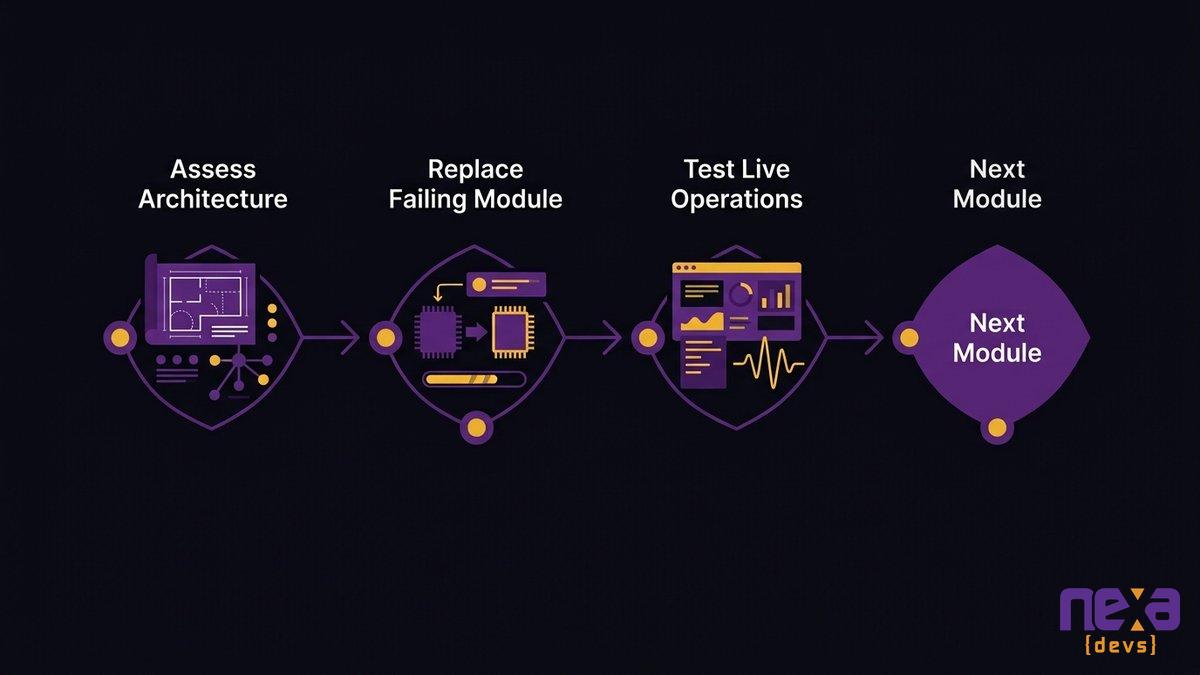
Incremental modernization isn’t about nursing broken systems along for another year. You replace the parts that are actually failing, one module at a time, while everything else keeps working.
Start with an architecture assessment that maps which parts of your current SIS environment are genuinely at risk versus which ones just look old. Nexa Devs has run this kind of work inside institutions like UNED, Europe’s largest distance-learning university, absorbing years of growing system complexity without forcing a full platform swap or a proportional expansion of internal IT headcount. The pattern holds in higher ed generally: modernize the module that’s actually failing, test it against live operations, and move to the next one only once the first is stable.
A phased modernization path that replaces failing modules one at a time instead of the whole platform at once
This approach costs less than a full rewrite for a simple reason: you’re not paying to rebuild what already works. You’re paying to fix what doesn’t, with AI-assisted architecture analysis and testing built into every phase instead of bolted on at the end.
Owning Your Systems and Your Documentation: Never Captive to One Vendor’s Roadmap Again
The Anthology-to-Ellucian consolidation is what vendor lock-in looks like from the outside: a decision made somewhere you weren’t in the room, executed on a timeline you didn’t set.
As Ashwin Ballal, CIO at Freshworks, states: “Legacy systems have become so complex that companies are increasingly turning to third-party vendors and consultants for help, but the problem is that, more often than not, organizations are trading one subpar legacy system for another.” That’s the trap worth naming directly: swapping vendors without changing the underlying dependency doesn’t solve anything. It only resets the clock on the next forced migration.
Pragmatic Coders puts it precisely: legal IP ownership isn’t the same as practical operational control. You can own the contractual rights to your data and still be functionally locked out if nobody on your team, or your partner’s team, ever documented how the pieces connect. Dreamix has documented the same failure mode from the other direction: documentation gaps and undocumented dependencies create expensive problems months after a transition completes, long after anyone thought to check.
Complete documentation, architecture diagrams, data schemas, integration maps, transferred to your institution at every project milestone instead of buried in a final deliverable, is the structural fix. institutional knowledge loss
Building the Business Case for the President and CFO
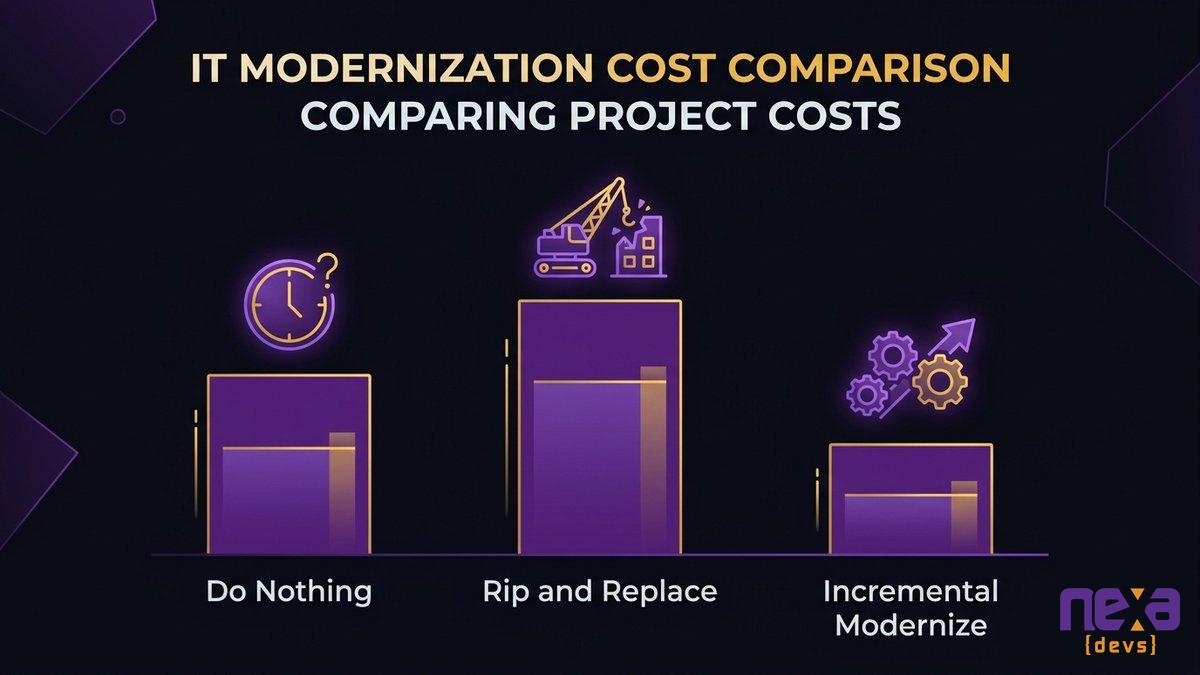
Your CFO doesn’t need architecture diagrams. They need three numbers, side by side: what doing nothing costs, what rip-and-replace costs, and what incremental modernization costs.
- What doing nothing costs. Ask what happens to compliance, financial aid processing, and reporting accuracy if support genuinely ends on your current product with no plan in place.
- A full rip-and-replace typically runs into seven figures once staff time, data remediation, and multi-year vendor fees are counted, not just the software license.
- Incremental modernization spreads cost across budget cycles instead of requiring one large capital approval, and it doesn’t require freezing all other IT projects for two to three years while the migration runs.
NACUBO publishes budget planning frameworks that can help translate this into language your board will recognize. A full rip-and-replace is rarely the right call for a mid-size institution mid-transition. Modernizing what you already own, on your own schedule, almost always is.
A comparison of doing-nothing, rip-and-replace, and incremental modernization costs prepared for a board presentation
Nexa Devs builds the integration and data layer that keeps your campus running through a vendor transition, modernizes the systems you already own instead of forcing a rebuild, and transfers complete documentation at every milestone so your institution owns what it’s paying for. Schedule an architecture assessment to map what’s actually at risk in your current SIS environment before your next contract renewal deadline forces the decision for you.
FAQ
What does the Ellucian acquisition of Anthology mean for my university’s SIS?
If your institution used Anthology Student, PowerCampus, or another Anthology SIS or ERP product, Ellucian now owns that platform’s roadmap, support terms, and pricing. That doesn’t automatically force a migration. Check your contract’s renewal terms and ask your account rep directly about support timelines for your specific product.
How long does a typical SIS migration take in higher education?
A full rip-and-replace SIS migration for a mid-size university typically runs 18 to 36 months, covering data migration, integration rebuilding, testing, and staff training. Incremental modernization of existing systems usually moves faster, since you’re replacing pieces instead of rebuilding the whole platform at once.
Can my institution keep its current SIS instead of switching vendors?
Yes, if your current system still meets core functional and security needs. A vendor acquisition changes who owns the roadmap, but your existing SIS doesn’t suddenly stop working. Many institutions modernize and extend what they have instead of accepting a forced replacement timeline.
What is a data integration layer, and why does it matter during an SIS transition?
A data integration layer is middleware that connects your SIS, finance system, and student records so they keep exchanging data correctly, even while the underlying platform question is unresolved. It keeps daily operations running without forcing an immediate full replacement decision.
How much does higher education ERP modernization cost?
Costs vary widely by scope. The global education ERP market is projected to grow from $23.13 billion in 2026 to $41.18 billion by 2030, according to Research and Markets. Incremental modernization of owned systems generally costs less than a full platform rip-and-replace, since you’re not paying for a complete rebuild.
What should be in an SIS vendor contract to prevent future lock-in?
Require complete documentation transfer, including data schemas, integration maps, and architecture records, as a standard deliverable rather than an optional add-on. Tie documentation delivery to project milestones instead of final payment. Confirm you retain practical operational control of your data, not just legal ownership on paper.
by Sarah Mitchell | Sep 10, 2026 | AI & Innovation Hub
AI Agent Access Control: Fixing the Plumbing Gap
Every mid-market engineering team runs the same experiment. Connect an AI agent to a few internal systems, watch it work, celebrate the demo. Then someone asks what happens if the agent misfires for ten minutes with the credentials it currently holds, and the room goes quiet.
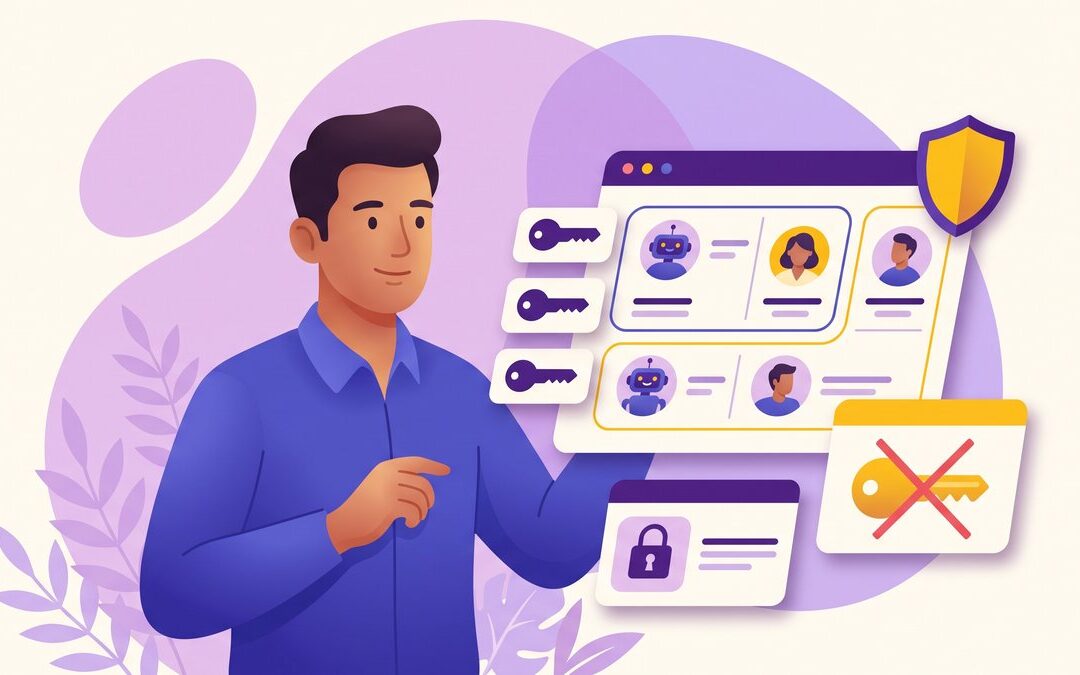
AI agent access control means giving each agent its own scoped, least-privilege identity instead of a shared API key, so it can only reach the specific systems and actions its task requires, and every action it takes gets logged and attributed to that identity. Most mid-market pilots skip this step. They wire an agent to a single service account with broad permissions because that’s the fastest path from prototype to demo, and that shortcut is what turns a working pilot into a security incident.
The problem isn’t the model. It’s the access surface underneath it, built for humans clicking through a UI one action at a time, not for software calling it thousands of times a minute with nobody watching. Fixing that surface, not restricting what the AI is allowed to think, is the actual engineering work ahead.
Quick answer: securing AI agent access control
- Give every agent its own scoped identity. A shared API key means one bad prompt can reach everything that key touches.
- Apply least-privilege by default. An agent should only call the specific endpoints its task requires, nothing broader “just in case.”
- Build a safe-access layer with APIs and MCP-based tool interfaces over legacy systems instead of granting raw database or admin access.
- Log every agent action to a per-identity audit trail, so you can answer “what did this agent do” in seconds, not weeks.
- Require human approval for irreversible actions: large transfers, deletions, or external messages sent on your behalf.
A visual comparison of a shared API key versus scoped, per-agent identities with individual permission boundaries
Why Every Agent Pilot Becomes a Breach Waiting to Happen
Set an over-permissioned agent loose with untrusted input and outbound access, and you don’t need a sophisticated attacker. A single malformed customer email can trigger it. Security researchers call this combination the lethal trifecta: private-data access, exposure to untrusted content, and the ability to take outbound action, all held by one agent at once.
The scale of the agent-security gap
Production security posture for AI agents is worse than most CTOs assume. Help Net Security’s 2026 research found that only 11% of production AI agents land in what researchers call the Fortified Leaders quadrant, where high attack surface meets strong defenses. The other 89% carry more access than their defenses can justify.
That gap isn’t evenly distributed. It concentrates hardest in mid-market environments, where a small platform team gets asked to wire agents into ERPs, CRMs, and internal tools that were never built with an API-first mindset. Nobody sat down and decided to grant an agent broad access. It accumulated one integration ticket at a time, the same way technical debt always does.
We’ve watched this happen inside client environments more than once: a proof-of-concept agent gets a “temporary” admin token to unblock a demo, the demo succeeds, the token quietly becomes permanent. Six months later, nobody on the team remembers why it has the scope it does. It just works, so nobody touches it.
A support agent with read access to customer records, an inbox to monitor, and reply authority is a lethal trifecta walking around loose. An attacker doesn’t need to breach your network. They just need to email the agent something that looks like an instruction.
Help Net Security reported on a mid-sized company where an AI agent kept using an expired credential nobody had logged, reaching customer records, source code, and HR files for an entire quarter before anyone noticed. Nobody revoked the access, because nobody was tracking that the agent had it in the first place.
This is the failure mode the rest of this piece addresses: not a smarter attacker, but an access surface nobody mapped. Restricting what an agent is capable of reaching is a plumbing problem, not a model problem, and it needs to be solved with the same rigor you’d apply to any privileged system account. why legacy systems block AI agent deployment
Anatomy of an Over-Permissioned Agent
Over-permissioning rarely happens on purpose. It happens because scoping access properly takes real engineering time, and shipping the demo doesn’t wait for it. Three patterns show up again and again.
The single shared API key shortcut
One key. One service account. Every agent action, every integration, every tool call routes through the same credential. It’s the fastest way to get an agent working across five systems by Friday, and it’s also the fastest way to make a single leaked secret catastrophic.
When every agent shares one identity, you lose the ability to answer a basic question during an incident: which agent did this? A shared key collapses five distinct actors into one undifferentiated blob of access. You can revoke the key, but you can’t selectively revoke just the piece that misbehaved without breaking everything else that depends on it.
Nexa’s engineering teams see this pattern constantly in mid-market codebases that were never built expecting programmatic callers. The workaround someone reached for under deadline pressure becomes the permanent architecture, because nobody schedules time to go back and fix it once the demo works.
Standing and expired credentials no one logs
Human employees get offboarded. Their accounts get disabled, their badges get deactivated, someone checks a box. Agent credentials almost never go through an equivalent process, because most organizations don’t treat non-human identities as identities that need a lifecycle at all.
That’s how you end up with the exact scenario Help Net Security documented: a credential expires on paper but keeps working in practice, because the system issuing it never enforced the expiration and nobody was watching the logs closely enough to notice. The agent didn’t do anything malicious. It just kept using access nobody remembered granting.
Standing credentials, ones that never expire and never get reviewed, are the single most common finding when Nexa’s teams run an architecture assessment on a client’s agent integrations. They’re rarely flagged as a problem until an audit or an incident forces the question.
How prompt injection weaponizes excess permissions
Prompt injection is the mechanism that turns excess scope into a live incident, and it stopped being hypothetical a long time ago. An attacker doesn’t need your credentials if your agent already has broad ones and can be tricked into using them.
A well-scoped agent that gets successfully prompt-injected can still only do limited damage, because its access ceiling caps the blast radius. An over-permissioned agent that gets injected can do almost anything a human administrator could do, at machine speed, without a human in the loop to notice something’s off. The vulnerability class is the same either way. The consequence is entirely a function of scope.
An illustration of how a malicious input can trigger unauthorized actions when an agent holds excess permissions
Why Mid-Market Internal Systems Can’t Safely Be Called by an Agent
Your ERP was built for a person clicking buttons, not for software issuing thousands of calls a minute. That mismatch, not the AI model, is the real reason mid-market agent pilots keep producing over-permissioned access.
Systems never designed for programmatic access at scale
Most mid-market internal systems, the finance platform, the practice management tool, the operations database, were built fifteen or twenty years ago around a human sitting at a screen. Authentication assumed a person typing a password. Authorization assumed a role assigned to an employee. Rate limits, if they exist at all, assume human typing speed.
An AI agent breaks every one of those assumptions. It doesn’t log in once a day. It calls the same endpoint hundreds of times in a single task. It doesn’t have a “role” in the HR sense, so someone has to invent one, and under deadline pressure the invented role is usually “give it whatever the admin has.”
David Burg, Cybersecurity Leader at Ernst & Young Americas, put the underlying issue plainly: “One of the challenges with legacy systems is that an accumulation of technical debt amasses over time. When they were built, developers were working with the institutional knowledge that existed at that time. The documentation of architecture, interoperability, and dependencies and such were likely never documented.” An agent trying to call into that undocumented system inherits every one of those gaps.
The legacy-integration bottleneck that forces the shortcut
The average enterprise runs on nearly 900 applications, and only about a third of them are properly integrated, according to Salesforce research. Every one of those unintegrated systems is a wall an agent has to get through somehow, and the fastest way through a wall with no door is to borrow the master key.
That’s the trap. Building a proper scoped interface for one legacy system takes weeks of engineering work. Grabbing an existing admin credential takes an afternoon. Under a deadline, the second option wins almost every time, and the resulting integration quietly becomes permanent infrastructure instead of the temporary hack it was meant to be.
This is precisely the gap Nexa’s engineering process is built to close: architecture assessments that map exactly which legacy systems an agent needs to reach, followed by scoped API and middleware work that gives it a real door instead of a stolen key. It doesn’t require ripping out the underlying system, only wrapping it with an interface that was designed for this use case instead of retrofitted under pressure. the hidden cost of unaddressed technical debt
Treat Every Agent as a First-Class Non-Human Identity
Stop thinking of an agent’s credentials as a technical detail and start thinking of the agent itself as an employee who needs onboarding, a defined role, and an offboarding process. That reframe changes almost everything about how the access gets built.
Per-agent scoped identities, not a shared key
Every agent, every tool, every integration should authenticate as itself, not as a shared service account. A billing agent gets an identity scoped to billing endpoints. A support agent gets a separate identity scoped to support tools. If one is compromised, the blast radius stops at the boundary of what that specific identity can reach.
None of this is new. Organizations already apply the same principle to human employees: an intern doesn’t get the CFO’s login. Non-human identities deserve the same discipline, and most mid-market environments simply haven’t extended it that far yet.
Least-privilege by default
Default every new agent integration to zero access, then grant exactly the permissions its specific task requires, nothing broader “for flexibility” or “in case we need it later.” Flexibility granted in advance is the surface a future prompt injection will exploit.
Least-privilege has to survive the agent’s entire lifecycle, not just its first setup. When its task changes, its scope should change with it, and permissions it no longer needs should get revoked rather than left in place because nobody wanted to risk breaking something.
Zero trust for non-human identities
Zero trust architecture, don’t automatically trust any request regardless of where it originates, verify continuously, applies at least as strongly to agents as it does to human users. NIST’s Zero Trust Architecture guidance (SP 800-207) treats every access request as untrusted until proven otherwise, and that standard doesn’t carve out an exception for software callers.
In practice, this means an agent’s identity gets verified on every call, not once at session start, and that verification checks not just “is this a valid credential” but “does this specific action fall within this identity’s current scope.” An agent that’s normally scoped to read-only reporting shouldn’t be able to trigger a write action just because its credential happens to still be valid.
A diagram showing continuous verification checkpoints for a non-human identity across multiple system calls
Build a Controlled Access Surface with APIs and Middleware
Give the agent a door, not a master key. That’s the entire architectural shift: a scoped interface layer between the agent and your legacy systems, instead of direct, unmediated access to the systems themselves.
A scoped safe-access layer over legacy systems
You don’t rebuild your ERP or your practice management platform. You build a thin, purpose-designed layer of APIs and middleware that sits in front of the legacy system and exposes only the specific operations an agent is allowed to perform. The legacy system stays exactly where it is. The agent never touches it directly.
This is the work Nexa delivers as standard on integration engagements: APIs and middleware that connect disparate internal systems, scoped to what each caller specifically needs rather than opened broadly because that was easier to configure. It’s engineering discipline applied to a new class of caller, not a new discipline invented from scratch.
Model Context Protocol gives agents a standardized way to call tools, and that standardization is itself a security win: every tool call becomes a discrete, loggable, scopeable event instead of an opaque database query buried inside application code. When an agent’s access is expressed as a defined set of MCP tools, you can see, name, and limit exactly what it’s capable of doing.
An over-permissioned MCP configuration is still possible. Exposing a generic “run this SQL” tool defeats the entire purpose of the pattern. A well-scoped configuration exposes named, narrow tools instead: “look up customer by ID,” not “query the database.” Nexa’s delivery teams use MCP-based integrations as a core engineering workflow specifically because that granularity makes least-privilege enforceable rather than aspirational.
Least-privilege scoping without a full rewrite
You don’t need to replace the underlying system to fix this. A scoped API and middleware layer can go live in weeks, not the years a platform rip-and-replace would take, because it wraps the existing system instead of rebuilding it. That’s the practical argument for a mid-market CTO who doesn’t have the runway or the risk tolerance for a big-bang migration.
Skylar Roebuck, CTO at Solvd, frames the underlying risk this way: “Traditional modernization tends to over-index on protecting how things work today rather than building for what’s next. AI capability is compounding rapidly, and the real risk for mid-market companies is delay.” Every quarter spent without a scoped access layer is a quarter of accumulated exposure, not a quarter of safety bought by inaction. how legacy stacks block AI agent deployment
Make Every Agent Action Auditable
If you can’t answer “what did this agent do yesterday” in under a minute, you don’t have an audit trail. You have logs somewhere that nobody has time to read until after something has already gone wrong.
Per-identity audit trails
Every action an agent takes should write to a log tied to that agent’s specific identity, not a shared application log where its calls blend into everyone else’s. That per-identity trail is what lets a security team answer the only question that matters during an incident: exactly which actions did this specific agent take, in what order, against what data.
This is where scoped identities and audit logging reinforce each other. A shared credential produces a shared, ambiguous log. A per-agent identity produces a clean, attributable one. You can’t build accountability on top of an architecture that never separated the actors in the first place.
Documenting what each agent can and cannot reach
Every agent in production should have a written, current answer to a simple question: what can it reach, and what can’t it? Not a diagram from the kickoff meeting eighteen months ago. A living document that gets updated the moment scope changes.
This is where Nexa’s standard delivery practice becomes a security control rather than a nice-to-have: complete documentation transfer, UML diagrams, API references, architecture decision records, applied specifically to what each agent identity can and cannot touch. When that documentation stays current and lives with the client rather than locked in a departed vendor’s head, a new engineer or a security auditor can answer “is this agent over-scoped” without reverse-engineering the integration from scratch.
Runtime Monitoring and Human-in-the-Loop for High-Impact Actions
Scoping access at setup time isn’t the finish line. An agent that behaved normally for six months can start behaving abnormally the moment its prompt changes, its upstream data source gets compromised, or someone quietly widens its permissions to unblock a ticket.
Behavioral monitoring and anomaly detection
Watch for what changed, not just what happened. An agent that normally makes twenty calls a day and suddenly makes two thousand is worth a look, even if every individual call is technically within its scope. Volume and pattern shifts catch problems that permission checks alone will miss.
Runtime monitoring for agents borrows heavily from existing SIEM and behavioral analytics practice for human users. The difference is baseline: an agent’s “normal” behavior is far more predictable than a human’s, which actually makes anomalies easier to spot once you’re looking for them.
Approval flows for irreversible actions
Not every action deserves the same trust level. Reading a report and wiring $50,000 are not the same category of risk, and they shouldn’t route through the same approval path. Draw a hard line around actions that can’t be undone, large financial transfers, permanent deletions, external communications sent under your company’s name, and require a human to click “approve” before they execute.
This is the same control you’d apply to a new hire in their first week: full trust for reversible, low-stakes work, a second set of eyes on anything that can’t be walked back. Multi-agent setups raise the stakes further, since one agent’s output can become another agent’s trusted input; the same approval discipline should apply anywhere an irreversible action sits downstream of automated reasoning.
If your team is still deciding whether to build this layer in-house or bring in a partner who’s already done it, our piece on what actually blocks AI agents from reaching production walks through the infrastructure gaps that show up first.
What a Controlled Agent Surface Looks Like in Practice
The answer is not “don’t deploy agents.” That advice is both unrealistic and, frankly, bad business guidance in 2026. The fix is giving agents a controlled surface to act on: scoped identities instead of shared keys, MCP-based tool interfaces instead of raw database access, audit trails instead of silence, and human approval on anything irreversible.
None of that requires ripping out the systems your business runs on today. It requires an API and middleware layer purpose-built for this new class of caller, engineered with the same rigor you’d apply to any system handling customer data. That’s engineering work Nexa delivers as a standard part of how we build, not an add-on security product bolted onto a finished pilot after the fact.
A CTO who ships this layer before the next agent pilot isn’t slowing the roadmap down. They’re the reason the roadmap survives its first incident intact. Ready to see exactly where your systems stand? book an architecture assessment
An overview diagram of a complete controlled access surface, from scoped identity through audit trail to human approval
FAQ
How do I secure AI agent access?
Give each agent its own scoped, least-privilege identity instead of a shared credential, wrap legacy systems in a scoped API or MCP-based interface, log every action to a per-identity audit trail, and require human approval before irreversible actions execute.
What are the common vulnerabilities of AI agents?
The most common vulnerabilities are over-permissioned credentials, prompt injection that hijacks excess access, standing or expired credentials nobody monitors, and the lethal trifecta of private-data access, untrusted input, and outbound action combined in one agent.
How secure are AI agents?
Most production AI agents aren’t secure by default. Help Net Security’s 2026 research found only 11% of production agents reach the strongest security posture, meaning roughly 9 in 10 carry more access than their defenses can justify.
What is least-privilege access for an AI agent?
Least-privilege means an agent only gets the specific permissions its task requires, nothing broader. If it only needs to read customer names, it shouldn’t also be able to edit billing records or delete accounts.
What is a non-human identity?
A non-human identity is a distinct, trackable identity assigned to software, like an AI agent or a service, instead of a shared credential. It gets its own scope, audit trail, and lifecycle, the same way a human employee account does.
by Sarah Mitchell | Sep 8, 2026 | Software Development Best Practices
Legacy Migration Strategy: Big-Bang vs Incremental
A legacy migration strategy comes down to one choice: replace everything on a single cutover date, or replace the system piece by piece while it keeps running. The first approach is a big-bang rewrite. The second is incremental migration, usually built on the strangler fig pattern. For most mid-market companies, incremental wins.
Big-bang rewrites fail at a rate that should alarm any CEO signing the budget, and the reason is structural rather than bad luck. Teams start rebuilding before they understand what the current system actually does, then bet the entire project on one delivery date set eighteen months out. Incremental migration avoids both mistakes. You map the system before touching it, and you ship value in gated phases the board can actually see.
This guide covers why big-bang rewrites fail so often, how the strangler fig pattern works mechanically, and how to sequence an incremental roadmap that doesn’t stall halfway through.
Quick answer: choosing your legacy migration strategy
- Big-bang rewrites replace everything on one cutover date. Incremental migration replaces the system piece by piece while the old one keeps running.
- Big-bang rewrites fail more often because teams start rebuilding before they understand what the current system actually does.
- Incremental migration gives a CEO value-gated milestones the board can see, instead of one high-risk delivery date eighteen months out.
- The strangler fig pattern routes traffic gradually from old code to new code, so every cutover stays reversible.
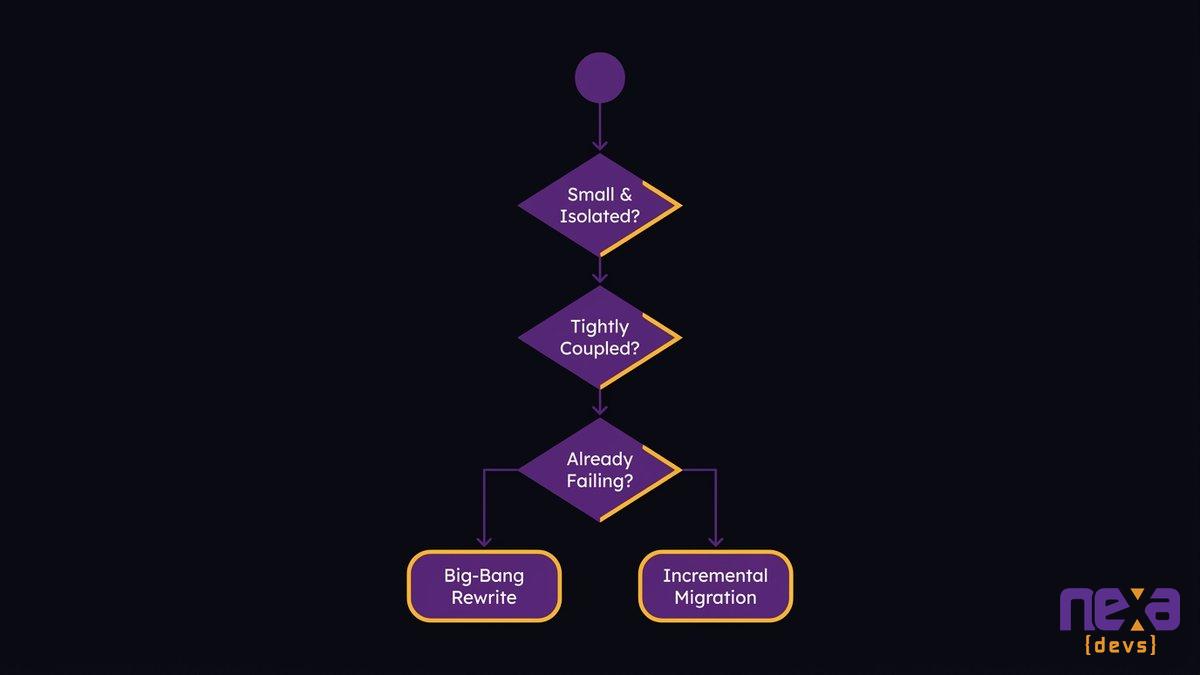
- Most mid-market teams should default to incremental delivery. A full rewrite is only defensible for small, isolated, well-understood systems.
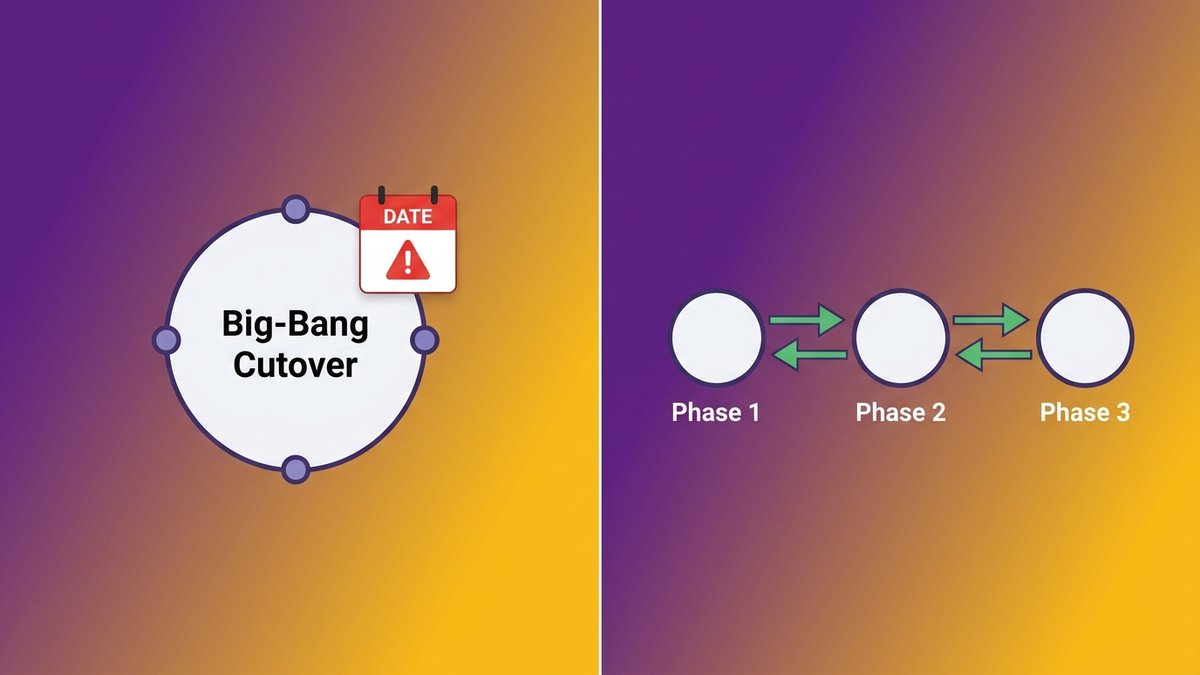
A side-by-side view of the two migration paths: one high-risk cutover date versus a series of smaller, reversible phases
The Real Reason Modernization Projects Stall
A CTO at a 200-person logistics firm once told us her team hadn’t shipped a customer-facing feature in four months. Nothing had broken. Nothing had shipped either. Every sprint went to keeping the current system running.
That’s the legacy tax at work: the slow transfer of engineering capacity from building new things to defending old ones. CIO Dive’s analysis of enterprise IT spending found teams sending 43% of budget to legacy maintenance and just 29% to transformative technology work. The rest goes to keeping systems compliant, patched, and barely stable.
The tax compounds every year a system goes unaddressed. Dependencies get more tangled. The people who understand the original design get harder to reach. Boards start asking why velocity keeps dropping, and engineering leaders start dreading that question, because the honest answer (most of our capacity goes to holding the current system together) doesn’t sound like a plan. It sounds like an excuse.
This is the moment most companies decide to modernize. It’s also the moment they make the decision that determines whether the project ships or stalls: how do you get from the system you have to the system you need?
Big-Bang Rewrite vs Incremental Migration: What the Choice Actually Means
Two paths exist for retiring an aging system, and only one lets you change your mind halfway through. Both start from the same diagnosis. They diverge completely on execution.
This isn’t the classic “rewrite vs. refactor” debate that plays out inside a single codebase, where a team decides whether to clean up one module or start it over. Here you’re deciding how to retire an entire legacy platform, and that decision shapes budget, timeline, and risk for the next one to two years.
The big-bang rewrite: one date, all-or-nothing
A big-bang rewrite builds the replacement system in parallel, off to the side, while the legacy system keeps running production unchanged. Nothing goes live until the new system is judged “done.” On cutover day, traffic switches all at once. The old system gets retired, usually within weeks.
It’s the approach most people picture when they hear “system migration process.” It’s also a lift-and-shift in the worst sense: everything moves at once, on a single date, with no partial credit for getting most of it right.
The incremental path: replace in place, piece by piece
Incremental migration replaces functionality in slices. One workflow, one module, or one customer segment moves to the new system while everything else keeps running on the old one. Both systems coexist for months, sometimes longer, connected by a routing layer that decides which system handles which request.
This is the phased migration approach behind the strangler fig pattern, which we’ll walk through mechanically in the next section. The short version: you never bet the whole project on one date, because there is no single date.
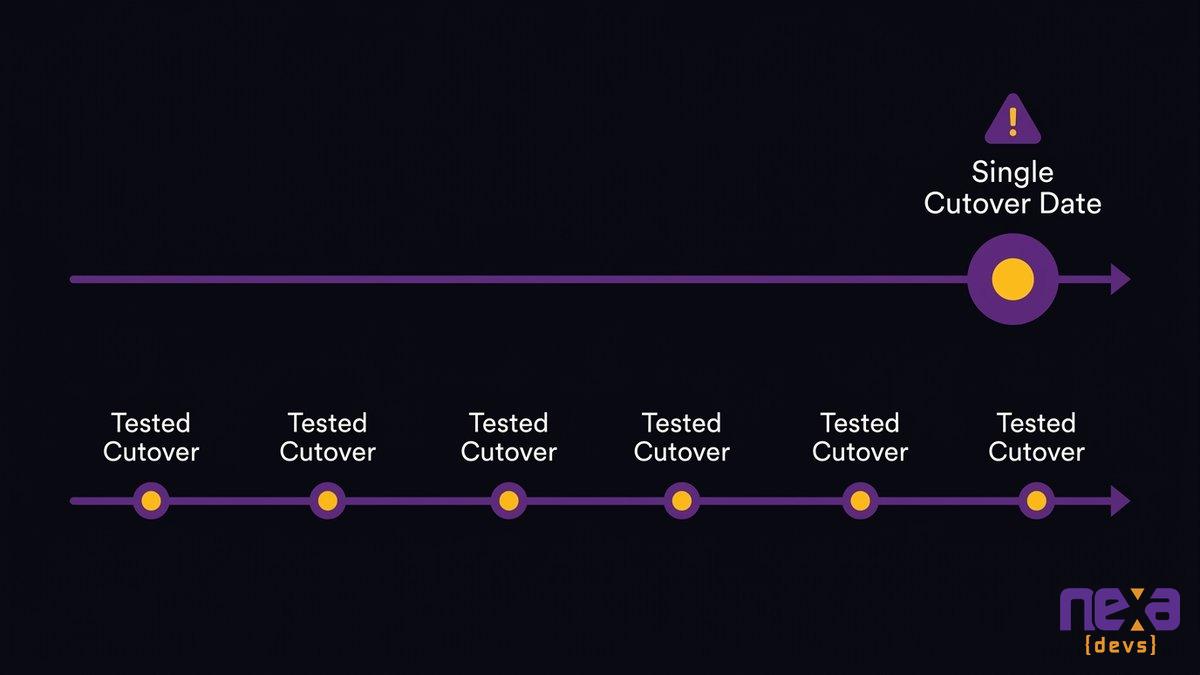
A timeline view comparing a single high-stakes cutover date against a sequence of smaller, independently tested cutovers
Why Big-Bang Rewrites Are the Most Common Way Modernization Dies
Big-bang rewrites fail at a rate that should worry anyone signing the check. Hypertrends’ 2026 research found that big-bang modernization projects fail more than 70% of the time, whether “fail” means over budget, past deadline, or quietly shelved. That number holds up against what we see across mid-market engagements: the pattern is structural, not situational.
The comprehension gap: starting before you understand the system you have
Most rewrite projects start with a requirements document, not a system audit. Nobody maps what the current codebase actually does before deciding what the new one should do instead. Edge cases that took years to discover in production get rediscovered the hard way, usually after launch, usually by an angry customer.
As Ashwin Ballal, CIO at Freshworks, states: “Legacy systems have become so complex that companies are increasingly turning to third-party vendors and consultants for help, but the problem is that, more often than not, organizations are trading one subpar legacy system for another. Adding vendors and consultants often compounds the problem, bringing in new layers of complexity rather than resolving the old ones.” A rewrite built on an incomplete understanding of the original system doesn’t remove the legacy tax. It just moves into a newer building.
The single-cutover risk: everything rides on one delivery date
TSB Bank’s 2018 core banking migration is the case study every CTO in financial services already knows. On cutover weekend, a large share of TSB’s customer base lost access to online and mobile banking, and the outage stretched on for weeks. The financial and regulatory fallout, later covered extensively by the Financial Times and the BBC, ran into the hundreds of millions of pounds.
A single cutover date means every risk in the project (technical, operational, and organizational) lands on the same day. There’s no partial rollback, no gradual detection of what broke. There’s a go-live and a postmortem.
How the Strangler Fig Pattern Works in Practice
Martin Fowler, who named the pattern, borrowed the term from a vine that grows around a host tree until the original tree is gone and the vine stands on its own. Fowler’s original description frames incremental replacement as a discipline, not just a scheduling choice.
Routing and the facade layer
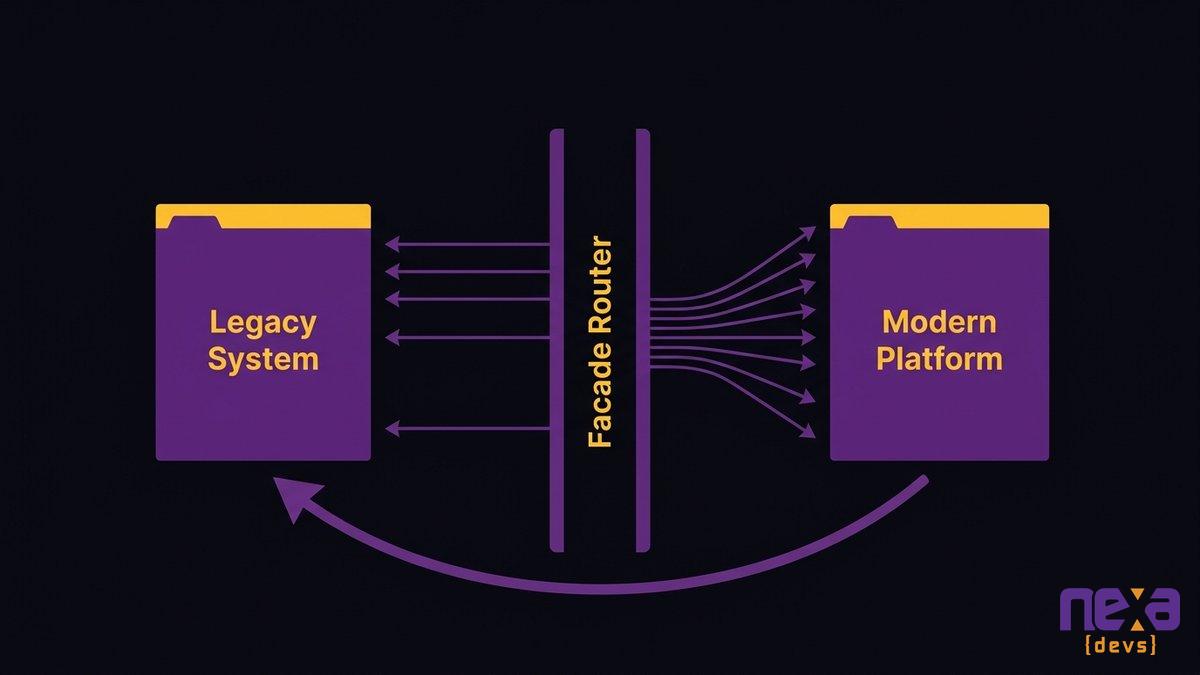
A facade layer sits in front of both systems and decides, request by request, which system handles the work. Early on, almost everything routes to the legacy platform. As new functionality ships, more traffic routes to the new system, one endpoint or one workflow at a time. Users never see the switch. They just notice, eventually, that features ship faster.
This is the same mechanism behind a monolith to microservices migration, except the target architecture doesn’t have to be microservices. It can be a modern monolith, a modular service layer, or anything else that fits the team’s operating model. The facade is what makes the migration incremental. The target architecture is a separate decision.
Parallel running and reversible cutovers
Each slice of functionality runs in parallel for a defined window before the old path gets retired. If something breaks, the facade routes traffic back to the legacy system in minutes, not weeks. Nobody is betting the business on a single migration event, because there isn’t one. There are dozens of small, individually reversible ones.
How a routing layer gradually shifts traffic from the old system to the new one, keeping each cutover reversible
What Incremental Delivery Gives a Non-Technical Budget Owner
A big-bang rewrite gives the board one report: green until the day it’s red. Incremental delivery gives a dozen reports, each one gated to a milestone the board can actually see and evaluate on its own merits.
Value-gated milestones the board can see
Every phase of an incremental migration ships something real: a workflow that’s faster, a report that’s more accurate, a feature the old system couldn’t support. The CEO isn’t asked to trust an 18-month plan on faith. Each phase either delivers the value it promised or it doesn’t, and the next phase gets funded, adjusted, or paused based on evidence instead of a sunk-cost bet.
Technical debt doesn’t just slow down engineering. AEI’s 2025 analysis puts the annual cost of unaddressed technical debt to the US economy at roughly $2.41 trillion. It’s the number a board sees when nobody acts. Value-gated milestones are how you show a board that action is producing something measurable instead of just spending against that number.
Accountability at every cutover, not one delivery date
A big-bang rewrite typically ends with a single handoff: the vendor delivers, invoices, and moves on. If the system fails six months later, who answers for it depends on the contract, and contracts written before launch rarely cover problems discovered after. This is where Nexa Devs’ engagement model diverges from a standard project vendor. Every phase runs under the same SLA-based partnership, so accountability doesn’t reset at each cutover. And because documentation transfers to the client unconditionally at every stage, not just at final delivery, each phase is something the client actually owns and can operate without Nexa in the room. Reversibility here isn’t only architectural, it’s contractual.
Choosing Your Path: A Decision Framework
Incremental is the safer default for most mid-market teams. A rewrite still makes sense, but only in a narrow set of cases, and pretending otherwise is how projects end up as another Hypertrends statistic.
When a rewrite is actually defensible
A full rewrite makes sense when the system is small enough to fully understand in a few weeks, isolated enough that few other systems depend on it, and either already failing outright or built on a platform nobody can hire for anymore. Under those conditions, the comprehension gap shrinks and the single-cutover risk shrinks with it. Replatforming versus re-architecture becomes a much smaller decision when the blast radius is small.
When incremental is the safer default
Everywhere else, incremental wins. Systems tightly coupled to other internal tools, systems processing regulated or customer-facing transactions, and systems nobody on the current team fully understands are exactly the cases where a single cutover date is the riskiest possible plan. Deloitte’s research, cited by Aalpha, found that phased modernization led to a 25 to 40% reduction in IT operational costs over three years compared to rip-and-replace approaches.
As Skylar Roebuck, CTO at Solvd, puts it: “Traditional modernization tends to over-index on protecting how things work today rather than building for what’s next. AI capability is compounding rapidly, and the real risk for mid-market companies is delay.” Most people read incremental as the cautious option. In practice it’s the one that keeps you shipping while the rest of the system catches up.
A simple decision tree: system size, coupling, and current failure state determine which migration path fits
Sequencing an Incremental Modernization Roadmap
Skip the comprehension phase and every phase after it inherits the same blind spot. Map the system first. Everything else in the roadmap depends on that map being accurate.
Comprehension first: map what exists before you touch it
Before any code moves, document what the current system does: its dependencies, its undocumented business rules, and the workflows nobody wrote down because the person who built them never left. This is usually the slowest part of a manual modernization effort, and it’s also where an AI-augmented delivery process earns its keep. how incremental AI integration works without a full rewrite Automated dependency mapping and code analysis compress a comprehension phase that used to take months into weeks, without skipping the step that big-bang projects skip.
Prioritize by risk and value, not by what’s easiest
The instinct is to migrate the easiest module first, because it feels like progress. Better sequencing prioritizes by a combination of business risk and business value: which workflow, if migrated successfully, proves the pattern works and unlocks the most value for the least exposure? That module becomes phase one, not because it’s simple, but because getting it right builds the case for phase two.
What You Gain After Escaping the Legacy Tax
Feature velocity comes back first. Maintenance cost drops months later, once enough of the legacy surface area has actually shrunk.
Teams report shipping features in weeks that used to take a quarter, simply because engineers are no longer routing around a system they don’t fully trust. The legacy modernization market itself reflects how widespread this shift has become. Mordor Intelligence projects the global legacy modernization market to reach $29.39 billion in 2026, up from $24.98 billion the year before, as more mid-market companies decide the cost of standing still now exceeds the cost of moving.
The bigger shift is less visible on a spreadsheet. Systems built or modernized through an incremental, well-documented process are ready for the next thing, whether that’s an AI feature, a new integration, or a team that didn’t build the original system taking it over without months of archaeology. the hidden tax of technical debt and what it costs every year you wait That readiness, not just lower maintenance cost, is what actually justifies the migration.
Choosing a legacy migration strategy isn’t really a technology decision. It’s a risk management decision that happens to involve technology. Big-bang rewrites bet everything on a date. Incremental migration, built on comprehension first and reversible cutovers, bets on a process instead. Talk to Nexa Devs about a phased legacy migration roadmap →
FAQ
What are the 7 migration strategies?
The 7 R’s framework, popularized by AWS, covers rehost, replatform, repurchase, refactor, re-architect, retire, and retain. Most mid-market migrations combine two or three of these across different parts of the system rather than applying one strategy to everything.
Why do companies still use legacy systems?
Because replacing them feels riskier than keeping them. The system still runs, switching costs money right now, and nobody wants to own a failed cutover. Fear drives it, not laziness.
What is legacy data migration?
It’s the process of moving data from an old system into a modern platform, including cleaning and validating it so nothing breaks. It’s usually one part of a larger application migration, not the whole project.
What is the strangler fig pattern?
It replaces a legacy system piece by piece. A routing layer sends some traffic to new code and the rest to the old system, growing the new system gradually until nothing routes to the old one anymore.
Is a big-bang rewrite ever the right choice?
Rarely. It only makes sense when the system is small, isolated, and well understood, or already failing outright. For most production systems, a big-bang rewrite carries more risk than it’s worth.