by Sarah Mitchell | Oct 8, 2026 | Software Development Best Practices
Slow Release Cycles Aren’t a People Problem
If features that used to ship in two weeks now take twelve, your developers almost certainly did not get worse at their jobs. The system around them got more expensive to change. That is a different problem, and it takes a different fix.
Slow release cycles happen because every change now touches more of the system than it should. More surface area means more re-verification, and once re-verification gets expensive, batching changes into bigger and riskier releases starts to look like the only safe option left. How fast you ship tracks how much you trust the system, which is why pushing the team harder does so little.
Whether you are the CEO watching the roadmap slip or the CTO who already knows why and needs the language to explain it upward, what follows is the mechanism behind the slowdown, why AI coding tools haven’t closed it, and four questions that measure your own cost of change.
Quick answer: why release cycles slow down
- Slow release cycles usually mean the system got expensive to change, not that developers got less productive.
- Every change touches more of the system than it should, so teams batch changes into bigger, riskier releases to stay safe.
- AI coding tools haven’t fixed this because the bottleneck was never typing speed. Re-verification and confidence set the pace.
- Four questions reveal your real cost of change: time to production, waiting versus working, regression share, and deferred work.
- Measure your cost of change before picking a modernization approach. Don’t default to a rewrite because it feels decisive.

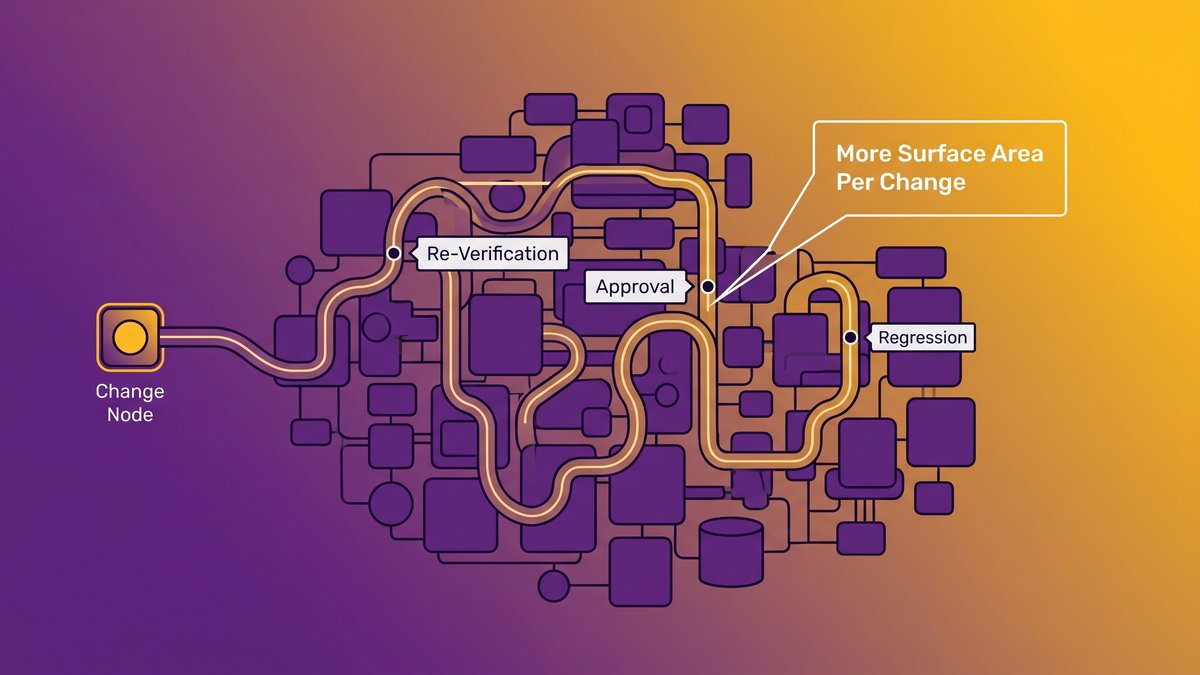
A single change has to clear more checkpoints than it should when a system grows without clear boundaries.
Your Developers Are Not Unproductive. Your System Got Expensive to Change.
A mid-market CEO told the team at modernization consultancy Corgibytes exactly this: “Features used to take two weeks to push three years ago. Now they’re taking 12 weeks. My developers are super unproductive.” He had the facts right and the diagnosis wrong.
His developers didn’t get slower. His system got more expensive to change. The wording matters because it decides where the money goes next.
Two different problems, two different fixes
A productivity problem gets solved with headcount, training, or a new project management tool. A cost-of-change problem gets solved by reducing how much of the system a typical change has to touch, which makes it an architecture problem that no change to the org chart ever reaches. Hire five more engineers into a system where every change ripples outward, and you’ll ship the same twelve-week features, just with five more people billing hours against them.
Why the productivity diagnosis sends the money to the wrong place
Boards and budget owners default to the productivity story because it’s the comfortable one. It doesn’t implicate a decade of architectural decisions, and it comes with a familiar fix: hire, pressure, repeat. First Round Review’s interview with Corgibytes is worth reading in full. The CEO quoted there isn’t an outlier, according to the piece, just the most quotable version of a call Corgibytes fields regularly.
What Twelve-Week Features Actually Cost the Business
Twelve weeks for a feature that used to take two annoys every customer waiting on it. The costlier damage is a budget problem most leadership teams never trace back to engineering.
What slips first: time to market and customer patience
Every week a feature sits in the pipeline is a week a competitor can ship something comparable first, a renewal conversation goes unanswered, or a sales team promises a date it can’t keep. Engineering dashboards don’t capture any of that. Churn numbers and stalled deals do.
The compounding loop that shrinks next year’s budget
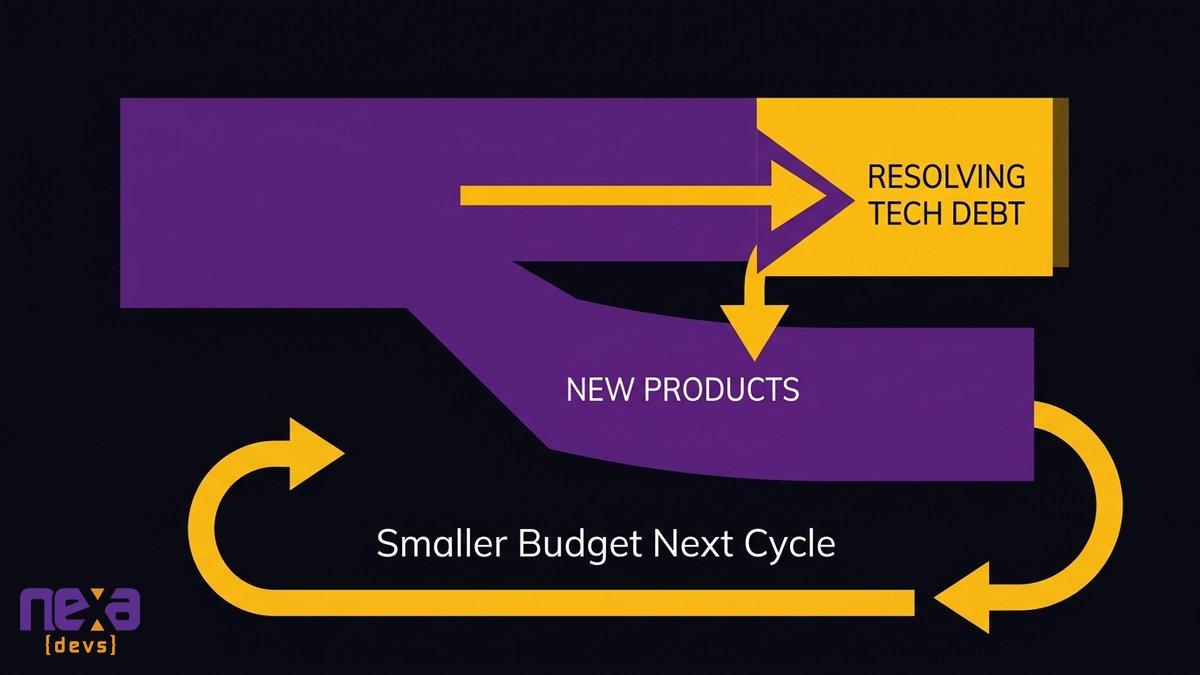
The quieter mechanism works like this: a system that’s expensive to change gets starved of the features that would make it more valuable, which justifies an even smaller budget next cycle, which leaves the system harder to touch the year after. McKinsey’s research puts the diversion at 10 to 20 percent of the technology budget earmarked for new products pulled instead into resolving tech debt, though that figure comes from 50 CIOs at financial-services and technology firms above a billion in revenue, so read it as directional rather than a mid-market benchmark.
As Skylar Roebuck, CTO at Solvd, states: “AI capability is compounding rapidly, and the real risk for mid-market companies is delay.” The same compounding works against you on the budget side of this problem, not just the competitive side. If this loop sounds familiar, we’ve written about the full mechanics of it in our piece on the compounding maintenance tax.
Budget that should fund new features gets pulled into resolving technical debt instead.
The Mechanism: Every Change Touches More of the System Than It Should
More surface area per change leads to more re-verification, re-verification leads to batching, and batching makes every release bigger. It’s arithmetic, and nobody ever bothered to write it down.
More surface area per change
In a system built without clear boundaries, a change to one feature can ripple into three others that share the same database table, the same authentication flow, or the same untested integration point. The engineer making the change has no reliable way to know how far the ripple goes, so they have to assume it goes far.
More re-verification per change
If you can’t be sure what else moved, you test more of the system than the change itself touched, every single time. Call that caution if you like. It is really the only honest response to not knowing the blast radius.
So the safe move is to batch, and batching makes every release bigger
Re-verifying one small change is expensive relative to its size, so teams bundle several changes into one release to spread that fixed testing cost across more work. Each bundled release is now bigger, which means more can go wrong, which means more approval and more caution, which slows the next release too. Martin Fowler’s writing on technical debt describes a version of this same dynamic from the engineering side: debt you don’t pay down charges interest on every future change.
The Regression Wall: Why Your Release Size Is Set by Confidence
Developers aren’t slow because they test too much. They’re slow because they can’t predict what breaks when they ship, and you can put a number on that gap.
What share of a release window disappears into re-testing
Ask any engineering lead how much of a typical release cycle goes to re-running regression tests against code nobody touched this sprint, and you’ll usually get an uncomfortable pause before the answer. The pause tells you more than the number will. Stack Overflow’s 2024 Developer Survey found that 62.4% of developers named the sheer amount of technical debt as their single biggest frustration on the job, nearly twice the share who pointed to build or deployment complexity instead.
The changes that never get made because nobody is confident
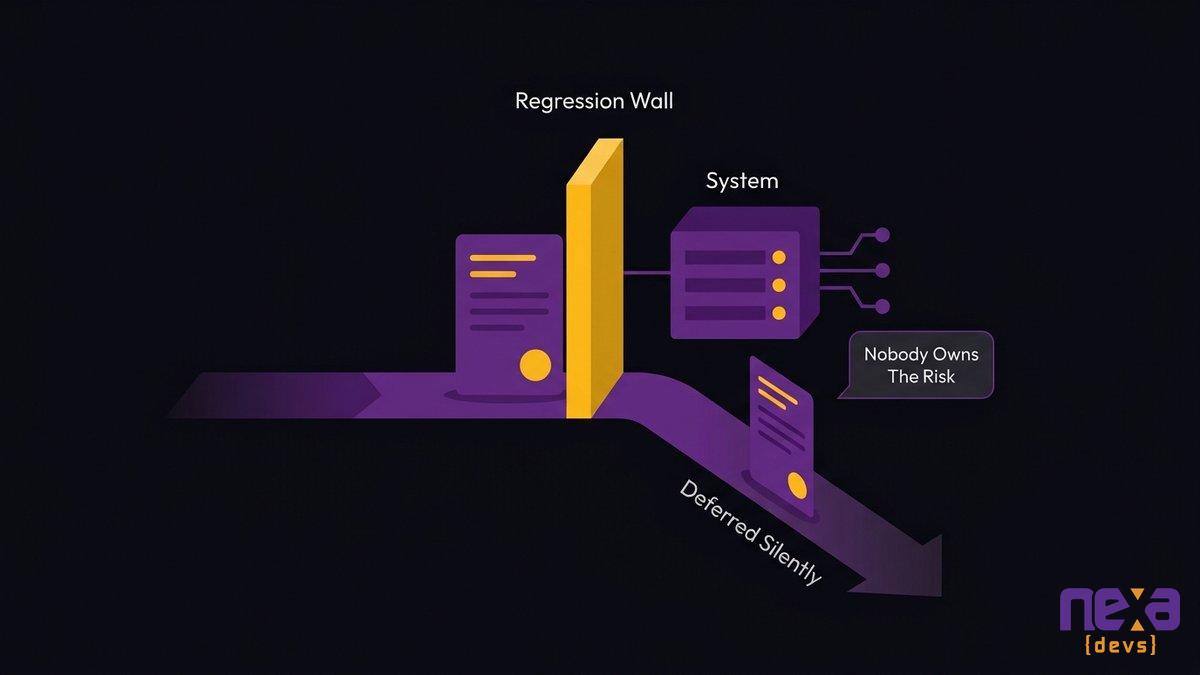
The more expensive part never shows up as a line item. It’s the change quietly dropped from the sprint because nobody wants to own the risk of touching that part of the system. Nothing misses a deadline, because nothing was ever scheduled, and the roadmap gets shorter without anyone deciding to shorten it.
Risk nobody wants to own is how work leaves the roadmap without anyone making a decision.
Where the Time Actually Goes: Waiting, Approving, Re-Verifying
Most of your twelve weeks isn’t spent writing code. It’s spent waiting: for a reviewer with context, for a test environment, for someone senior enough to approve the risk.
Separating waiting from working
Time a single one-line change from commit to production and split the clock into two buckets: time someone was actively working on it, and time it sat in a queue waiting on a person, an environment, or a signature. In systems with a high cost of change, the waiting bucket usually dwarfs the working bucket, because every handoff point exists to manage risk the system itself created.
Why adding process makes it slower, not safer
The instinct when a release goes wrong is to add a review step, a sign-off, a checklist. Each one adds waiting time without reducing the surface area of the change, so the system gets a little slower and no safer. Google’s DORA research has spent a decade documenting this pattern across thousands of teams: the fix that actually improves both speed and stability is reducing batch size and blast radius, not stacking more approval gates on top of a system that’s already hard to change.
Your engineers have had AI coding assistants for two years now. The twelve weeks didn’t become eight, and that’s worth sitting with before buying more licenses.
The bottleneck was never typing speed
AI tools write code faster. They don’t reduce how much of the system a change touches, and they don’t make re-verification any cheaper, because re-verification was never about how fast someone could type in the first place. A September 2026 survey of 945 CIOs and CTOs by GFT Technologies found that more than four in five tech leaders had cancelled at least one AI pilot because their legacy systems created limitations for the project, CIO Dive reported. AI ran into the same wall your release cycle did.
What AI did change: the toil moved to verification
Writing a change got cheaper. Trusting a change did not. If anything, AI-generated code stacks a fresh verification burden on top of the old one, since someone now has to confirm the AI read the system correctly. The toil moved one step downstream instead of disappearing.
Four Questions That Tell You Your Real Cost of Change
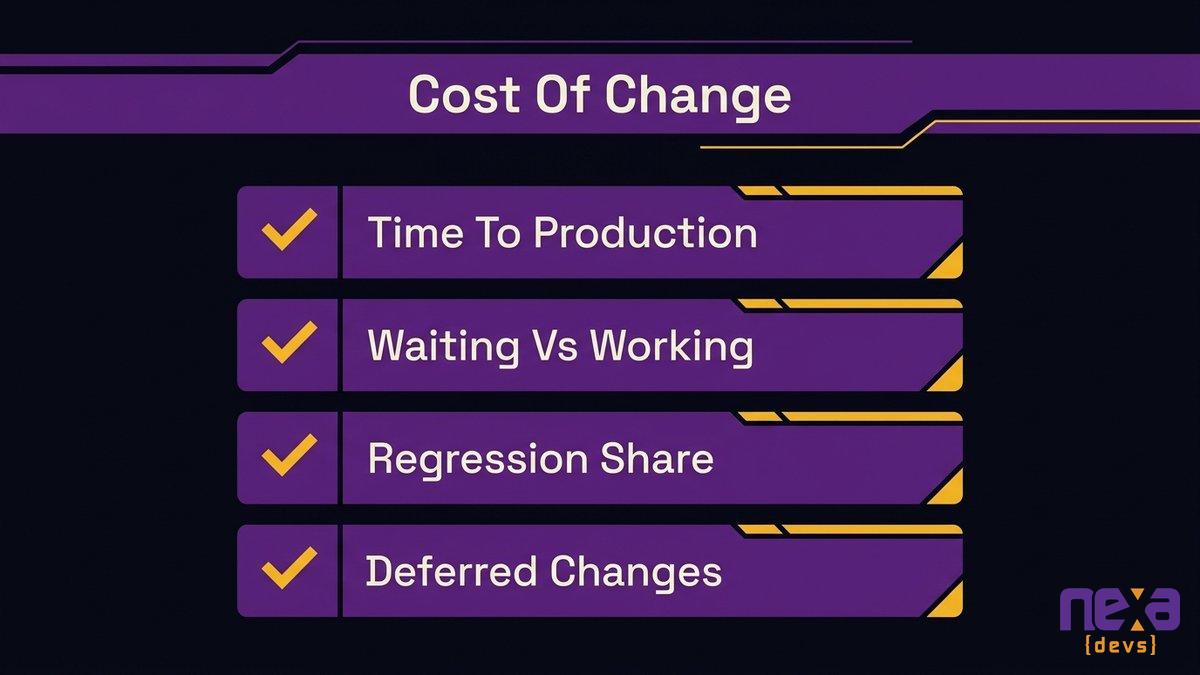
You don’t need a system-wide audit to know where you stand. Four questions, answerable this week with data you already have, tell you almost everything.
Four concrete questions tell you where your own release cycle is losing time.
How long does a one-line change take to reach production?
Time it literally, start to finish. If the answer is measured in weeks instead of hours or days, your constraint lives in the system itself.
How much of that time is waiting rather than working?
Split the clock from the question above into active work and queue time. A high waiting share points to approval and handoff bottlenecks. A high working share points to the change itself being genuinely hard.
What share of your release window goes to regression?
Ask your QA lead what percentage of a typical release cycle is spent re-testing code the release didn’t actually change. There’s no universal healthy number here, but if nobody can even estimate it, that’s itself an answer.
How many changes get deferred because nobody is confident?
This is the number leadership never sees, because work nobody schedules never registers as late. Ask your engineering leads to name three changes they’ve been avoiding, and in about ten minutes you’ll have located your highest concentration of risk.
What to Do With the Answer, Before You Choose an Approach
Once you can name where your cost of change concentrates, you have something most teams never get: a target instead of a guess.
Locate where change cost is concentrated instead of guessing
An architecture assessment that maps dependencies and ownership tells you which part of the system is actually generating most of your waiting and re-verification time. Many teams skip straight to a modernization approach without ever running this step, which is how a rewrite ends up touching parts of the system that were never the problem.
Get the knowledge needed to change the system safely out of one person’s head
Whatever you decide to do next, it only works if the people doing the work understand the system well enough to change it safely. That means architecture decision records and system documentation handed to your team, not retained by whoever did the work, so the next change doesn’t depend on the same one or two people again.
Why the answer is not automatically a big project
It’s tempting to treat a high cost of change as proof you need a full rewrite. Resist that. Modernization projects that reach for scope before locating the actual concentration of risk routinely run past both budget and timeline. Walk into the scope conversation with four measured numbers and you’re arguing from evidence instead of from dread. The choice between a big-bang rewrite and incremental modernization comes after that, once the diagnosis is in hand.
Measuring your cost of change takes no new platform and no new vendor relationship. It takes an honest look at where the time goes between a commit and a customer seeing the result. If that exercise surfaces more than you want to carry alone, Nexa Devs runs AI-assisted architecture assessments that pinpoint where your change cost concentrates. We modernize live systems without disrupting the operations running on them today, hand over every architecture decision record and system document to your team as standard, and stay engaged under an ongoing partnership long after launch. Schedule a call and walk through your own four numbers with us.
FAQ
What counts as a long software release cycle?
Anything beyond two to four weeks from commit to production is generally considered slow by modern standards. Elite teams release multiple times a day. A twelve-week cycle usually means the system itself has become expensive to change.
Can AI actually understand legacy code?
AI tools can read, summarize, and even modify legacy code, but understanding isn’t the same as safely changing it. AI-assisted changes still need the same re-verification a human change needs, which is why AI hasn’t shortened most release cycles on its own.
How do you work effectively with legacy code?
Map where a single change ripples across the system before you touch it, rather than rewriting everything at once. Document dependencies as you find them and let confidence in the system, not a deadline, decide how big a release gets.
How many companies are still running on legacy systems?
Most established mid-market and enterprise organizations run at least one business-critical application on infrastructure built years or decades ago, because replacing a working system is riskier than maintaining one.
by Sarah Mitchell | Oct 6, 2026 | Business and Technology
Disconnected Systems Cost: Find Your Integration Tax
Disconnected systems cost mid-market companies far more than any software line item shows. The real bill is hours. Every week, somebody on your operations team logs into four tools, copies numbers into a spreadsheet, and hunts down the one figure that refuses to match. Call it the integration tax: the toll your team pays because systems that should hand data to each other automatically instead wait for a person to carry it.
Nobody budgets for it directly. It shows up as headcount that never quite catches up, a weekly report that eats half a day, and a COO who can describe the problem in vivid detail but has never priced it. So let’s price it. You’ll find a measurement you can run this week, the three root causes behind most of the manual hours, and what a real fix looks like when it isn’t a platform swap or another subscription.
Quick answer: the cost of disconnected systems
- Disconnected systems cost you staff hours, not just software fees. People copy, reconcile, and chase data between tools that don’t talk to each other.
- The math is simple: hours per week per person on manual handoffs, times loaded salary, times 52.
- Three gaps produce most of those hours: no data exchange, mismatched formats, exceptions nobody owns.
- Replacing the ERP or buying another tool rarely closes the gaps, and usually adds cost.
- What works is a scoped connective layer: APIs and middleware around your real handoffs, with documentation your team owns.
An operations manager cross-checking figures across disconnected business systems before a leadership report
What the Integration Tax Actually Is
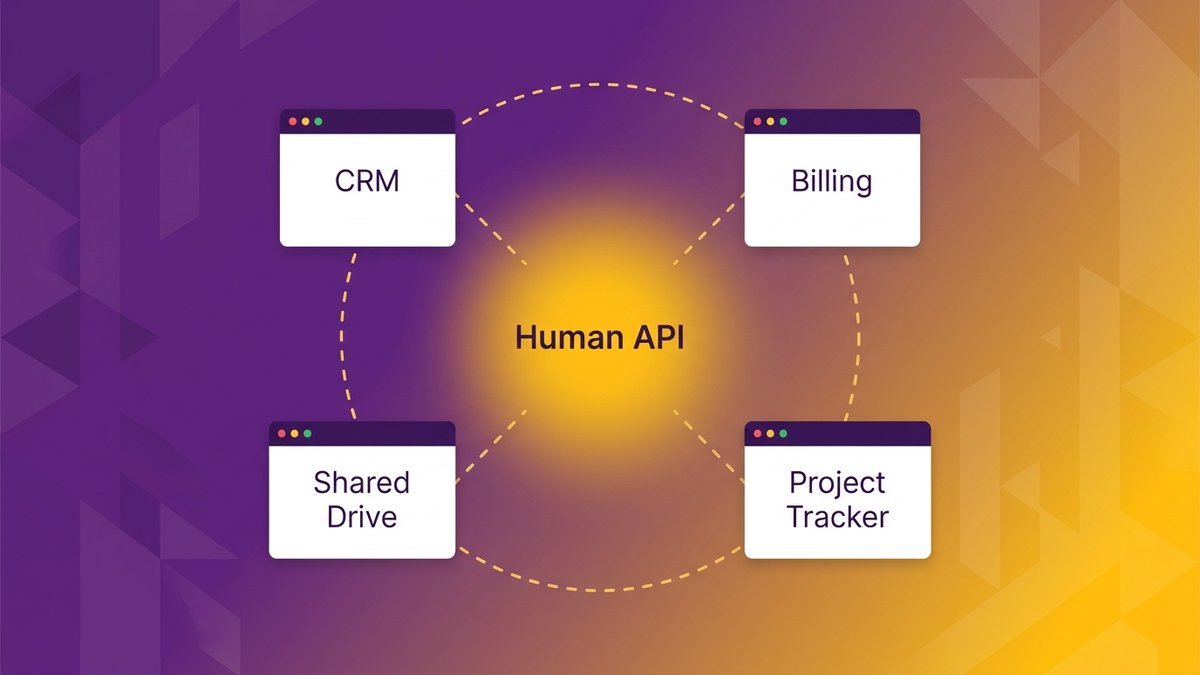
Your operations team doesn’t build software. Every Monday, they run it by hand: pulling data out of one system, reshaping it, feeding it into the next.
The human API: what your operations team does between systems
Watch what happens in the hour before a leadership meeting. Someone opens the CRM and exports a pipeline number, then opens the billing platform for last month’s invoiced total, then checks the project tracker for delivery status. None of it arrives in a shared format. So a person sits in the middle and translates each number into whatever shape the next system, or the next spreadsheet, expects.
That person is the real cost of disconnected systems. The missing piece is a connection, and a human is standing in the gap where an API should be. The job appears on no org chart. It gets absorbed into “operations,” into “reporting,” or into whoever built the spreadsheet first.
Why the gaps appear exactly where they do
The gaps aren’t random. They sit at the seams, between tools that separate teams bought years apart, each for a reason that made sense at the time. Sales picked the CRM. Finance picked the billing platform. Nobody picked the connection between them, because buying a connection was never on anyone’s list.
Which makes it an architecture problem, not a people problem. Your team is doing integration work by hand because nobody ever built the automated version.
A shared spreadsheet assembled by hand from four separate systems every Monday morning
Where the Hours Go: The Weekly Report Assembled by Hand
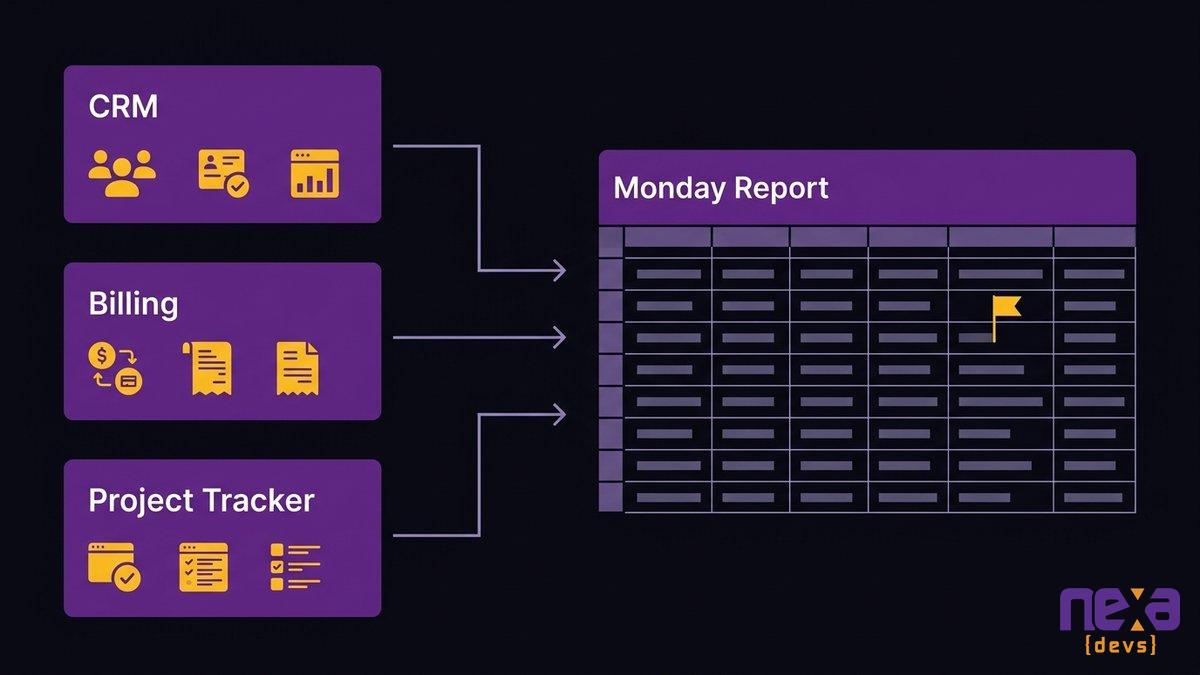
Every Monday at 9 a.m., someone pulls last week’s numbers from the CRM, the billing platform, the project tracker, and a shared drive, then builds the leadership report in a spreadsheet nobody else is allowed to touch.
Four systems, one spreadsheet, every Monday
We see this at almost every mid-market company we work with. One spreadsheet turns into the unofficial source of truth, because it’s the only place sales, delivery, and finance data finally sit next to each other. And whoever built it maintains it forever, since rebuilding that logic from scratch always feels riskier than living with it.
The average company now runs close to 900 applications, and only about a third are connected, according to Salesforce research. The rest wait for someone to remember to check them, export from them, and reconcile what they say against everything else. Asana’s Anatomy of Work Index puts the share of a typical workday lost to repetitive, low-skill task work at roughly 62 percent.
Rekeying, reconciling, and chasing status
Rekeying is the easy part. Reconciling is slower: the CRM says a deal closed, billing shows a different amount, and now twenty minutes go to working out which system is wrong, or whether both are right and nobody updated the other. Then there’s chasing status, pinging a project manager for a number that should already be on a screen somewhere. That eats the rest of the morning.
The work that never appears on anyone’s job description
None of this has a title. It isn’t in anyone’s performance review, and nobody gets credit when the report lands on time. It turns visible exactly once: the week the report is late. Even then, the response is “move faster,” not “fix the gap.”
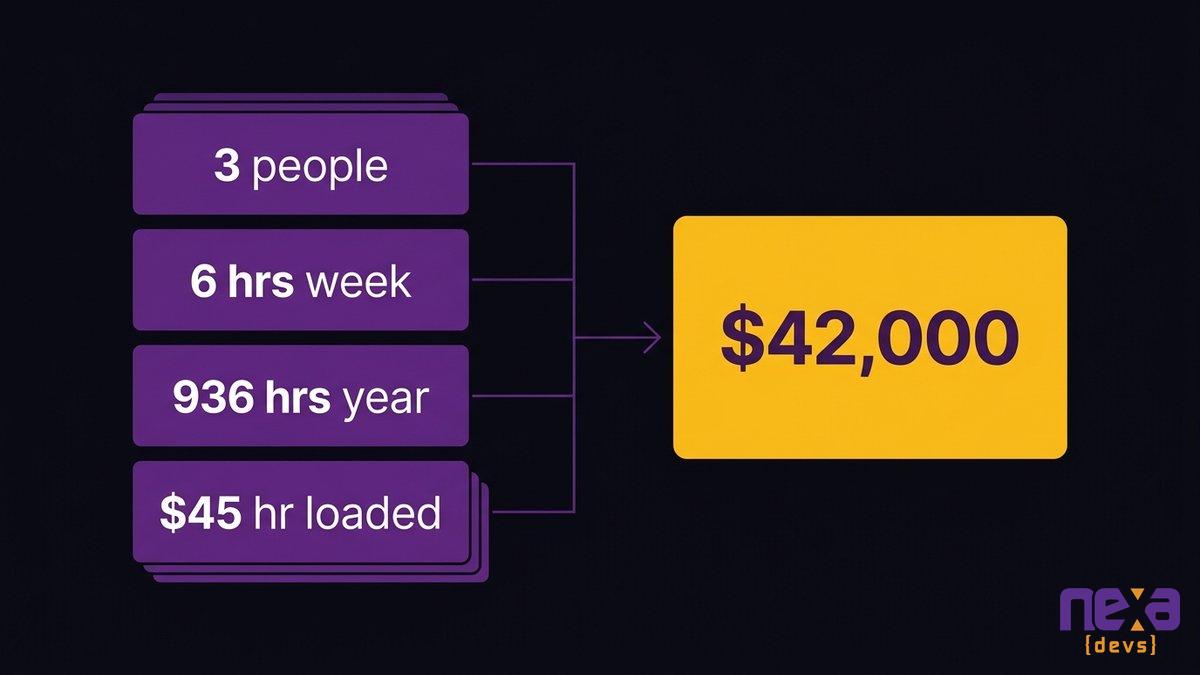
Converting weekly manual-reconciliation hours into an annual, dollar-denominated cost figure
Turning Those Hours Into a Number Your CEO Can Read
Multiply hours by headcount by loaded salary. The arithmetic takes about ten minutes, and almost no operations team has ever been asked to run it.
Hours per week per person, measured not estimated
Estimates will undersell this, so measure it. For one week, ask everyone who touches the weekly report, the billing reconciliation, or the status chase to log real minutes spent on manual handoffs, separate from the minutes spent on the underlying work. Teams are regularly surprised by the total once it’s written down instead of guessed at.
Annualizing against loaded salary cost
Run the math with your own figures. Say three people each spend six hours a week reconciling data between systems. Eighteen hours a week, or roughly 936 hours a year. At a loaded cost of $45 an hour (salary, benefits, and overhead combined), you’re at about $42,000 a year for one recurring report.
That tracks with McKinsey’s research, which puts the time employees lose hunting for information across disconnected systems at close to a fifth of the work week. Asana’s research is harsher on duplicated effort specifically: roughly 19 workdays a year per employee go to recurring task work, nearly a full working month spent redoing what already exists somewhere else.
Why the number is bigger than the software budget you are defending
The weekly report is rarely the only recurring handoff. Finance reconciles invoices against delivery records. Customer success checks renewal dates against a CRM field nobody trusts. Add all of it up across a 50-person operations and finance function, and the annual number regularly runs past the entire software budget the COO is defending in next quarter’s planning meeting.
That version of the number is the one worth bringing upstairs. A CEO who has never seen “integration tax” on a line item recognizes it instantly once it’s priced in headcount hours instead of described as a workflow annoyance.
The Three Gaps That Produce Most of the Manual Hours
Most of the manual hours trace back to one of three gaps, not a dozen different problems.
Systems that never exchange records at all
The first one is the simplest. Two systems hold related information and have never been connected, by API or anything else. So someone has to be the connection, every single time a record needs to move from one to the other.
Systems that exchange records, but not in the shape the next step needs
The second gap hides better. Two systems do pass data back and forth, but in formats, field names, or units that don’t match what the receiving system or person needs. The data arrives. It just arrives wrong, so someone still reshapes it by hand before anyone can use it.
Exceptions with nowhere to go
The third gap is the one most automation projects skip entirely: what happens when a record doesn’t fit the standard path. A refund that doesn’t match the original invoice, a contract amended mid-cycle. Those exceptions need somewhere to go, and in most disconnected environments “somewhere” means a person’s inbox.
As Jesper van den Bogaard, CEO at Factor Blue, describes it: “We need to process manufacturing, but the invoice is here, the order data is there, and we’re manually passing information around, with data scattered across different systems.” Teams know something is broken. They’re rarely asked which of the three gaps is doing the damage. Which one is yours?
The Two Fixes Worth Declining
Two vendors have probably already pitched you a fix this year. Neither one closes the gap.
Do not replace the ERP: the gaps survive the migration
Replacing the ERP doesn’t close integration gaps. It relocates them to a newer, pricier system that still can’t talk to your other tools without the same connective work you were trying to avoid. Gartner’s research on technical debt flags this trap repeatedly: migration spend doesn’t retire the underlying architecture problem. Meanwhile the migration eats a year or more of attention, and the human API keeps running the whole time, just between a different set of screens.
A new integration platform or iPaaS subscription sounds like the fix, until you notice it’s one more system: its own login, its own maintenance window, its own handoff gap at both ends. We’ve watched this pattern play out with the department spreadsheet that quietly becomes production infrastructure. Another subscription rarely breaks that pattern. It adds a layer to it.
What a Connective Layer Looks Like Instead
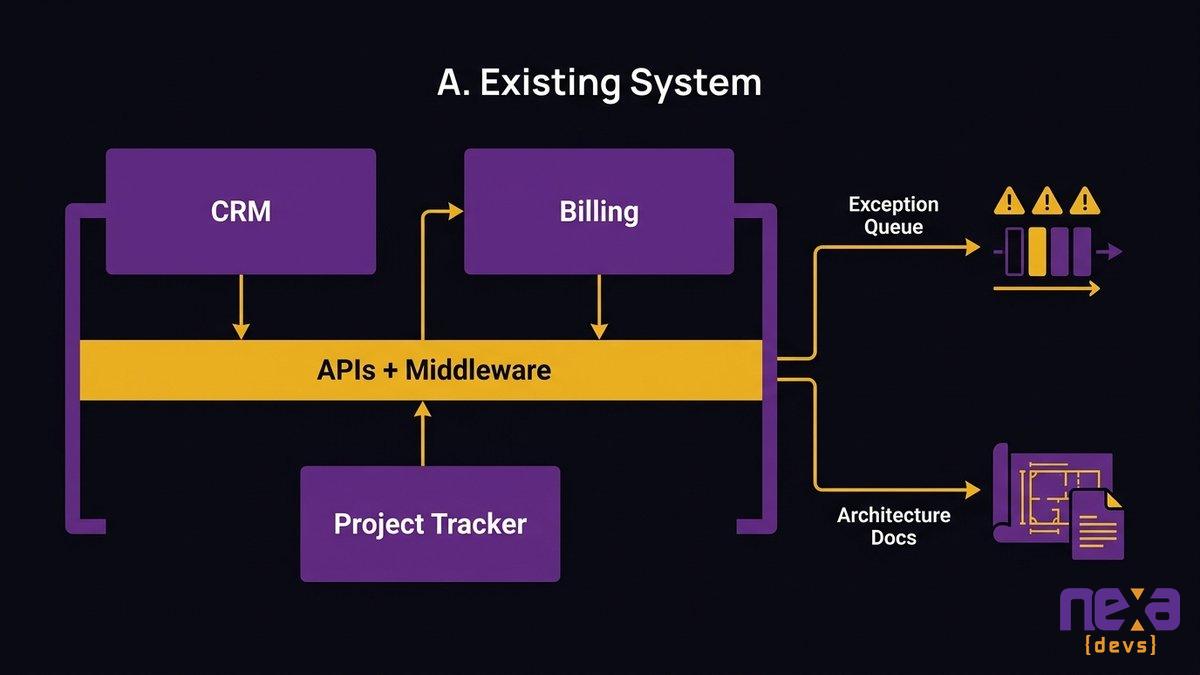
A connective layer isn’t a platform. It’s a small, specific set of APIs and middleware built around the handoffs you really run.
APIs and middleware scoped to the real handoffs, not to a vendor’s idea of the process
The work itself is narrow. Scope the three or four handoffs producing most of the manual hours, then build the specific connections that close them. Not a company-wide integration platform. Not a rebuild of every system you own. Just the gaps costing you hours, closed with code shaped around the way your team already works.
Architecture documentation handed over so it does not become the next black box
This is where integration work fails you. A contractor builds the connection, it works, they leave, and nobody inside the company understands how it’s wired together. One black box gets stacked on another. Martin Fowler’s writing on integration architecture makes the same point from the engineering side: a connective layer becomes critical infrastructure the moment it goes live, and it deserves the documentation rigor of any core system. Architecture diagrams and API references should transfer to your team as a condition of the engagement, not as a favor if you ask nicely.
What changes in week one versus month three
In week one, nothing changes on the surface. The handoff still happens by hand while the connective layer gets built and tested against real data. By month three, the weekly report pulls itself, exceptions route to a defined queue instead of somebody’s inbox, and the person who used to own the spreadsheet is spending that time on work that requires judgment.
A scoped integration layer connecting existing systems around the business’s actual handoffs
How to Find Your Own Number This Week
No consultant is required to find your number. Three handoffs and twenty minutes with the people who run them will do it.
Pick the three handoffs people complain about most
Ask around. The handoffs people gripe about in hallway conversations are almost always the ones producing the most manual hours. Pick the three mentioned most often, not the three that sound most technically interesting.
The three questions to ask at each one
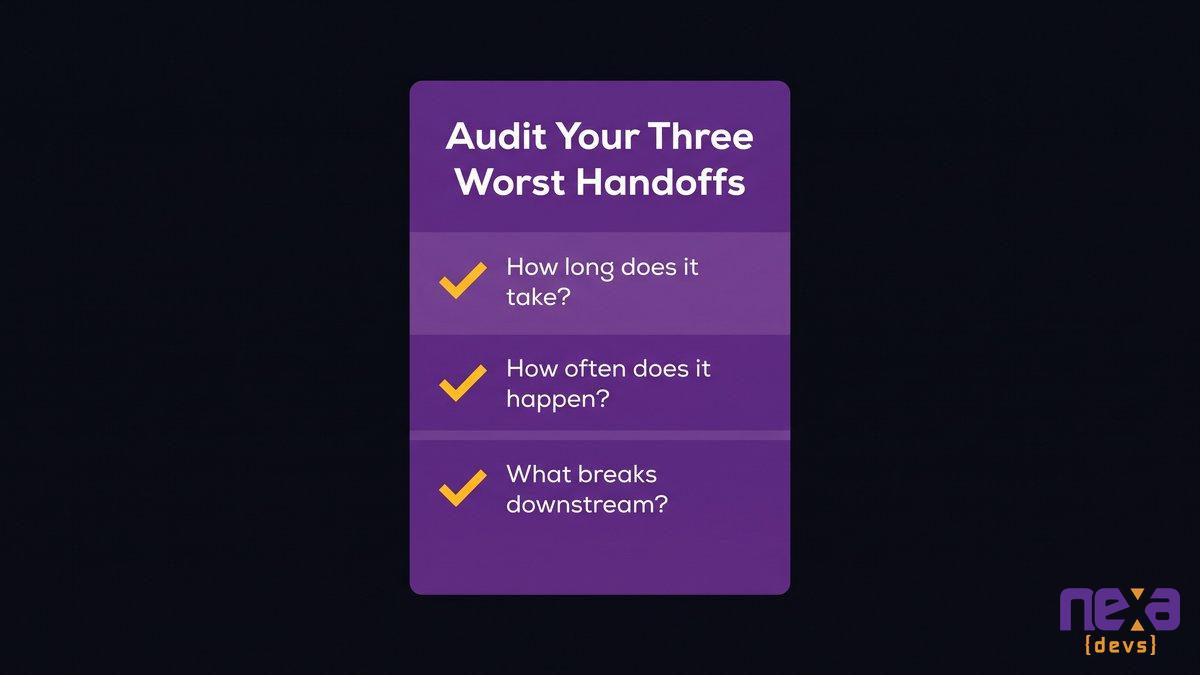
For each one, ask three things: how long does it take each time, how often does it happen, and what breaks downstream when it’s late or skipped. You can run a structured audit of the kind IT governance frameworks such as COBIT recommend. Fifteen minutes with the right person answers all three just as well.
What to do with the number once you have it
Run the math from earlier against your real answers, then bring the figure to your next leadership meeting in annual dollars rather than weekly minutes. If you want the wider context this sits inside, read why the maintenance tax on aging systems keeps growing. Framed that way, the number is what gets a connective-layer project funded instead of filed under “someday.”
A simple one-week audit to identify and price your organization’s worst manual handoffs
Most operations leaders already know where their time goes. What they haven’t done is write it down next to a dollar figure and hand it to the person who controls next year’s budget. Schedule a call with Nexa Devs if you’d rather have that conversation with an engineering partner who has already built this fix for teams your size.
FAQ
How much does it cost to integrate disconnected systems?
It varies by scope, but most mid-market connective-layer projects cost far less than the manual hours they replace. A targeted project closing two or three handoff gaps typically pays for itself within a year once you price in the staff hours saved.
What are some examples of hidden costs of disconnected systems?
Common examples include staff hours spent rekeying data, delayed decisions from stale reports, billing errors from mismatched records, and the salary cost of someone maintaining a shadow spreadsheet that quietly became critical infrastructure.
What is the integration tax?
The integration tax is the ongoing cost of running manual work between systems that should exchange data automatically. It shows up as staff hours spent copying, reconciling, and chasing information instead of doing higher-value work.
How do I calculate the cost of disconnected systems for my team?
Track the hours each person spends weekly on manual handoffs for one week, multiply by headcount and loaded hourly salary, then multiply by 52 weeks. That annualized figure is your integration tax.
Should I replace our ERP to fix data silos?
Usually not. ERP migrations are expensive and slow, and they rarely close the actual handoff gaps between systems. A scoped connective layer built around your real workflow is typically faster and cheaper than a full platform replacement.
What is a connective layer in software integration?
A connective layer is a set of APIs and middleware built to connect your existing systems around your actual workflow. It replaces manual data handoffs with automated ones, and good implementations include documentation your team owns.
by Sarah Mitchell | Oct 1, 2026 | Business and Technology
Nonprofit CRM Integration: Connect What You Already Own
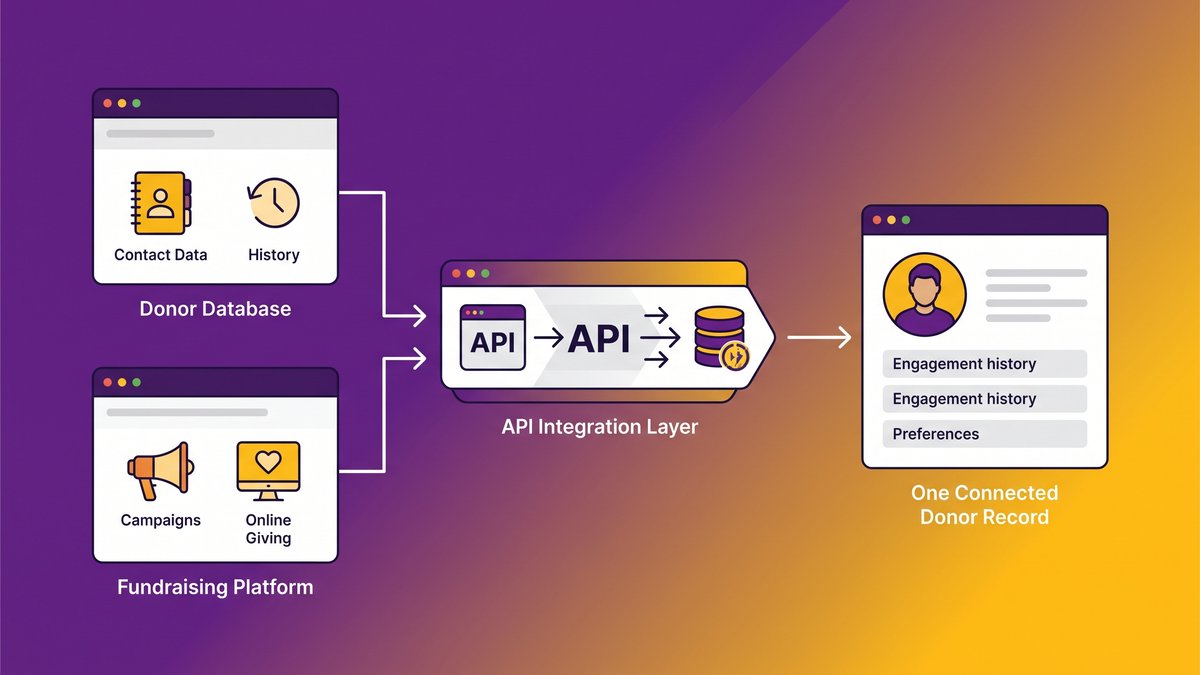
Your donor database and your fundraising platform run your organization’s most important relationships, and most days, they don’t agree with each other. Nonprofit CRM integration is the fix: connecting the systems you already depend on into one accurate donor record, instead of replacing software your staff has spent years learning.
So much for the short version. The harder question is why the disconnect happens in the first place, and what it costs your organization while it sits unaddressed. Picture a development director at a mid-size nonprofit spending two hours before every board meeting reconciling numbers that should already match. Two hours a month sounds survivable. Multiply it across a finance director, a database manager, and every program coordinator pulling their own donor list, and the real number gets uncomfortable fast.
Quick answer: fixing nonprofit donor data silos
- Nonprofit CRM integration connects your existing donor database and fundraising platform through APIs, not by replacing either system.
- Disconnected systems cost staff hours in manual reconciliation, produce duplicate donor records, and undermine board reporting accuracy.
- Silos form because each tool in your stack treats itself as the master record instead of sharing one.
- Owning the integration layer, including documentation, avoids per-connector subscription costs and consultant dependency over time.
- A connected donor record is also the prerequisite for any future AI-powered donor analytics or predictive giving models.
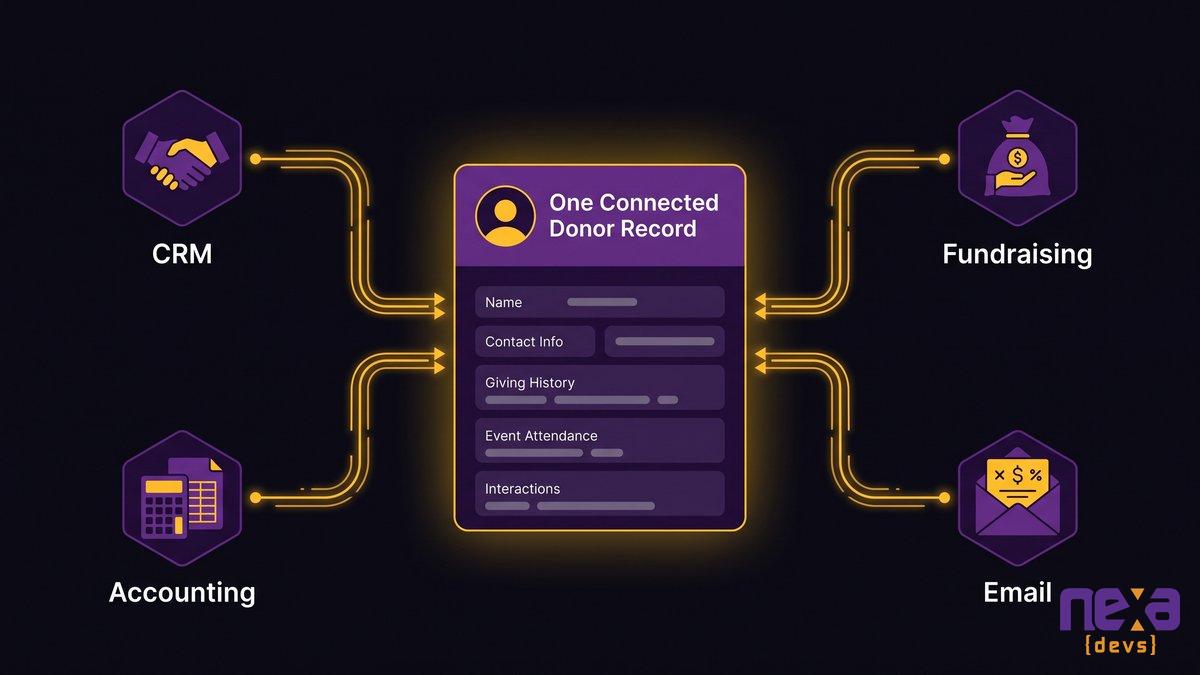
A visual overview of how nonprofit CRM integration links donor and fundraising systems into one connected record
The disconnect costs three things: staff hours, data integrity, and board confidence. All three compound month over month, and none of them show up as a single line item on your budget.
Staff hours lost to manual reconciliation and re-keying
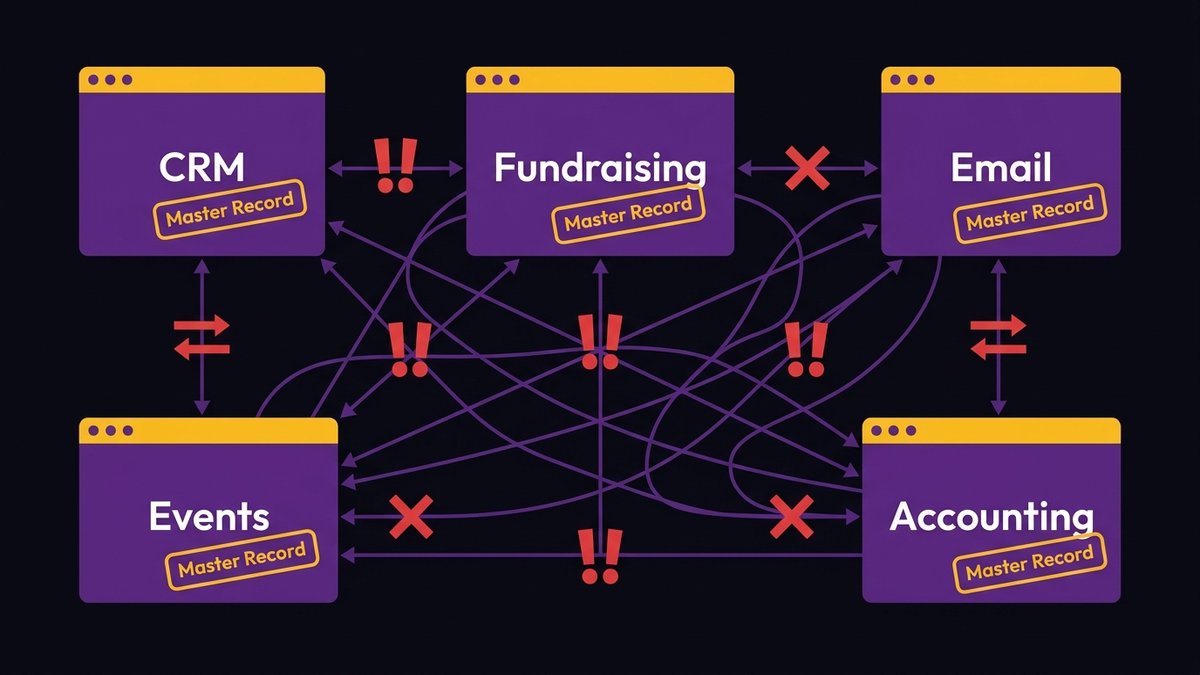
Every donor management tool wants to own the master record. Your CRM has one version of a gift. Your fundraising platform, if it’s separate, has another. Your accounting system might have a third. Someone has to sit in the middle and make them agree.
That someone is usually your database manager or a development associate, and the job never ends. A gift comes in through an online donation form, gets recorded in the fundraising platform, then gets manually entered into the CRM so donor history stays current. Multiply that across every channel: direct mail, events, monthly giving, matching gifts. The re-keying work scales with your fundraising success, which means your best campaigns generate the most silo cleanup.
Duplicate and conflicting donor records
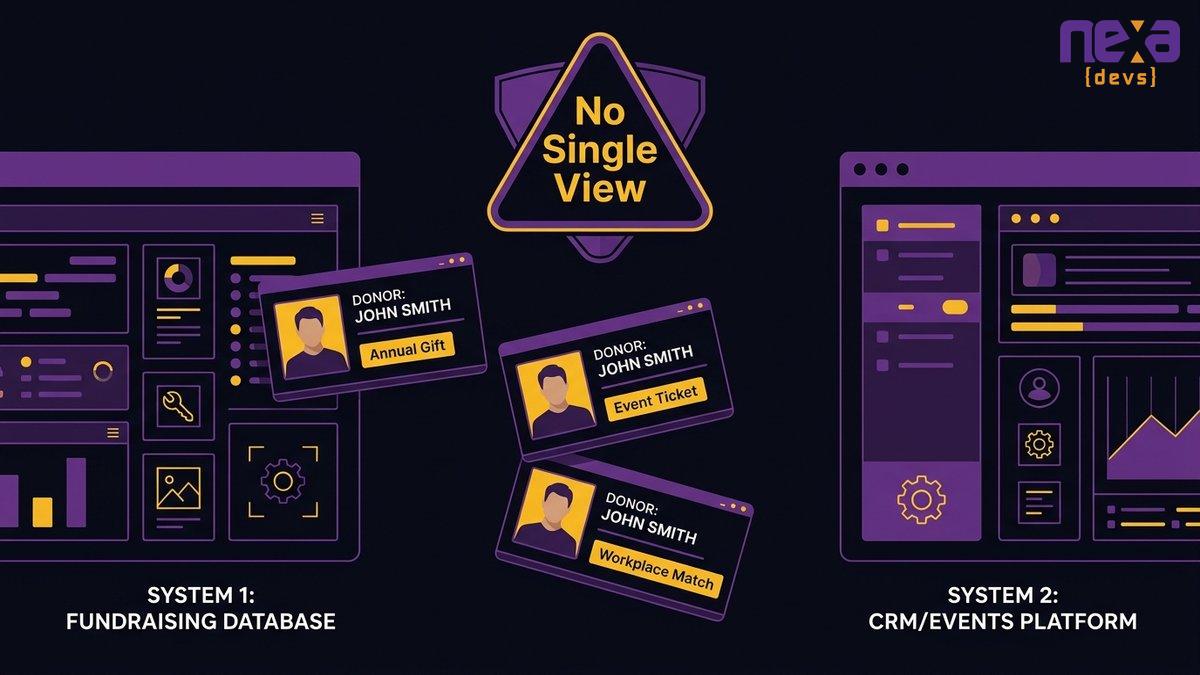
Treat duplicate records as a data hygiene nuisance and you miss the real problem: they put donor relationships at risk. A major donor who gives through three channels, an annual gift, an event ticket, and a workplace giving match, can end up as three separate profiles across your systems. Nobody sees the full relationship.
That donor gets a form thank-you letter for a $50 event ticket the same week your executive director should be calling to discuss a planned gift. The systems didn’t fail loudly. They failed quietly, and the cost is a relationship your organization spent years building.
Board reports you can’t fully trust
Only 20% of membership organizations have a formal data strategy in place, according to MemberWise’s 2026 Digital Excellence Report, and the figure barely improves among larger organizations. That gap shows up first in board reporting, where two systems produce two different fundraising totals and someone has to explain the discrepancy before the meeting even starts.
A board that questions your numbers stops trusting your strategy. At that point you have a governance problem, not a data hygiene one, and it follows directly from running a fundraising operation on systems that don’t reconcile themselves.
What “nonprofit CRM integration” actually means (and what it isn’t)
Integration is not a product on your shopping list. It’s the layer that lets the software you already have exchange accurate data automatically, in both directions, without a staff member acting as the manual bridge.
Most nonprofits already run two to five separate systems: a CRM or donor database, a fundraising or online giving platform, an email marketing tool, sometimes a separate events or peer-to-peer platform, and an accounting system. Integration means building the connective layer between them, usually through APIs, so a gift recorded in one system updates every other system that needs to know about it.
It gets confused with a few things it isn’t. Not a data migration, where you move everything into a single new platform and retire the old ones. Not a manual export-and-import routine dressed up as automation, and not a temporary workaround that breaks the moment one vendor changes its interface. Real integration is a maintained connection between systems your organization controls, built to survive a platform update on either end.
Nonprofit technology communities like NTEN increasingly treat this as a sustainability question rather than a purely technical one: a resource-constrained team can’t afford to re-platform every time a vendor releases a shinier product.
A staff member manually cross-checking donor records between two disconnected systems
The warning signs your donor systems are working against each other
Five signs tend to show up before anyone calls it a crisis. If two or more sound familiar, the silo is already costing you more than it looks like it is.
- Your development team keeps a shadow spreadsheet to track what the CRM “should” say.
- Two staff members give different fundraising totals for the same reporting period, and finance catches it before anyone else does.
- A donor complains about receiving duplicate mail, duplicate asks, or being thanked twice for one gift.
- New staff take weeks to figure out which system holds the real donor history.
- Grant compliance or board packet reporting requires someone to manually stitch data from three separate exports.
- Nobody remembers who set up the last export process, or why it runs the way it does.
The last one deserves attention. When the person who built the workaround leaves, the workaround usually leaves with them, and whoever inherits it starts from zero.
Each tool in your stack is built to assume it holds the master record. That assumption, multiplied across five systems, is the entire mechanism behind the silo.
Vendors design each product to be self-sufficient. Your fundraising platform assumes it’s the authoritative record of every gift processed through it. Your CRM assumes the same thing about donor history. Neither one is wrong on its own. The problem starts when you connect them with a one-time export, a manual CSV upload, or nothing at all, because none of those methods designate who wins when the records disagree.
Nobody assigned that job on purpose. It fell to whoever was available, and it stayed there.
The per-connector subscription trap
The average organization runs 897 applications, but only 29% are actually integrated, MuleSoft’s 2025 Connectivity Benchmark found. Nonprofits run a smaller stack than the average enterprise, but the same math applies: most of what you own doesn’t talk to the rest of what you own.
Plenty of vendors will sell you a pre-built connector to close that gap, usually priced per connection, per month. It works until the vendor on either end changes its API, at which point the connector breaks and you’re back to manual re-entry while you wait for a fix you don’t control. You end up renting a bridge you don’t own between two systems you do.
What one connected donor record actually unlocks
A single donor record means your database manager, your finance director, and your executive director look at the same number, at the same time, without someone translating between systems first.
A single, trustworthy source of truth
When a gift updates automatically across every system that touches it, “which number is right” stops being a weekly question. Staff spend less time verifying and more time doing the work that actually moves the mission forward.
Faster reporting your board can rely on
Board packets and grant reports pull from one connected data set instead of three manual exports stitched together the night before a deadline. Your team gets fewer late nights, and fewer awkward moments explaining a discrepancy nobody can trace.
A better, more consistent donor experience
A major donor who also volunteers and attends events should show up as one person with a complete history. Right now they surface as three unrelated records, each getting its own set of communications. Integration is what makes that recognition automatic instead of dependent on someone remembering to check.
A diagram showing how disconnected point-to-point tools each act as their own source of truth
All-in-one suite or connect what you already have? The decision, reframed
Should you replace everything with one all-in-one platform, or connect what you already run? Most vendor content skips straight to the first option, because that’s the option they’re selling.
Mordor Intelligence puts the nonprofit software market at $4.95 billion in 2026, growing to $7.24 billion by 2031, a 7.9% compound annual growth rate. That growth means a steady stream of vendors telling you the fix is another purchase. Sometimes it genuinely is: a very small organization with minimal donor history and no staff investment in existing tools might be better off consolidating onto one platform from the start.
For most mid-size nonprofits with an established donor base, the math rarely works out. Ripping out working systems to chase a unified platform means retraining your entire team, migrating years of donor history with real risk of data loss, and re-learning workflows everyone already knows by muscle memory. The switching cost usually outweighs what a single vendor promises to simplify.
As Ashwin Ballal, CIO at Freshworks, puts it: “Legacy systems have become so complex that companies are increasingly turning to third-party vendors and consultants for help, but the problem is that, more often than not, organizations are trading one subpar legacy system for another.” Swapping platforms doesn’t remove the disconnect risk. It relabels it and hands you a new contract.
An integration layer your organization owns outright
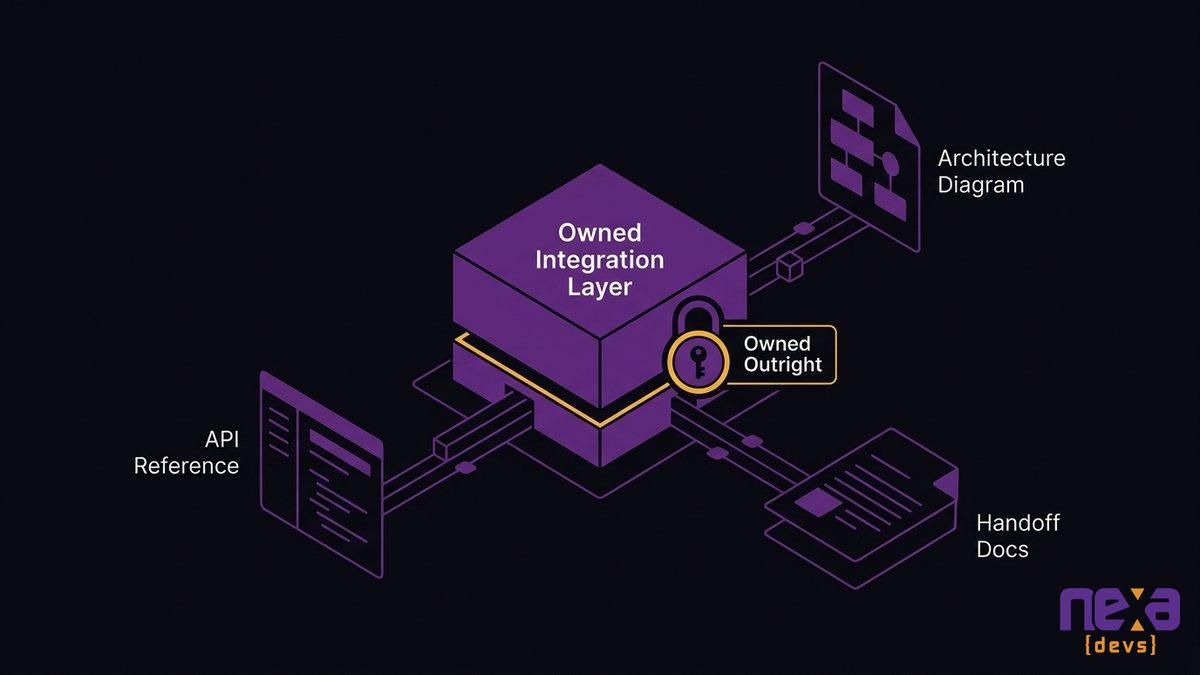
Ownership is the difference between a fix and a new dependency. An integration layer you own outright means your organization controls the code, the documentation, and the decision to change vendors later, on your own timeline.
Complete documentation the nonprofit keeps
An integration built for you and handed over with nothing but a login isn’t really yours. It’s someone else’s system you’re allowed to use until that person becomes unreachable. Complete documentation, including API references and architecture diagrams, is what turns a built integration into an owned one. why documentation ownership prevents vendor lock-in
No per-connector tax, no single-consultant dependency
Owned integration means you’re not paying a recurring fee per connection, and you’re not one departure away from nobody understanding how your systems talk to each other. When your team, or a partner with a documented handoff process, can maintain the connection, you’ve eliminated the single point of failure that makes so many nonprofit tech stacks fragile.
The prerequisite for any future donor AI analytics
Organizations with strong system integration see a 10.3x return on AI investments, compared with 3.7x for those with poor connectivity, MuleSoft’s 2025 Connectivity Benchmark found. Predictive donor scoring, lapsed-donor identification, and gift-capacity modeling all depend on clean, connected data. None of that works if your donor history is still split across three exports and a shadow spreadsheet.
A unified donor profile view pulling data automatically from every connected nonprofit system
The fix isn’t a bigger platform. It’s a connected one, and one your team can actually maintain without waiting on a vendor’s support queue every time something breaks.
An operations team reviewing documentation for a nonprofit CRM integration they own outright
If your donor database and fundraising platform have been fighting each other for longer than anyone wants to admit, an integration audit is the place to start. schedule a systems audit Nexa Devs builds the APIs and middleware that connect the nonprofit software you already run, and hands over documentation your team owns from day one, not documentation locked inside a consultant’s head.
FAQ
What is the best CRM for nonprofits?
There’s no single best nonprofit CRM. The right choice depends on your size, giving channels, and existing systems. What matters more is whether it integrates cleanly with your other donor and fundraising tools, since most nonprofits run several systems, not one.
Is there a free CRM for nonprofits?
Yes. HubSpot for Nonprofits and Zoho CRM offer free tiers, and Salesforce provides discounted nonprofit licenses. Free tiers often cap contacts or automation, so growing organizations tend to outgrow them and still need integration with other systems.
What is nonprofit CRM integration?
Nonprofit CRM integration connects your donor database with your fundraising platform, email tool, and accounting system so donor data updates automatically across all of them, replacing manual re-entry with one shared donor record.
How do I stop donor data duplication between systems?
Stopping duplication requires an integration layer, not just better data entry habits. Connect your systems through APIs so a gift or contact update propagates automatically, instead of relying on staff to manually copy and reconcile records.
Can I integrate my existing donor database with a new fundraising platform without switching CRMs?
Yes. You don’t need to replace your CRM to add a new fundraising platform. Custom API integration lets both systems share donor and gift data automatically, so your team keeps the tool it already knows.
by Sarah Mitchell | Sep 29, 2026 | Business and Technology
Institutional Knowledge Loss: Beating the Gray Tsunami
Institutional knowledge loss is what happens when the people who understand how your systems actually work leave before that understanding gets written down anywhere else. In 2026, the biggest driver of that loss isn’t a resignation or a layoff. It’s a birthday. Roughly 10,000 Americans turn 65 every day, a wave that’s been building since 2011 and won’t crest until around 2030. Your senior engineers are part of that wave, and unlike a surprise departure, you already know when most of them plan to go.
Most leaders miss that. A retirement is a date you can put on a calendar, plan around, and prepare for months in advance, as long as your organization treats documentation as something the system produces continuously instead of something one person tries to reconstruct in their final two weeks.
Quick answer: engineer retirement and knowledge loss
- Roughly 10,000 Americans turn 65 every day through 2030, so engineer retirements are demographic math, not sudden surprises.
- Institutional knowledge loss costs U.S. companies an estimated 1.3 trillion dollars a year, according to Deloitte’s 2024 research.
- Knowledge captured in a departing engineer’s final two weeks is almost always incomplete and arrives too late to be useful.
- Documentation has to be a byproduct of how you build and maintain systems, not a scramble triggered by a resignation letter.
- AI can encode what’s written or observable in code, but someone still has to document the tacit reasoning behind past decisions.
The Retirement Cliff Is a Date on Your Calendar, Not a Surprise
Your longest-tenured systems engineer already knows their retirement date. HR probably knows it too, from a pension conversation or a benefits enrollment question dropped months ago. The only person consistently caught off guard is the executive who finds out when the two-weeks notice hits their inbox.
That gap is the actual problem. Organizations plan for retirement in every department except engineering, where the loss is hardest to see and most expensive to recover from.
Pew Research Center’s demographic work on the aging U.S. workforce has tracked this shift since the early 2010s, and by 2030 every remaining Baby Boomer will have crossed 65. For a mid-market company running internal systems built fifteen or twenty years ago, that means the engineers who wrote the original code, made the early architecture calls, and know why a particular workaround exists are retiring on a schedule you can see coming.
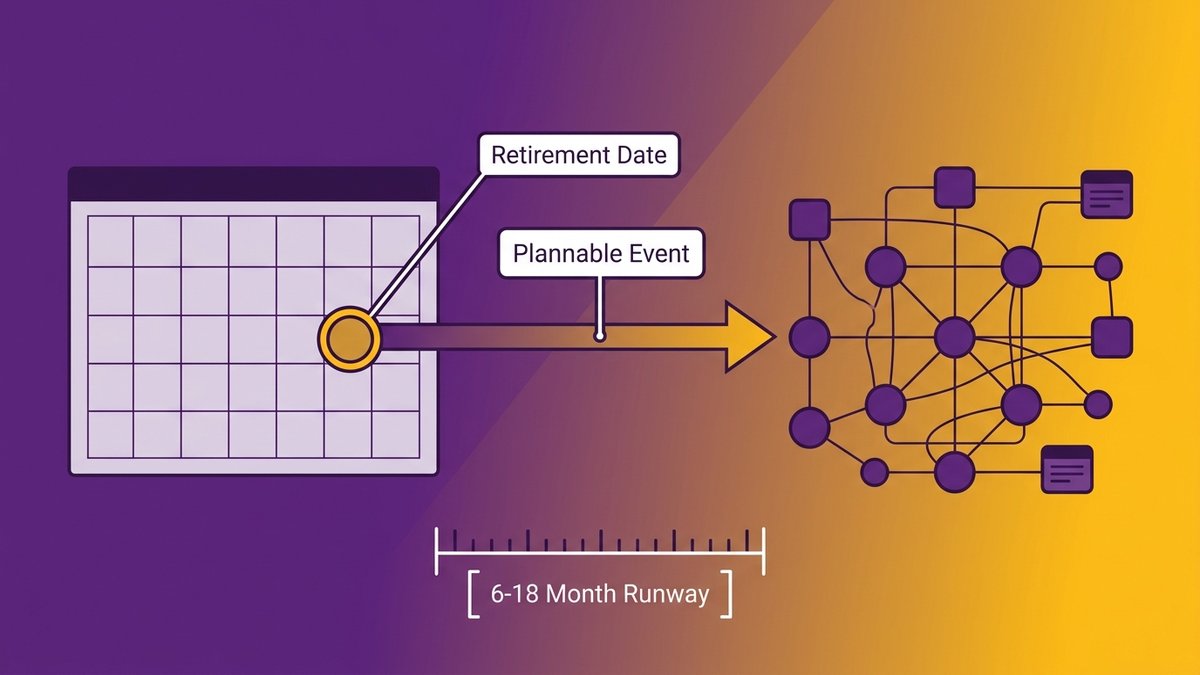
Treat it that way. A CEO who reviews engineering tenure alongside retirement eligibility, the same way finance reviews vendor contract renewals, gets six to eighteen months of runway most companies throw away by pretending the date isn’t already set.
A calendar marked with a scheduled retirement date sitting beside a legacy system diagram
What Actually Walks Out the Door When an Engineer Retires
Explicit knowledge lives in a wiki, a README, or a ticket. Tacit knowledge lives in a person’s head, built from years of judgment calls nobody wrote down. Only one of those survives a retirement party.
Researchers estimate that tacit knowledge makes up roughly 90% of what an organization actually knows, with only about 10% ever captured in documents, wikis, or code comments. That imbalance is why losing one senior engineer can feel disproportionate to their job title. They aren’t just holding tickets closed, they’re holding the reasoning that never made it into any system of record.
Explicit knowledge versus the tacit “why”
Explicit knowledge answers “what does this function do.” Tacit knowledge answers “why does it do it that way, and what happens if we change it.” Your codebase can tell a new hire the first answer. Only a person who lived through the original decision can reliably give the second, and that’s exactly the knowledge that a retiring engineer takes with them if nobody asked the question earlier.
Key-person dependency: the system only one person understands
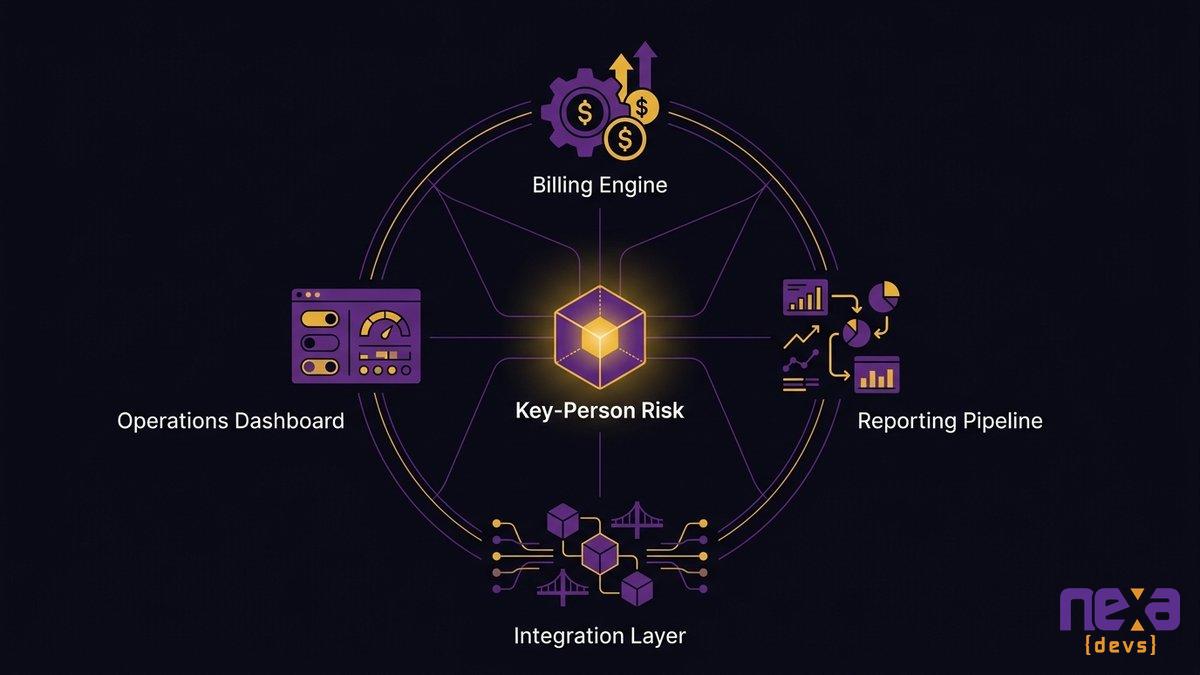
Every mid-market company has at least one system like this: a billing engine, a reporting pipeline, an integration layer that only one engineer can touch without breaking something. It usually isn’t documented as a risk. It’s documented, if at all, as “ask Dave.” When Dave retires, the risk stops being theoretical.
An illustration of one engineer connected to every critical system, showing concentrated key-person risk
The Real Cost of Losing Institutional Knowledge
Deloitte puts the figure at $1.3 trillion a year: institutional knowledge loss costs U.S. companies that much annually across every industry, according to Deloitte’s 2024 Human Capital Trends research. That number covers everything from slower onboarding to duplicated work to decisions made without the context that would have prevented them.
For a mid-market company, the cost shows up in smaller, more specific ways. Replacing a senior technical hire typically runs 150% to 400% of their salary once you count recruiting, ramp time, and lost productivity, and delays projects six to twelve months, according to ClearlyAcquired’s analysis of key-person risk. New engineers coming into an undocumented system routinely need sixteen to twenty weeks before they’re contributing at full speed. Multiply that by every retirement your organization has scheduled over the next three years, and the number stops looking abstract.
The compounding part is what leaders underestimate. An undocumented system costs more to staff, and it costs more every single time someone touches it, because every change requires re-deriving context that used to live in one person’s head. That tax never goes away on its own. It gets worse with each engineer who leaves without transferring what they knew.
how tacit knowledge creates vendor risk
Why Last-Minute Knowledge Capture Fails
Two weeks before an engineer’s last day, someone hands them a laptop and says “write it all down.” That plan fails almost every time it’s tried, and it fails for reasons that have nothing to do with the engineer’s effort.
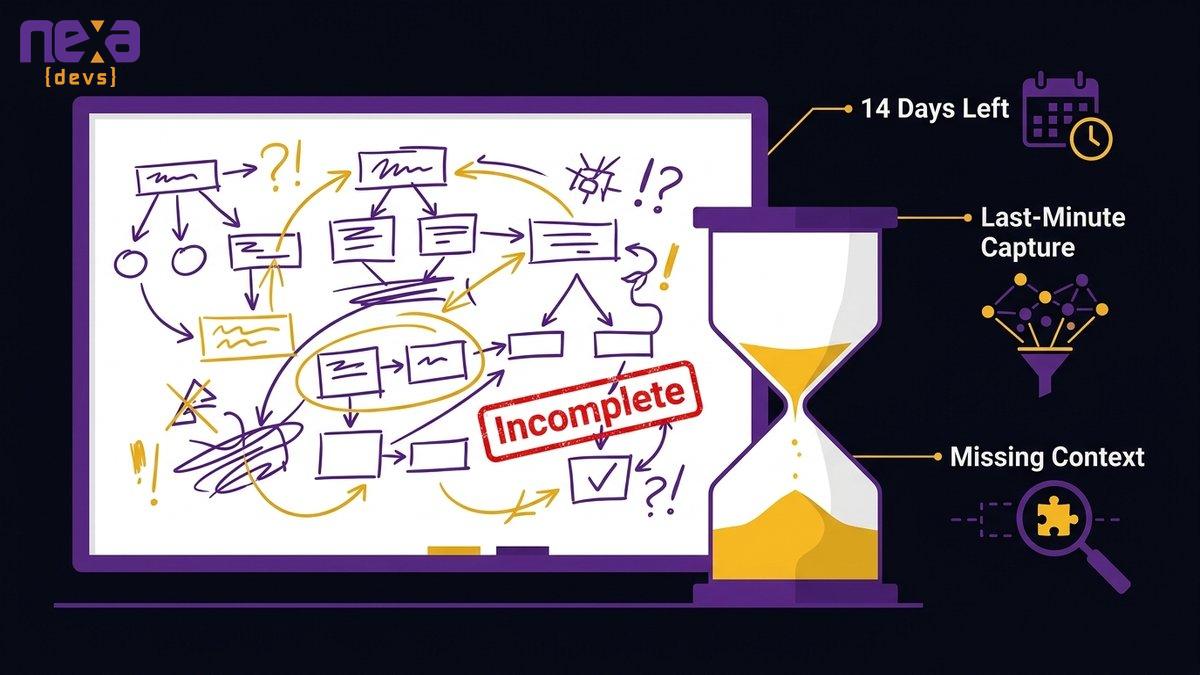
Fourteen days isn’t enough time to reconstruct a decade of context. The engineer doesn’t remember every tradeoff they made in 2019. They document what feels urgent, not what a future hire will actually need. And they’re doing it while also handing off active tickets, training a replacement, and mentally checking out of a job they’re about to leave. The result is a document that looks thorough and turns out, six months later, to be missing the one detail that would have prevented an outage.
This is why “we’ll capture it before they leave” isn’t a plan. It’s a hope dressed up as a plan. Real capture has to happen continuously, months and years before anyone announces a retirement date, as a normal part of how the system gets built and maintained.
A last-minute documentation scramble happening in an employee’s final days on the job
Make Documentation a Byproduct of How the System Is Built
Documentation as a farewell task always loses to documentation as a delivery standard. One happens under duress, written by someone who’s already mentally gone. The other happens every sprint, written by someone who’s actively building the thing they’re describing.
That structural shift is what actually works: instead of treating documentation as a separate project competing for time against feature work, it becomes a required output of the development process itself, the same way tests and code reviews already are on well-run teams.
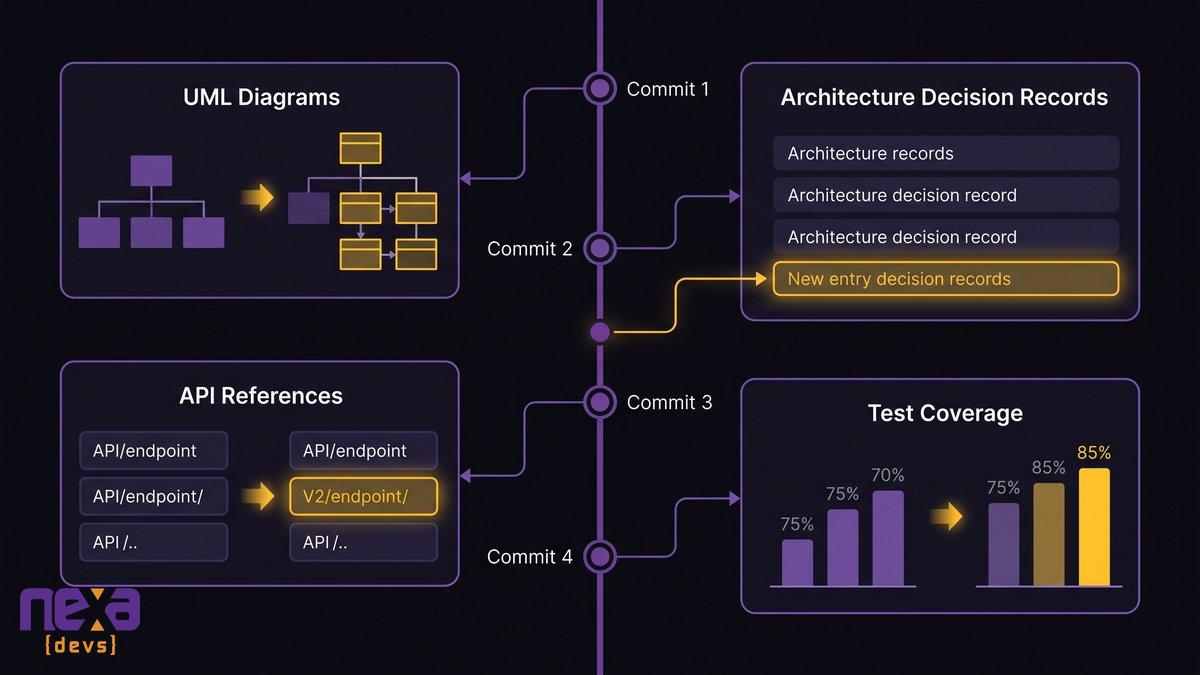
The artifacts that outlive the author: UML, ADRs, API references, test coverage
A development process built this way produces four things as standard deliverables on every engagement: UML architecture diagrams that show how the system fits together, architecture decision records that capture why specific choices were made and what alternatives got rejected, API references that document every integration point, and test coverage that encodes expected behavior in a form nobody can quietly forget. None of these require a retiring engineer to sit down and write a memoir. They accumulate automatically as the system gets built and modified.
Andrea Goulet, CEO of Corgibytes, put it well: “We realized that what we were doing transcended clearing out old code. We were actually remodeling software the way you would remodel a house to make it last longer, run better, do more.” Documentation produced this way is part of the remodel itself, not a chore bolted onto the end of a project.
Living documentation versus the stale wiki
Most companies already have a wiki. Most of those wikis stopped matching reality years ago, because updating them was optional and optional documentation always loses to a shipping deadline. The fix isn’t a better wiki, it’s making documentation a required, reviewed part of every change, so it stays accurate for the same reason your code stays functional: because the process won’t let it drift.
A documentation dashboard that updates automatically alongside code changes rather than sitting stale
what an AI-augmented SDLC actually produces
What AI Can and Cannot Capture
AI can read a codebase and generate a UML diagram in minutes. It can scan an API and produce a reference doc that used to take a developer a full week. What it can’t do is tell you why your team chose a queue over a cron job in 2019, or why a particular validation rule exists because of a customer incident nobody wrote down.
That distinction matters more than most AI vendors admit. AI-assisted documentation tools are genuinely good at encoding what’s written or observable: the structure of the code, the shape of the data, the paths a request takes through a system. They’re built for pattern recognition, not for archaeology into a decision that happened in a hallway conversation six years ago and never made it into a commit message.
Put honestly, AI is a supporting tool for capture, not a replacement for deliberate documentation. It can capture the “what” faster than any human ever could. The “why” still needs a person, usually the engineer who made the call, to sit down and explain their reasoning while they’re still around to ask. Skipping that step because AI handled the diagrams is how companies end up with beautiful documentation that still can’t answer the one question that mattered.
Turning a Retirement Into a Scheduled Transition
A retirement handled well looks almost boring. A handoff meeting. A transition period measured in months, not days. A new name on the on-call rotation, and nobody scrambling to figure out what the old name used to fix. That’s the goal, achievable once documentation stops being a scramble and starts being a byproduct of daily work.
Nexa Devs builds toward that outcome through long-term embedded partnerships, including a relationship with UCLA’s David Geffen School of Medicine that has run more than ten years. Institutional memory doesn’t live in one retiring employee’s head in that model. It lives in the partnership itself and in documentation the client owns unconditionally from day one, regardless of whether the engagement continues.
That’s the antidote to knowledge walking out the door. Not a heroic documentation sprint before someone’s last day, but a development process that produces UML diagrams, architecture decision records, API references, and test coverage as standard output every sprint, plus a partner who’s been embedded long enough to remember the “why” even when the person who made the original call has moved on to retirement.
Wikipedia’s overview of tacit knowledge, the concept researchers use to describe undocumented expertise
If your organization is watching senior engineers approach retirement age without a documentation plan in place, see how AI-driven layoffs create the same knowledge risk, the underlying mechanics are the same whether the departure is voluntary or not.
FAQ
How many Americans are turning 65 every day in 2026?
Roughly 10,000 Americans turn 65 every day, a pace that’s held steady since 2011 and continues through around 2030. That’s why engineer retirements cluster into a predictable wave instead of arriving as isolated surprises.
Is it true that by 2030 all baby boomers will be age 65 or older?
Yes. The youngest Baby Boomers, born in 1964, turn 65 around 2029, meaning the entire generation will have crossed that age threshold by roughly 2030. For engineering teams, that’s the outer edge of the retirement wave.
What does institutional knowledge mean?
Institutional knowledge is the accumulated understanding of how an organization’s systems, processes, and decisions actually work, including the reasoning behind past choices. It splits into explicit and tacit knowledge.
How do you prevent institutional knowledge loss when an engineer retires?
You prevent it by making documentation a continuous byproduct of development, not a task assigned during someone’s final weeks, so UML diagrams, architecture decision records, and API references already exist before a retirement date.
Can AI capture institutional knowledge automatically?
AI can capture what’s written or observable in a codebase quickly and accurately. It can’t capture the tacit reasoning behind past decisions unless a person deliberately documents that reasoning first.
What’s the difference between tacit and explicit knowledge in software?
Explicit knowledge is written down and readable by anyone. Tacit knowledge is undocumented judgment and experience a person accumulates, and it disappears when that person leaves.
by Sarah Mitchell | Sep 24, 2026 | Software Development Best Practices
MVNO Billing Modernization: Fixing BSS for eSIM and IoT
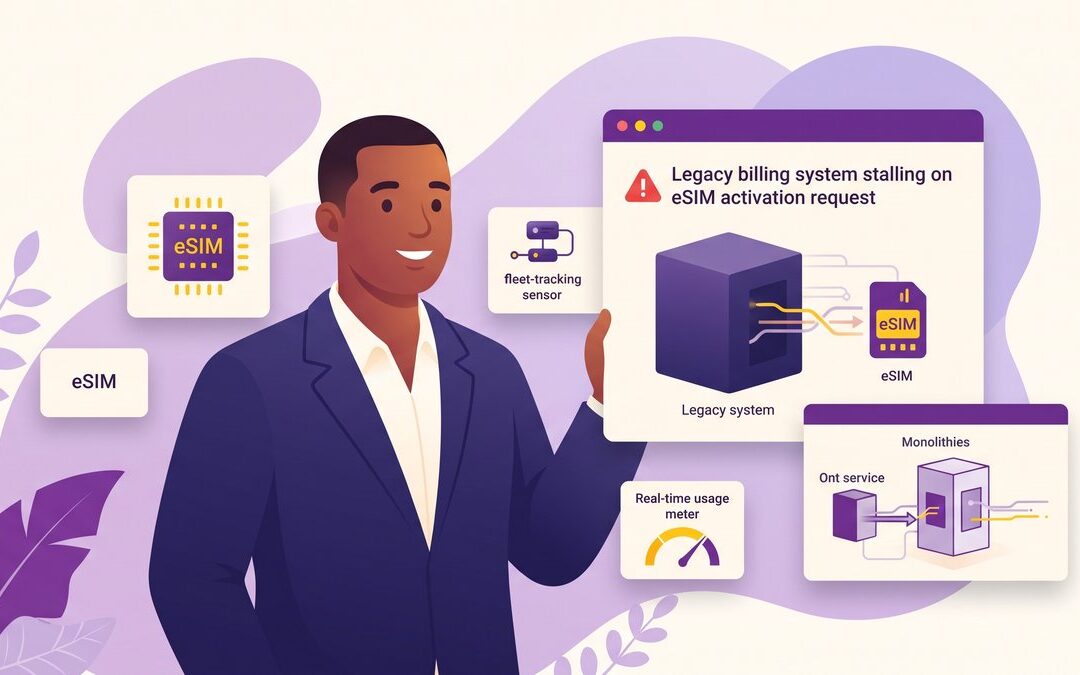
A regional MVNO launches an eSIM bundle for a connected-fleet client. The provisioning API can’t activate it. The rating engine can’t apply per-device usage pricing in real time. Sales already sold the plan to three enterprise accounts, and now support is fielding the fallout.
That failure is a symptom, not a vendor problem. The back-office was built for physical SIMs. MVNO billing modernization fixes it without a full platform rebuild: extract the specific functions, real-time charging, mediation, and provisioning, that eSIM and IoT actually stress, and rebuild them as cloud-native services while the rest of the platform keeps billing customers.
Quick answer: modernizing MVNO billing safely
- Legacy BSS platforms built for physical SIMs can’t provision eSIM activations or rate IoT usage bundles in real time.
- The fix isn’t a full rebuild or a new MVNE. Extract charging, mediation, and provisioning into cloud-native services one piece at a time.
- This strangler-pattern approach keeps you billing customers through the whole migration; you route traffic over only once each new service is proven.
- AI-augmented delivery rebuilds rating and mediation logic faster, with higher test coverage, than a traditional in-house rebuild.
- Full documentation transfer means you own the modernized system, instead of trading one black-box MVNE dependency for another.
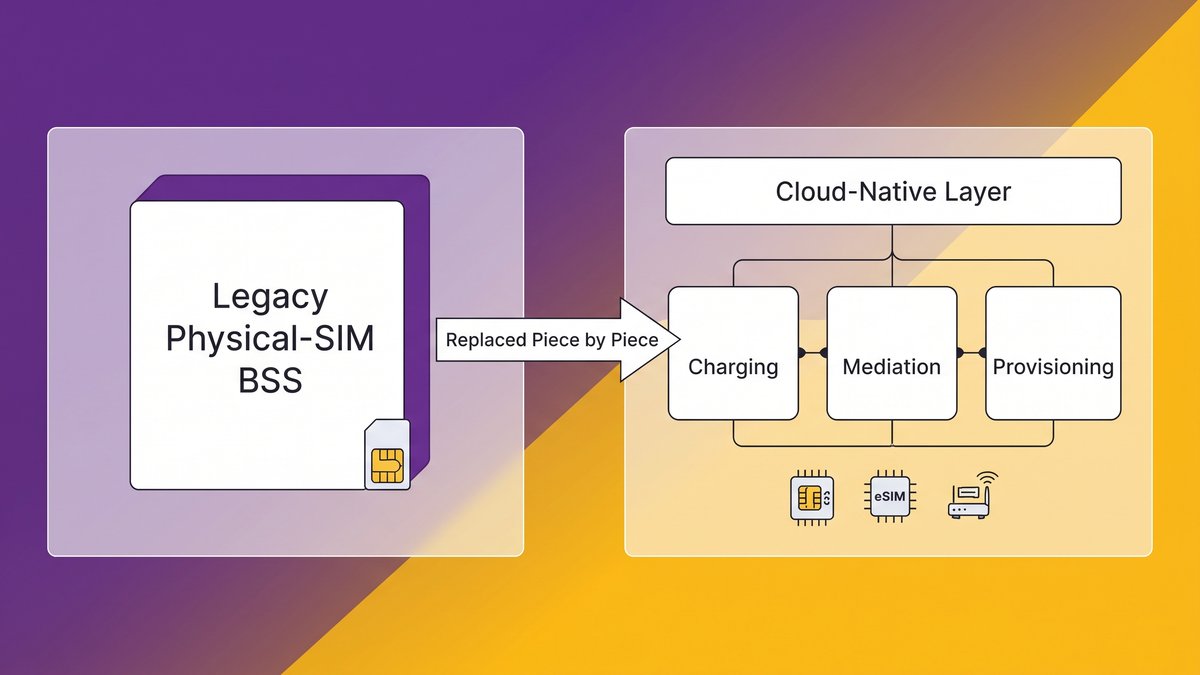
A side-by-side view of a physical-SIM-era BSS next to the cloud-native charging, mediation, and provisioning layer that replaces it piece by piece.
The eSIM/IoT Bundle Your Back-Office Can’t Provision or Rate
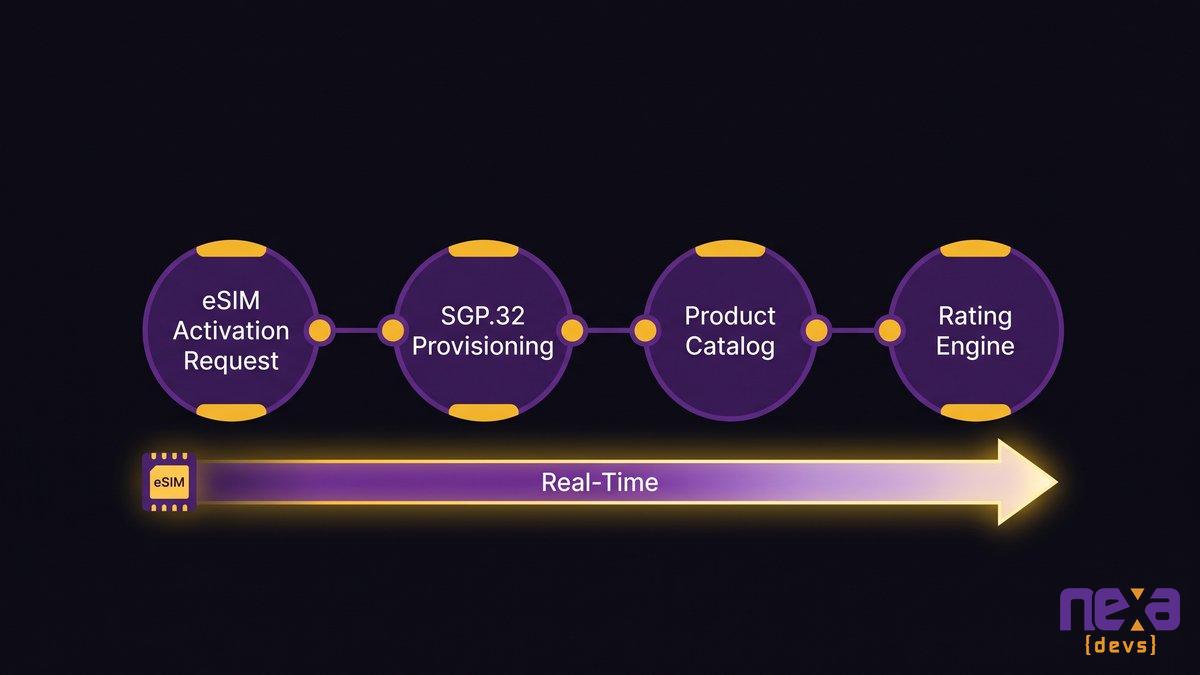
The provisioning request needs SGP.32 remote SIM profile management, an over-the-air handshake most physical-SIM-era provisioning modules were never built to perform. The rating engine needs to price data by the megabyte, per connected device, close to real time, not batch-rate a monthly bucket overnight. Both requirements hit a BSS designed around a different problem entirely: activate a physical card, meter voice and SMS, run one nightly rating batch.
Nexa has spent years inside an MVNO’s operations, including a carrier scaling its connectivity products well beyond what its original systems were sized to support. We have watched this play out more than once. The failure never shows up in a demo; it surfaces about three weeks after launch, when volume hits the provisioning queue and support tickets pile up faster than anyone can clear them by hand.
Built for Physical SIMs: Why the 2026 Product Mix Breaks Legacy BSS
Your BSS wasn’t broken when it shipped. It was built for a world where every SIM arrived as a physical card, activation took days, and usage meant voice minutes plus a monthly data bucket. eSIM readiness wasn’t part of the original spec, and neither was per-device IoT metering. That world is mostly gone.
eSIM, SGP.32 and remote provisioning at scale
For MVNOs, eSIM has already moved from a future trend to the current sales motion. According to GSMA Intelligence’s Mobile Economy 2026 report, eSIM-enabled smartphone connections are forecast to reach roughly 2.5 billion globally by 2028, with eSIM expected to account for 42% of all SIM technologies by 2030. That shift underpins broader 5G monetization strategies industry-wide too, not just eSIM logistics. Every one of those connections needs SGP.32 provisioning: instant, over-the-air profile downloads instead of a physical card mailed to a customer.
A provisioning module built around physical logistics fails quietly. It queues requests, batches what should be instant, and lets a backlog grow between the moment a customer buys a plan and the moment their device actually connects.
IoT and usage-based bundles the rating engine never anticipated
IoT connectivity billing multiplies the problem. A fleet-tracking device, a smart meter, and a connected vending machine don’t generate a predictable monthly usage pattern the way a phone plan does. They need metered, usage-based billing that rates small, frequent transactions accurately, close to real time, across potentially thousands of devices per customer account.
Grand View Research puts the U.S. MVNO market at roughly $30 billion in 2024, on pace to exceed $52.9 billion by 2032. Growth like that is coming disproportionately from IoT and connected-device plans, not traditional consumer mobile. A rating engine tuned for human subscriber behavior was never built for that shape of demand.
How an SGP.32-based eSIM activation request flows through provisioning, the product catalog, and the rating engine in real time.
What MVNO Billing Modernization Must Actually Do: Real-Time Charging, Mediation, Provisioning
Three capabilities separate a BSS that can handle the 2026 product mix from one that can’t: real-time charging, clean CDR mediation, and provisioning tied to a flexible product catalog. Everything else is implementation detail.
Real-time / convergent charging and rating
Convergent charging means one real-time rating engine handles voice, data, SMS, and IoT usage together, instead of running separate batch processes for each product line. A customer on a hybrid plan, unlimited voice plus metered IoT data for a connected device, needs a single rated bill, not three systems reconciled after the fact.
Mediation takes raw call detail records from the network and turns them into something the charging engine can actually rate: normalized, deduplicated, and matched to the right product and customer. When eSIM and IoT triple the volume and variety of CDRs flowing through that pipeline, a mediation layer sized for a smaller, more uniform dataset starts dropping or misrouting records it was never designed to parse.
Automated provisioning and the product catalog
Provisioning has to talk directly to the charging engine and the product catalog, not sit in a separate queue waiting for someone to reconcile them by hand. SIM provisioning automation means the product catalog defines a new bundle once, with provisioning, rating, and mediation all reading from that same definition instantly, not three weeks later after someone updates each system separately.
Every rejected CDR is unbilled usage. Every hour of mediation lag is a delayed invoice and a slower fraud signal. Neither shows up on a dashboard until finance asks why margin is shrinking.
This is the cost nobody puts in a modernization business case, because it doesn’t look like a system failure. The BSS is up. Customers are getting bills. But a rating engine that can’t process eSIM and IoT usage in real time does something worse than slow down. It drops or misprices a share of usage records it can’t parse correctly, and that’s where revenue assurance breaks down quietly, cycle after cycle, at a scale that compounds fast for an MVNO.
A bigger dashboard won’t surface this; an audit will. Pull your CDR rejection rate and average mediation lag for the last three billing cycles, and compare them against what your current product catalog actually needs to support. If nobody on your team can produce that number quickly, that’s the real finding. For a deeper look at how legacy platforms accumulate costs that never show up on a single invoice, see why legacy platforms quietly cost more every quarter.
Rip-and-Replace vs. the Strangler Pattern: Modernizing BSS Without Going Dark
A full BSS rebuild sounds clean on a slide deck. It also asks you to stop billing customers for the length of the migration, which is the one thing an MVNO can never actually do.
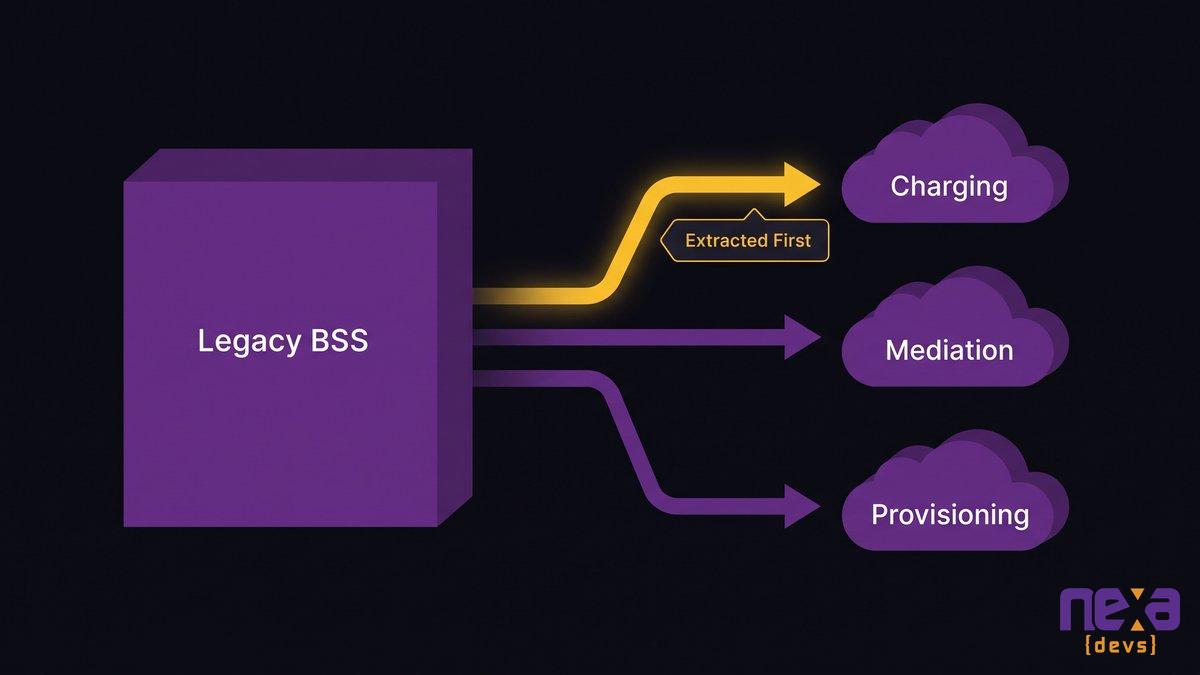
The strangler pattern, a term coined for exactly this kind of incremental legacy replacement, works by pulling one function out of the legacy platform at a time and standing it up as an independent, API-driven service. Charging comes first, since it’s the function most stressed by eSIM and IoT. Mediation and provisioning follow, each built and tested against real production traffic before either takes over anything. A cloud-native BSS/OSS emerges service by service this way, never in one all-at-once cutover.
How the strangler pattern extracts charging, mediation, and provisioning from a legacy BSS one proven service at a time.
Route traffic over once each service is proven, decommission legacy last
Each new service runs in parallel with its legacy counterpart, processing a shadow copy of live traffic, before any real customer data routes through it. Once the results match, and keep matching under real volume, you cut over. The legacy component that handled that function gets decommissioned only after its replacement has proven itself, never before.
Why a big-bang rebuild risks the one thing you can’t stop: billing customers
A rewrite-everything-at-once project has one massive cutover date, and everything downstream of it, invoicing, collections, regulatory reporting, depends on that single event going perfectly. Delay it and you’re running two systems in parallel anyway, just without a plan for it. The strangler pattern gets you the same architectural outcome without betting the business on one weekend.
A big-bang rebuild is almost never the right call for an operator who can’t stop billing. It sounds more impressive in a boardroom and survives contact with production far less often.
Build vs. Buy, Revisited: Why Another MVNE Isn’t the Fix
Moving to a new MVNE feels like progress. Usually it’s a lateral move: you trade the black box you understand for one you don’t, and you still don’t own the platform running your revenue.
As Ashwin Ballal, CIO at Freshworks, states: “Legacy systems have become so complex that companies are increasingly turning to third-party vendors and consultants for help, but the problem is that, more often than not, organizations are trading one subpar legacy system for another. Adding vendors and consultants often compounds the problem, bringing in new layers of complexity rather than resolving the old ones.”
None of this rules out ever using an MVNE. It rules out treating a vendor swap as modernization. An MVNE can get a new operator to market fast. It doesn’t solve the ownership problem for an operator who already has years of customer data, billing history, and operational process built into an existing platform.
Legacy integration, including legacy BSS 5G integration specifically, is a widely shared problem, not a telecom-specific one. Deloitte’s 2025 analysis found that nearly 60% of AI leaders name legacy-system integration as their primary modernization barrier. Swapping one closed platform for another leaves that barrier fully in place; all it changes is who controls it.
Owning the Modernized System: AI-Augmented Delivery and Full Documentation Transfer
The goal of modernization was never a newer platform for its own sake. What you actually want is an operator who understands, controls, and can extend the system running their own revenue, without calling a vendor for permission first.
Rewriting rating and mediation logic by hand, function by function, is exactly the kind of work AI-augmented delivery speeds up without cutting corners, generating test cases alongside the new charging service and catching CDR-parsing edge cases a rushed manual QA pass might miss. According to HFS Research’s 2026 analysis, agentic AI-augmented modernization delivers 40 to 60% productivity gains and cuts migration timelines by 30 to 50% compared with traditional approaches. Applied to a strangler-pattern migration, that’s the difference between a modernization that takes a year per component and one that takes a quarter.
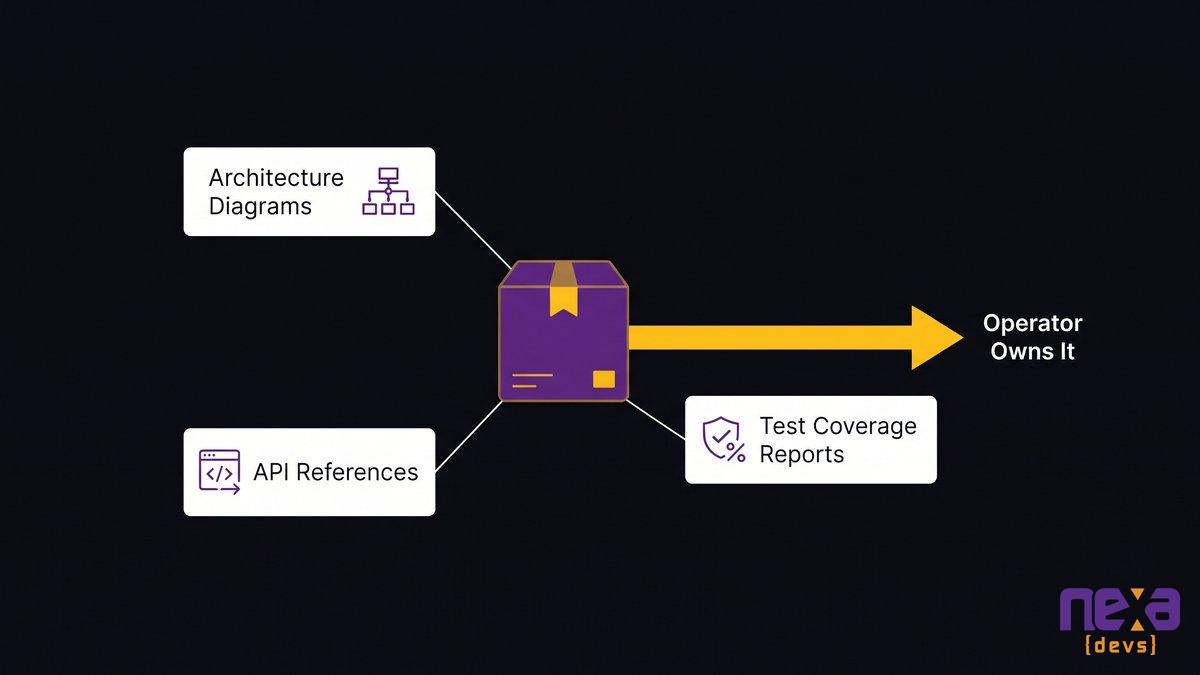
The documentation package handed to the operator at the end of a modernization engagement: architecture diagrams, API references, and test coverage reports.
Documentation transfer so the operator owns the system, not the vendor
Every extracted service comes with architecture diagrams, API references, and test coverage reports, transferred to the operator unconditionally, whether or not the engagement continues afterward. Documentation transfer is what separates modernizing a system you own from quietly re-creating the MVNE dependency you were trying to escape in the first place. how documentation transfer works walks through what a complete handoff actually includes.
Your BSS doesn’t need a funeral. It needs the three or four functions that eSIM and IoT are stressing pulled out, rebuilt cloud-native, and proven before anything gets decommissioned. That’s the modernization path that keeps you billing customers on day one and owning your system on the last day of the project too.
If you want a clearer picture of where the strangler pattern applies first inside your own BSS, talk to our team about mapping your charging, mediation, and provisioning stack before you commit to any rebuild.
FAQ
What is MVNO billing modernization?
MVNO billing modernization means upgrading the charging, mediation, and provisioning logic inside your BSS to support real-time rating, eSIM activation, and IoT usage-based billing, typically without replacing the entire platform at once.
How does the strangler pattern work for BSS modernization?
The strangler pattern extracts one function at a time, like charging or provisioning, into a new cloud-native service running alongside the legacy BSS. You route traffic over once it’s proven, then repeat until the old platform is retired.
Why can’t legacy BSS platforms support eSIM provisioning?
Most legacy BSS platforms were architected around physical SIM logistics: manual activation, batch processing, and static rate plans. eSIM and SGP.32 provisioning need real-time API calls and instant rating, which those systems weren’t built to handle.
Should a mid-market MVNO switch to a new MVNE instead of modernizing?
Switching MVNEs can solve a speed problem, but it usually doesn’t solve an ownership problem. You still don’t control the platform or its documentation. Modernizing the system you already run gives you both speed and long-term control.
How long does BSS modernization take without a full rebuild?
A strangler-pattern modernization typically rolls out service by service over several months, not years, because each extracted component ships and proves itself independently while the legacy system keeps billing customers throughout.