AI Readiness Assessment: Why 80% of AI Projects Fail Before They Start (And How to Know If You’re Next)
You approved the AI initiative six months ago. The vendor presented a convincing pilot. The team was excited. Then nothing made it to production.
Or maybe it got to production and it doesn’t work the way anyone expected. Or maybe it’s still “in progress,” consuming budget and delivering status updates.
This is the experience waiting for most mid-market companies that skip the pre-work. That pre-work has a name: an AI readiness assessment.
According to OvalEdge, 80% of AI projects fail to deliver intended outcomes. That number gets cited constantly, but almost nobody asks the obvious follow-up: what are they failing on? If it’s not the AI model, not the use case, and not the team — what is it?
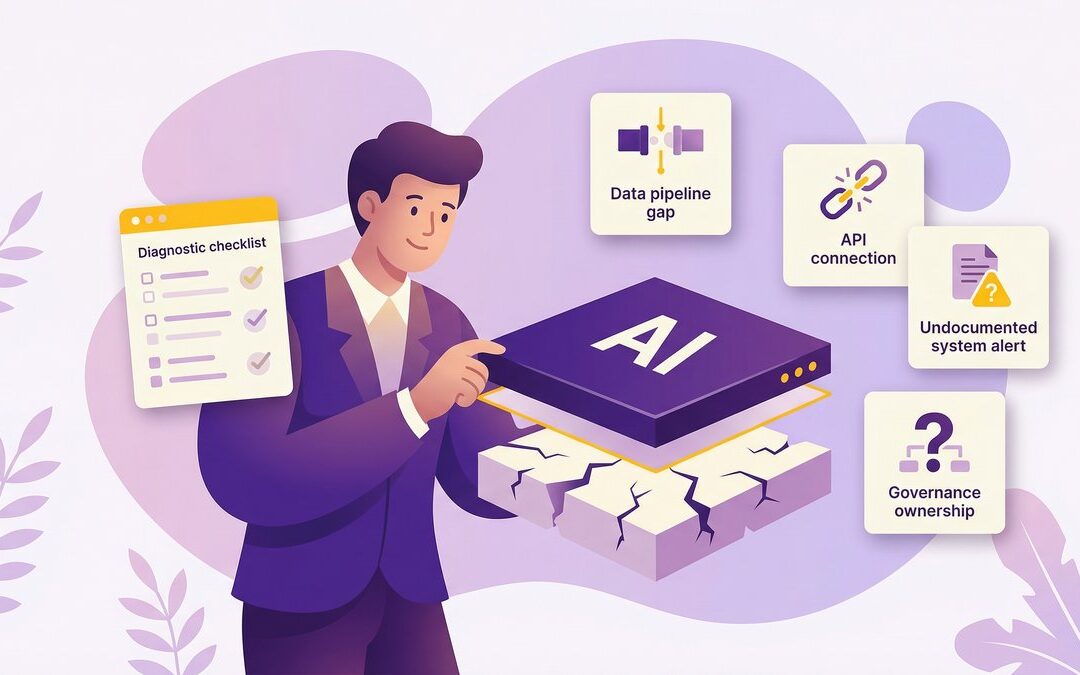
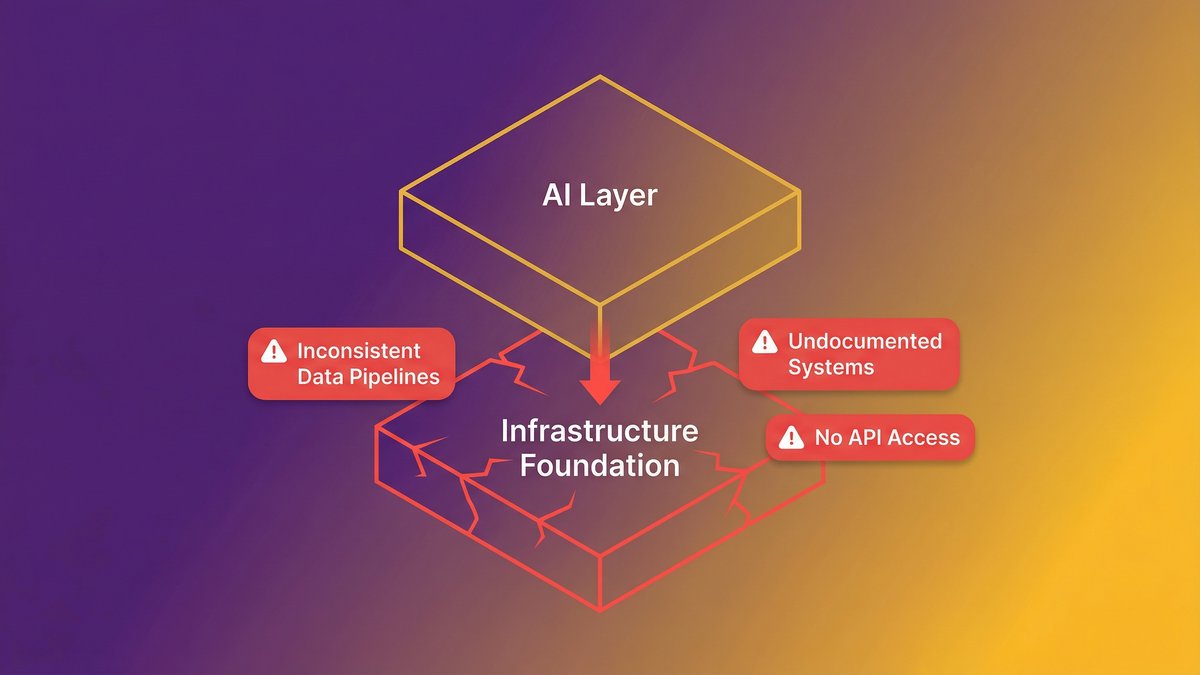
The answer, in almost every case, is the layer underneath. Infrastructure that was never built to serve AI. Data that exists but can’t be accessed in the format AI needs. Systems that were documented by the person who left three years ago, in a format no one can read.
This guide will show you exactly what an AI readiness assessment measures, where mid-market companies get stuck, and what a real pre-build diagnostic looks like before you spend another dollar on AI.
Quick answer: Why AI readiness assessments matter
80% of AI projects fail to deliver intended outcomes — and the failure almost never comes from the AI itself.
The root cause is legacy infrastructure, undocumented systems, and missing data pipelines underneath the AI layer.
An AI readiness assessment measures five dimensions: data, infrastructure, talent, governance, and strategic alignment.
Most mid-market companies score between 22 and 38 out of 50 on their first assessment. The gap is normal, but ignoring it is costly.
The right response is a pre-build diagnostic that addresses modernization and AI embedding simultaneously, not sequentially.
Why AI Projects Fail Before the First Line of Code Is Written
AI project failure starts at the foundation layer, not the AI layer. The model is rarely the problem. The data infrastructure underneath it almost always is.
According to OvalEdge, only 30% of AI pilots progress beyond the pilot stage. That means 70% of teams that build something promising hit a wall between the pilot and production phases. The wall isn’t a technical ambition. It’s an operational reality.
The real failure point: infrastructure, not intelligence
Here’s what that wall looks like in practice. A Series B SaaS company with 120 employees builds a promising AI feature during a three-month pilot. The model performs well in testing. Then the engineering team tries to deploy it against live data — and discovers the data pipelines feeding it are inconsistent, the systems generating that data weren’t designed with API-first architecture, and the ownership of the AI output is undefined. Legal gets involved. The pilot stalls.
Nobody failed at AI. They failed at readiness.
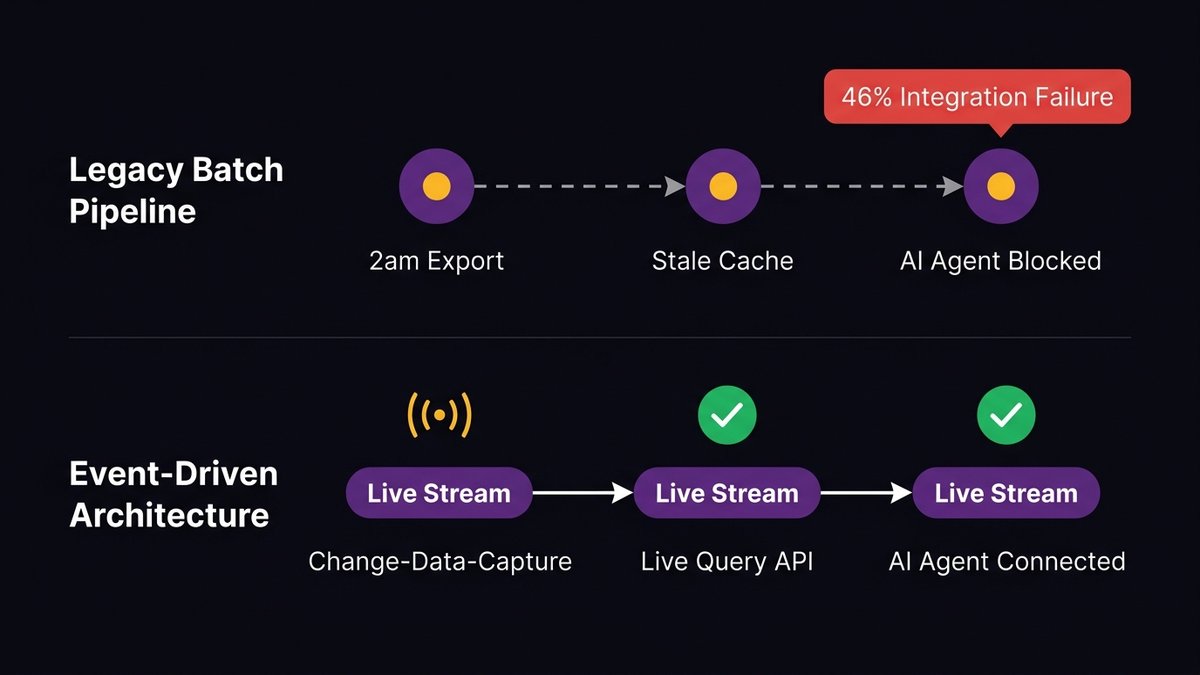
According to Arcade.dev’s 2026 State of AI Agents report, 46% of enterprises cite integration with existing systems as their primary AI deployment challenge. Not the model. Not the use case. The existing systems need the AI to work with.
This is the failure the standard project planning process misses entirely. Project plans start with the AI use case. They should start one layer below that.
What 80% failure rate data actually reveals about organizational readiness
The MIT report cited in Fortune (August 2025) noted that 95% of generative AI pilots at companies are failing. OvalEdge puts the broader AI project failure rate at 80%. These numbers aren’t measuring bad AI. They’re measuring organizations that attempted AI before they were ready for it.
The pattern is consistent: organizations prioritize the AI layer and assume the infrastructure layer will accommodate it. It almost never does without deliberate preparation.
According to Forrester, 70% of digital transformations are slowed by legacy infrastructure. AI adoption is a digital transformation. The math applies.
What an AI Readiness Assessment Actually Measures
An AI readiness assessment diagnoses whether your organization’s infrastructure, data, talent, governance, and strategy can support AI deployment before you build anything. It’s a pre-investment diagnostic, not a post-failure autopsy.
The assessment doesn’t measure how sophisticated your AI ambitions are. It measures whether the foundation underneath those ambitions can hold the weight.
The 5 dimensions of enterprise AI maturity
Most credible AI readiness frameworks evaluate across five dimensions. Each one creates a different category of failure if it’s missing.
1. Data readiness: Is your data accessible to AI systems, not just stored somewhere? Data quality, labeling, pipeline architecture, and format consistency all matter. According to OvalEdge, 67% of organizations cite data quality issues as their top AI readiness barrier. The data exists. Getting it into a form AI can consume is the problem.
2. Infrastructure readiness: Are your systems built to serve AI workloads? API availability, cloud architecture, compute capacity, and system integration points all factor in. On-premises infrastructure with no upgrade path is the most common blocker in mid-market companies.
3. Talent and skills readiness: Does your team have the capability to build, maintain, and govern AI systems? According to OvalEdge, 52% of organizations lack AI talent as a readiness barrier. This isn’t just about hiring a data scientist — it’s about whether your engineering team can maintain what gets built.
4. Governance and ethics readiness: Who owns the AI output? What happens when the model produces something wrong? Do you have policies covering AI-generated decisions? According to OvalEdge, 91% of organizations need better AI governance and transparency. Most mid-market companies have no governance framework at all.
5. Strategic alignment: Is AI connected to a specific business outcome, or is it a technology initiative searching for a problem? Assessments score whether leadership has defined success criteria, ownership roles, and integration with business strategy — not just a technology roadmap.
Why most assessments miss the legacy infrastructure layer
Generic AI readiness assessments score well on paper for companies that have a technically modern infrastructure. But they systematically miss a category that specifically affects mid-market companies: undocumented legacy systems.
You might have a cloud-hosted application built in 2019 and an on-premises system built in 2008 that has never been formally integrated. The 2019 system scores well on infrastructure readiness. The 2008 system holds 60% of the operational data AI would need. That combination doesn’t show up cleanly in a standard assessment — and it’s the one that kills the project.
The Legacy Infrastructure Problem No One Puts in the Assessment
Legacy infrastructure is the hidden variable in every AI readiness assessment. It’s often underdocumented, partially understood by a shrinking group of people, and structurally incompatible with the way AI systems need to consume data.
Most assessment frameworks treat infrastructure as a binary: you have cloud infrastructure, or you don’t. Real organizations have layers — some cloud, some on-prem, some somewhere in between. The assessment needs to go one level deeper.
Undocumented systems and missing data pipelines: the invisible blockers
The highest-risk infrastructure problem isn’t outdated technology. It’s undocumented technology. A system running on a 2011 stack that’s fully documented, well-tested, and understood by your team is manageable. A system running on a 2023 stack built by a vendor who left no documentation, with three critical integrations no one remembers setting up and feeding data to five other systems in undocumented formats, is catastrophic.
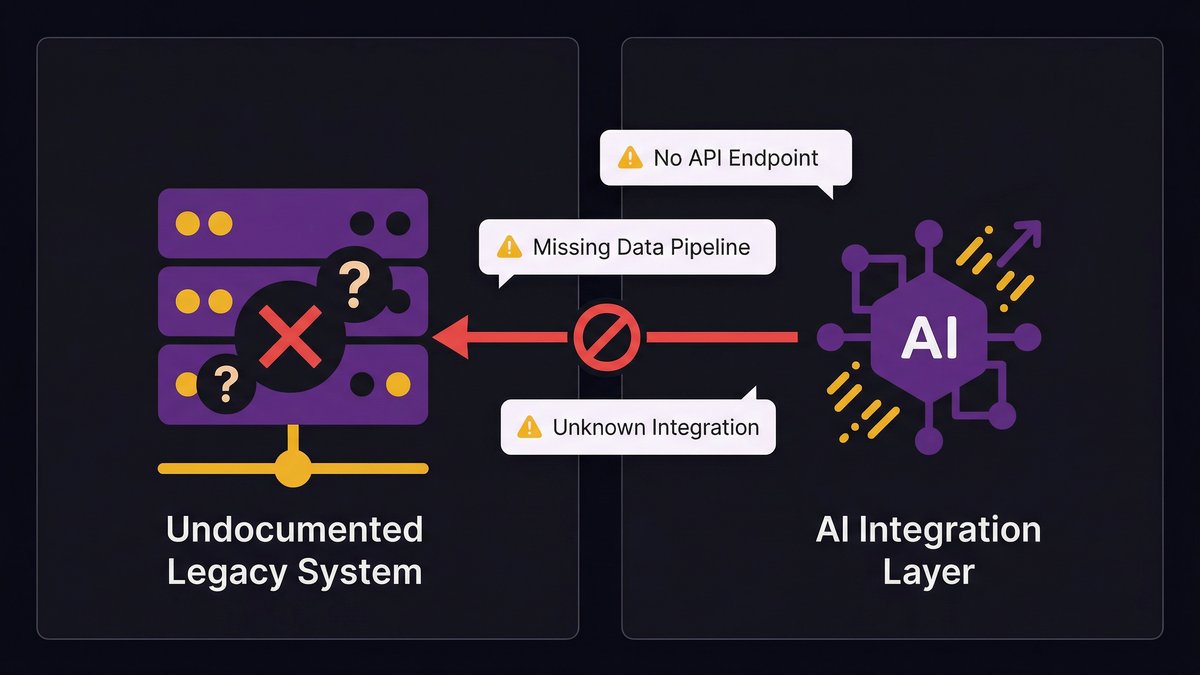
AI needs reliable, structured data delivered through predictable pipelines. Undocumented systems can’t reliably provide either. You don’t know what data they’re actually producing, you can’t trace where it goes, and you can’t build a data pipeline on top of a system you don’t fully understand.
This is why the pre-build diagnostic has to go deeper than the assessment checklist. The checklist asks, “Do you have data pipelines?” The diagnostic asks, “Are those pipelines documented, tested, and owned by someone who’s still here?”
Why bolting AI onto a broken foundation fails every time
AI-on-top-of-legacy is the most common deployment pattern and the most reliable way to produce the failure rate OvalEdge is measuring. The logic sounds reasonable: build the AI layer, connect it to existing systems via API, and don’t touch the legacy infrastructure. You preserve operational continuity, limit the project scope, and ship faster.
Here’s what actually happens. The API connection works in testing, where data is clean, and volume is low. In production, the legacy system produces inconsistent data formats at unpredictable intervals. The AI model receives garbage, outputs garbage, and someone notices six weeks in. Then the conversation turns to whether the problem is the AI model, even though the problem has always been the data pipeline.
“Traditional modernization tends to over-index on protecting how things work today rather than building for what’s next,” says Skylar Roebuck, CTO at Solvd. “AI capability is compounding rapidly, and the real risk for mid-market companies is delay.”
That delay compounds when you build AI on top of a foundation that can’t support it. You don’t save time by skipping modernization. You create a rework cycle that costs more than the original modernization would have.
The mid-market gap: when your infrastructure was built before AI existed
Enterprise companies with Fortune 500 infrastructure face a different AI-readiness problem than mid-market companies. They have resources, dedicated engineering teams, and technology roadmaps that can absorb a multi-year modernization program.
Mid-market companies — 50 to 500 employees, operational systems that have compounded in complexity over 10 to 15 years — are in a different position. Their infrastructure was designed to run the business of 2012. It wasn’t designed to feed AI agents, expose clean APIs, or maintain data pipelines that meet modern consistency standards.
Unlike enterprise companies, mid-market organizations typically don’t have a dedicated platform engineering team to run modernization while the business continues to operate. The same engineers maintaining the legacy system are also responsible for any AI work. That structural constraint is the mid-market AI readiness gap — and a standard assessment framework won’t surface it.
Common AI Readiness Gaps in Mid-Market Organizations
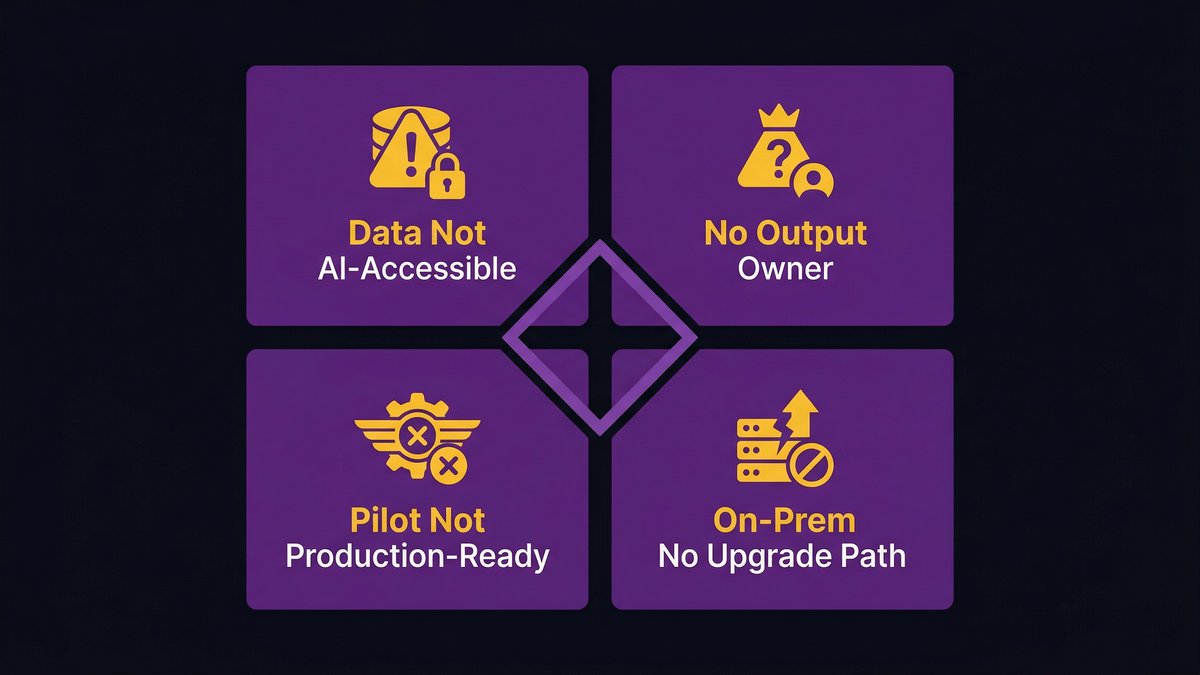
Most mid-market companies share four specific readiness failures. They’re not unique — but they are predictable. Which means they’re diagnosable and fixable before you start building.
Data exists, but is not AI-accessible
This is the most common gap. Your company generates enormous amounts of operational data. It lives in your CRM, ERP, legacy databases, spreadsheets, and email archives. You know it’s there.
AI systems can’t access most of it. The data is in formats that require transformation before an AI model can consume it. The pipeline from storage to model doesn’t exist. The transformation logic for inconsistent formats hasn’t been written. So the data sits — full of signal, structurally inaccessible.
The assessment question “Do you have sufficient data?” almost always gets answered yes. The follow-up question “Is your data AI-accessible?” almost always gets answered no, once you dig one level deeper.
No one owns the AI output
If your AI system generates a recommendation, a prediction, or an automated decision — who owns that output? Who reviews it for accuracy? Who’s accountable when it’s wrong?
This question sounds simple. It rarely has a simple answer. Organizations building AI features often define ownership for the AI input (the model, the training data, the deployment infrastructure) and leave AI output ownership undefined. That gap creates liability exposure and makes production deployment politically impossible.
Every AI readiness assessment should require a named owner for AI output before any build begins. That person doesn’t need to be technical. They need to be accountable.
Pilot success mistaken for production readiness
A pilot that works in a controlled environment tells you the AI approach is sound. It doesn’t tell you the underlying infrastructure can support it at scale, with real data volumes, under production load conditions.
This is the specific failure behind the “only 30% of AI pilots progress beyond the pilot stage” statistic. The pilot succeeded. The infrastructure couldn’t support what the pilot proved was possible.
The gap between pilot and production is a readiness gap, not an AI gap. It requires the same infrastructure assessment you should have run before the pilot began.
Infrastructure is on-prem with no upgrade path
On-premises infrastructure isn’t automatically an AI readiness blocker. Documented, well-maintained, API-accessible on-prem systems can support AI workloads.
But on-prem infrastructure built before cloud architecture existed — with no APIs, no documented integration points, and no planned migration path — is a hard constraint. AI systems that need elastic compute, cloud-based model hosting, or real-time data access can’t run effectively against a locked-on-prem backend.
The assessment question isn’t “is your infrastructure on-prem or cloud?” The question is: does your infrastructure have a realistic path to supporting AI workloads in the next 12 months? If the answer is no, modernization needs to happen before AI deployment — not alongside it.
What a Pre-Build Diagnostic Looks Like in Practice
A pre-build diagnostic differs from a standard AI readiness assessment in one critical way: it’s designed to inform a specific build decision, not to generate a generic readiness score.
A standard assessment tells you where you stand across the five dimensions. A pre-build diagnostic tells you what has to change before you can build what you’re planning to build — and sequences that work so modernization and AI development happen simultaneously, not in separate phases.
The difference between an assessment and a diagnostic
An assessment scores your current state. It benchmarks you against a maturity model and identifies gaps. It’s useful for understanding where you are.
A diagnostic goes further. It maps your current state against the specific requirements of the AI capability you want to build. Instead of asking “are your data pipelines adequate?” — a generic assessment question — it asks “are your data pipelines adequate for the specific model and use case you’re planning, given your current data volumes, formats, and consistency levels?”
The difference sounds subtle. The operational implications are significant. A diagnostic produces a sequenced action plan. An assessment produces a gap report.
What Nexa maps before any modernization engagement begins
At Nexa Devs, no modernization or AI integration engagement starts without a pre-build diagnostic phase. This isn’t optional, and it isn’t billable overhead. It’s the mechanism that makes the subsequent build reliable.
The diagnostic maps four things before any code is written:
Infrastructure topology — which systems exist, how they’re connected, which connections are documented, and which are held together by institutional knowledge that lives in one person’s head.
Data pipeline audit — which data sources feed which systems, in what formats, at what frequency, with what consistency. Where the pipeline is broken, undocumented, or dependent on a manual process.
AI use case compatibility — whether the specific AI capability being planned can be supported by the current data and infrastructure state, or whether infrastructure work needs to come first.
Ownership mapping — who owns each system, who owns the data flowing through it, and who will own the AI output once it’s in production.
This diagnostic takes days, not weeks. It produces a written map the client owns. And it determines the sequence: what gets modernized first, what gets built alongside modernization, and what gets deferred.
How does simultaneous stack modernization and AI embedding work
The conventional approach sequences modernization and AI in two phases: modernize first, then build AI. This sounds logical. It’s slow, expensive, and creates a false choice.
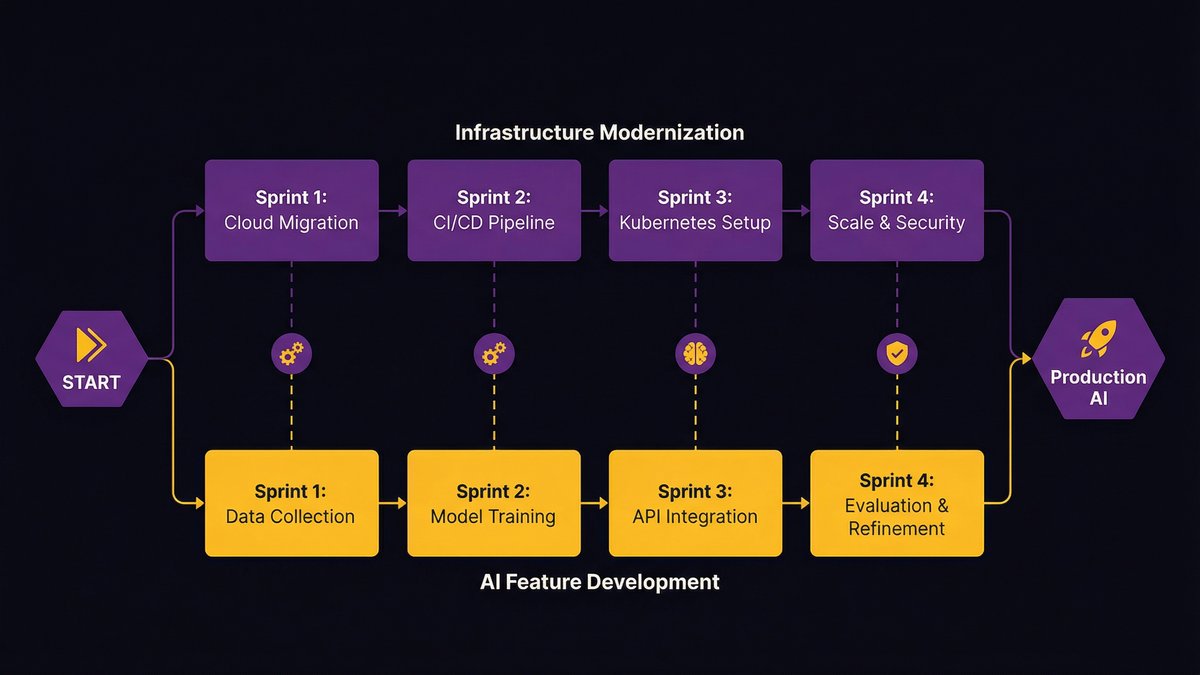
Nexa’s approach runs both tracks simultaneously. Every sprint delivers two things: modernization work that cleans up infrastructure for AI compatibility, and AI feature development that operates against the progressively cleaner infrastructure.
This requires a team that understands both modernization and AI development concurrently — and a delivery process that can sequence work across both tracks without one blocking the other. That’s the structural capability the diagnostic phase establishes.
The result: clients don’t wait 12 months for modernization to be completed before seeing any AI capabilities. They see AI capability advancing in parallel with the infrastructure improvements that make it sustainable.
AI Readiness Maturity Levels: Where Mid-Market Companies Actually Score
The five-level maturity model is the standard framework for scoring AI readiness across dimensions. Most mid-market organizations land in a specific band — and knowing that band before you start is operationally useful.
The 5-level maturity model explained
Level 1 — Initial/Ad-hoc: No structured approach to AI. Individual tools are used opportunistically. No governance, no data strategy, no defined ownership. AI happens despite the organization, not because of it.
Level 2 — Developing: Some AI pilots underway. Data strategy is being defined. Technology infrastructure is being assessed. No production deployments at scale. This is where most mid-market companies start their assessment journey.
Level 3 — Defined: Repeatable AI processes in place. Data pipelines documented and maintained. Governance framework established. Some AI capabilities in production. The organization knows how to build and run AI — but not yet at scale.
Level 4 — Managed: AI capabilities are measured, monitored, and continuously improved. Infrastructure is AI-native. Governance is operational, not aspirational. Multiple production AI systems are running reliably.
Level 5 — Optimizing: AI is embedded in core operations. Continuous improvement loops run automatically. The organization generates its own AI capability advancement through learning and iteration.
Why most mid-market enterprises score between 22 and 38 out of 50
According to Intuz, most mid-market enterprises score between 22 and 38 out of 50 on their first AI readiness assessment. That range maps to Levels 2 and 3 in the maturity model — developing to defined.
This isn’t a failure. It’s a realistic starting point for organizations that have been running operational systems for a decade or more without AI in mind. The infrastructure exists. The data exists. The processes exist. None of them were designed for AI.
What this means practically: if you score in the 22–38 range, you’re not starting from scratch. You’re starting from an infrastructure that needs focused modernization in specific areas — not a complete rebuild — before AI development can proceed reliably.
The 5-Question AI Readiness Self-Assessment (Take It in 5 Minutes)
This isn’t a scoring tool. It’s a signal. Each question maps to one of the five dimensions of AI readiness. If you answer “no” or “I don’t know” to three or more, your organization needs a pre-build diagnostic before any AI investment proceeds.
Answer honestly — these questions are designed to surface the gaps that sink AI projects, not the ones that make you feel prepared.
Question 1 — Data accessibility
Can your team pull a clean, structured dataset from your primary operational systems in under 24 hours, without a manual extraction process and without calling the one person who knows the database schema?
If the answer is no, your data readiness gap will kill your AI project before the model is trained.
Question 2 — Infrastructure compatibility
Are your core operational systems accessible via documented, maintained APIs — or do they require direct database access, custom middleware, or tribal knowledge to query?
If any critical system is accessible only through undocumented integrations, your infrastructure can’t reliably feed an AI system in production.
Question 3 — Ownership clarity
Can you name the person in your organization who will be accountable for the accuracy and consequences of your AI system’s outputs — not the person who built it, but the person who owns what it produces?
If that person isn’t named yet, you don’t have governance. You have a liability.
Question 4 — Pilot-to-production track record
Has your organization successfully taken any software system from pilot to production in the past 18 months — not a vendor-hosted SaaS deployment, but a custom system your team built and now maintains in production?
If the answer is no, you have a production deployment readiness gap that will surface when you try to scale an AI pilot. The AI project won’t be the first thing this gap kills.
Question 5 — Use case specificity
Can you describe your AI initiative in a single sentence that includes: what it predicts or automates, using which data, to produce which measurable outcome, owned by which team?
If that sentence requires more than one “and” or leaves any of those four elements undefined, you don’t have a use case. You have a direction.
Score yourself: five yes answers means your organization has foundational readiness for AI development. Three or more ‘no’ or ‘don’t know’ answers indicate a pre-build diagnostic is the right first step — not another pilot.
What to Do After Your Assessment: From Diagnostic to Delivery
Once you’ve completed an AI readiness assessment or pre-build diagnostic, you have two kinds of output: a score and a sequence. The score tells you where you are. The sequence tells you what to fix and in what order.
Most organizations treat the assessment as the end of the process — they file the report and wait for budget approval to start modernization. That’s the wrong move.
How to prioritize modernization before AI investment
The diagnostic produces a sequenced list of infrastructure improvements ranked by their impact on the AI capability you’ve committed to building. Start there — not with the longest list of improvements, but with the specific changes that unblock the target use case.
A common mistake is treating infrastructure modernization as a prerequisite that has to be completed before AI development starts. This turns a 6-month AI project into an 18-month program.
The better approach is modular: identify the minimum viable infrastructure state that supports the AI use case, modernize to that state in parallel with early development, and treat further modernization as ongoing work. According to Deloitte, nearly 60% of AI leaders identify legacy system integration as their primary barrier to agentic AI adoption. The organizations that succeed don’t eliminate that barrier before starting — they sequence around it.
Why AI-augmented development from day one beats retrofitting
If you’re modernizing your infrastructure to support AI, the development team doing that modernization should use AI in their delivery process. Not as a feature — as the delivery mechanism.
When AI is embedded in the modernization process itself, two things happen. The work moves faster. AI-augmented development teams achieve higher test coverage, cleaner architecture, and more consistent documentation than traditionally staffed teams working at the same pace. And the systems that emerge from that process are inherently better suited to AI integration, because they were built by a team that understands AI requirements from the inside.
Retrofitting AI onto a system built without AI in mind requires translating every integration point, every data format, and every API contract. Starting with AI-augmented development produces systems where those integration points, formats, and contracts were designed for AI compatibility from the first sprint.
That’s the structural advantage of addressing both layers simultaneously. Not AI-on-top-of-legacy. Not modernization-then-AI. Both, from day one.
The Diagnosis Comes Before the Build
Every AI project that failed in the past three years had a moment where someone saw the gap and kept moving anyway. The pilot looked good enough. The use case was compelling. The budget was approved. The gap — in the data, the infrastructure, the documentation, the governance — got deprioritized.
That’s the decision this post is designed to interrupt. The AI readiness assessment isn’t bureaucratic overhead. It’s the work that determines whether the build that comes after it has a chance of making it to production.
Most mid-market companies score between 22 and 38 out of 50. That’s not a disqualifying score. It’s a starting point. The question is whether you address the gaps before or after you’ve spent the budget.
If you want to know exactly where your gaps are and what it would take to close them, the pre-build diagnostic is the right first step — not another pilot, not another assessment checklist.
The four most consistent pillars are: data readiness (accessible, structured, quality-controlled data), infrastructure readiness (systems that support AI workloads), talent readiness (capability to build and maintain AI), and governance readiness (ownership, accountability, and ethics framework). Most comprehensive frameworks add strategic alignment as a fifth pillar.
What is an AI readiness framework?
An AI readiness framework is a structured model for evaluating your organization’s ability to build, deploy, and maintain AI systems. It scores the current state across data, infrastructure, talent, governance, and strategy — producing a maturity score that identifies gaps and prioritizes improvements before any AI build begins.
What is the AI readiness process?
The AI readiness process runs in three stages: a structured assessment that scores the current state and maps gaps; a sequenced improvement plan that prioritizes infrastructure and data work by impact on the target use case; and a build phase against progressively improved infrastructure, with governance in place before AI output enters production.
Why do most AI projects fail before reaching production?
Most AI projects fail because the infrastructure, data pipelines, and governance beneath the AI layer aren’t ready for production workloads. Pilots work with clean data and low volume. Production exposes inconsistent data formats, undocumented integrations, undefined output ownership, and infrastructure that can’t scale. The AI doesn’t fail — the foundation does.
Your AI pilot worked. The demo impressed the board. Then you tried to scale it, and it stopped.
Not because the model was wrong. Not because the team lacked talent. The problem is older than all of that: your systems weren’t built to connect to anything new. Legacy AI integration doesn’t fail in the proof-of-concept phase. It fails the moment you try to run it on the infrastructure your business actually depends on.
The bottleneck isn’t your AI strategy. It’s the foundation strategy that runs on.
The AI Ambition Gap: Why Strategy Is Outpacing Infrastructure
CEOs now own the AI decision, but ownership doesn’t equal infrastructure readiness. Most organizations have the ambition. Few have the foundation.
72% of CEOs now own the AI decision, but ownership doesn’t equal readiness
According to the World Economic Forum (2026), 72% of respondents now identify the CEO as the primary decision-maker on AI, a significant jump from one-third the year before. That’s a striking shift in who holds the mandate.
But there’s a gap between holding a mandate and having the infrastructure to execute it. The WEF data shows confidence at the strategy level. What it doesn’t measure is whether the underlying systems can support the AI tools the strategy calls for.
Most can’t. Not because leadership isn’t serious, but because the systems those organizations depend on were designed before real-time AI inference, API-driven architectures, or vector databases existed. Deciding to adopt AI doesn’t change what your ERP was built to do.
“As Eric Kutcher, McKinsey North America Chair, has stated: companies that don’t move on AI won’t survive.” That’s the urgency framing boardrooms are working with. The problem is that urgency at the strategy layer can’t accelerate infrastructure that physically can’t support the next step.
What ‘AI-ready’ actually requires at the infrastructure level
Being AI-ready isn’t a posture. It’s a technical checklist that your systems either pass or fail.
At a minimum, AI-ready infrastructure requires:
Real-time data access, AI models need to query live data, not yesterday’s batch export
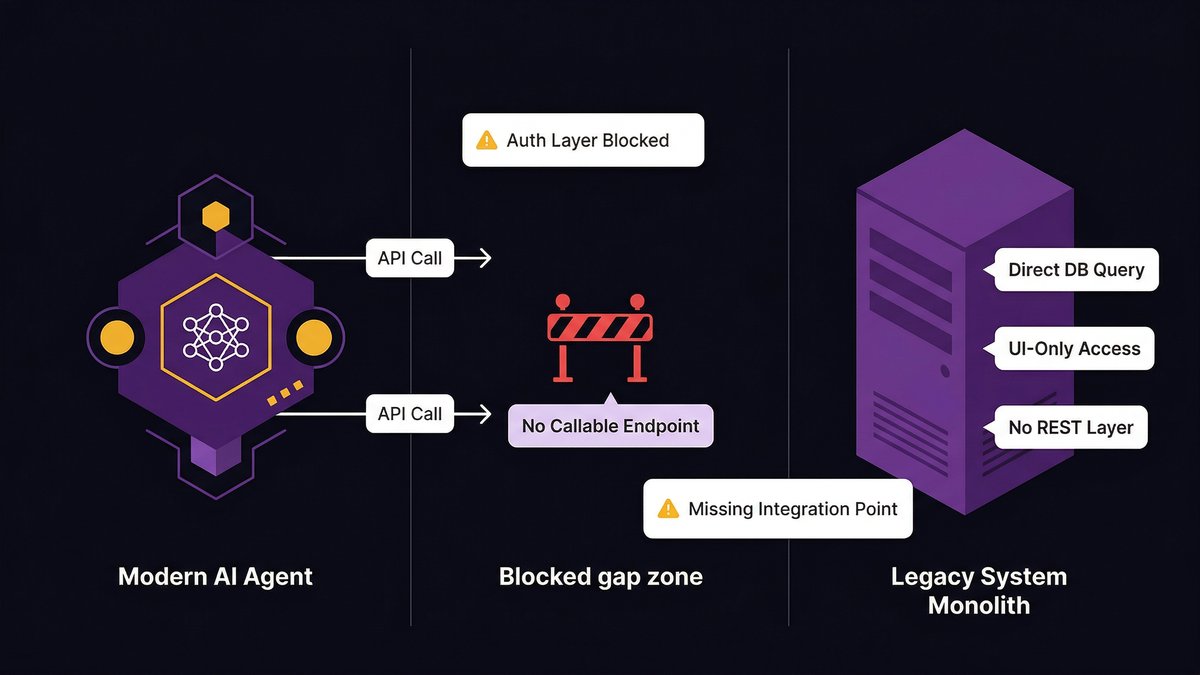
Callable APIs, AI agents, and tools need clean endpoints to trigger actions across your systems
Data quality and schema consistency, models trained on dirty, siloed, inconsistently labeled data, produce unreliable outputs
Observability, you need to know what the AI system is doing, why, and when it fails
Most legacy systems fail two or more of these tests. That’s not a reflection of past engineering decisions; it’s a reflection of when those systems were built. The requirements simply didn’t exist.
‘Legacy’ in an AI context doesn’t mean old. It means architecturally incompatible with what AI systems require to function.
Batch processing vs. real-time inference: why the architectural mismatch matters
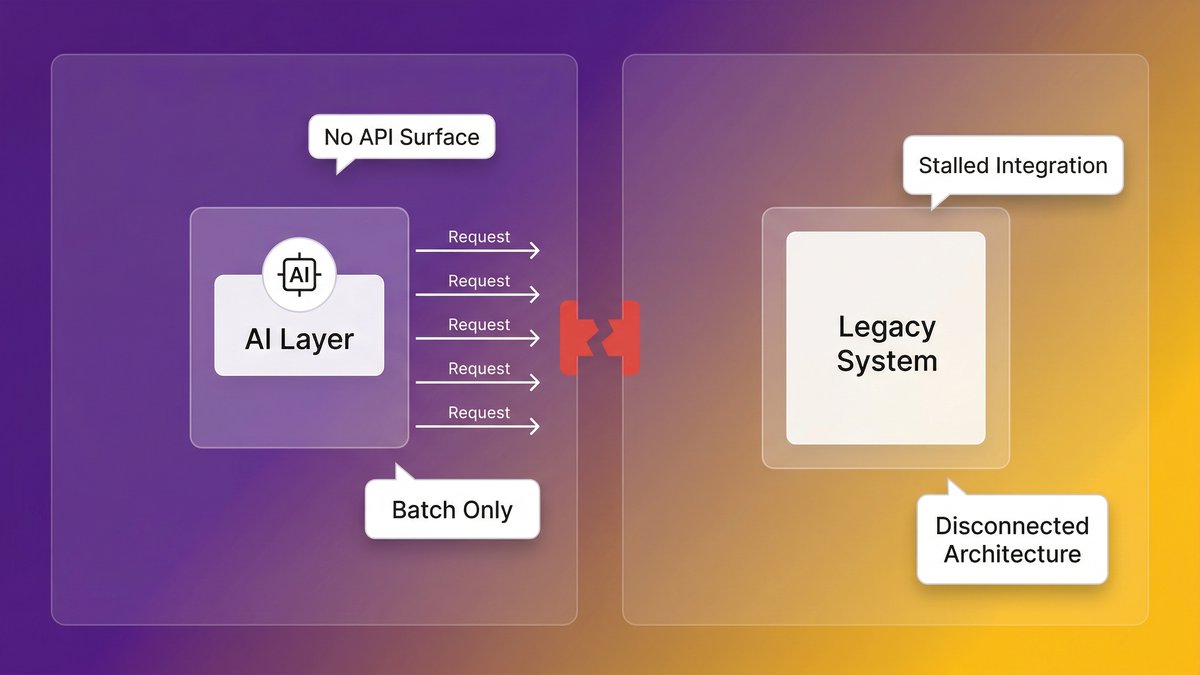
Your ERP runs nightly batch jobs. Your AI model needs to query data in milliseconds. These two facts are incompatible, and no middleware wrapper makes them compatible at scale.
Batch-processing architectures move data in scheduled cycles. They were designed for reporting and record-keeping, not for the sub-second response loops required by AI inference. When you try to layer an AI layer on top, you get two outcomes: either the AI model runs on stale data (reducing accuracy), or you build an increasingly expensive real-time data pipeline on top of an architecture that wasn’t designed to support one.
Neither is a solution. Both are expensive. The AI system you’re running on top of a batch architecture is never the AI system the demo showed you.
Data silos and the dirty data problem AI exposes
AI doesn’t hide bad data. It amplifies it.
When your sales data lives in Salesforce, your operational data in a 15-year-old on-prem database, and your finance data in a combination of spreadsheets and a custom ERP, any AI system that touches all three immediately surfaces every inconsistency, duplicate record, and missing field that your team has quietly managed around for years.
According to McKinsey, 70% of software in Fortune 500 companies is over two decades old. Those systems weren’t designed with data interoperability as a requirement. Every year of operation adds more idiosyncratic data structures, more schema drift, and more tribal knowledge about what the data “really means.” AI can’t work with tribal knowledge.
The API gap: when your systems can’t talk to anything new
Modern AI tools, and especially AI agents, operate by calling endpoints. They need to be able to query your data, trigger actions, and receive structured responses. This requires a clean API layer.
Most legacy systems don’t have one. They were built in an era of tight coupling, direct database calls, and human-driven workflows. Connecting them to an AI tool requires either building an API wrapper around an architecture that wasn’t designed for it or accepting that the AI tool simply can’t touch those systems. For mid-market companies where legacy systems hold the most operationally critical data, that second option is rarely viable.
The Hidden Cost: What Technical Debt Is Actually Doing to Your AI Timeline
Technical debt doesn’t just slow development. It consumes the budget and engineering capacity that AI adoption requires, before AI spending even starts.
Technical debt consumes 21–40% of IT budgets before AI spending begins
According to Deloitte’s 2026 Global Technology Leadership Study, technical debt accounts for 21% to 40% of an organization’s IT spending. That’s not the AI budget line. That’s the maintenance tax your team pays just to keep existing systems running.
It compounds directly with the AI readiness problem. The same engineering capacity that would build the API layers, clean the data pipelines, and modernize the architecture is already spoken for, maintaining systems that were supposed to be replaced years ago.
According to Making Sense (citing enterprise survey data from 2026), enterprises lose around $370 million annually due to outdated technology and technical debt, including maintenance costs, failed modernization attempts, and operational drag.
That’s not an abstract number. For a mid-market company operating at 1/100th of enterprise scale, the proportional cost still runs into seven figures annually, money that isn’t available for AI infrastructure investment because it’s already spent keeping the current infrastructure alive.
The opportunity cost: every month of delay is a month competitors are shipping AI features
This is the part that board conversations underweight: the cost of delay isn’t just the maintenance budget. It’s the compounding competitive disadvantage of watching competitors ship AI-native features while your team is buried in patch cycles.
Competitors who modernized their infrastructure 18 months ago are now deploying AI agents in production. They’re reducing operational costs, accelerating decision cycles, and building AI capabilities into products your team can’t replicate on your current stack.
Why AI Projects Fail at Scale (And It’s Not the Model)
AI projects fail in production not because of the model, talent, or strategy, but because of the infrastructure. That’s a counterintuitive finding for teams that invest heavily in all three.
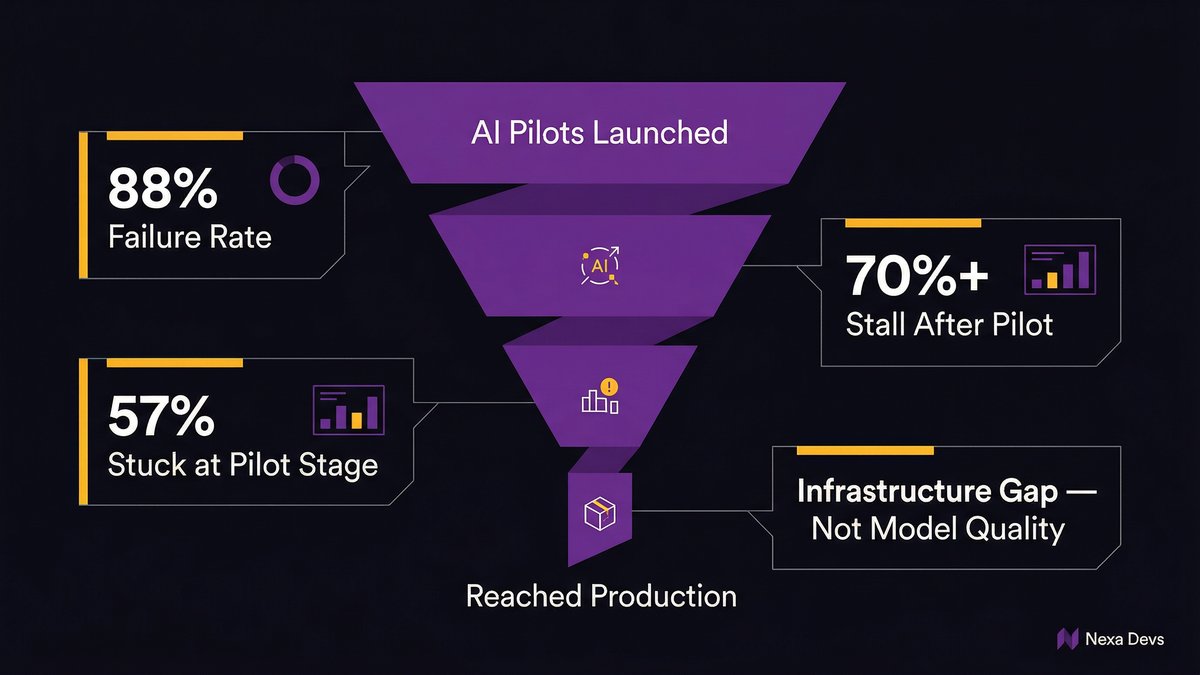
Over 70% of AI initiatives stall after pilot phases, due to infrastructure explanation
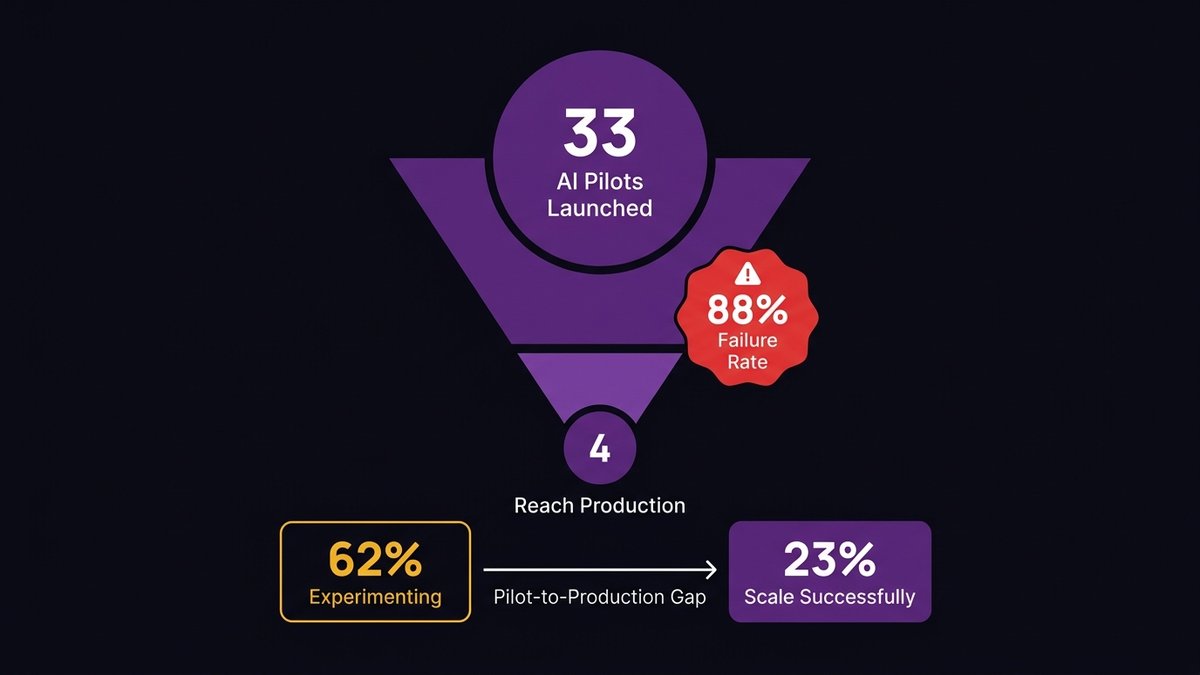
Over 70% of AI initiatives stall after pilot phases, even in organizations with advanced cloud and DevOps practices, with primary causes being structural platform limitations, not model performance or talent shortages, according to Arbisoft’s analysis of enterprise surveys (2026).
The pilot environment hides the problem. Pilots run on clean data extracts, controlled environments, and hand-selected use cases. None of those conditions exists in production. Production means the full data mess, the legacy system dependencies, the undocumented edge cases, and the latency requirements that a batch-processing architecture can never meet.
According to IDC Research, for every 33 AI pilots launched, only 4 reach production, an 88% failure rate. The gap between pilot and production is almost never a model problem. It’s an infrastructure problem.
This matters for how you frame the AI investment decision internally. If you’re evaluating whether to invest in AI, the first question isn’t “which AI tool should we buy?” It’s “Does our current infrastructure support what that tool needs to run?”
Agentic AI and real-time decisions expose legacy limits that prototypes hide
AI agents are more demanding than AI tools. A tool responds to a query. An agent takes multi-step actions: it calls an API, reads a result, decides what to do next, calls another system, and writes a record. Each step requires a clean, low-latency, reliable endpoint.
Legacy systems fail this test in ways that prototypes never reveal. A prototype that runs on a pre-extracted CSV file looks identical to a production agent until you try to give the agent live access to the system from which the CSV came. At that point, the architectural gap becomes visible, and it’s rarely fixable with a configuration change.
According to ITBrief (2026), 57% of enterprises remain in the pilot stage for agentic AI; only 15% have operationalized agents at scale. The 85% gap between aspiration and production isn’t a talent shortage. It’s a foundation shortage.
The Modernization Spectrum: From Duct Tape to a Real AI Foundation
Modernization isn’t binary. There’s a spectrum of approaches, each with different costs, timelines, and AI-readiness outcomes.
The 5 R’s: Rehost, Refactor, Rearchitect, Rebuild, Replace, what each buys you
The 5 R’s framework is the standard vocabulary for modernization decisions. Here’s what each option actually delivers in terms of AI readiness:
Refactor and optimize existing code without changing the architecture. Improves performance marginally. Still doesn’t produce the API layer or data accessibility that AI requires. Better than nothing; not sufficient for AI readiness.
Rehost (lift-and-shift): move the system to the cloud as-is. Fast and cheap. Produces zero AI readiness improvement. Your system is still batch-processing, still silo-enclosed, still without APIs. The only thing that changed is which data center it runs in.
Rearchitect, Restructure the application to a more modern architecture (microservices, event-driven, API-first). This is where AI readiness becomes achievable. Expensive and time-consuming. Requires significant engineering investment. Worth it if executed correctly.
Rebuild, rewrite from scratch on a modern stack. Maximum AI readiness potential. Maximum risk. Mid-market companies rarely have the runway for a clean rebuild of a production-critical system.
Replace or swap with a commercial off-the-shelf system. Sometimes the right answer. Creates new integration dependencies and rarely produces the custom API surface your specific AI use cases need.
Most mid-market companies need a combination of approaches applied to different systems, not a single strategy applied uniformly.
API layering: the fastest path to AI connectivity without a full rewrite
For systems where a full rearchitecture isn’t feasible in the near term, API layering is the pragmatic path to AI connectivity. The approach: build a modern API layer on top of the legacy system, abstracting the underlying architecture from the AI tools that need to access it.
This isn’t a permanent solution. The underlying system is still batch-processing, still accumulating technical debt, still structurally limited. But it creates a bridge, a way to connect AI tools to legacy data without requiring a full rearchitecture first.
The key constraint: API layering works when the underlying system can surface data with acceptable latency. If the legacy system can’t serve results fast enough to support real-time inference, the API layer becomes a well-engineered dead end.
When phased modernization works, and when it just delays the reckoning
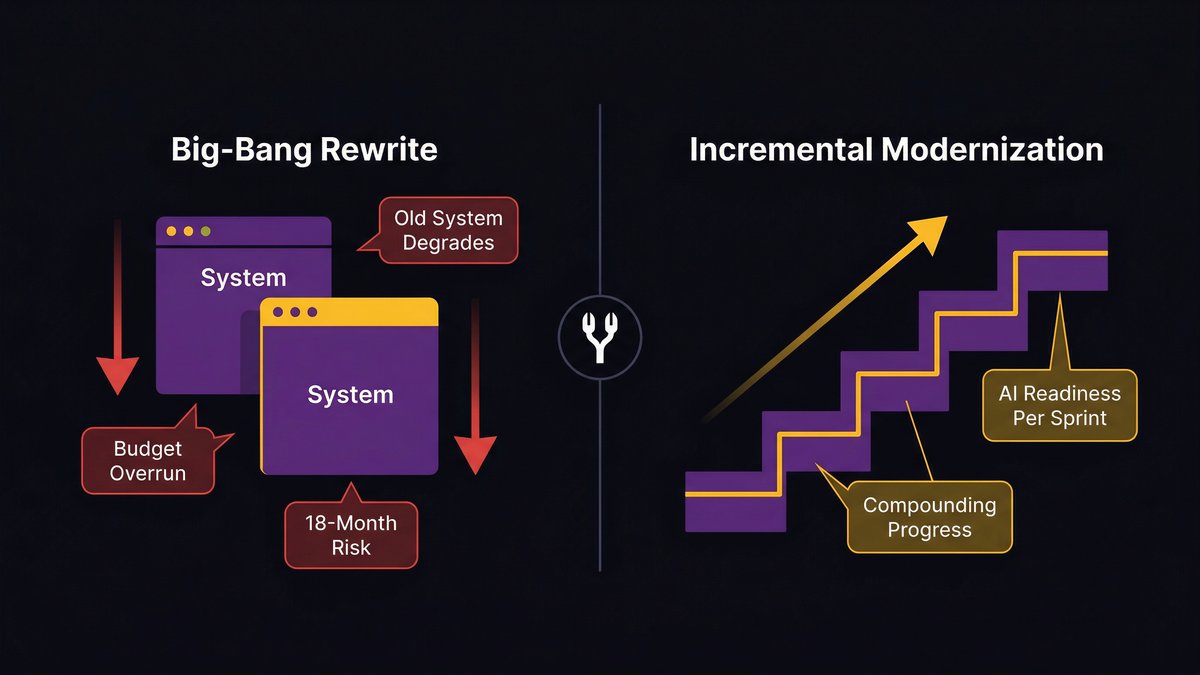
Phased modernization works when each phase produces a working, AI-ready component. It stalls when phases are planned around technical milestones rather than AI capability unlocks.
The difference is in how you sequence the work. A phase that produces a clean API surface for your highest-priority data domain is immediately valuable; AI tools can start using that domain while subsequent phases continue. A phase that cleans up internal code without producing any new external interface produces nothing your AI strategy can use until the next phase completes.
Sequencing phases by AI capability unlock, not by technical convenience, is the difference between phased modernization that builds momentum and one that takes 3 years to produce the first usable result.
The Trap: Why Most Modernization Programs Fail to Deliver AI Readiness
The standard modernization playbook is designed for a world where the goal is a better system. That goal has changed; now the goal is an AI-ready system. Those aren’t the same thing, and most programs haven’t caught up.
Modernization projects that run separately from product delivery create two-year delays
The conventional approach: stand up a modernization workstream, run it in parallel with the product team, reconnect them when modernization is “done.” This approach fails for mid-market companies for a specific reason: they don’t have the engineering capacity to run two parallel workstreams.
What actually happens: the modernization project competes with the product roadmap for engineering time. Product wins, because the product has visible deliverables and stakeholders applying deadline pressure. Modernization slips. The timeline extends. Two years become three. Competitors who didn’t wait are shipping AI features.
Legacy modernization projects run 45% over budget and 7% behind schedule on average, according to Fingent’s analysis of enterprise modernization data (2026). That’s the average. Mid-market companies, with thinner engineering benches and fewer resources to absorb overruns, perform worse.
The ‘big bang’ rewrite risk: why it stalls mid-market companies specifically
The big-bang rewrite is the scenario every CTO fears and every board eventually proposes. The logic sounds reasonable: stop patching, start fresh, build the AI-ready system you should have built five years ago.
The execution is almost always a disaster. Here’s why it’s especially dangerous for mid-market companies:
A big-bang rewrite requires running two systems in parallel: the old system (which the business depends on) and the new system (which the team is building). Mid-market engineering teams rarely have the capacity to maintain production fidelity on a live system while simultaneously building its replacement from scratch.
The result: the old system degrades (because maintenance capacity is diverted), the new system takes longer than planned (because scope always expands), and the business ends up in a worse position at month 18 than it was at month zero, having spent the modernization budget, delayed AI adoption, and accumulated new risk on both systems simultaneously.
Nearshore doesn’t fix this by itself. But it changes the capacity constraint, which is what makes the alternative model viable.
A Different Model: Modernizing the Foundation While You Build
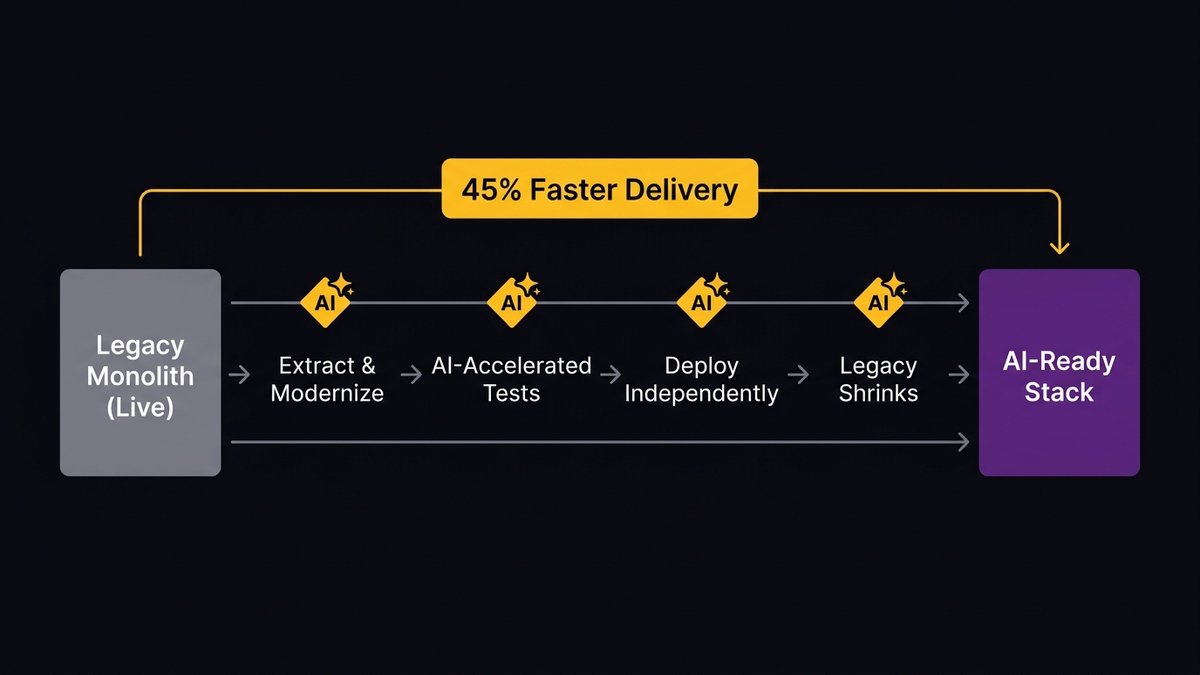
The right answer for mid-market companies isn’t choosing between modernizing and shipping. It’s finding a delivery model where modernization is a byproduct of delivery.
What AI-augmented delivery looks like in practice
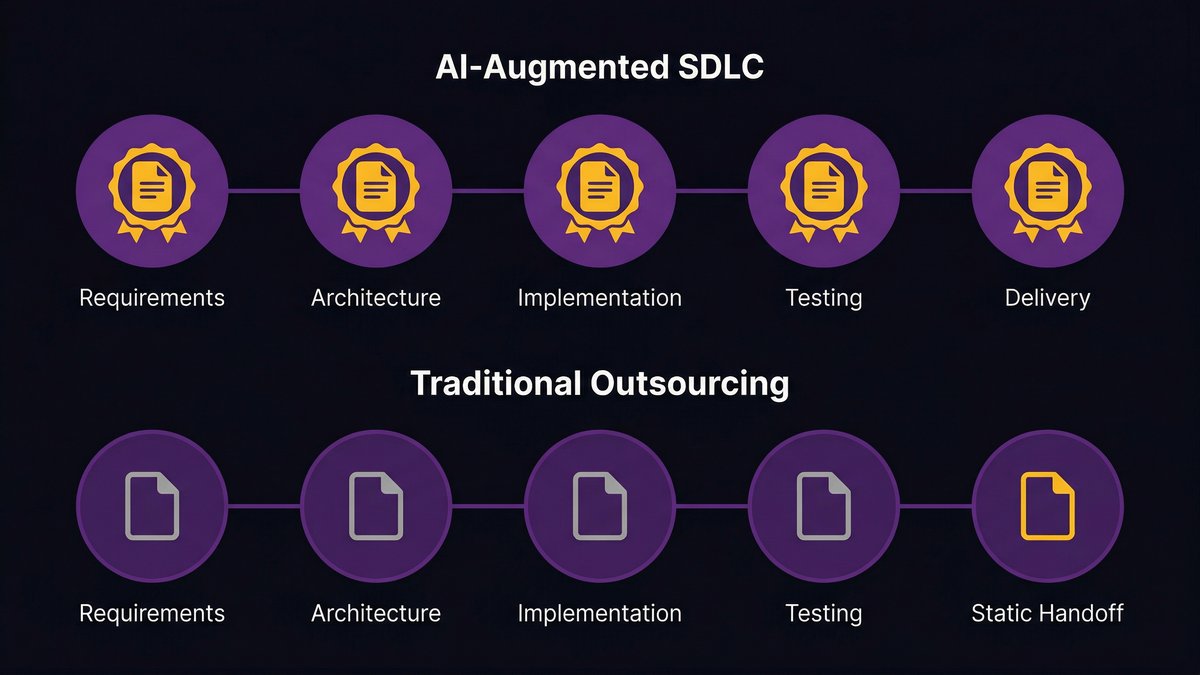
AI-augmented delivery means applying AI across every phase of the software development lifecycle, not just at the code generation step.
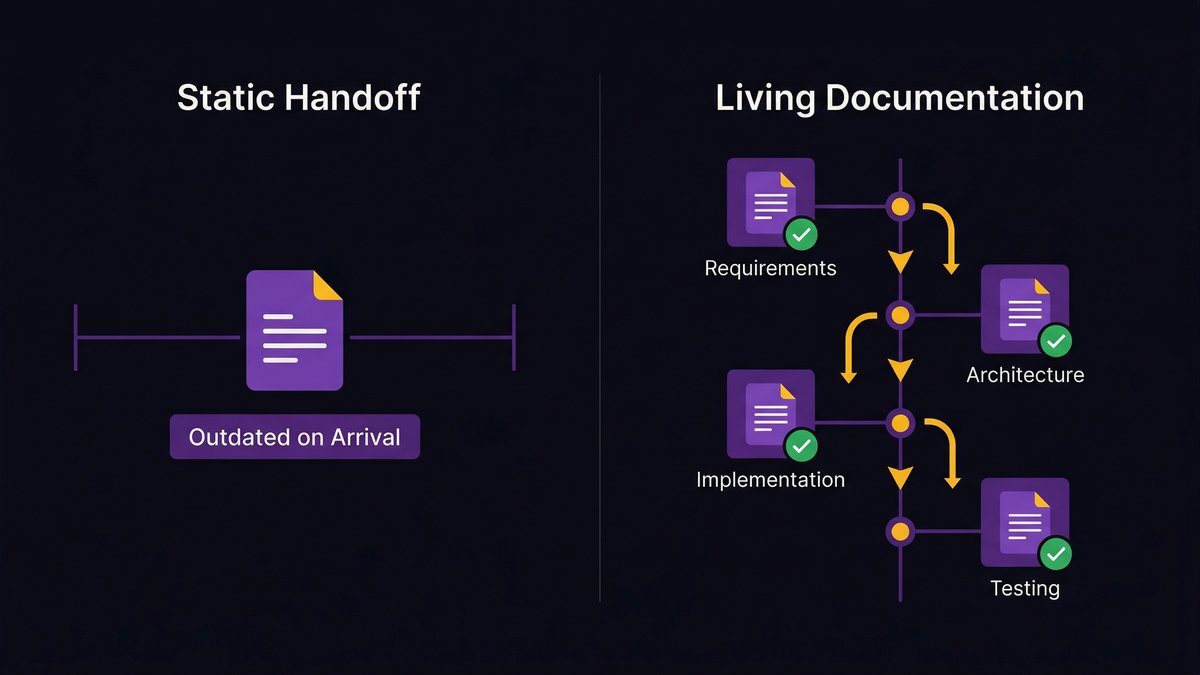
At the requirements phase, AI surfaces architecture conflicts and integration risks before a line of code is written. At the design phase, AI generates architecture diagrams and API specifications that would otherwise take weeks to produce manually. During implementation, AI accelerates code generation while enforcing the clean architecture patterns required for AI readiness. At testing, AI generates comprehensive test coverage alongside delivery, not as a separate phase after.
The output isn’t just faster delivery. It’s delivery that produces cleaner systems with better documentation, higher test coverage, and more consistent architecture than traditional delivery. Systems that emerge from an AI-augmented delivery process are structurally more AI-ready than systems built the conventional way, because the process itself enforces the architectural patterns AI tools need.
How nearshore teams compress the modernization timeline without offshore risk
Nearshore teams operating in the U.S. timezone alignment change the capacity equation for mid-market companies specifically. Instead of choosing between a two-year modernization project and a big-bang rewrite, nearshore augmentation creates a third option: a dedicated team working in real-time coordination with your internal engineers, modernizing and building simultaneously.
This isn’t theoretical. It’s a delivery model. The nearshore team isn’t working on a separate track; it’s integrated into the delivery cycle, working the same hours and in the same Scrum process, producing both feature delivery and the architectural improvements that make future AI integration possible.
As Ashwin Ballal, CIO at Freshworks, has noted, adding vendors to complex systems risks trading one problem for another. The nearshore model only avoids that trap if the delivery process produces clean documentation and clean architecture, so the team that inherits the system (whether internal or external) actually understands what was built.
The ‘getting there in the process’ principle: AI readiness as a byproduct of delivery
The framing shift is this: AI readiness doesn’t have to be a precondition for AI adoption. It can be a byproduct of how you build.
If each sprint produces both a working feature and a cleaner architectural layer, a new API endpoint, a resolved data silo, a documented service boundary, then AI readiness accumulates over time as a function of delivery, not as a separate workstream competing with delivery.
At Nexa Devs, every engagement is structured this way. Systems emerge from the delivery process with clean architecture, complete documentation, and API surfaces that AI tools can actually use. The client doesn’t wait for a two-year modernization project to complete before AI adoption becomes possible. They’re getting there in the process.
Where to Start: A Practical AI Readiness Assessment for Mid-Market Leaders
You don’t need a six-month consulting engagement to know whether your infrastructure can support AI. Three questions will tell you most of what you need to know.
Three questions that reveal your actual AI readiness (not your strategic intentions)
Question 1: Can your highest-priority AI use case access live data, not a batch export?
Name the AI capability you most want to deploy. Now ask: Does it need access to data that currently lives in a batch-processing system? If the data your AI model needs is only available after a nightly job runs, you don’t have an AI use case; you have a reporting use case. Real-time AI inference requires real-time data access.
Question 2: If an AI agent needed to trigger an action in your core operational system, what would it call?
AI agents need callable endpoints. Think about your ERP, your CRM, your core data system. Does it expose a clean, documented API? Or would an AI agent need to interact with it the way a human does, through a user interface, a manual import, or a database query that bypasses the application layer entirely?
If the answer is “there’s no API,” you know where your first modernization investment needs to go.
Question 3: Who holds the knowledge of how your systems actually work?
According to Deloitte’s 2026 Global Technology Leadership Study, technical debt accounts for 21–40% of IT spending. A large fraction of that spending is the human cost of maintaining systems that only specific people understand. If two engineers left tomorrow and took their system knowledge with them, would your modernization path be blocked?
Undocumented systems can’t be modernized efficiently. They can’t be handed to an AI tool for analysis, they can’t be onboarded to a new team in a reasonable timeline, and they can’t be incrementally improved without the risk of breaking something nobody documented.
Prioritizing the highest-leverage modernization moves for your stack
Not everything needs to be modernized to unlock AI readiness. You need to identify the three or four systems that your highest-priority AI use cases actually depend on, and modernize those first.
The highest-leverage moves, in order:
Build an API layer on your most data-rich legacy system. This creates the connection point AI tools need without requiring a full rearchitecture.
Resolve the data silo that your AI use case depends on the most. One clean, consistent, real-time data domain is more valuable than five partially cleaned ones.
Document the undocumented. Systems that no AI tool can analyze and no new engineer can safely touch are a modernization blocker regardless of architecture.
Start with a readiness assessment, not a roadmap. A roadmap plans for where you want to go. An assessment tells you where you actually are. You need the second before the first is useful.
If you want a structured starting point, book an architecture assessment. We’ll map your current systems to AI agent requirements and provide a prioritized modernization path tailored to your specific stack, not a generic framework.
You’re Not Waiting for AI. AI Is Waiting for Your Foundation.
The companies pulling ahead on AI aren’t the ones with the best AI tools. They’re the ones whose infrastructure can actually run those tools at scale.
The bottleneck is real. The cost of delay is real, in maintenance spend, in engineering capacity, and in the compounding competitive gap that widens every month you wait. What’s also real is that you don’t have to choose between modernizing and shipping. The right delivery model does both simultaneously.
If you want to understand where your current systems stand against AI-agent requirements, specifically, start with an architecture assessment. We’ll map your stack, identify the highest-leverage modernization moves, and give you a concrete starting point.
Not a two-year roadmap. A first step.
FAQ
What is legacy AI integration?
Legacy AI integration is the process of connecting AI tools, models, or agents to enterprise systems that weren’t designed with AI in mind. It typically involves building API layers, resolving data silos, and modernizing the architectural patterns that prevent legacy systems from supporting real-time AI inference.
What is AI’s number one bottleneck?
Infrastructure is AI’s number one bottleneck, specifically legacy systems that can’t provide real-time data access, callable APIs, or consistent data quality. Over 70% of AI initiatives stall after pilot phases due to structural platform limitations, not model performance or talent gaps.
What is the difference between legacy systems and AI?
Legacy systems were built for batch processing, tight coupling, and human-driven workflows. AI systems require real-time data access, clean API endpoints, consistent data schemas, and a loosely coupled architecture. The mismatch between these two design paradigms is the core challenge of legacy AI integration.
Is replacing a legacy system worth it?
Replacing a legacy system is worth it when maintenance costs and AI incompatibility exceed replacement costs, which is often the case when technical debt consumes 40% of IT budgets (Deloitte, 2026). A full replacement isn’t always necessary; API layering and phased rearchitecture often deliver AI readiness faster and at lower risk.
What are the 5 R’s of modernization?
The 5 R’s are: Rehost (lift-and-shift), Refactor (optimize existing code), Rearchitect (restructure to a modern architecture), Rebuild (rewrite from scratch), and Replace (swap for commercial software). For AI readiness, Re-architect and Rebuild produce the most impact; Rehost alone produces none.
What is legacy integration?
Legacy integration connects older enterprise systems to modern tools or platforms through APIs, middleware, or data pipelines. In an AI context, it specifically addresses making existing systems accessible to AI models and agents without requiring a full system replacement.
Staff Augmentation vs. Dedicated Team: Who’s Accountable When Something Breaks?
There’s a scenario every mid-market CEO eventually lives through. The details vary. The outcome doesn’t.
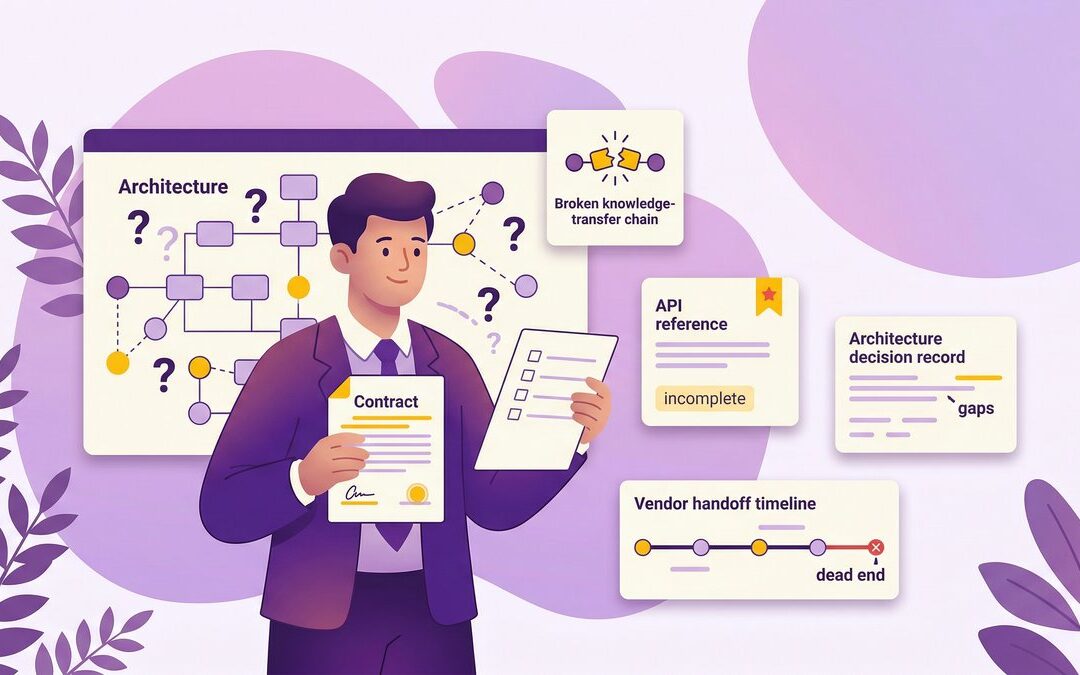
A software contractor joins the team for a project. They’re good. Really good. They build the payment processing module, the API layer, and the integration with your CRM. Six months in, they leave for another opportunity. No notice. You’re left with a codebase that works mostly and a team that can’t touch it without breaking something. The logic lives in one person’s head, not in yours.
This isn’t a contractor management failure. It’s a structural property of staff augmentation. The staff augmentation vs. dedicated team decision turns on exactly that: not which model is cheaper in month one, but who is accountable when something breaks at 11 pm in month fourteen.
Accountability comparison: how staff augmentation and dedicated teams differ when something breaks
The Contractor Who Took the Codebase With Him
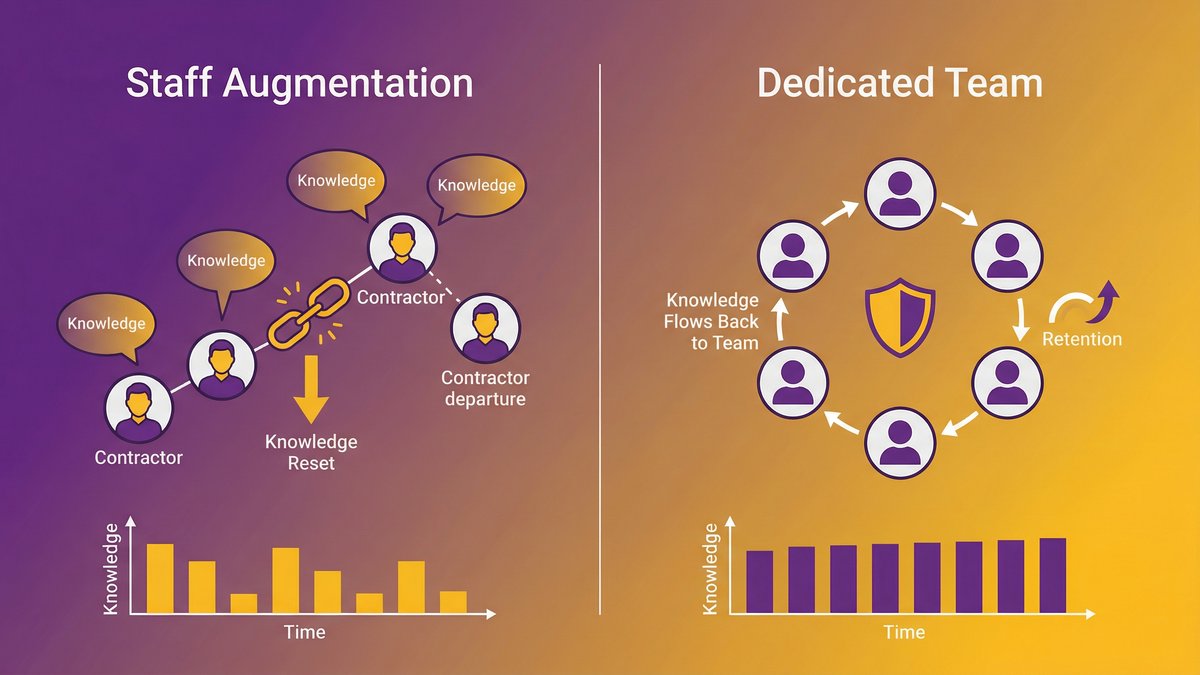
Staff augmentation, by design, gives you capacity. The contractor shows up, does the work you direct them to do, and leaves when the engagement ends. That’s the model. Nothing went wrong. Nobody broke a promise.
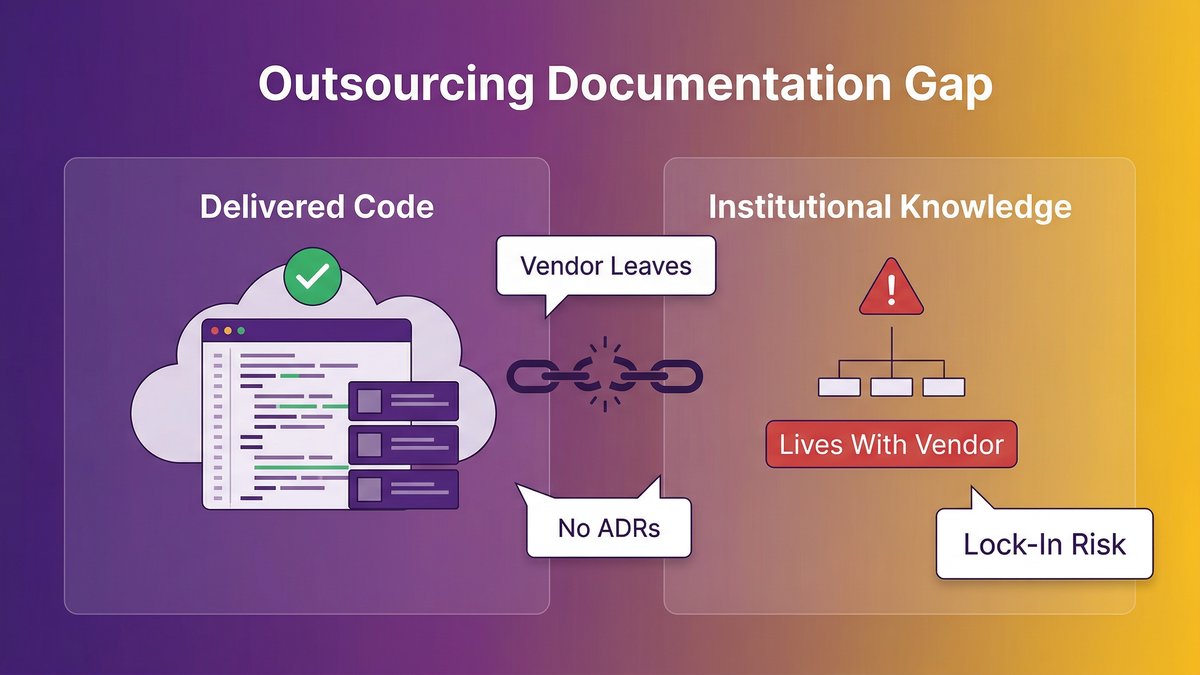
The problem is that “capacity” and “accountability” are not the same thing. When the contractor leaves, the knowledge leaves with them. The codebase stays, but the institutional understanding of why it works the way it does doesn’t transfer automatically. Dreamix, a software development consultancy, documented exactly this: “documentation gaps, undocumented dependencies, and lost configuration details create expensive problems months after transition completion.” That describes what happens when the engagement model doesn’t require knowledge transfer, regardless of how good the contractor was.
The dedicated team model is structured differently. The team is accountable for outcomes, not just outputs. When someone leaves the team, knowledge transfer is the vendor’s problem. When something breaks, the team owns the fix, not because you’ve negotiated a service credit, but because the model is built around continuity, not throughput.
Once you see that difference, the cost comparison looks completely different.
Staff Augmentation vs. Dedicated Team: What Each Model Actually Promises
Staff augmentation vs. a dedicated team isn’t a question of quality. It’s a question of what each model is designed to deliver, and what it’s designed to leave to you.
What you get with staff augmentation
Staff augmentation means you hire individual contractors, typically senior engineers, who integrate into your existing team. You manage them directly. You own the architectural decisions. You run standups, set priorities, and handle QA. The contractor delivers work product. Accountability for what gets built and how it holds up sits with your internal team.
The tradeoff is explicit in how these engagements are scoped: you pay for hours, not outcomes. According to Statista’s Global IT Workforce Trends 2025, over 70% of tech companies now use remote or hybrid teams, and staff augmentation is the model that makes individual remote contributors available quickly. Speed and flexibility are real. Continuity is not guaranteed.
What you get with a dedicated team
A dedicated team is an external engineering group assembled and managed by a vendor, integrated with your organization’s goals and workflows. The vendor is responsible for team composition, knowledge continuity, process discipline, and delivery accountability. You set the direction; they manage the execution.
You’re not paying for hours. You’re paying for a team that remains responsible for the outcome past the end of the billing period. That’s a different contract in every sense of the word.
The Question Nobody Asks Before They Sign: Capacity or Accountability?
Most mid-market CEOs ask the wrong question: “Which model costs less?” The question that actually matters: “Which model makes someone else accountable for outcomes?”
Capacity: what you control, what you own
Capacity means individual contributors doing work you direct. You control the priorities, the architecture, the sprint contents, and the code review process. You also own every decision made and every gap left uncovered. If the contractor builds something fragile, you own the fragility. If they leave, you own the knowledge gap.
None of that is a criticism. Staff augmentation is a labor market transaction: skilled people, short timeline, maximum control. For the right situation, that’s exactly what you need.
Accountability: what gets guaranteed, and by whom
Accountability means a vendor that is contractually and operationally responsible for what gets delivered and how it performs. The dedicated team model shifts who picks up the phone at 11 pm. It’s not you, scrambling to reach a contractor who may or may not respond. It’s the vendor, whose business depends on the system running.
Stratagem Systems noted in their 2026 analysis that “choosing the wrong model costs 30-50% more and delays your project by months.” Under staff augmentation, the delay is your problem. Under a dedicated model, it’s the vendor’s.
For a mid-market CEO running a 50- to 500-person organization whose operations depend on internal software, the accountability question matters more than the hourly rate. If the system breaks, you can’t call the contractor and make it their problem. You can call the dedicated team vendor and do exactly that.
The Hidden Costs of Staff Augmentation Over 12 Months
Staff augmentation looks cheaper on a line-item basis. It stops looking cheaper when you account for what you’re actually paying for.
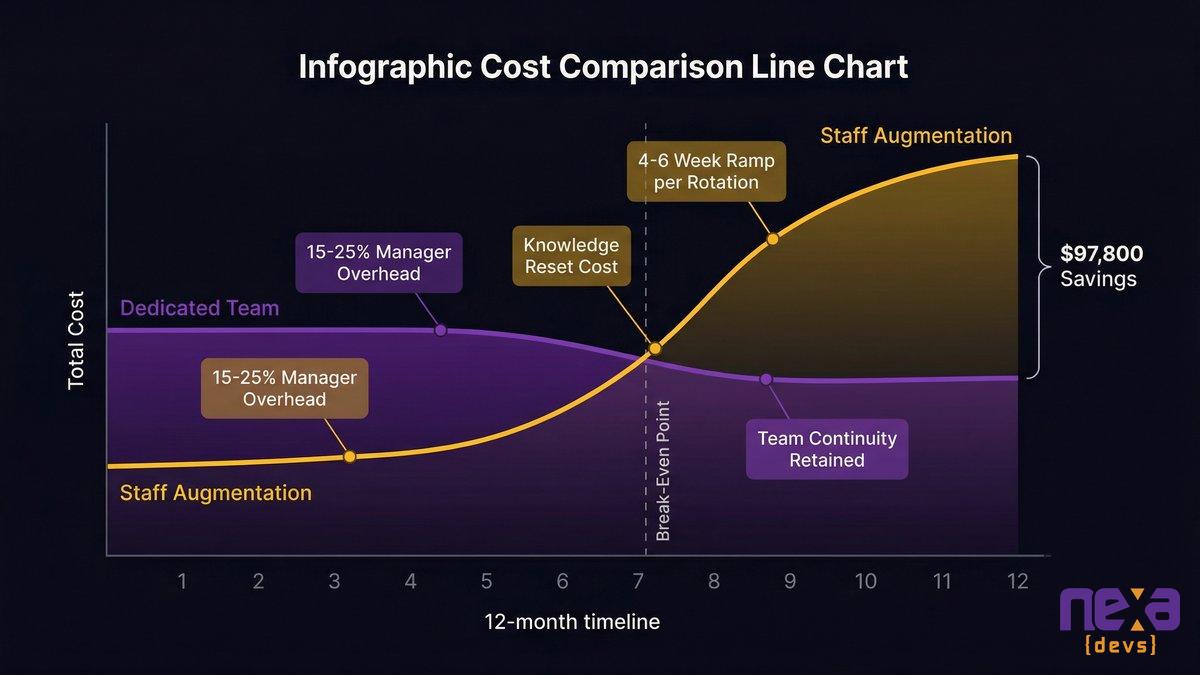
Management overhead: 15-25% of a manager’s time per developer
Staff augmentation requires 15-25% of a manager’s time per augmented developer. For a team of 4 developers, that’s 25 to 40 hours per week of internal management capacity consumed by oversight, coordination, code review, and context-setting. A dedicated team cuts that to 5-10% of a manager’s time, since the vendor handles the coordination layer.
Those 25 to 40 hours aren’t free. It’s an internal salary cost your budget model didn’t include.
The knowledge reset: what you lose every time a contractor leaves
Every contractor departure is a knowledge reset. The code stays. The understanding of why it’s built the way it is leaves with them. You pay ramp time for the next hire. You pay for the bugs that only surface three weeks after the handoff. You pay for the architectural decisions that can’t be explained to a new engineer without rebuilding half the context from scratch.
The hidden cost of re-onboarding is the one cost that no staff augmentation vendor will include in the proposal. It should be.
Ramp time multiplied across a revolving door
A new contractor takes 4 to 8 weeks to reach full productivity on a mature codebase. If your contract terms allow turnover, and most do, you pay ramp time every time someone rotates out. In a 12-month engagement with even one turnover event, you’ve absorbed one to two months of reduced throughput you never budgeted for.
Dedicated teams, because the vendor owns continuity, absorb that cost themselves. You don’t pay ramp time when someone on their team is replaced. That’s part of the accountability model.
Total cost of ownership over 12 months: where staff augmentation and dedicated teams cross over
The Break-Even Point: When Dedicated Teams Start Winning on Cost
Staff augmentation wins at month one to three. After that, the math inverts. That’s not a sales pitch, it’s what the total cost of ownership data shows.
Months 1-3: Staff augmentation has the cost advantage
At the start of an engagement, a staff augmentation model is faster and cheaper to stand up. There’s no team assembly process, no scoping phase, no onboarding to the vendor’s delivery model. You post a rate, you find contractors, they start. For a 3-month burst of capacity, a specific feature, a temporary backfill, staff augmentation is the right answer.
Months 6-12: the crossover
In a total cost of ownership analysis, a dedicated team model saves approximately 18%, roughly $97,800 over 12 months, compared to an equivalent staff augmentation engagement for a 4-developer team. The gap comes from three sources: management overhead absorbed by the vendor, knowledge continuity that eliminates ramp-time losses, and the reduced cost of defect resolution when one team owns the codebase end to end.
The crossover point sits somewhere between months 6 and 9. Before that, staff augmentation looks cheaper. After that, the dedicated model wins on total cost, and the risk gap is just as wide.
If your software initiative runs longer than 6 months, and most mid-market software systems run for years, the question of which model is “cheaper” already has an answer.
Decision Framework: Which Model Fits Your Situation
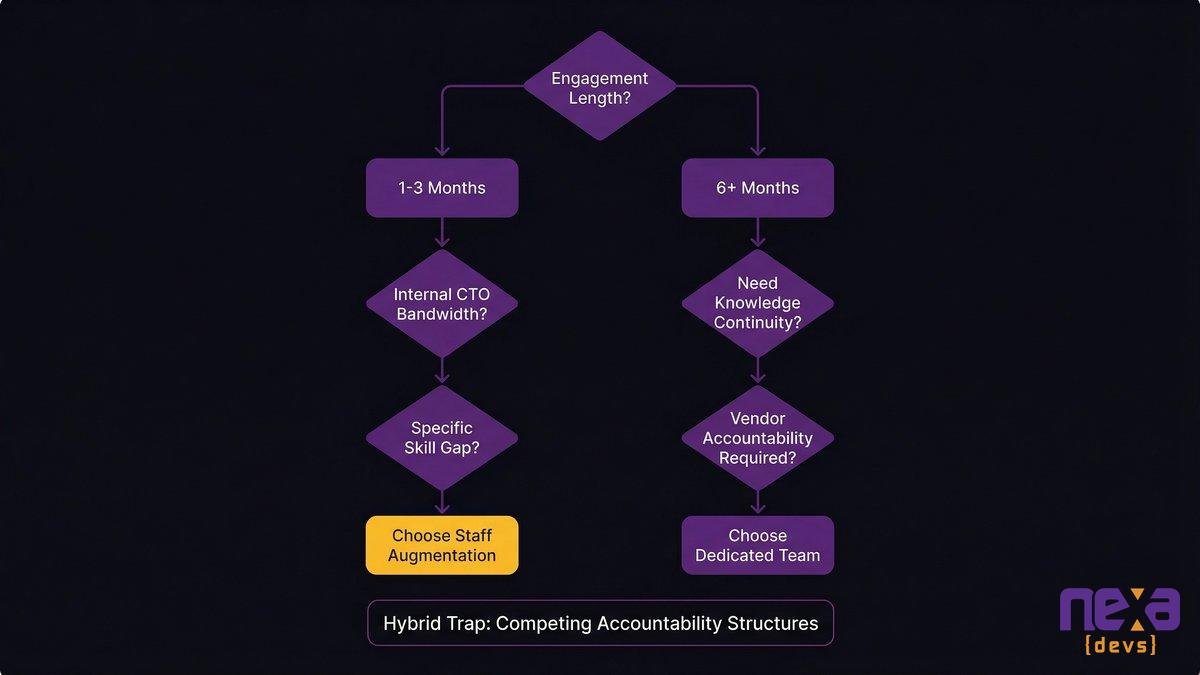
The decision comes down to two variables: how long the initiative runs, and how much internal management capacity you actually have.
Choose staff augmentation if…
You need to backfill a specific skill gap for less than 4 months
You have strong internal engineering leadership with the capacity to manage additional contributors
The work is well-scoped and discrete, not architecturally dependent on tribal knowledge
You’re comfortable owning outcome accountability and have the technical bench to exercise it
Staff augmentation at Nexa works well for this scenario: senior Latin America-based engineers, U.S. timezone alignment, and embedded directly into your team’s workflow. For the right situation, it’s exactly what it’s designed to be.
Choose a dedicated team if…
Your initiative runs 6 months or longer
You don’t have internal engineering leadership with the bandwidth to manage contractors
The work involves systems your business depends on operationally
You want a vendor who is accountable for outcomes, not just outputs
You’re building something that will need to live, evolve, and be maintained past the delivery date
The hybrid trap: why splitting the difference often gives you the worst of both
The hybrid approach, which uses a dedicated team for core work and augments with contractors for specific pieces, looks clean on paper. In practice, it almost always underdelivers. The coordination overhead between an accountable core team and unaccountable augmented contributors degrades the accountability you paid for. The dedicated team gets pulled into managing the contractors. The contractors operate without the context that the dedicated team holds. When something goes wrong, accountability diffuses across both engagement types.
Pick a model and commit to it. For any initiative lasting 6 months and running on systems your business depends on, the dedicated team is the right answer. Staff augmentation is not a compromise position. It’s the right tool for a specific, shorter-horizon job.
How to choose: key questions that point toward staff augmentation or a dedicated team
What 10-Year Client Relationships Look Like and What They Prove
No Nexa client has maintained a 10-year staff augmentation relationship. That’s not an accident.
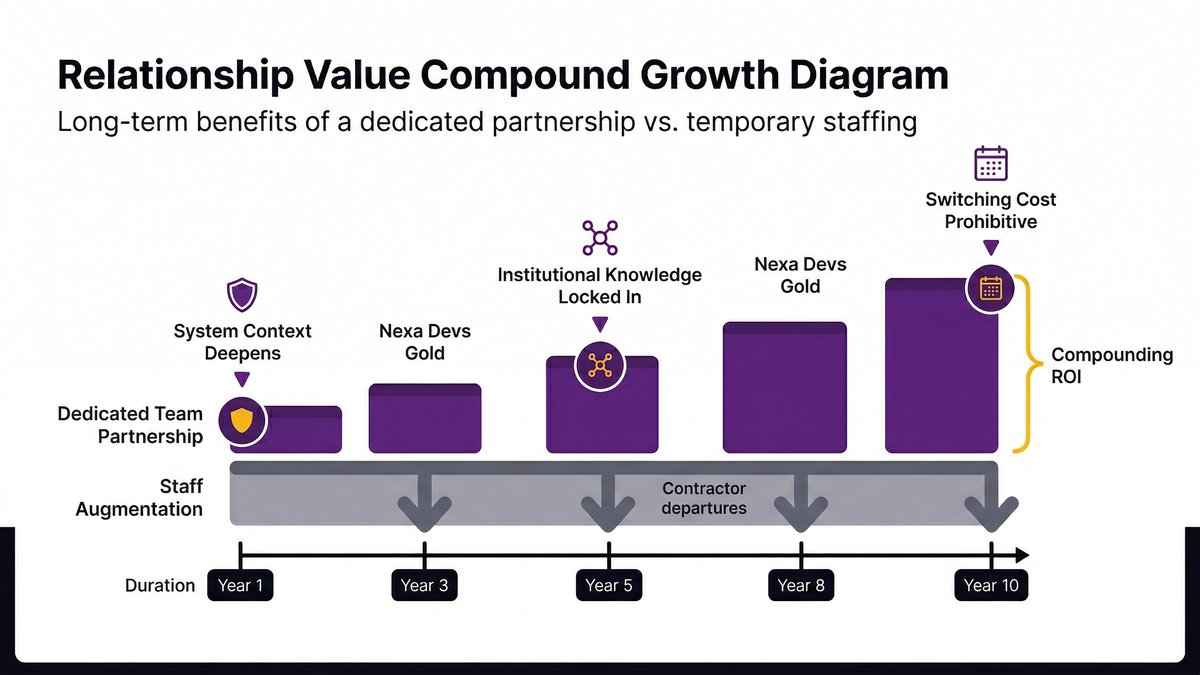
Nexa’s longest client relationships, UCLA David Geffen School of Medicine at 10+ years, TSB at 8+ years, and FrontStream at 8+ years, are all dedicated team engagements. They continue not because the contract auto-renews, but because the accountability model creates compounding value on both sides.
The client ends up with a vendor that knows their systems in depth. The vendor builds institutional knowledge that can’t be replicated from scratch with new staff. After a few years, you can’t easily replace that team with a fresh set of contractors; the knowledge gap would cost you more than the contract savings.
The cost comparison misses the bigger picture. Staff augmentation relationships are transactional by design. Dedicated team relationships, when the model is working, get better over time. The break-even point, roughly month 6 to 9 on cost, is just the start. Past that, the ROI keeps building in ways a contractor rate never captures.
When a client has worked with the same engineering partner for 10 years, that’s evidence of accountability, not loyalty. They stayed because the model delivered on outcomes. They kept renewing because the team knew the system and kept it running.
If you’re making a vendor decision today, think about what year five looks like. If the honest answer is “we’d need a new vendor in 18 months when this project ends,” you’re not picking a partner. You’re renting capacity.
The Five Questions to Ask Any Vendor Before You Choose a Model
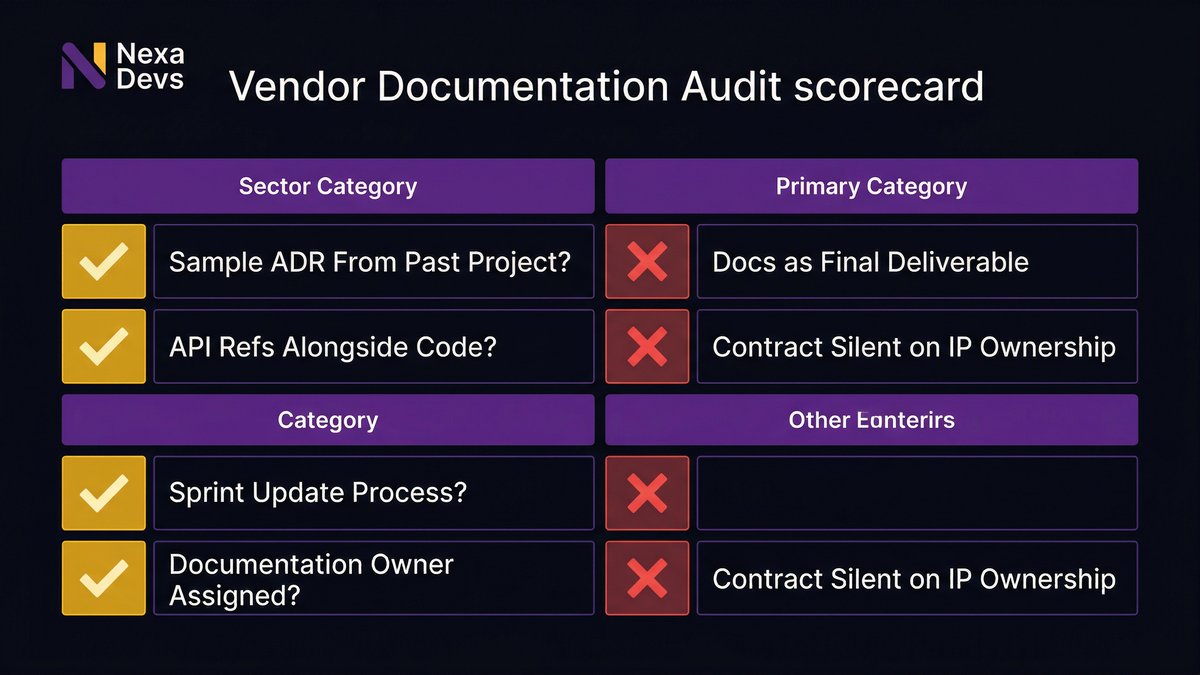
Before you sign with any vendor, staff augmentation, or dedicated team, use these five questions. They’re designed to surface accountability gaps fast.
1. If a critical engineer leaves your team mid-project, what happens to knowledge continuity, and who pays for it?
A staff augmentation vendor will tell you they’ll find a replacement. They won’t tell you who absorbs the 4 to 8-week ramp time. A dedicated team vendor should tell you exactly how knowledge transfer is handled internally, because it’s their problem.
2. Who is accountable if the delivered system fails in production 60 days after launch?
Under staff augmentation, the answer is usually: you. The contractor delivered what you directed. Under a dedicated team model with SLA-based ongoing support, the answer should be: us.
3. What documentation do you deliver at project close, and who owns it?
This question separates vendors who deliver documentation as a standard deliverable from those who treat it as optional. Any answer that involves “we can provide that for an additional fee” is a red flag.
4. What is your longest active client relationship, and what drove the renewal?
A staff augmentation firm will struggle with this question. Contractors don’t create long-term relationships; they fill short-term gaps. A dedicated team vendor should be able to name clients and describe what accountability produced the renewal.
5. Can you support systems you didn’t build?
This tells you whether the vendor is in the accountability business or the billing business. A vendor who only supports their own work is one who won’t be there when you need to migrate away from a previous bad engagement. A vendor who supports any system, including systems built by others, is signaling genuine accountability.
5 questions to ask any vendor before signing — regardless of which model you choose
Before You Sign Anything
Nearshore beats offshore for most mid-market teams. Not because the rates are always lower, but because timezone alignment turns a staff augmentation or dedicated team engagement from a coordination tax into a working relationship. U.S. timezone overlap means real-time standups, same-day code reviews, and a vendor you can actually reach when something breaks.
But timezone proximity doesn’t solve the accountability gap. That’s solved by the model you choose and the contract terms you negotiate.
Six months or longer, operationally critical systems, no internal engineering leadership with bandwidth to manage contractors, that combination points clearly to a dedicated team. It’ll cost less, break less, and build in value rather than expiring at launch.
The contractor who takes the codebase with them when they leave is a cautionary tale every mid-market CEO has either lived or heard. The way to avoid it isn’t to find better contractors. It’s to choose the model where institutional knowledge is someone else’s responsibility to maintain and transfer.
Accountability, in this context, is a structural choice, not a clause you negotiate into a contract after the fact.
What is the difference between team augmentation and staff augmentation?
Staff augmentation adds individual contractors to your team under your direct management. Team augmentation can mean adding a pre-formed group. In practice, most vendors use both terms for the same model: you manage the work, they supply the people. Neither term implies vendor accountability for outcomes.
What does a dedicated team mean?
A dedicated team is an engineering group assembled by a vendor and integrated into your project, but managed by the vendor. The vendor is accountable for team composition, knowledge continuity, delivery process, and outcomes. You set direction; they own execution, unlike staff augmentation, where you manage the work directly.
What is one key risk of outsourcing in capacity planning?
The biggest capacity planning risk in outsourcing is knowledge concentration. When critical systems knowledge lives with one or two contractors, their departure creates an immediate capacity crisis that takes months to rebuild, not just a headcount gap.
How does outsourcing increase accountability?
Outsourcing increases accountability when the engagement model ties the vendor’s business outcomes to your system’s performance. A dedicated team with SLA-based ongoing support has a financial reason to keep the system running. Staff augmentation creates no such alignment; the contractor is accountable for hours, not outcomes.
What is another word for staff augmentation?
Common alternatives include contractor placement, extended workforce, nearshore staffing, IT staffing, resource augmentation, and talent augmentation. All describe the same model: third-party individuals integrated into your team under your management, with no implied accountability for outcomes.
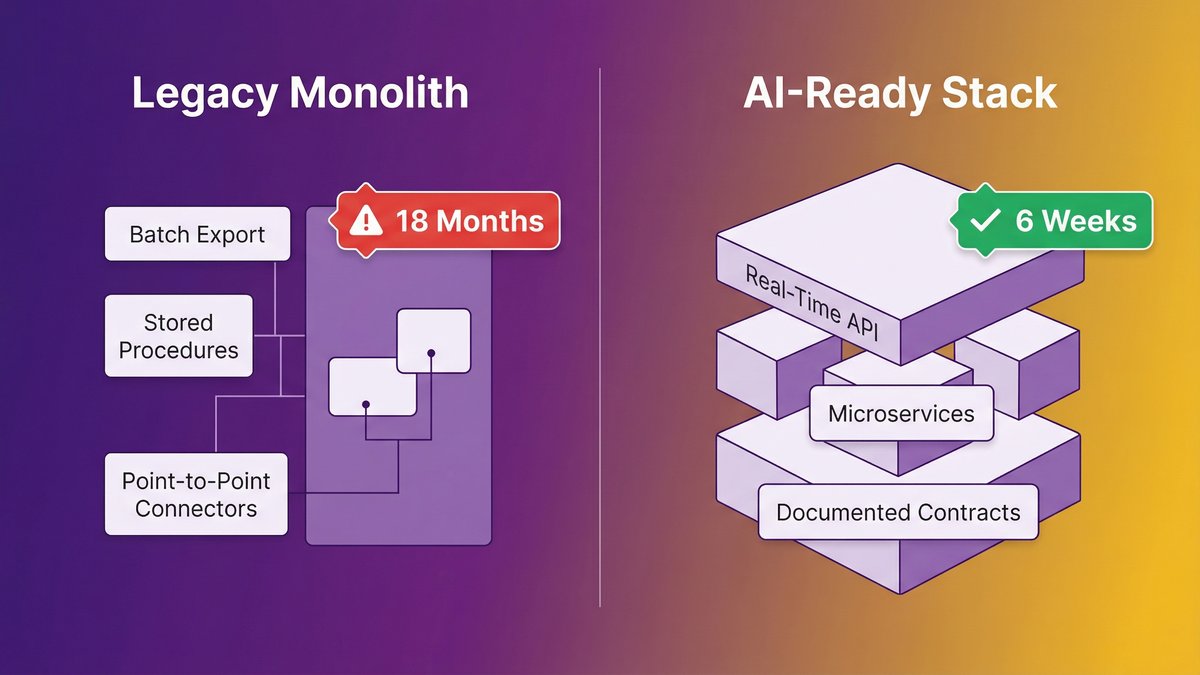
You watched a competitor launch an AI feature in six weeks. Your engineering team quoted you 18 months just to “get the systems ready.” That gap isn’t a strategy problem or a budget problem. It’s a stack problem, and it’s structural.
AI readiness in the enterprise isn’t about picking the right AI vendor. It’s about whether your underlying architecture can support AI at all. Legacy systems built for operational stability, the kind that kept your business running reliably for a decade, were not designed for real-time data access, API-first integration, or the modular component structure that AI agents require. That’s not a configuration gap. It’s an architectural one.
This post explains why, shows you the three specific characteristics that make AI impossible on most legacy stacks, and ends with a checklist that most mid-market legacy shops fail four out of five times.
Quick answer: Why AI readiness enterprise initiatives stall
AI readiness is an architecture problem, not a tool selection problem; legacy systems built for operational stability can’t support AI agents by design.
Three stack characteristics block AI: no real-time data access, no API-first design, and no modularity.
According to Gartner, 40% of enterprise applications will embed AI agents by the end of 2026, up from less than 5% in 2025. The gap is widening fast.
Traditional rip-and-replace rebuilds typically run past 18 months and add compounding risk; AI-augmented modernization is the alternative.
Most mid-market legacy stacks fail 4 of the 5 readiness criteria at the bottom of this post.
The 18-Month Wake-Up Call: What Legacy Systems Are Really Telling You
Your legacy stack isn’t just slowing you down. It’s telling you something specific: your architecture was built for an era AI doesn’t operate in.
Why your competitor shipped an AI feature in weeks
They didn’t have a better AI strategy. They had a different foundation. A competitor who ships an AI feature in six weeks is starting from an architecture that already exposes data in real time, already has documented API contracts, and already runs services that are independently callable. Their AI vendor plugs in. Yours hits a wall.
The asymmetry here is stark. A Series B SaaS company on a modern microservices stack can have a working AI co-pilot in a sprint. A mid-market operations platform built on a 12-year-old monolith with batch-export data pipelines can’t do the same thing in 18 months, not because the AI is harder, but because the plumbing doesn’t exist.
According to Gartner, 40% of enterprise applications will embed AI agents by the end of 2026, up from less than 5% in 2025. Your competitor is in that 40%. The question is whether you will be.
The “systems readiness” answer your engineering team keeps giving you
When your CTO says, “We need to get the systems ready first,” that’s not stalling. That’s a precise technical diagnosis. The frustrating part is that it’s accurate.
Legacy systems weren’t built to fail at AI. They were built to succeed at something else: operational stability, batch processing, and predictable throughput. Those design goals are now exactly the wrong design goals for an AI-enabled business. Your engineering team knows this. What they don’t always have is a path through it that doesn’t require shutting down the business to get there.
AI Readiness Is Not a Tool Problem, It’s an Architecture Problem
Stop looking at AI vendors. Look at your stack. The constraint is architectural, and no vendor selection process fixes an architectural constraint.
What “operational stability” architecture looks like under the hood
Operational-stability systems share a recognizable anatomy. Data lives in a relational database with tables designed for transactional accuracy, not query flexibility. Business logic is embedded deep in stored procedures or monolithic application code that hasn’t been touched since the original developer left. Integrations between systems run on point-to-point connectors, often undocumented, that break if either side changes. Deployments require planned downtime windows because nothing is truly independent.
This architecture is defensible. It produced reliability. It kept your business running.
It also cannot support AI agents. Not without modification that goes all the way down to the data layer.
Why are the same systems that kept your business running blocking AI
The design choices that created reliability in 2012 are the same design choices that create AI-incompatibility in 2026. Batch exports instead of real-time data streams. Tightly coupled modules instead of independently callable services. Direct database access instead of API contracts. No architectural separation between “where data lives” and “how systems consume it.”
As Cesar DOnofrio, CEO and co-founder of Making Sense, puts it: “When legacy systems limit access to reliable data, slow down integration across workflows, or make change deployment complex and time-consuming, AI initiatives stop being strategic levers and become isolated experiments.”
That’s the exact failure mode most mid-market AI initiatives hit at month three.
Three Stack Characteristics That Make AI Impossible
Your stack blocks AI in three specific ways. Each one is a hard blocker, not a configuration problem.
No real-time data access: why AI agents need live data, not last night’s batch
AI agents don’t run on historical exports. They need access to live, current data, what’s happening now, not what happened at 2 am when the batch job ran. Most legacy systems generate data as a side effect of transactions and export it on a schedule. The AI agent asks, “What’s the current inventory level?” and the system’s honest answer is “whatever it was at midnight.”
This is why 46% of respondents in Arcade.dev’s 2026 State of AI Agents report cite integration with existing systems as their primary challenge. The integration challenge is almost always a data-access challenge in disguise. The system can’t give AI what it needs at the moment it needs it.
Real-time data access requires a data layer built for event-driven consumption, streaming pipelines, change-data-capture patterns, or, at a minimum, an API layer that queries live records. Legacy batch-export architectures need significant re-engineering before they’re AI-capable. That’s not a configuration setting.
No API-first design: the integration wall every AI vendor hits
Every serious AI vendor will ask one question early in your evaluation: “What APIs can we call?” If the answer is “we have some endpoints, but they’re not fully documented” or “we’d need to build those,” the evaluation just got significantly more expensive.
API-first design means every system capability is exposed through a documented, versioned, contract-based API before any external consumer is built. Legacy systems were almost never built API-first. They were built to do a job internally. APIs were added later, often inconsistently, often without documentation, often by developers who are no longer there.
When the AI vendor hits that wall, the options are: build a custom integration layer (expensive, slow, brittle), build the APIs that should have been there from the start (the right answer, but adds months), or wrap the AI around a surface-level data export that doesn’t actually give it what it needs (produces a failing pilot at month four). Most organizations take door three. Then wonder why the pilot didn’t scale.
No modularity: why you can’t embed AI into a monolith without breaking it
Embedding AI into a monolithic application requires you to surgically modify code that was never designed to be modified surgically. Business logic is intertwined. Changing one component means testing the entire application. Deploying one fix means deploying everything. The feedback loop between “write the AI feature” and “verify it works in production” stretches from days to months.
Modular architectures, where services are independently deployable, independently testable, and independently callable, allow AI to be embedded into specific workflows without touching unrelated ones. Monoliths don’t allow that. Every AI feature becomes a full-application deployment risk.
This is the part your CTO is describing when they say “we’d have to restructure significant portions of the codebase.” They’re right. That’s not pessimism. It’s an accurate read of what AI actually requires.
AI pilots work in controlled conditions. Production doesn’t offer controlled conditions.
What failed AI pilots have in common
According to IDC research, for every 33 AI pilots launched, only 4 reach production, an 88% failure rate. That’s not a technology failure. It’s an infrastructure failure. Pilots succeed by working around the constraints of the production system. They use curated datasets, custom data exports, manually assembled API responses, and a dedicated implementation team that doesn’t represent what production support looks like.
When the pilot is handed to production infrastructure, real data access patterns, real integration dependencies, real deployment processes, it hits every constraint that was bypassed during the pilot. And it fails.
According to McKinsey, 62% of organizations are experimenting with AI agents. Only 23% successfully scale them. The gap between 62% and 23% lives in the production infrastructure.
The hidden cost of “AI-on-top-of-legacy” workarounds
There’s a tempting intermediate move: build the AI on top of the legacy system through a combination of data exports, API wrappers, and integration middleware. Don’t touch the underlying architecture, just build AI around it.
This works. For a while. The cost appears later: integration brittleness that breaks when either side changes, data latency that degrades AI accuracy, a middleware layer that becomes its own technical debt, and a system that still can’t support the next generation of AI capabilities. You’ve bought six to twelve months of AI capability at the cost of compounding the architectural problem underneath.
According to data from IDC, legacy data infrastructure drives $108 billion in annual wasted AI investment. A significant portion of that waste is the AI-on-top-of-legacy pattern: real money spent on AI tooling that can’t perform because the underlying system won’t support it.
The Modernization Trap: Why Traditional Rebuilds Make It Worse
The obvious answer is: modernize the system. But “modernize” done wrong produces outcomes that are worse than the status quo.
The rip-and-replace myth: why 18-month timelines are optimistic
A full system rewrite, rip out the old, build the new, sounds clean. It isn’t. It requires running two systems in parallel: the old one, which can’t go down because the business runs on it, and the new one, which needs to reach feature parity before you can switch over. Feature parity is harder than it sounds because legacy systems accumulate undocumented behavior over a decade. The new system has to replicate that behavior without anyone having written it down.
Eighteen months is when these projects start. Two to three years is where most of them end. And a significant number never complete at all, stalling at 70% migration while new requirements keep arriving for a system that’s half-old, half-new, and fully unmaintainable.
As Ashwin Ballal, CIO at Freshworks, says: “Organizations are trading one subpar legacy system for another. Adding vendors and consultants often compounds the problem, bringing in new layers of complexity rather than resolving the old ones.”
How maintaining legacy while rebuilding creates compounding risk
While the rebuild runs, the legacy system continues aging. Bug fixes on the old system have to be replicated in the new system or ignored. Security vulnerabilities in the old system have to be patched even though you’re “replacing it.” The team is split between maintaining the system that pays the bills and building the system that will replace it, and both suffer.
The compounding dynamic is real: every month the rebuild takes is another month the legacy system accumulates new technical debt, another month the AI ambitions sit on hold, and another month your competitor extends their lead with the AI features they shipped last quarter.
What AI-Augmented Modernization Actually Looks Like
There’s a third option between “stay on legacy” and “rewrite everything.” It uses AI to accelerate the modernization itself.
Using AI to accelerate migration without stopping the business
AI-augmented modernization applies AI tooling across the development lifecycle, requirements analysis, architecture documentation, code migration, test generation, and API design to compress timelines without requiring the business to stop. The approach: modernize incrementally, starting with the components that block AI integration first.
According to Ciklum, citing McKinsey research, AI can improve developer productivity by up to 45%. When that productivity improvement is applied to the modernization process itself, not to building new features on the old system, it changes the math on what’s achievable in a given timeline. A migration that traditional delivery would take 24 months can be approached in 14 to 16 months with AI-augmented delivery.
The key distinction from rip-and-replace: you’re not building a parallel system that replaces the old one all at once. You’re extracting, modernizing, and redeploying components incrementally. The legacy system stays live. Each completed component is one less thing the legacy system has to carry.
Why cleaner architecture emerges faster with AI-augmented delivery
AI-assisted code analysis, automated documentation generation, and AI-accelerated refactoring don’t just speed up the process; they produce a cleaner result. AI tooling applied at every phase of the development lifecycle surfaces design inconsistencies earlier, generates documentation as a continuous output of the process rather than a post-project sprint, and produces test coverage that traditional manual processes frequently skip under time pressure.
The output of an AI-augmented modernization isn’t just a faster migration. It’s a system that emerges with cleaner architecture, documented APIs, and the test coverage needed to safely embed AI agents into it afterward. The modernization doesn’t just “get the systems ready.” It produces a system that’s ready by design.
At Nexa Devs, this is how we approach every modernization engagement. We use AI across the full development lifecycle, not as a tool layered on top of delivery, but as the method through which the delivery happens. The result is a system you own fully: complete documentation transferred at project close, SLA-based support that continues after launch, and no new vendor dependency to replace the old one.
The AI-Ready Stack: What You Actually Need Before You Can Scale AI
Here’s the destination. Three layers, each with a specific requirement.
Data layer: real-time access over batch reporting
An AI-ready data layer exposes current data through event-driven patterns. Change-data-capture pipelines that push updates as they happen. Query APIs that return live records, not cached exports. A data access model that treats the AI agent as a first-class consumer, not an afterthought that reads from the same batch export the finance team uses every morning.
This doesn’t require a complete data warehouse rebuild. It requires designing a real-time access layer over your existing data, one that the AI can call without needing a data engineer to prepare a custom export first.
Integration layer: API-first contracts, not point-to-point connectors
AI-ready integration means every system capability has a documented, versioned API. Not “we have some endpoints”, documented, versioned, tested, with known response schemas. When the AI agent needs to call your inventory system, it calls an endpoint that returns a consistent response structure. When the AI agent needs to update a record, it calls a write endpoint with defined authorization and validation.
Point-to-point connectors between legacy systems, the duct tape and rubber cement of most mid-market stacks, don’t scale when AI becomes the new consumer. They break. They return inconsistent data. They don’t have the error-handling AI workflows that are required. The integration layer has to be rebuilt API-first before AI can rely on it.
Application layer: modular services AI agents can call
The application layer needs to be modular enough that AI agents can invoke specific capabilities without triggering side effects in unrelated parts of the system. An AI agent that needs to check order status shouldn’t have to navigate a monolith that bundles order management, inventory, billing, and customer records into the same codebase.
Modularity doesn’t require a full microservices rebuild. The strangler fig pattern, gradually extracting services from the monolith, one domain at a time, gives you modular, callable services without requiring the entire monolith to be decomposed before AI can touch anything. Each extracted service is immediately AI-accessible. The monolith shrinks while AI capability grows.
The 5-Point AI Readiness Checklist: Where Does Your Stack Stand?
Run through these five criteria honestly. A typical mid-market legacy stack fails four of them.
1. Real-time data access Can an external system, including an AI agent, query your live operational data without waiting for a scheduled batch export? If your data access model is export-based, you fail this one.
2. Documented, versioned APIs Do you have a documented API layer with versioned endpoints, known response schemas, and active maintenance? If your integration approach relies on direct database access, undocumented connectors, or one-off scripts, you fail this one.
3. Independent deployability Can you deploy a change to one part of your system without a full application deployment? If your deployment process requires taking everything down or running a full regression test suite for a single module change, you fail this one.
4. Observable production behavior Do you have logging, monitoring, and tracing granular enough to debug an AI agent interaction in production? If your observability stack can’t tell you what happened inside a specific transaction in real time, you fail this one.
5. AI-accessible documentation Is your system documented well enough that an AI agent or a new developer could understand how to interact with it without asking the one person who built it? If the answer is “it’s in Gary’s head,” you fail this one.
Most mid-market organizations reading this fail four of five. That’s not an indictment, it’s a diagnosis. The path through it is architectural modernization, done incrementally, in a sequence designed to unlock AI capability at each phase rather than waiting until the entire system is rebuilt.
If you want to know exactly where your stack sits against these five criteria, start with an architecture assessment. It’s the fastest way to turn a frustrating 18-month estimate into a prioritized, phased roadmap that produces AI capability in months, not years.
Ready to find out where your stack actually stands?
An architecture assessment from Nexa Devs maps your existing system against AI-agent requirements, the exact five criteria in the checklist above, and produces a sequenced modernization roadmap that unlocks AI capability at each phase. No 18-month wait. No business disruption. No new black-box dependency.
AI readiness for enterprises is a structured assessment of whether your current architecture can support AI deployment at scale. It covers data access patterns, integration layer design, application modularity, and observability. The process starts with an architecture audit mapped against AI-agent requirements, then produces a prioritized modernization roadmap.
Why are AI implementations failing?
Most enterprise AI implementations fail because they’re deployed on infrastructure that can’t support them in production. Common causes: legacy batch data pipelines, undocumented APIs, and monolithic architectures. According to IDC research, only 4 of every 33 AI pilots reach production, an 88% failure rate driven almost entirely by infrastructure constraints.
Is 95% of AI failing?
IDC data shows approximately 88% of AI pilots don’t reach production. McKinsey reports 62% of organizations experiment with AI agents, but only 23% scale them successfully. The consistent pattern: pilots succeed in controlled conditions, then fail when hitting real production infrastructure with legacy constraints.
What are the 4 pillars of AI readiness?
The four pillars are: (1) data infrastructure, real-time, accessible, high-quality data; (2) integration architecture, API-first, documented, independently deployable; (3) organizational alignment, executive buy-in, and cross-functional coordination; (4) security and governance, privacy, compliance, and responsible AI controls. For mid-market organizations, pillars one and two are the most common blockers.
Why do AI pilots fail to scale in enterprises?
AI pilots fail to scale because conditions that make them succeed, curated test data, custom integrations, and dedicated teams, don’t exist in production. Real production requires live data from legacy systems, undocumented API integration, and standard deployment processes. Legacy architecture failures become visible exactly when the pilot moves to production.
What percent of AI implementations fail?
IDC research shows 88% of AI pilots don’t reach production scale. S&P Global data shows 46% of AI projects are scrapped between proof-of-concept and broad adoption, up from 17% previously. Across multiple sources, the failure or abandonment rate ranges from 46–88%, depending on how failure is defined and when it’s measured.
You signed the contract, the team shipped on time, and the system runs. Then your lead vendor contact leaves. Or you decide to switch partners. Or a new engineer joins your team and asks: “Where’s the architecture diagram?”
The silence that follows is not a documentation problem. It’s a vendor lock-in problem you didn’t know you had.
In 2026, the single biggest differentiator in outsourcing software development isn’t cost per sprint or team timezone. It’s whether the partner you hired leaves you with a codebase you own, or one you’re renting without knowing it.
The Hidden Cost of Undocumented Outsourced Code
Undocumented outsourced code creates vendor dependency the moment the engagement ends. The work product exists on your servers. The knowledge that explains it lives in someone else’s head.
This is not a hypothetical. It’s the most common failure mode in custom software outsourcing, and it almost never appears in the vendor’s pitch deck.
When Your Vendor Leaves, What Stays Behind?
Think about what gets produced during a typical outsourcing engagement: working software. What doesn’t get produced, by default: architecture decision records, API references, system design documents, onboarding guides, or any structured explanation of why the code does what it does.
When the vendor team rotates, and it will, because engineers change jobs, the institutional knowledge walks out with them. The system keeps running, but nobody on your side can modify it confidently. Every change requires either recontacting the original vendor, paying to reverse-engineer your own system, or accepting engineering risk that compounds sprint by sprint.
One case from Generic.de, a German enterprise software consultancy, captures the worst version of this: a client asked where their source code documentation was, and the answer was that the only person who knew the system was a retired developer, then 82 years old, who “still did it on the side.” That’s not a documentation gap. That’s organizational fragility dressed up as a software engagement.
The Vendor Lock-In Trap: How Undocumented Systems Create Dependency
Vendor lock-in in outsourced software development doesn’t look like a software license. It looks like a working system that nobody except the original vendor can safely modify.
As Vendor Lock-In in Custom Software: How to Spot and Prevent It defines it: “Vendor lock-in occurs when switching providers becomes so costly or risky that you feel stuck.” In custom development, that dependency doesn’t come from a license agreement. It grows from the relationship between your codebase and the people who built it, specifically the undocumented knowledge those people hold that your organization never received.
The pattern repeats: engagement ends, documentation doesn’t arrive, the system works until something breaks or needs to change, and then you discover that switching vendors requires re-explaining years of design decisions to a new team, at your expense.
Why Documentation Quality Has Become an Outsourcing Differentiator in 2026
Documentation quality is the new baseline for CTO evaluation. Not because documentation suddenly became important, it’s always been important, but because the cost of ignoring it has become impossible to hide.
Two forces made this the year it matters: the rise of AI-augmented delivery processes that make comprehensive documentation achievable without slowing teams down, and the growing pressure on CTOs to ensure every system they build or inherit is AI-ready for future integration.
The Shift: From Deliverable to Living System
Static documentation, a handoff packet at project close, was always better than nothing and rarely enough. By the time the final PDF arrived, it was already outdated. The codebase had evolved. The architecture decisions in the document didn’t match what actually shipped.
Living documentation changes the frame entirely. It means documentation is produced, updated, and reviewed throughout the development lifecycle, not assembled retrospectively. Architecture decision records are written when decisions are made. API references are generated and maintained alongside the code. User story libraries reflect what was built, not what was planned.
This isn’t aspirational. It’s what structured development processes produce when documentation is treated as a first-class engineering output rather than an administrative afterthought.
How AI-Augmented SDLCs Change the Documentation Equation
The practical objection to comprehensive documentation has always been capacity: writing docs takes time that teams could spend shipping code. AI-augmented development processes eliminate that tradeoff.
When AI assists at every phase of the SDLC, requirements analysis, architecture review, implementation, testing, and documentation emerge as byproducts of the process rather than separate workstreams. Requirements analysis produces structured specifications. Architecture review generates decision records. Implementation produces commented, reviewable code with AI-assisted documentation scaffolding.
The result: systems built under an AI-augmented process arrive with documentation that reflects what was actually built. Not what was planned. Not a summarized afterthought. The actual system, explained.
What Poor Knowledge Transfer Actually Costs Engineering Teams
Poor documentation in outsourced development has a direct, measurable cost to your engineering organization. It shows up in onboarding time, sprint velocity, and the rework your internal team absorbs to compensate for what the vendor didn’t leave behind.
The aggregate number is significant. According to the Decidr AI Readiness Index (2026), 73% of businesses face delays because critical knowledge lives with too few people. That’s not a software problem. It’s a documentation problem expressed in calendar days and missed delivery dates.
Onboarding Delays and Sprint Disruption
When a new engineer joins a team maintaining an undocumented outsourced system, the fastest path to productivity runs through whoever worked with the original vendor. If that person has left, the path runs through trial-and-error code archaeology.
Full Scale’s research on distributed team knowledge management puts a number on it: developers on undocumented systems spend an average of 4.5 hours per week searching for documentation and 6.2 hours per week rediscovering solutions that already exist somewhere in the codebase. That’s nearly 11 hours per developer per week of recoverable capacity that undocumented systems consume.
Rework, Duplicate Effort, and the Compounding Knowledge Debt
Poor knowledge transfer doesn’t produce a one-time cost. It compounds. The first engineer who can’t find an explanation writes their own workaround. The next engineer inherits both the original undocumented system and the workaround. By the third iteration, the codebase reflects three separate engineers’ attempts to compensate for documentation that should have been there from the start.
According to DemandSage (2026), 20–25% of outsourcing relationships fail within the first two years. Documentation gaps are not the only cause, but they’re consistently present in the post-mortems. Deloitte’s Global Outsourcing Survey (2024) found that 55% of failed outsourcing engagements lacked benefit tracking and reporting, and 53% cited inadequate change management. Both of those failure modes become structurally harder to solve when nobody can clearly document what was built or why.
The Documentation Audit: What to Demand From Any Outsourcing Partner
Every CTO who has been burned by a documentation gap will tell you the same thing: the time to ask about documentation is before you sign, not after you ship.
Here’s a practical framework for evaluating any outsourcing partner’s documentation practices at the pre-engagement stage.
Contract Clauses That Protect Code Ownership
Documentation ownership must be explicit in the contract. The default in many outsourcing agreements is silence, which courts typically interpret in the vendor’s favor. Your contract should specify:
All deliverables include complete documentation packages: architecture diagrams, system design documents, API references (Swagger/Postman), test coverage reports, and architecture decision records
Documentation is transferred unconditionally to the client at project completion, regardless of whether the engagement continues
Source code, documentation, and all associated artifacts are client-owned intellectual property from the moment of creation, not the moment of handoff
That third clause matters. Some vendors structure engagements so that IP ownership transfers only on final payment, which gives them leverage in disputes. Your IP should be yours throughout, not contingent on billing milestones.
The Pre-Engagement Documentation Scorecard
Before signing with any outsourcing partner, ask for evidence of their documentation practices on a recent completed engagement. Evaluate what they provide against this checklist:
Can they show you a sample architecture decision record from a past project (anonymized if needed)?
Do they maintain API references alongside code, or separately as a post-delivery task?
What is their process for updating documentation when code changes during a sprint?
Who is accountable for documentation quality: a dedicated technical writer, the engineers themselves, or a project manager?
What happens to documentation if a team member leaves mid-engagement?
A vendor who answers these questions vaguely hasn’t solved the problem. A vendor who answers them with specific process documentation has.
Red Flags: What Vendors Who Can’t Document Actually Look Like
The red flags are consistent and appear early:
Documentation is described as a “final deliverable” rather than a continuous practice
No process exists for updating documentation when code changes
The team lead is the only person who knows how the past system was built
Sample documentation, when provided, looks like it was assembled the day before the meeting
The contract is silent on the documentation ownership
Any one of these should prompt more questions. Two or more should prompt a different vendor conversation entirely.
Knowledge Transfer That Survives Team Changes
Team change is not an edge case in outsourced software development. It’s the default. Engineers rotate, engagements end, vendors grow. A knowledge transfer strategy that depends on specific individuals staying in place isn’t a strategy. It’s a risk.
The Four Stages of Knowledge Transfer in Outsourced Development
Effective knowledge transfer follows a consistent four-stage structure regardless of vendor model:
Define scope: what knowledge exists, what needs to be transferred, and to whom. This includes technical knowledge (architecture, APIs, data models) and operational knowledge (deployment processes, incident response, integration dependencies).
Capture and structure: converting tacit knowledge into documented, searchable artifacts. This is where most outsourcing engagements fail: they rely on informal communication rather than structured documentation.
Execute transfer: active handover sessions, documentation review with the receiving team, and verification that the receiving team can actually use what’s been transferred.
Validate that the receiving team demonstrates they can operate and modify the system without returning to the original vendor for clarification. Validation is the step almost no one builds in, and the step that proves the transfer actually worked.
These four stages apply whether you’re transitioning from one vendor to another, onboarding an internal team, or preparing for staff augmentation. The structure doesn’t change. What changes is who’s responsible for each stage.
Living Documentation vs. Static Handoffs: Why the Difference Matters
A static documentation handoff at project close is better than nothing. It’s not adequate.
The problem is timing. By the time a static handoff is assembled, the documentation reflects the system as it was designed, not as it was built. Decisions made during implementation don’t always make it back into the design documents. Workarounds discovered during QA rarely appear in the architecture records. The handoff describes the intention; the codebase reflects the reality.
Living documentation, maintained throughout the engagement, updated when code changes, reviewed in sprint ceremonies, reflects the system as it actually exists. That’s the only version of documentation that survives a team change intact.
Roles and Accountability: Who Owns What at Every Stage
Knowledge transfer doesn’t have a default owner in most outsourcing structures. Assigning accountability explicitly produces better outcomes than assuming documentation responsibility is shared.
A practical role assignment for documentation in outsourced development:
Your CTO or technical lead owns the documentation standards and acceptance criteria. Defines what “done” means for documentation on your engagement.
Vendor project manager, accountable for ensuring documentation milestones are met within the engagement timeline. Not responsible for writing all documentation, but responsible for the process.
Vendor engineers are responsible for producing documentation as part of their development workflow, not as a post-sprint cleanup task.
Your internal engineers are responsible for reviewing documentation during the engagement, not after. Documentation reviewed only at handoff is documentation reviewed too late to fix.
Nearshore vs. Offshore: The Documentation Advantage No One Talks About
The conventional nearshore vs. offshore debate focuses on cost, timezone alignment, and communication overhead. The documentation angle, the one that directly affects your long-term technical autonomy, rarely comes up. It should.
Time Zone Overlap as a Documentation Enabler
Documentation quality in outsourced development is directly correlated with the frequency of review. Documentation that never gets reviewed by the client team drifts from the actual system. Errors go uncorrected. Assumptions accumulate. The handoff artifact describes a system that hasn’t existed for months.
Real-time review requires working hours overlap. A nearshore team operating in U.S. timezone alignment, Latin America-based engineers working U.S. business hours, can participate in sprint reviews where documentation is examined alongside code. Questions can be answered in the same conversation. Corrections happen the same day.
An offshore team in a +12-hour timezone posts documentation for async review. The client team sees it the next morning, raises questions, and the response arrives 24 hours later. A cycle that takes one day with nearshore alignment takes four to five days offshore. Over a 12-month engagement, that accumulates into meaningful documentation drift.
Real-Time Review vs. Async Drift: What the Gap Looks Like Over 12 Months
Here’s a concrete scenario. Your offshore vendor produces architecture decision records at the end of each two-week sprint. The async review cycle means errors and omissions typically take five days to surface and correct. Over 26 sprints in a year, that’s 130 review cycles, each one introducing potential drift between documentation and codebase.
By month 12, you have a documentation set that started accurately and accumulated dozens of small misalignments. None of them is individually catastrophic. Collectively, they mean the documentation can’t be trusted without verification, which means it’s effectively not usable for onboarding, system maintenance, or future development planning.
Nearshore time zone alignment doesn’t eliminate this problem, but it compresses the review cycle enough to catch drift before it compounds. That’s not a soft benefit. It’s a concrete reduction in the documentation debt you’ll inherit at engagement close.
According to Mismo Team research (2026), 58% of IT firms already prefer nearshore for timezone alignment. The documentation quality advantage is the underappreciated technical reason behind a preference that most firms describe in communication terms.
Measuring Documentation Health as an Engineering KPI
Documentation health isn’t a soft metric you review at project close. It’s a measurable engineering output you can track sprint by sprint. CTOs who treat documentation debt like code debt, visible, assigned, and tracked, don’t get surprised at handoff.
The Metrics That Signal Documentation Debt Before It Compounds
Four metrics that tell you documentation health is deteriorating before the problem becomes a handoff crisis:
Documentation coverage ratio: What percentage of system components (services, APIs, data models, integration points) have current documentation? Below 80% is a warning. Below 60% is a problem.
Documentation lag: average time between a code change and the corresponding documentation update. More than one sprint cycle of lag is a signal that the process isn’t working.
Onboarding time for new engineers: How long does it take a competent engineer unfamiliar with the system to become productive? This is the most honest measure of documentation quality because it tests whether documentation is usable, not just whether it exists.
Clarification request frequency: how often does your internal team need to contact the vendor for explanations that should be in the documentation? Every clarification request is a documentation gap made visible.
How to Build Documentation Health Into Sprint Reviews
Sprint review is the lowest-friction place to add documentation accountability. Before a sprint can be closed, documentation coverage for all new components should meet the agreed standard. This isn’t a separate documentation sprint. It’s a completion criterion, like test coverage, that makes documentation a shipping requirement rather than a cleanup task.
The practical implementation: add a documentation acceptance criterion to your definition of done. Every user story that delivers new or modified system components includes a documentation task that must be reviewed before the story is marked complete.
Vendors who resist this are telling you something important about how they’d handle documentation without it as a requirement.
What an AI-Augmented Outsourcing Partner Documents, And Why It Changes the Handoff
There’s a meaningful difference between a vendor who commits to documentation and a vendor whose delivery process produces documentation as a structural output. The second type exists, and the difference in handoff quality is not marginal.
Requirements, Architecture, and Decision Logs: The Full-SDLC Documentation Stack
A partner with a genuine AI-augmented SDLC produces documentation at every phase, not just at the end:
Requirements phase: AI-assisted requirements analysis surfaces ambiguities before development begins. The output isn’t just a spec document; it’s a structured artifact that captures what was decided, what was ruled out, and why. That decision history is the most valuable thing a vendor can hand over.
Architecture phase: UML architecture diagrams, system design documents, and architecture decision records produced before implementation begins. Not retrospectively. When the architecture decision is made, it’s recorded with the reasoning. Two years later, when a new engineer asks why the system is structured the way it is, the answer exists.
Implementation phase: AI-assisted code review and documentation generation alongside development. Not code first, docs later. The documentation reflects what was built because it was produced while building it.
Testing phase: Test coverage reports and QA documentation transferred to the client, not retained by the vendor. Your CI/CD pipeline should be able to run the tests. Your team should be able to read the results.
Delivery: A complete documentation package, architecture diagrams, system design documents, API references (Swagger/Postman), user story library, test coverage reports, and transferred unconditionally at project completion. Owned by you from day one of the engagement, not just at final payment.
What Nexa Devs Produces at Each Phase
This is Nexa Devs’ standard delivery model, not an optional add-on: AI-augmented development across every phase of the SDLC, complete documentation transfer at project close, and unconditional client ownership of all deliverables regardless of whether the engagement continues post-delivery.
The practical implication: when the engagement ends, or when you decide to bring development in-house, hire a different vendor, or onboard a staff augmentation engineer, the system you paid to build is fully yours. No documentation scarcity. No institutional knowledge held hostage by the vendor. No need to maintain a relationship for access to a system you already own.
For mid-market organizations who have experienced the alternative, a vendor who delivered working code and left a codebase nobody could confidently touch, that’s not a feature. It’s the thing you actually bought.
As Reid Jackson, CEO of Unison Software, describes the fear that drives vendor selection: ‘This fear that if we go with one system… we’re going to find ourselves really beholden to that one vendor, and we’re not going to be able to make changes, and everything will become wildly expensive.’” The answer to that fear isn’t better contract language. It’s a partner whose process makes documentation unavoidable.
How do you document knowledge transfer in outsourced software development?
Effective knowledge transfer documentation captures technical knowledge (architecture diagrams, API references, data models, decision records), operational knowledge (deployment processes, incident response), and contextual knowledge (design rationale, ruled-out alternatives). Documentation should be produced throughout the engagement, reviewed before handoff, and validated by testing whether the receiving team can operate the system without vendor support.
What are the four stages of knowledge transfer?
The four stages are: (1) Define scope, identify what knowledge exists, and who needs it. (2) Capture and structure, convert tacit knowledge into documented artifacts. (3) Execute transfer, active handover with verification. (4) Validate that the receiving team demonstrates they can operate the system independently without contacting the original vendor.
What is a KT checklist for outsourced development?
A knowledge transfer checklist should include: architecture diagrams (UML, system design), API references (Swagger/Postman), data model documentation, architecture decision records, deployment guides, test coverage reports, user story library, integration dependency map, and an operational runbook. The receiving team should be able to onboard a new engineer using only these documents without contacting the original vendor.
How do you prevent vendor lock-in in outsourced software development?
Vendor lock-in is prevented through three mechanisms: contractual clarity (IP ownership at creation, not final payment; documentation as a required deliverable); process accountability (documentation as a sprint completion criterion); and vendor selection (evaluate documentation practices before signing). A partner whose SDLC structurally produces documentation eliminates lock-in risk at the source.