AI Legacy Integration Without a Full Rewrite
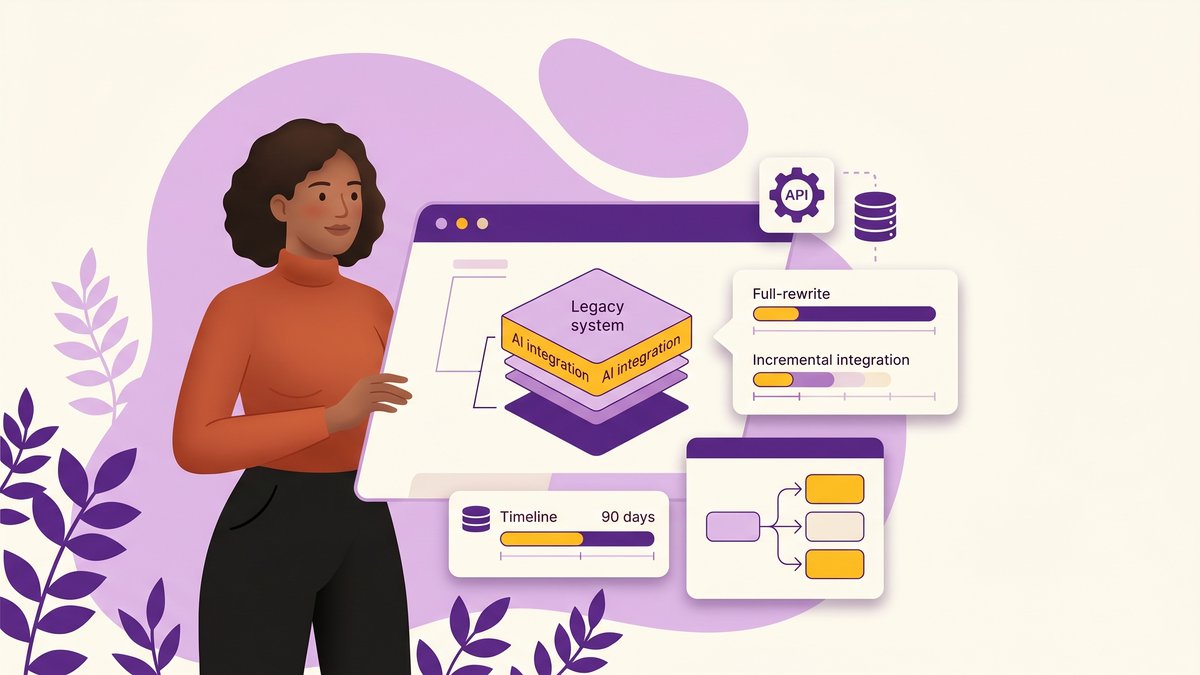
Table of Contents
- Why Mid-Market Internal Systems Stall AI Before It Starts
- The Full-Rewrite Trap: Why It Costs More Than You Think and Delivers Less Than You Hope
- The Integration Ladder: Four Patterns That Add AI Without Touching Core Logic
- MCP and the New Integration Layer: What Mid-Market CTOs Are Testing in 2026
- Where to Start: Choosing the First System to Integrate (And What to Avoid)
- What AI-Ready Data Actually Means for a System That Wasn’t Built for It
- A 90-Day Integration Roadmap for Mid-Market Teams
- Build vs. Partner: When Your Team Can Own This and When You Need Outside Help
- FAQ
Your CEO wants AI in your systems by Q4. Your board has seen the competitor demo. Your team is already stretched across three ongoing initiatives, and your primary internal system is a 12-year-old platform that nobody fully understands anymore.
A full rewrite would take 18 months minimum and cost more than the business will approve. Doing nothing is not an option your CEO accepts as a strategy.
There’s a third path. AI legacy integration, done incrementally, lets you add real AI capabilities to systems that were never designed for them, without touching core logic, without a greenfield rebuild, and without betting the business on a two-year timeline.
This guide covers how to do it, in sequence, for mid-market internal systems.
Why Mid-Market Internal Systems Stall AI Before It Starts
Most AI pilots fail at the infrastructure layer, not at the AI layer. The model works fine in isolation. The problem is connecting it to anything real.
Data Silos: The Hidden Tax on Every AI Pilot
Your internal systems weren’t built to share data. They were built to do a specific job: process invoices, manage customer records, track inventory. They did that job in isolation. Every system-of-record your organization accumulated became another silo, and the data inside it became inaccessible to everything outside it.
When you try to build an AI feature, the first question is always: where does the training data come from? The second is: how does the AI read from and write back to the operational system? If the data lives in a legacy database with no API surface and no documented schema, you’re not building an AI feature. You’re building a data extraction project first, and that project is the one that kills the timeline.
ITBrief’s 2026 analysis found that 40% of enterprises named integration as their single biggest challenge for AI deployments. That figure understates the mid-market problem. Enterprises have integration teams and data engineering functions. Mid-market organizations often have neither.
Technical Debt as an AI Integration Barrier
Legacy systems carry technical debt that actively blocks AI adoption. Undocumented dependencies mean you can’t expose a safe API without first mapping what the system does. Tightly coupled logic means a change in one module can break three others you didn’t touch. No test coverage means you can’t validate that your integration layer didn’t break something.
None of this requires a full rewrite to fix. But it does require a deliberate audit before you start building.
Why the Gap Between “We Have AI Running” and “AI Is Doing Real Work” Is So Wide
A McKinsey analysis found that 62% of organizations are experimenting with AI agents, but only 23% have successfully scaled them. The Everest Group, in research commissioned by R Systems in 2026, found that while 64% of enterprises report strong trust in agentic AI systems, only 15% have actually operationalized them at scale.
The gap isn’t a failure of AI. It’s a failure of the infrastructure layer beneath it. Organizations run a successful pilot in a controlled environment with clean data, then discover that connecting the same AI to the production system involves three months of data mapping, two months of API work, and a compliance review nobody budgeted for.
The integration architecture has to be planned before the AI is built, not after.
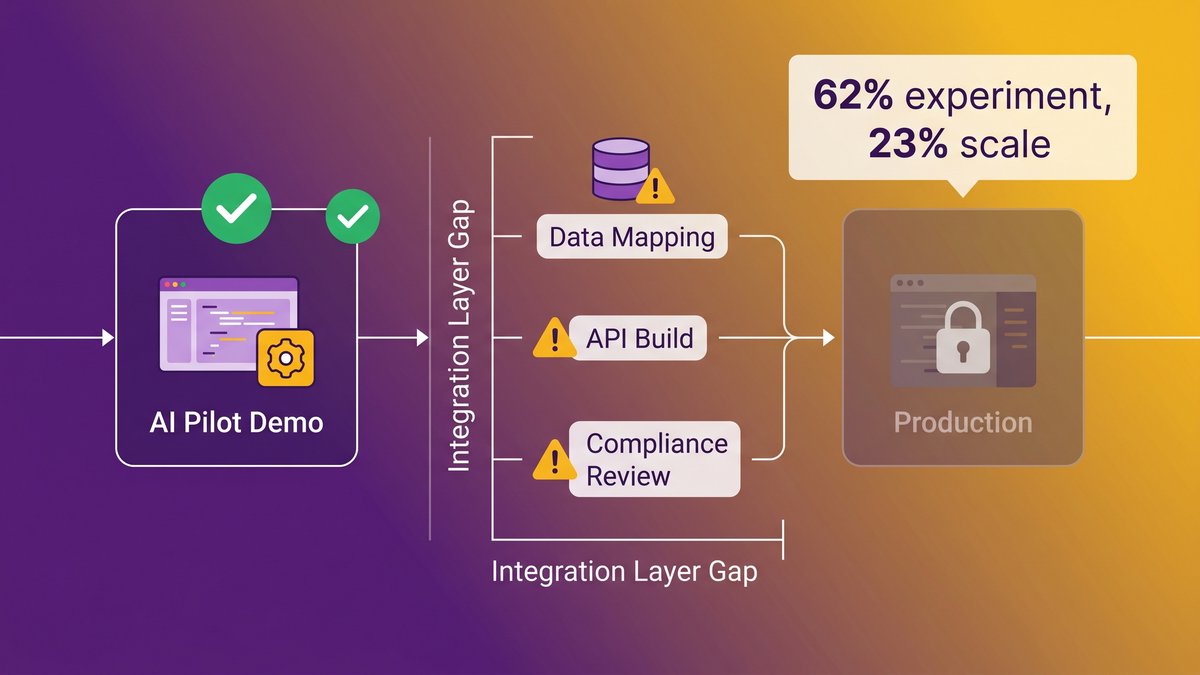
The pilot-to-production gap for AI integration: most teams reach a working demo but stall before production because the integration layer was treated as an afterthought.
The Full-Rewrite Trap: Why It Costs More Than You Think and Delivers Less Than You Hope
Skip the rewrite. Not because it’s always wrong, but because it’s almost always wrong for mid-market organizations integrating AI.
Real Cost Ranges for Mid-Market Modernization in 2026
A partial modernization, where you refactor one major subsystem while keeping others intact, typically runs $150,000 to $500,000 for a mid-market organization. A full platform rewrite runs $2 million and up, with the ceiling undefined. Projects in the $3M to $5M range are common for organizations with 10+ years of accumulated feature logic.
Those are the budgeted figures. The actual cost almost always lands higher. Scope expands once engineers start touching code they’ve never touched before. Timelines slip when undocumented dependencies surface in month four. And the biggest cost nobody accounts for: your team can’t ship new features during the rewrite because every engineer is occupied.
What Gets Lost in a Rewrite That Nobody Budgets For
Institutional knowledge is the hidden casualty of every rewrite. Your legacy system contains 10 years of workflow decisions, edge case handling, and business logic that is not documented anywhere. When you rebuild from scratch, you have to rediscover all of it through end-user interviews, support tickets, and production bugs that tell you what the old system used to handle silently.
Forrester’s research found that 70% of digital transformations are slowed by legacy infrastructure. A full rewrite doesn’t remove the legacy constraint. It just moves it to the risk column for the duration of the project.
The Integration Ladder: Four Patterns That Add AI Without Touching Core Logic
Four patterns cover the majority of AI legacy integration scenarios. They’re not interchangeable: each one solves a different problem and requires a different level of access to the underlying system. Together, they form a ladder. Start with whichever rung your system can support, and move up as you validate each step.
Pattern 1: The API Wrapper, Giving AI a Door Into Your Existing System
The API wrapper is the most common first step. You build a controlled API surface over the legacy system, a translation layer that accepts modern HTTP requests and maps them to whatever the legacy system actually understands, whether that’s a direct database query, a file-based exchange, or a proprietary protocol.
The AI doesn’t talk to the legacy system directly. It talks to the wrapper. The wrapper handles the translation. This means the legacy system needs no modification at all.
This pattern works when your system has a database you can query, or any output the legacy system produces (files, logs, batch exports) that you can intercept and expose. It doesn’t work well when the legacy system’s business logic needs to run as part of the AI interaction. For those scenarios, you need Pattern 3 or 4.
Practical limits: read-heavy AI use cases (search, summarization, classification) fit this pattern. Write-heavy use cases (AI taking action, updating records) require careful validation before trusting the AI to write back through the wrapper.
Pattern 2: The Event-Driven Sidecar, Letting AI Listen Without Interrupting
The sidecar runs alongside the legacy system without being connected to it directly. Every time the legacy system produces an event, a completed transaction, a status change, a new record written to the database, the sidecar picks up that event and routes it to an AI processing pipeline.
The AI processes the event and produces an output: a classification, a recommendation, a risk score, a summary. That output can be stored separately and surfaced to users through a lightweight front end that sits alongside the legacy system, not inside it.
This is the lowest-risk integration pattern. The legacy system is completely untouched. If the sidecar fails, the legacy system keeps running. The AI layer is additive, not load-bearing.
Where it falls short: the AI operates on events after the fact. If you need the AI to influence what the system does in real time, to route a transaction differently based on a risk assessment, for example, the sidecar can’t do that. For real-time decision injection, you need Pattern 4.
Pattern 3: The Shadow Deployment, Testing AI Decisions in Parallel Before Committing
Shadow deployment runs the AI model in parallel with the existing system’s decision logic. Every decision the legacy system makes, approve or reject, route to A or route to B, flag or pass, the AI makes the same decision independently.
Compare the outputs side by side. Track where the AI agrees with the legacy system and where it diverges, then dig into each divergence. When the AI’s accuracy on a specific decision type crosses your threshold, flip the switch and let the AI handle that decision type in production.
This pattern de-risks the transition from “AI running alongside” to “AI running instead.” It lets you validate AI behavior against production data without exposing users to wrong decisions during the testing period.
Shadow deployment is most valuable when the legacy system’s decision logic is not fully documented, and you can’t be certain the AI is learning the right patterns until you see it against real cases.
Pattern 4: The Strangler Fig, Gradually Replacing Functionality as AI Proves Itself
The strangler fig is the most powerful pattern and the most misunderstood. Named after a vine that grows around an existing tree and gradually replaces it, the strangler fig lets you build AI-powered replacement functionality piece by piece, routing specific workflows to the new implementation while the legacy system continues to handle everything else.
You don’t replace the system. You replace specific functions within it, one at a time, as each replacement proves its reliability in production. Over 12 to 24 months, the legacy system handles fewer and fewer requests until you can sunset it, or until the AI has covered enough of its functionality that the remaining core is small enough to replace with confidence.
This is how you add real AI capabilities to a legacy system without a big-bang rewrite, and without creating a parallel system that multiplies your maintenance burden during the transition.
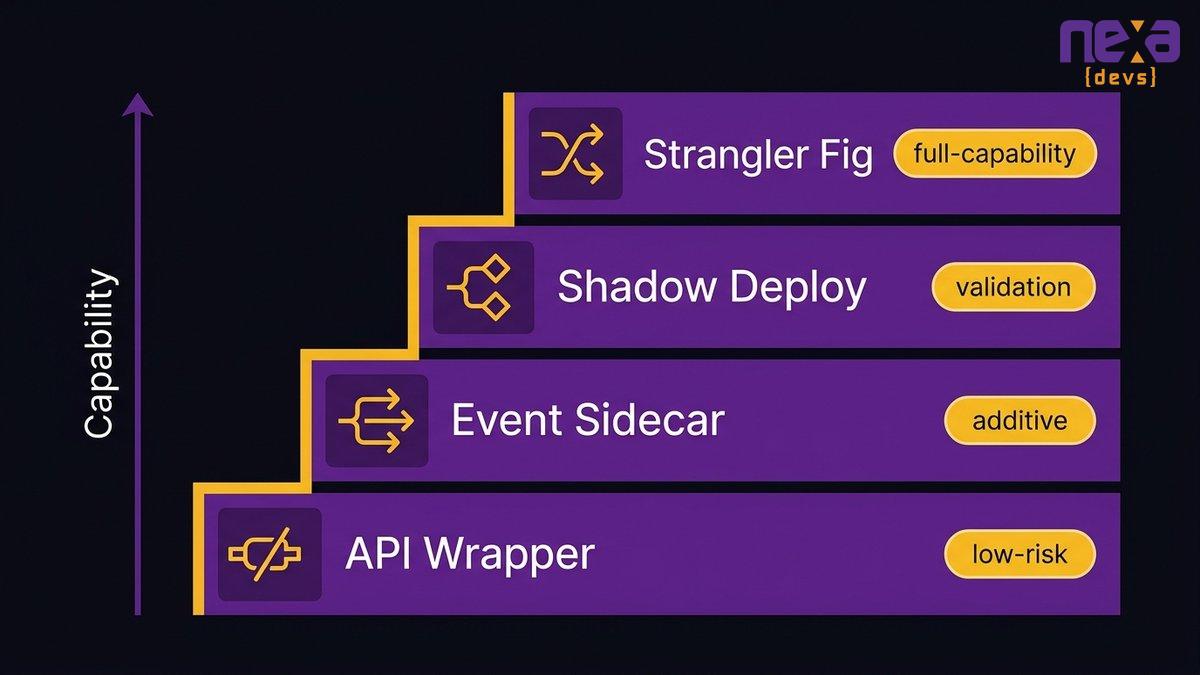
The four-pattern integration ladder from lowest risk and simplest access requirements (API wrapper) to highest capability and longest timeline (strangler fig). Most mid-market organizations start at Pattern 1 or 2.
MCP and the New Integration Layer: What Mid-Market CTOs Are Testing in 2026
None of the competitors that cover AI legacy integration mention this. If you’re choosing your integration architecture in 2026, this one matters.
What the Model Context Protocol Actually Does for Internal Systems
The Model Context Protocol, or MCP, is an open standard developed by Anthropic that defines how AI models communicate with external tools and data sources. Think of it as a standardized connector: instead of building custom integration code for every AI model you want to plug into your internal systems, you build one MCP server that exposes your system’s capabilities as a set of callable tools.
Any AI model that supports MCP can then call those tools directly. You add a new AI model or upgrade to a newer one with no integration rewrite needed, because the MCP layer handles the protocol translation.
For legacy systems specifically, MCP changes the integration equation. Instead of building a custom API wrapper for each AI use case, you build an MCP server once that wraps the legacy system’s data and functionality. Every AI feature you add after that consumes the same MCP layer, not a new custom integration.
It’s early. MCP support is not universal across AI tooling yet. But for organizations choosing their integration architecture in 2026, building to MCP compatibility from the start avoids a round of integration rewrites when support becomes standard.
When MCP Makes Sense vs. When a Simple API Wrapper Is Enough
MCP makes sense when you plan to connect multiple AI models or agents to the same internal system, or when you’re building toward a more agentic architecture where AI tools need to discover and call capabilities dynamically. A single use case with one AI model doesn’t need MCP. A simple API wrapper is faster to build and maintains the same integration surface.
The decision criterion is straightforward: if you expect to add more than two AI features to the same system over the next 18 months, MCP is worth the upfront investment. If you’re validating a single AI use case before committing to the architecture, start with Pattern 1 and revisit.
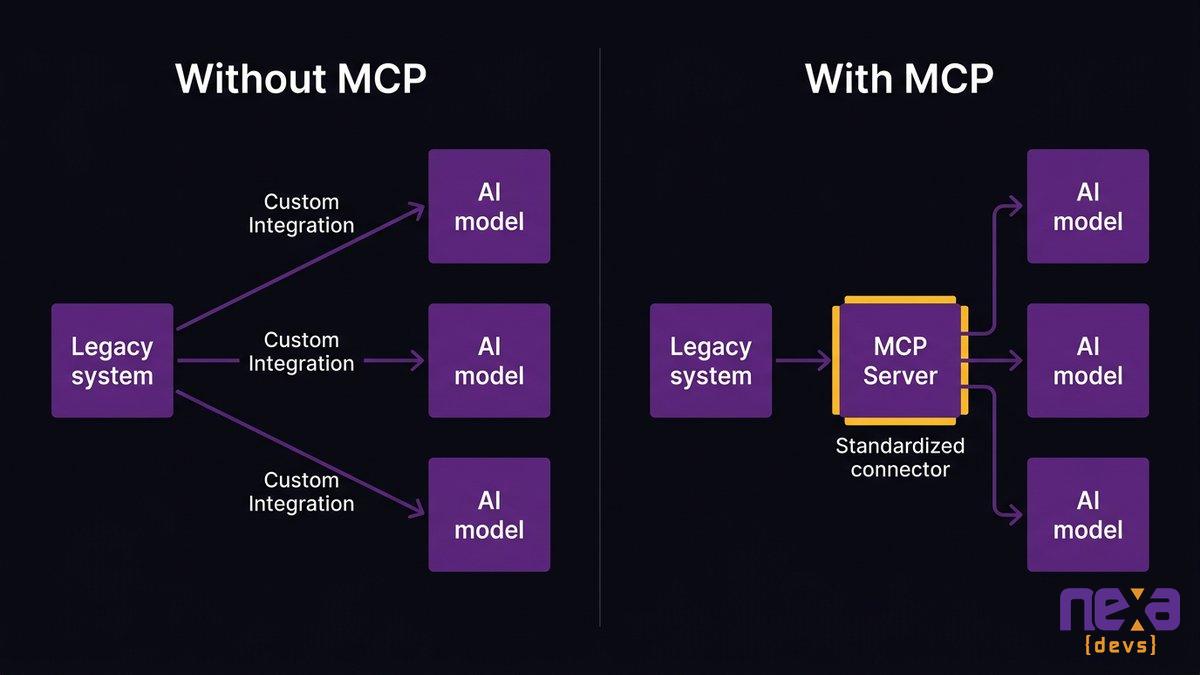
MCP sits between your legacy system (via an API wrapper or direct database access) and any AI model that supports the protocol, standardizing the connection so you don’t rebuild the integration for each new AI feature.
Where to Start: Choosing the First System to Integrate (And What to Avoid)
You probably have four to six internal systems that could theoretically benefit from AI. The right first target is not the one that would produce the biggest transformation if it worked. It’s the one where failure costs the least, and success is easiest to measure.
The Four Criteria That Identify Your Lowest-Risk, Highest-Value First Target
Data accessibility. Can you get to the data without a six-month data engineering project? If the system produces structured output you can query or export, it’s a candidate. If the data lives in a 1990s-era flat file format with no documentation, it’s not your first target.
Workflow isolation. Is there a self-contained workflow within the system where the AI takes an input, produces an output, and you can validate whether the output is right? Classification, document routing, anomaly flagging, and search are all well-defined enough to validate. “Make the system smarter” is not a use case. It’s a hope.
Business consequence of error. What happens if the AI is wrong 10% of the time? In a document routing system, a misrouted document is an annoyance. In a financial approval system, a wrong approval is a compliance event. Start where errors are recoverable.
Measurability. You need to be able to answer “Is this working?” within 30 days of go-live. If you can’t define the success metric before you build, you can’t build a business case to justify the next integration.
Systems That Look Easy But Aren’t: Common First-Attempt Mistakes
The most common first-attempt mistake is choosing the CRM or ERP as the first integration target because it holds the most data. ERPs and CRMs are among the hardest legacy systems to integrate with. They have restrictive API access, complex data models, and vendor support policies that may limit what you can expose.
The second most common mistake is choosing the system where the CEO has the most emotional investment. Business importance and integration feasibility don’t correlate. A charismatic use case with a complex legacy system will fail, and that failure sets the organizational tone for every subsequent AI initiative.
Start with a workflow management system, a reporting pipeline, an internal search layer, or a document processing workflow. Systems where the data is already somewhat structured, and the workflow is already somewhat defined.
What AI-Ready Data Actually Means for a System That Wasn’t Built for It
“Your data isn’t ready for AI” is the most common reason AI integration projects get killed before they start. It’s usually not true, or more precisely, it’s true in a way that doesn’t require a full data overhaul to fix.
The Minimum Data Governance Layer Before You Connect Any AI Model
AI-ready data has three requirements, and only three.
Consistent format. The AI needs to see the same structure repeatedly. If your system stores customer names in one field in some records and splits first/last across two fields in others, the AI can’t reason over both formats simultaneously. Normalizing the format doesn’t require rebuilding the database. It requires a transformation layer in the integration code.
Accessible fields. The AI needs to read the fields relevant to its task. If those fields live inside a BLOB column or are computed from a stored procedure with no external call path, you have an access problem that needs an extraction layer. Again, this doesn’t require a schema rebuild. It requires a query wrapper.
Controlled access. The AI should only see what it needs to see. Before you expose any legacy data to an AI model, map which fields are sensitive (PII, financial, clinical) and ensure the integration layer enforces field-level access restrictions. This is your compliance layer, and it needs to exist before anything else.
That’s the full list. You don’t need perfect data quality, complete records, or years of historical depth before you start. Address data quality incrementally as the AI surfaces anomalies, and it will surface them faster than any audit your team could run manually.
How to Expose Legacy Data Without Giving AI Uncontrolled Access
The integration layer is also your security layer. Don’t connect the AI model directly to the legacy database. Route all AI access through the API wrapper, define explicit tool functions for each operation the AI is allowed to perform, and log every AI read and write at the wrapper level.
This architecture protects you in two directions: it prevents the AI from accessing data it shouldn’t, and it gives you an audit trail if you need to demonstrate compliance. For organizations in healthcare, finance, or any regulated industry, the audit trail isn’t optional.
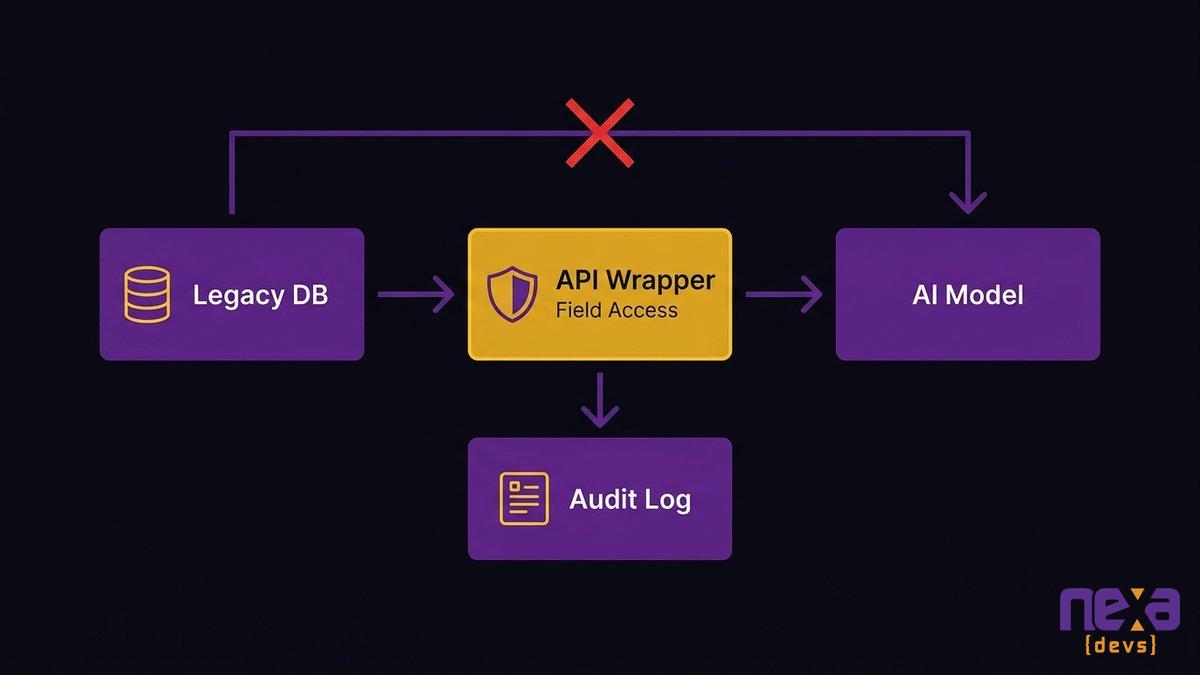
A controlled integration architecture: the AI model talks to the wrapper, not to the database directly. The wrapper enforces field-level access restrictions and logs every transaction to the audit trail.
A 90-Day Integration Roadmap for Mid-Market Teams
This structure assumes a team of two to three engineers with one AI integration project as a primary focus. Adjust for team size, but don’t compress the phases. Each one depends on the output of the previous.
Days 1-30: Audit, Prioritize, and Define the First Use Case
The first month is entirely diagnostic. You’re not building anything.
Map the data model of the target system. Document every field your AI use case will need, every format inconsistency you find, and every access constraint. Don’t skip this step. Engineers who skip straight to code discovery find the same constraints in month two, but now they’re blocked in the middle of a build.
Define the AI use case in narrow terms. Not “improve document processing” but “classify inbound vendor invoices into three categories (standard, exception, flagged) with 90% accuracy within 24 hours of receipt.” Specific enough to measure. Contained enough to build.
Get the compliance and security review started now, not in month three. Most regulated organizations have a review process for new data consumers. Starting it on day one means it finishes before go-live, not after.
Days 31-60: Build the Integration Layer and Run in Shadow Mode
Month two is the build phase. The integration layer comes first: API wrapper, access controls, audit logging, before any AI model code. This is not the exciting part. It’s the part that determines whether the exciting part works in production.
Once the integration layer is live, deploy the AI in shadow mode (Pattern 3). The AI runs and makes decisions, but nothing it does touches the production system yet. You collect the AI’s decisions alongside the legacy system’s decisions and start your comparison analysis.
By day 60, you should have a two-week data set of parallel decisions. Analyze divergences. Categorize them: AI wrong (false positive, false negative), AI right (caught something the legacy system missed), or ambiguous (needs a judgment call). This analysis is your go-live evidence package.
Days 61-90: Validate, Hand Off, and Define the Next Target
The third month is validation and handoff. If the shadow mode data supports it (and define “supports it” before you start, not after), flip the AI to production mode on the agreed workflow. Keep the monitoring instrumentation from running in shadow mode. The audit trail should continue.
Document what you built before you move to the next target. This is not optional documentation. It’s the institutional knowledge that prevents the next engineer on this system from spending month one rediscovering everything you learned in month one.
By day 90, you’ve shipped one AI feature into production, you have a documented integration architecture, and you’ve identified the second target. The second integration moves faster because the pattern is established.
Build vs. Partner: When Your Team Can Own This and When You Need Outside Help
Nearshore beats offshore for most mid-market AI integration work. The reason is the timezone, not the cost. An AI integration project has daily decision points: integration architecture choices, data governance tradeoffs, and shadow mode anomaly analysis. Those decisions can’t wait 12 hours for an offshore team’s next working window.
What an Incremental AI Integration Engagement Actually Looks Like
A scoped AI legacy integration engagement looks nothing like a large-scale transformation project. There’s no 12-month discovery phase, no enterprise architecture committee, and no phased rollout plan spanning three fiscal years.
A mid-market AI integration engagement has four deliverables: an integration layer (API wrapper or MCP server), the AI feature itself (model selection, prompt engineering, output validation), the governance layer (access controls, audit logging, data transformation rules), and the documentation package (architecture decision records, API reference, runbook). The documentation isn’t the afterthought at the end. It’s the asset that determines whether your team can maintain and extend what was built.
For organizations where internal engineering capacity is already consumed by maintenance, the build-vs-partner question often answers itself. If your senior engineers are spending 40 to 60% of their time keeping existing systems running, they don’t have the headspace for a parallel AI integration effort without something else slipping.
Why Time-to-Value Matters More Than Cost When Choosing a Partner
A 12-month internal build timeline is not cheaper than a 5-month partner-delivered timeline, even if the hourly rates look more favorable. The actual cost comparison has to include the features you didn’t ship during the 12 months, the AI-enabled competitive advantage your competitors captured during that window, and the organizational cost of a team under pressure for twice as long.
IDC research found that for every 33 AI pilots launched, only 4 reach production. The other 29 die somewhere in the gap between a successful demo and a production integration. The highest-value thing a good partner brings is not cheaper engineers. It’s a shorter, more direct path through that gap.
Nexa Devs builds incremental AI integration directly into the systems your organization already runs: without a full platform rebuild, with complete documentation your team owns unconditionally, and with an ongoing support model that doesn’t disappear when the first integration ships. Schedule a call
FAQ
How to integrate AI into legacy systems?
Start with an API wrapper over your existing system — expose specific data and functions without touching the core application. Then add an event-driven sidecar for real-time AI processing. Use shadow deployment to validate AI decisions before going live. Finally, replace individual components selectively with AI-native versions. Each step builds on the last.
What is legacy integration?
Legacy integration connects modern systems, tools, or AI capabilities to existing older software without replacing the underlying application. It uses API layers, middleware, and event-driven architectures to expose legacy data and trigger legacy functions from new services running alongside the original system.
What are the 4 levels of AI adoption?
The four levels correspond to integration pattern complexity: (1) API wrapper for read-access AI assistants, (2) event-driven sidecar for real-time AI processing, (3) shadow deployment for evidence-based decision validation, and (4) selective strangler fig for replacing specific components with AI-native alternatives while the legacy system stays live.
What is an incremental adoption approach for AI?
Incremental AI adoption means starting with the lowest-risk integration pattern for a single system, measuring results within 90 days, and expanding based on evidence. You identify the system with visible value, integrate using one of the four patterns, validate in shadow mode, then promote and repeat.
How long does AI legacy integration take without a full rewrite?
A first AI integration win using an API wrapper or event-driven sidecar is achievable in 30 to 60 days for a single system with accessible data. The full 90-day cycle, including shadow deployment and validation, is the practical minimum for a production-ready result.