

Table of Contents
Unused Copilot Licenses: Why 64% of AI Seats Sit Idle
Three hundred Copilot licenses. A hundred and eight people open the app in a typical month. The other 192 are unused Copilot licenses, renewing automatically whether anyone touches them or not.
Training is not the thing that failed here. Placement is. The assistant lives in a separate tab from the system where the work happens, so using it costs more steps than skipping it. Recon Analytics’ January 2026 “AI Choice” study puts regular Microsoft 365 Copilot adoption at 35.8%, which leaves close to 64% of purchased seats idle across the average mid-market rollout. And the fix nearly every vendor sells, more champions, better prompt libraries, another workshop, takes for granted that the tool already sits in the right spot. It usually doesn’t.
Quick answer: fixing unused Copilot licenses fast
- Idle Copilot seats are usually a placement problem, not a training problem. The tool sits in a separate tab instead of inside the workflow.
- Recon Analytics puts regular Copilot adoption at 35.8%, meaning about 64% of purchased seats go unused.
- The UK’s 20,000-user Copilot trial found 71% Teams usage but only 23-24% in Excel and PowerPoint. Usage follows placement.
- Fix it by embedding AI into the intake screen, approval queue, or reconciliation step, not behind another login.
- Renewal is the wrong moment for a keep-or-cut debate. The better question is where the seat budget would do more work: inside the handful of workflows that run the company.
The 64% Nobody Put on the Renewal Spreadsheet
Multiply 192 idle seats by Microsoft’s list price for Copilot Enterprise, roughly $30 per user per month, and the arithmetic gets uncomfortable fast. A single 500-seat rollout burns six figures a year on licenses nobody opens. That number rarely makes the slide the CFO sees at renewal time.
What “unused” means read off your own tenant
Vendor benchmarks are a starting point, not an answer. Your Microsoft 365 admin center already holds the real number: sign-ins, active-use counts, and which departments never touch the assistant. A CEO who pulls that report before the renewal call walks into the negotiation with a stronger hand than one waiting on a reseller’s deck.
There is a reason the gap shows up so consistently. In the Kaufman Rossin and NewtonX 2026 study of mid-market decision-makers, 94% of companies said they already use generative AI somewhere, while only 2% have operationalized it at scale. Buying the tool was never the hard part. The hard part is reading what it does inside your own walls.
The per-seat arithmetic on a 500-seat rollout
Run the math once and Copilot waste stops being abstract. Five hundred seats at $30 a month comes to $180,000 a year. Apply the 35.8% regular-adoption rate and about 179 of those seats get used while roughly 321 sit idle, which lands close enough to the 64% figure that the two numbers corroborate each other independently.
Those 321 idle seats cost approximately $115,560 a year. The figure holds up for a boring reason: it is built from Microsoft’s published pricing, not from a vendor’s headline claim.
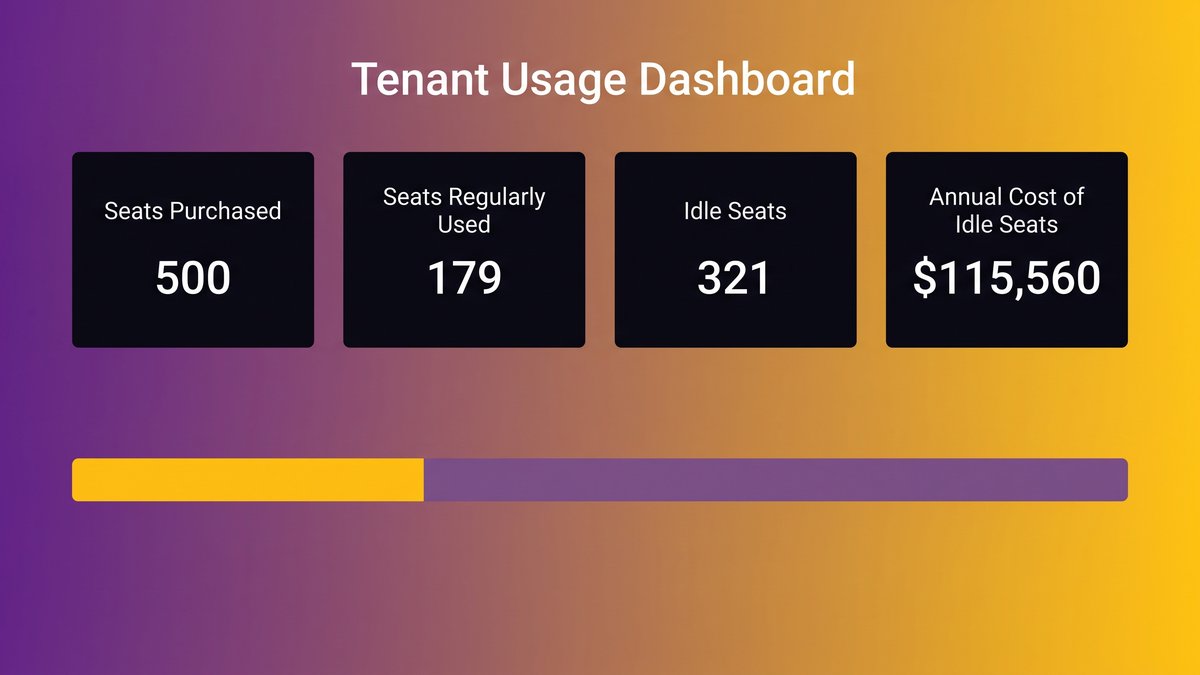
A tenant usage dashboard highlighting the gap between seats purchased and seats regularly used
Everyone Agrees It’s a People Problem. The Spend Says Otherwise.
Launch emails. Champion programs. Prompt-library workshops. Every vendor playbook treats low usage as a willingness problem, and every one of them assumes the assistant already sits where the work gets done.
The standard remedy: launch email, champions, prompt library, workshop
Nearly every published fix for low Copilot adoption follows the same shape. Pick a few enthusiastic early adopters and call them champions. Build a library of sample prompts. Run a lunch-and-learn. Measure “first use” instead of continued use, declare the rollout a success, and move on. None of it is wrong. It is aimed at the wrong variable.
What that remedy assumes
Training works when the tool already stands in the right spot and people need a nudge to reach for it. That is not the situation most teams are in. An operations coordinator who has to leave her system of record, describe context the assistant cannot see, and paste the answer back by hand does not need a better prompt. She needs the tool to stop asking her to do all that. No amount of enablement moves Copilot out of a browser tab and into the screen where the job happens.
Seats Were Assigned. They Were Never Placed.
Handing out five hundred licenses is a procurement event. It changes nothing about how anyone’s Tuesday runs, which is why usage data from the UK’s own Copilot trial beats any vendor benchmark.
Handing out licenses is a procurement event, not a workflow change
A license assignment is an IT ticket, not a redesign of anyone’s job. The seat appears in someone’s app list, maybe with a one-line announcement, and everyone waits for the work to reorganize itself around the new tool. Nobody touched the intake screen, the approval queue, or the month-end reconciliation to make use of it.
Usage clusters where the work already lives and collapses everywhere else
The UK’s cross-government Microsoft 365 Copilot trial, run across roughly 20,000 civil servants, is the largest published dataset on this pattern. Teams usage peaked at 71%. Excel and PowerPoint topped out at 23% and 24%. Participants reported an average saving of 26 minutes a day, though 17% said they saw no clear saving. Usage never spread evenly across the suite. It concentrated where collaborative work already happened and all but vanished wherever the tool sat one click removed from the job.
Count the Steps You’re Asking an Operations Coordinator to Take
Maria runs scheduling for a 40-location clinic network. Copilot sits in a browser tab she has to open separately from the scheduling system where her job lives.
Leave the system of record, open a second tab
Count what a single Copilot query costs her. First she leaves the scheduling platform and opens a second browser tab. That is already more clicks than the task warranted, and she hasn’t typed a word of her question yet.
Describe context the assistant cannot see
Now she describes the patient load, the open slots, and which technician just called in sick. Copilot can see none of it on its own, because it has no connection to the scheduling system. Typing all that out accurately takes longer than people assume, and getting it wrong means a bad answer coming back fast.
Paste the answer back and check it by hand
She copies Copilot’s suggested schedule, switches back to the scheduling platform, pastes it in, then checks it line by line against real-time availability before trusting a single slot. That last step is not optional. A scheduling error at a clinic lands on a patient.
Compare that to just doing the task
Five steps for a job she could finish in two without opening Copilot. No training session changes that math. The workaround costs more than the work, and an employee who notices, even without consciously running the numbers, stops opening the second tab.
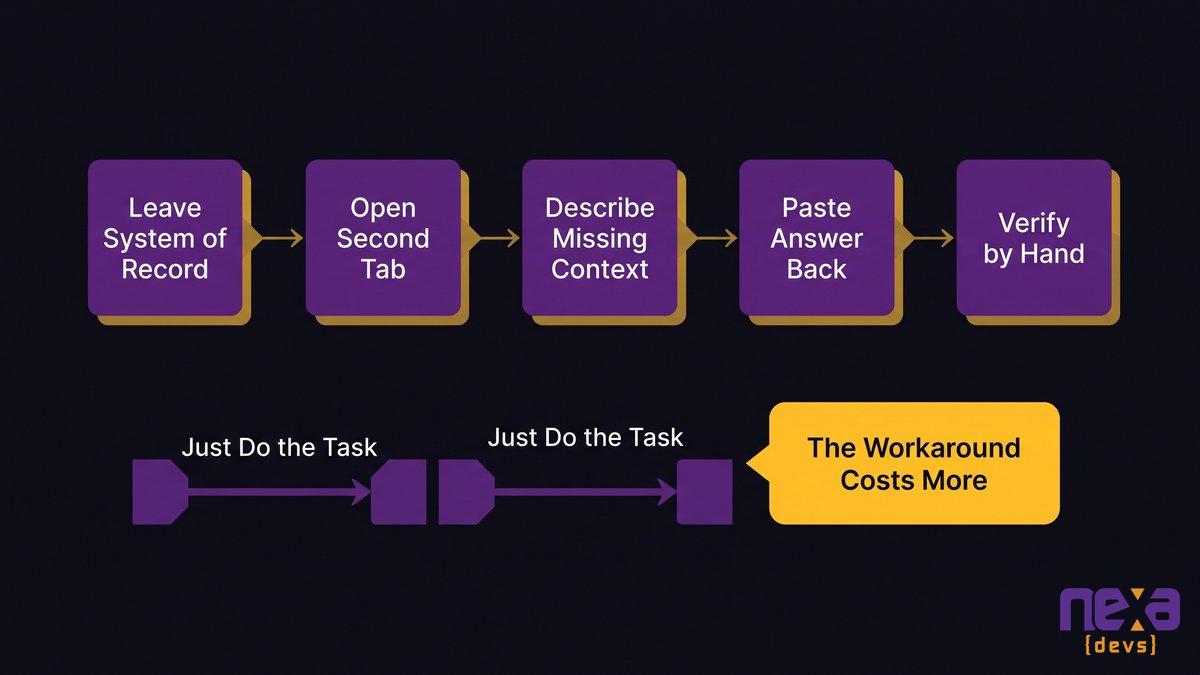
An operations coordinator juggling two screens instead of one connected workflow
AI That Lives Inside the Screen Where the Work Happens
Embed the same capability inside the scheduling view and Maria’s five steps collapse into one. She asks her question without leaving the screen she already trusts.
The intake screen, the scheduling view, the approval queue, the reconciliation step
The shape holds in finance, operations, and clinical scheduling alike. An approval queue that reads the request and suggests a decision. A reconciliation step that has both ledgers open and flags the mismatch itself. An intake screen that holds the customer’s history and drafts the response. Same principle every time: put the assistant where the system of record lives, not beside it.
Why there is no habit to form and no second tab to open
Adoption stops being a change-management project when there is no new habit to build. Nobody has to remember to use the tool, because the tool is part of a screen they were already going to open. how AI agents plug into legacy systems without a rewrite walks through what that scoped, embedded access requires on the engineering side.
What this looks like as a feature rather than a subscription
This is the model Nexa Devs builds toward: AI capability designed into the system your team already lives in, rather than a parallel subscription competing for their attention. Our engagements put workflow automation, intelligent data processing, and natural-language interfaces inside existing internal systems, and we use AI across the whole delivery process so the finished feature ships with documentation your team owns from day one.
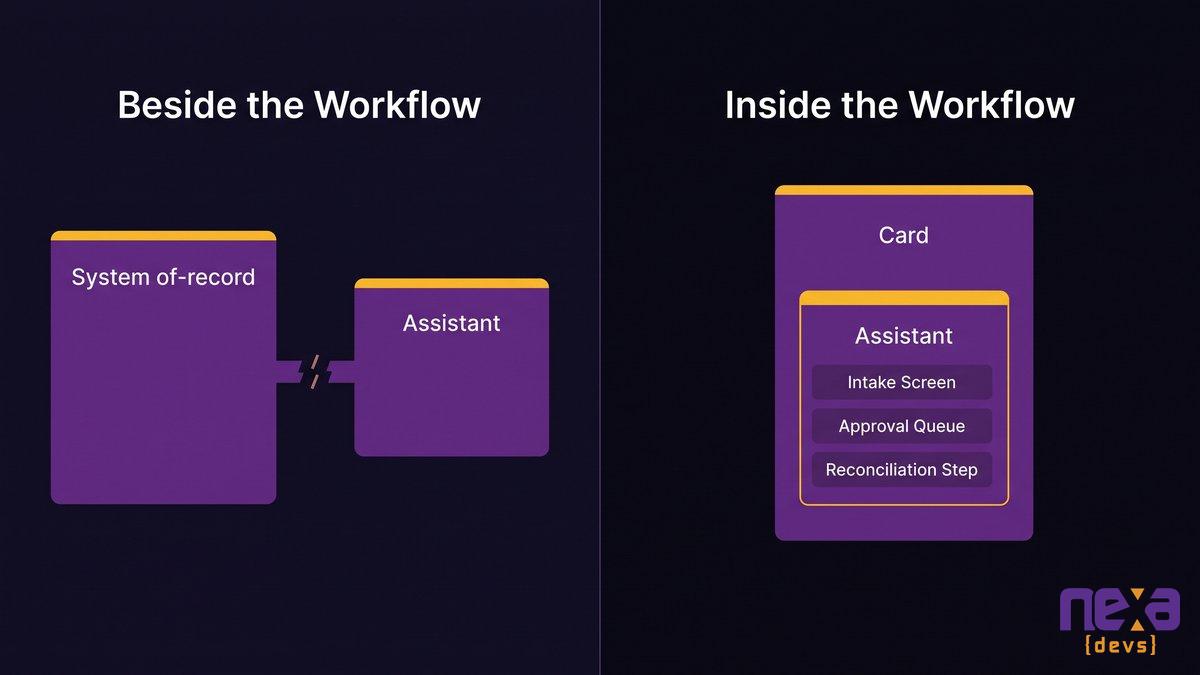
An approval queue with AI assistance built into the same screen operators already use
Before Any of That: Can Your System Host an AI Feature?
Fifty-three percent of mid-market leaders cite data quality as their top AI blocker, and 47% cite integration challenges, according to RSM’s 2026 middle-market survey. Embedding anything into a screen assumes the screen has something to embed into.
No API, no clean data access layer, no documentation
Plenty of internal systems built ten or fifteen years ago were never designed to expose their data to anything else, let alone to an AI feature that needs to read a record and act on it. No API means no safe way in. A missing or inconsistent data layer means what data exists is scattered, duplicated, or wrong often enough to be unusable. Without documentation, nobody currently on staff can say with confidence how the system behaves under load.
Manufacturing has it worst. Kaufman Rossin’s 2026 State of AI in the Middle Market report found legacy systems integration named the number one AI barrier by 55% of manufacturing respondents, well above the broader mid-market average.
The work before the AI work, and how long it takes
Most vendors skip this part, because naming it sounds like a reason to say no. It isn’t. An architecture assessment that maps what the system can and cannot expose typically runs a few weeks, not months, and it tells you what has to happen before an embedded feature is possible. why most AI pilots never reach production covers the data-readiness side of the same gap in more depth.
Assessment and documentation transfer as deliverables, not upsells
We can say this plainly because assessment and full documentation transfer are standard in every Nexa Devs engagement, never an upsell layered on afterward. The client owns the resulting UML diagrams, API references, and system documentation unconditionally, whether or not the engagement continues. That ownership is what keeps us honest. There is no incentive to drag out a readiness phase when the deliverable belongs to you either way.
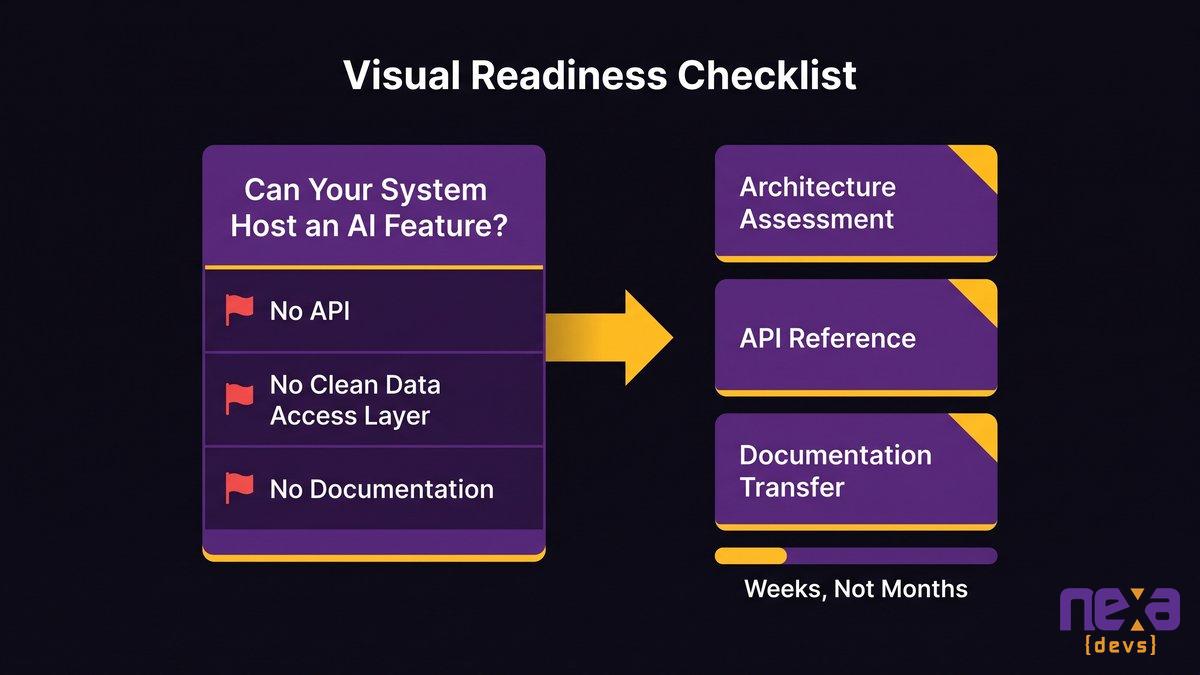
A technical review of API surface and documentation gaps before an embedded AI feature is scoped
How You’d Know It Worked
Seat counts tell you who has access. They say nothing about whether anyone’s job changed, which is the gap MIT’s Project NANDA put a number on: 95% of generative AI pilots deliver zero measurable P&L impact.
Habit inside one workflow beats first-use across the org
A dashboard showing that 500 people logged into Copilot once means almost nothing. A reconciliation step that closes two days faster every month means a great deal, and it needs no adoption survey to prove it. Measure habit inside the one or two workflows you redesigned, not first use across the whole organization.
Metrics that come out of the system, not out of a survey
If the AI lives inside the approval queue, the queue already logs how long each decision takes. If it lives inside the reconciliation step, the close date is already recorded. Placement produces its own measurement for free. An adoption dashboard bolted on afterward is usually a sign the AI was never placed inside the work.
The Renewal Question Isn’t Keep or Cut
Cutting unused seats saves money for exactly one renewal cycle. It does nothing about the AI gap your board is worried about.
When reclaiming a seat is the right call
Some seats should go. If a department never touches Copilot and has no workflow where it plausibly would, reclaiming that license is budget hygiene, not strategy. Be honest about which seats fall in that bucket before arguing about the rest.
Moving per-seat spend into the two or three workflows that run the company
Published best-case numbers sit a long way from a 35.8% real-world adoption rate. Forrester’s Total Economic Impact study, commissioned by Microsoft, modeled a 353% three-year return for small and midsize businesses. That distance between model and reality is the whole argument for reallocation: stop paying per seat for a tool nobody opens, and put the same budget into building AI into the two or three workflows that run the company. As Eric Kutcher, North America Chair at McKinsey & Company, states: “CEOs who take this on will take their organizations to a different level. And CEOs who sit and wait, their companies aren’t going to exist.”
What to scope first
Start with whatever workflow costs you the most manual hours. Usually it is the one everybody complains about in the same meeting every month: intake, approvals, the reconciliation nobody wants to own. An architecture assessment tells you whether that system can host an embedded AI feature today or needs documentation and API work first. Either answer is useful. Neither is a reason to keep renewing seats nobody opens while you figure it out.
If you want a clear answer on whether your systems are ready for embedded AI, instead of another seat count, schedule a scoping call with Nexa Devs and we’ll tell you what the assessment would cover before you commit to anything.
FAQ
What happens when a Microsoft license expires?
When a Copilot license expires or isn’t renewed, the user loses access to Copilot features immediately, though their underlying Microsoft 365 apps keep working normally. Any work saved inside those apps stays intact. Only the AI assistance layer disappears.
Are there different types of Copilot licenses?
Yes. Microsoft 365 Copilot is a full add-on seat, Copilot Chat is a free, limited tier included with most Microsoft 365 plans, and Copilot Business adds similar capability for smaller organizations. Each tier has different feature access and a different price point.
Why do most Copilot licenses go unused?
Most Copilot licenses sit unused because the tool lives in a separate browser tab instead of inside the system where the work happens. Workers have to switch screens, retype context, and paste answers back by hand, which often costs more effort than skipping the tool entirely.
What is a realistic ROI for Microsoft 365 Copilot?
Realistic ROI varies enormously by how the tool is deployed. Published best-case studies model returns above 300%, but MIT’s Project NANDA found 95% of generative AI pilots show zero measurable financial impact. The difference usually comes down to whether the AI was placed inside a real workflow.
How do I know if my internal system can host an embedded AI feature?
Your system can likely host an embedded AI feature if it has a usable API, a reasonably clean data layer, and current documentation. If any of those are missing, a short architecture assessment, typically a few weeks, will tell you what needs to be built first.
Should I cut unused Copilot seats or reassign the budget?
Reclaim seats that genuinely have no workflow fit, but don’t stop there. The stronger move is reallocating that freed-up budget into embedding AI directly into the two or three workflows your team already runs every day, rather than treating the renewal as a simple keep-or-cut decision.