
Table of Contents
Vendor Handoff Checklist for Software Development
The call happens on a Tuesday. Your project manager tries to reach the dev shop. The number rings out. You check your email: nothing in three weeks. Then someone finds their LinkedIn: the agency closed six weeks ago. The team scattered. The Slack workspace is gone. And the system your operations run on is now a black box with no key.
This isn’t an edge case. The ISG Index’s 2026 technology services analysis put the combined global market for technology services at a record $127.4 billion, a market that includes thousands of small and mid-size dev shops operating without succession plans, documentation standards, or any formal obligation to hand over what they built. When those shops close, change leadership, or hit a pricing dispute with a client, the code stays. The context doesn’t.
This guide covers what to do if you’re already in that situation, what a complete software handover checklist looks like, and how to write contracts that make vendor disappearance structurally impossible to sustain.
When the Vendor Goes Dark: How Mid-Market Companies End Up Trapped in Unmaintainable Systems
Your vendor didn’t set out to leave you stranded. The more common reality is that they simply didn’t build any obligation to stay coherent.
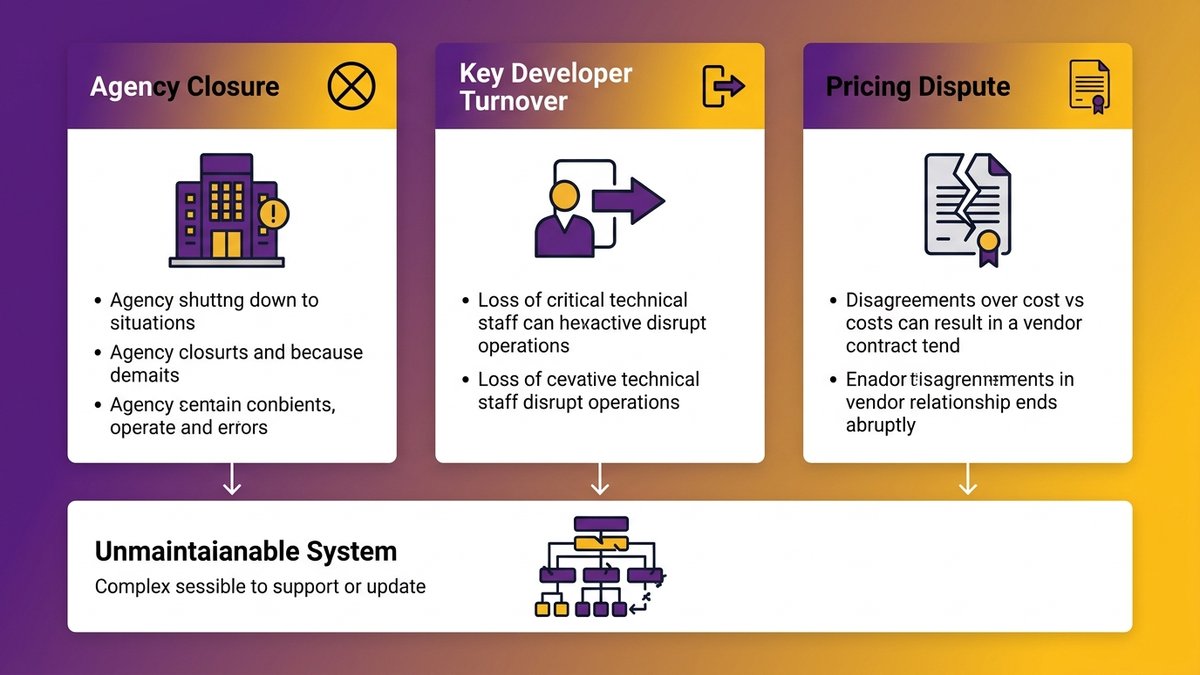
The three most common vendor disappearance scenarios that leave mid-market companies with unmaintainable systems.
The Three Scenarios That Trigger a Vendor Disappearance
The agency shutdown is the most dramatic version, but it’s not the most common. Three patterns account for most mid-market vendor handoff failures:
Agency closure or acquisition. Small development shops get acquired, pivot their business model, or simply dissolve. The founding developers move on. Whoever absorbed the assets doesn’t have your codebase. The documentation that never existed can’t be inherited.
Leadership or key developer turnover. The one person who understood your system took a new role. They’re contractually prohibited from sharing what they built. Their replacement has a full queue. The institutional knowledge that should have been in documentation existed only in one person’s head. That person is now at a competing firm.
Pricing dispute or contract non-renewal. The relationship ends acrimoniously. You stop paying, they stop responding. You own the IP in theory; in practice, you have production credentials that expired and a codebase that nobody at your company can navigate.
All three scenarios have the same outcome: a system your business depends on that you can’t maintain, can’t modify, and can’t hand to a new team without a significant reverse-engineering effort.
What “No Documentation” Actually Means for Your Business
“No documentation” sounds like an inconvenience. In practice, it means your next developer will spend their first 90 days figuring out what the system does rather than improving it. It means a bug that would take two hours to fix with architectural context takes two weeks without it. It means you can’t change an API integration, add a feature, or safely deploy an update until someone rebuilds the mental model of a system they didn’t build.
Dreamix’s research on vendor transitions puts it concisely: “Documentation gaps, undocumented dependencies, and lost configuration details create expensive problems months after transition completion.” Those problems don’t get cheaper the longer they sit.
The immediate operational impact depends on what the system does. A customer-facing billing platform with no handover documentation is a crisis. An internal reporting tool that nobody touches is a slow problem. Before you panic or minimize, you need to know what you actually have.
Outsourcing documentation as a vendor selection criterion
The Documentation Debt You Didn’t Know You Were Accumulating
Most vendor relationships don’t start with deception. They start with urgency.
What Vendors Leave Out, and Why
Development teams, especially smaller shops, optimize for shipping. Documentation doesn’t get reviewed at sprint demos. It doesn’t generate client applause. It doesn’t appear on the invoice in a line item that the client can scrutinize. So it gets deferred, abbreviated, or skipped entirely under schedule pressure, and both parties let it happen because neither the client nor the vendor made it contractually unavoidable.
The result is a structural incentive misalignment: the vendor gets paid when the feature ships, not when the handover packet is complete. The client sees a working product and assumes completeness. Six months later, when a developer needs to change something, the missing documentation becomes visible. And expensive.
This isn’t vendor malice. It’s a predictable consequence of contracts that measure delivery in features, not transferability.
The Difference Between Delivered Code and Transferable Code
Delivered code passes acceptance testing. Transferable code can be maintained, extended, and operated by someone who wasn’t part of building it.
A system can be fully functional and completely non-transferable at the same time. Non-transferable code has several recognizable characteristics:
- No README explaining the architecture or setup process
- Dependencies not explicitly tracked (no package lock file, no version pins)
- Environment variables and configuration values undocumented or committed directly to the repo
- No explanation of business logic in comments or architecture decision records
- Third-party credentials are stored in the developer’s personal accounts, not the client’s
- Deployment processes that exist only as undocumented tribal knowledge
You can ship working software with all of these conditions in place. What you can’t do is hand it to someone new and expect them to operate it confidently.
What You’re Actually Dealing With: The Post-Disappearance Code Audit
Your vendor is gone. You have a system. Now what?
The worst response is to immediately start hiring. The second-worst is to start rebuilding from scratch. Both decisions require information you don’t have yet.
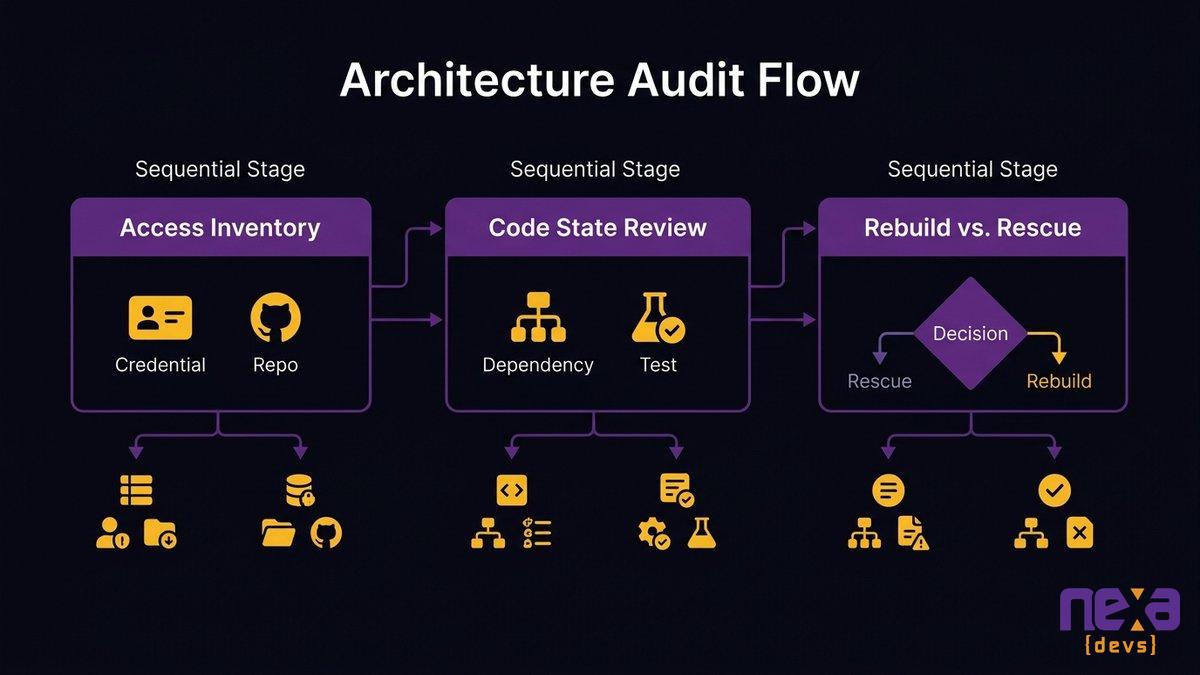
A structured triage approach to post-disappearance code audits, showing three stages: inventory, dependency mapping, and rebuild-vs-rescue assessment.
Triage Checklist: What Exists, What’s Missing, What’s Unusable
Before any cost estimates or recovery decisions, spend two to three days doing a systematic inventory. Work through this list:
Access and credentials
– Do you have the source code repository? Can you clone it?
– Do you have admin access to the production environment (hosting, cloud accounts)?
– Do you have the domain registrar login?
– Do you have database credentials or access to retrieve them?
– Do you have accounts for third-party services the system depends on (payment processors, email providers, analytics)?
Code state
– Is there a README? Does it accurately describe how to set up and run the system?
– Are dependencies tracked in a package manifest with version numbers?
– Can you spin up a local development environment in under an hour with what exists?
– Are there automated tests? Do they pass?
Architecture knowledge
– Is there any system architecture documentation, even a diagram?
– Are environment configuration requirements documented?
– Is the deployment process written down anywhere?
– Are there any architecture decision records explaining why key technical choices were made?
Business logic
– Is the core business logic readable without domain context?
– Are there comments explaining non-obvious decisions?
– Do variable and function names reflect the business domain, or are they opaque abbreviations?
Each “no” is a documentation gap. Rank them by operational risk: missing production credentials is a crisis. Missing architecture diagrams is a problem. Missing comments on a utility function is background noise.
Rebuild vs. Rescue: The Decision Framework for CEOs and CTOs
The rebuild-vs-rescue decision has a reputation for being a technical call. It isn’t. The technical input is only one factor.
Four questions determine the right answer:
1. Can a competent developer understand what the system does in two days of reading the code?
If yes, rescue is viable. If two days of reading leave a senior developer more confused, the comprehension problem will compound every hour of recovery work you do.
2. What is the business cost of extended downtime or feature freeze?
A rescue takes weeks to months. A rebuild takes months to a year or more. During that time, your ability to change the system is limited. If the system touches revenue, customer service, or regulatory compliance, the cost of that freeze factors directly into the rebuild threshold.
3. What does the system do that isn’t visible in the code?
Business rules, edge cases, and workflow exceptions built on domain knowledge your team holds (not the vendor’s) are rescuable. Business rules that only the vendor understood, with nothing visible in the code or documentation, are effectively lost regardless of which path you take.
4. What is the real cost of each option?
Which brings us to the next section.
Estimating Real Recovery Cost Before You Hire Anyone New
The most common mistake at this stage is asking a developer to estimate recovery cost before they’ve read the code. You’ll get a wide range that isn’t actionable.
A better sequence:
Engage a technical consultant or senior developer for a fixed-scope, time-boxed code audit: two to three days at a known rate. The deliverable is a written assessment: codebase comprehensibility score, dependency inventory, critical gap list, and a rough effort estimate for rescue vs. rebuild with confidence intervals.
That audit costs a few thousand dollars. It prevents a six-figure decision based on guesswork.
The Complete Software Handover Checklist: What Should Have Been Delivered
This is what a complete handover looks like. If you’re reading this before a project closes, make these requirements contractual. If you’re inheriting an undocumented system, use this as your recovery target list.
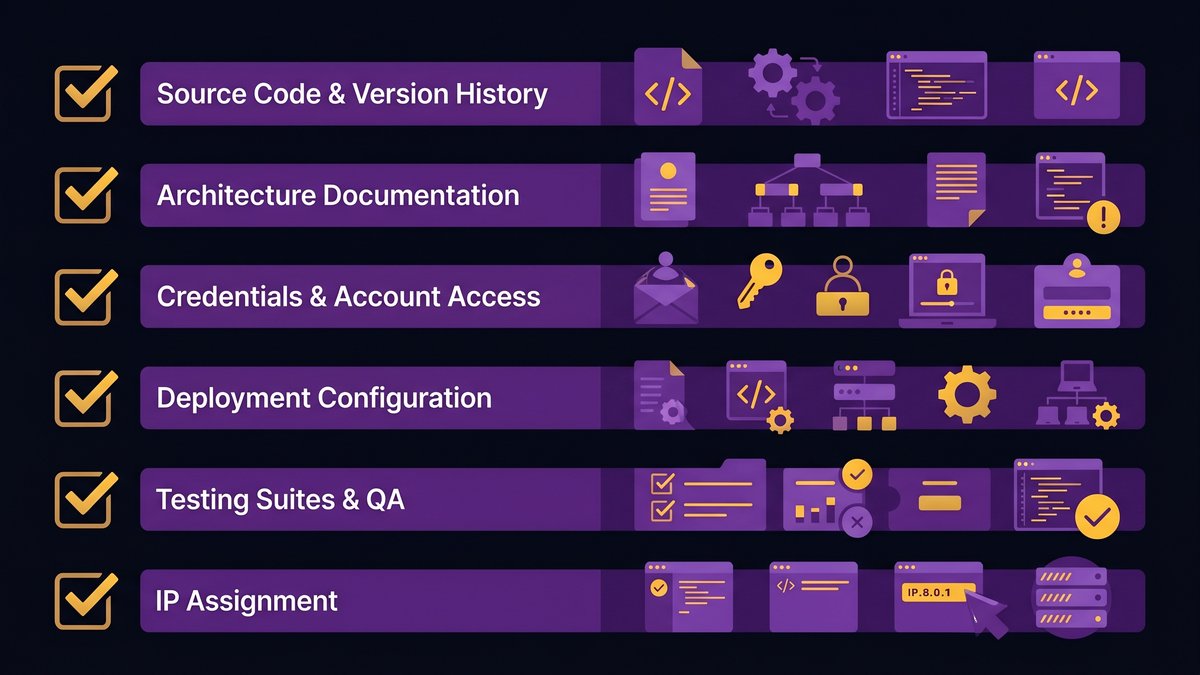
Complete vendor handoff checklist covering all six categories: source code, architecture documentation, credentials, deployment, testing, and IP transfer.
Source Code, Repositories, and Version History
- Full repository access with complete commit history (not just a ZIP of the current state)
- All branches, including development and staging branches
- Git tags for all production releases
- Documented branching strategy (how is main/master protected? how are releases tagged?)
- Submodules or external dependencies are explicitly identified
The commit history is not optional. It’s where the reasoning behind decisions lives. A ZIP of current code tells you what; the commit history tells you why.
Architecture and System Design Documentation
- High-level architecture diagram (what are the components, how do they communicate?)
- Data model documentation (schema, relationships, field-level explanations for non-obvious fields)
- API reference documentation (endpoints, request/response formats, authentication)
- Architecture decision records for significant technical choices
- Known limitations, performance ceilings, and scaling constraints
- Third-party integration documentation (which external services does this connect to, and how?)
Credentials, Accounts, and Third-Party Service Access
- Transfer of all production service accounts to client-owned email addresses
- Database credentials with rotation instructions
- SSL certificate details and renewal schedule
- API keys for all third-party services, with documentation of what each is used for
- Access to monitoring or error-tracking tools (Sentry, Datadog, etc.)
- DNS configuration documentation
One of the most common post-handover crises is discovering that the vendor’s personal Gmail account was the recovery email for production services. Confirm account ownership before the relationship ends.
Deployment, Infrastructure, and Environment Configuration
- Documented deployment process, step by step
- Environment variable reference (what variables does the system need, what are they for?)
- Infrastructure-as-code files if applicable (Terraform, CloudFormation, etc.)
- Staging and development environment setup documentation
- Database migration process and rollback procedure
- Monitoring and alerting configuration
Testing Suites and QA Documentation
- All automated test files (unit, integration, end-to-end)
- Instructions for running the test suite
- Current test coverage metrics
- Known failing tests with explanations
- Manual QA checklist for pre-release verification
- Load and performance test baselines if applicable
IP Assignment and Contract Clauses
- Signed IP assignment agreement confirming all code, documentation, and design assets transfer to the client
- Work-for-hire clause or equivalent in the original contract
- Confirmation that no open-source code was embedded under a license that restricts commercial use
- License documentation for all third-party components
How institutional knowledge disappears when vendors exit
Preventing the Next Disappearance: Contract Clauses That Force Documentation Transfer
The most effective vendor accountability tool isn’t a better evaluation process. It’s better contracts.
Milestone-Linked Documentation Requirements
Most contracts require documentation at project end. Change that to milestone-linked documentation throughout the engagement.
Practically, this means: at the close of each sprint or delivery phase, the vendor provides an updated documentation package covering what was built, what changed in the architecture, and any new dependencies or third-party integrations introduced. The client reviews and accepts this package as part of the milestone sign-off. Payment does not release without documentation acceptance.
Two effects follow from this structure. First, documentation stays current because it’s written close to the work, not six months after the fact. Second, it surfaces documentation gaps early, when they’re cheap to fix, rather than at project close, when the vendor is moving on.
IP Transfer Language That Actually Holds
Standard IP ownership clauses transfer legal title. They don’t transfer operational control. You can own the code and still be unable to run it without the vendor.
Stronger IP language includes:
- Explicit transfer of all accounts, credentials, and access required to operate the system
- A requirement that no production resources are registered in the vendor’s personal accounts
- A provision that the client receives admin access to all production environments at the start of the engagement, not at the end
- Clarification that the IP transfer covers all documentation, design files, test scripts, and deployment configuration, not only source code
The line worth borrowing from Pragmatic Coders’ research on vendor lock-in: “Legal IP ownership is not the same as practical operational control.” Write contracts that close the gap between the two.
Escrow and Code Repository Access Provisions
For long-running engagements or high-dependency systems, add a code escrow provision: a neutral third party holds a current copy of the repository, updated on a regular cadence, accessible to the client if the vendor fails to perform, ceases operations, or fails to respond within a defined window.
Less formally, the client can require repository access from day one. The vendor works in a client-owned repository (not their own), which means the client always has the current codebase regardless of what happens to the relationship. This costs nothing to implement and eliminates the most common handover failure mode entirely.
Why Vendor Accountability Starts Before You Sign the Contract
Documentation standards are hard to enforce retroactively. The evaluation phase is where you set the conditions.
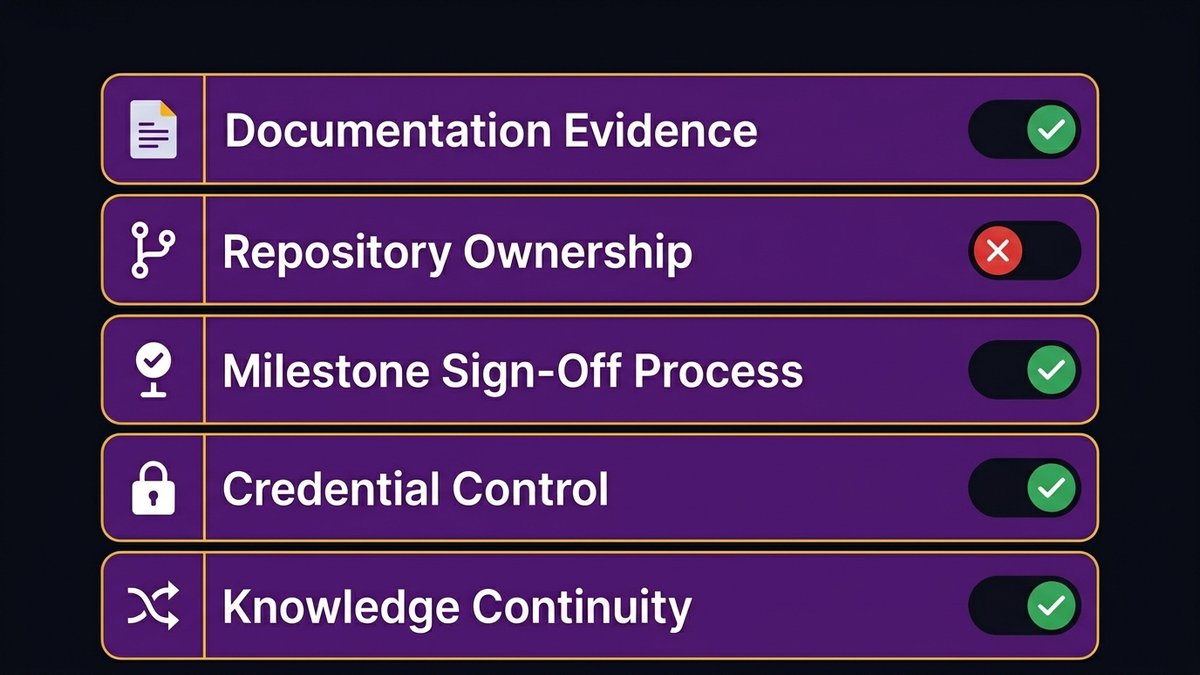
RFP and proposal evaluation criteria for vendor accountability, including documentation standards and IP transfer track record.
Red Flags to Evaluate at the RFP and Proposal Stage
Five questions separate vendors with genuine documentation practices from those who will promise anything to close the deal:
1. Can you show us documentation from a recently completed project?
Not a template. Not a sample. Actual documentation from actual work. A vendor with real documentation practices can produce a sanitized example. A vendor without them will deflect, offer a generic checklist, or produce something that looks like a marketing brochure.
2. Where do your clients’ repositories live during the engagement?
If the answer is “in our GitHub organization,” the client doesn’t have ownership. If the answer is “in the client’s repository from day one,” they do. There’s no correct answer that isn’t the second one.
3. What’s your process for documentation sign-off at milestone completion?
A specific, named process is a signal. “We document as we go” is not a process. It’s a hope.
4. Who holds the production environment credentials during the engagement?
Client-owned accounts from day one, with vendor access granted, is the only safe structure. Shared accounts or vendor-owned accounts are a lock-in risk regardless of IP clauses.
5. What happens to the system if your team changes significantly mid-engagement?
How the vendor answers this question tells you whether they’ve given serious thought to knowledge continuity. A vendor who can’t explain their knowledge transfer process for internal turnover definitely doesn’t have one for client handover.
What Mandatory Documentation Transfer Looks Like as a Structural Requirement
Mandatory documentation transfer isn’t a clause in a contract. It’s a condition of the engagement’s structure. Every sprint closes with a documentation update. Every milestone sign-off includes a documentation review. Documentation quality counts as part of delivery quality, not an optional context bolted on afterward.
A vendor who balks at this structure is telling you something important: documentation isn’t part of how they work. The conversation about their documentation practices during the sales process is your clearest signal about what the handover will look like.
How Nexa Devs Builds Documentation Transfer Into the Engagement Structure
The vendor-disappearance scenario this post describes (a working system, no documentation, no path to maintenance) is the specific failure mode that Nexa Devs was designed to prevent.
Documentation at Nexa isn’t a handover artifact. It’s a delivery standard. Every engagement produces UML architecture diagrams, system design documents, API references (Swagger/Postman), user story libraries, and test coverage reports as part of the normal delivery process. Those documents are unconditionally client-owned, not held pending contract renewal, and not contingent on post-launch engagement. The client has complete documentation from day one of the engagement, updated through every sprint.
The repository structure follows the same principle. Client-owned repositories, client-owned accounts, client-owned production environments from the start. Nexa engineers work in client systems, not the other way around.
For systems without documentation, including those built by other vendors and in poor condition, Nexa supports rescue and ongoing maintenance under the same SLA-based model. The starting point doesn’t have to be clean. The ending point does.
If you’re currently in a post-disappearance situation or approaching the end of a vendor relationship and worried about what the handover will look like, the conversation starts with a call.
Contact Nexa Devs to discuss a documentation audit or rescue engagement
FAQ
What should a handover document include?
A complete software handover document includes source code repository access with full commit history, architecture documentation, API references, database schema documentation, environment configuration, deployment instructions, third-party credentials transferred to client-owned accounts, automated test suites, and a signed IP assignment confirming all assets transfer to the client.
What is the document handover process?
Document handover in software development is the structured transfer of all documentation, code, credentials, and access rights from a vendor to the client or incoming team. A well-run process transfers these assets at each milestone sign-off rather than in a single bundle at project close.
What is an exit strategy for vendors?
A vendor exit strategy is a contractual and operational plan that defines how knowledge, code, credentials, and access transfer to the client when the relationship ends. It includes a documentation maintenance schedule, provisions for client-owned repositories, credential transfer requirements, and a defined handover acceptance process.
How to hold a vendor accountable?
Hold vendors accountable through contract structure: require milestone-linked documentation delivery, make documentation acceptance a condition of milestone payment, require client-owned repositories and production accounts from day one, and include an audit right to verify the completeness of documentation at any point during the engagement.
How to prove ownership of code?
Code ownership requires a signed IP assignment or work-for-hire clause, plus client-owned repositories and production accounts. A signed IP assignment without operational control is incomplete: if the vendor controls the accounts or holds the only operating knowledge, the legal transfer is not yet practically effective.
Who should be responsible for vendor oversight?
Vendor oversight sits with whoever owns the budget decision, typically the CEO or CTO in a mid-market organization. Day-to-day accountability should be assigned to a named internal contact who reviews milestone deliverables, including documentation packages, before authorizing payment.