
Table of Contents
The Excel File Everyone Depends On: Why Spreadsheet-Run Operations Break at Scale
You know which file it is. There’s one spreadsheet in your operation that, if it disappeared tomorrow, would take two or three people a full week to reconstruct. Everyone knows it exists. Nobody has a plan for when it breaks.
That file is not a tool. It’s load-bearing infrastructure, and it was never designed to be.
The question isn’t whether you should replace spreadsheets with software. At a certain scale, you already know you should. The question is what kind of software actually solves the problem, and why every company your size has already tried one version of the answer and come back frustrated.
This post is the COO’s case for fixing this properly. Not an IT project. A business continuity decision.
The Spreadsheet That Runs Your Business Is Also Your Biggest Single Point of Failure
Spreadsheets run critical workflows in mid-market operations because they fill a gap that no packaged system closes. That’s the honest answer. It’s not a failure of discipline or a sign of technical immaturity. It’s a rational response to a real gap.
How spreadsheets became load-bearing infrastructure
A new workflow emerges. There’s no system for it. Someone builds a spreadsheet. It works well enough, so it stays. A year later, it has 14 tabs, 3 people contributing on alternating days, and 1 person who actually understands the formulas in column Q.
That’s how spreadsheets become load-bearing infrastructure. Not through negligence. Through incremental adoption of something that solved an immediate problem, without anyone stopping to ask what it would look like at 10x the volume.
The spreadsheet was designed for analysis. When it becomes the system of record for an operational workflow, you’ve repurposed a hammer as a crane.
The moment a “temporary workaround” becomes the system of record
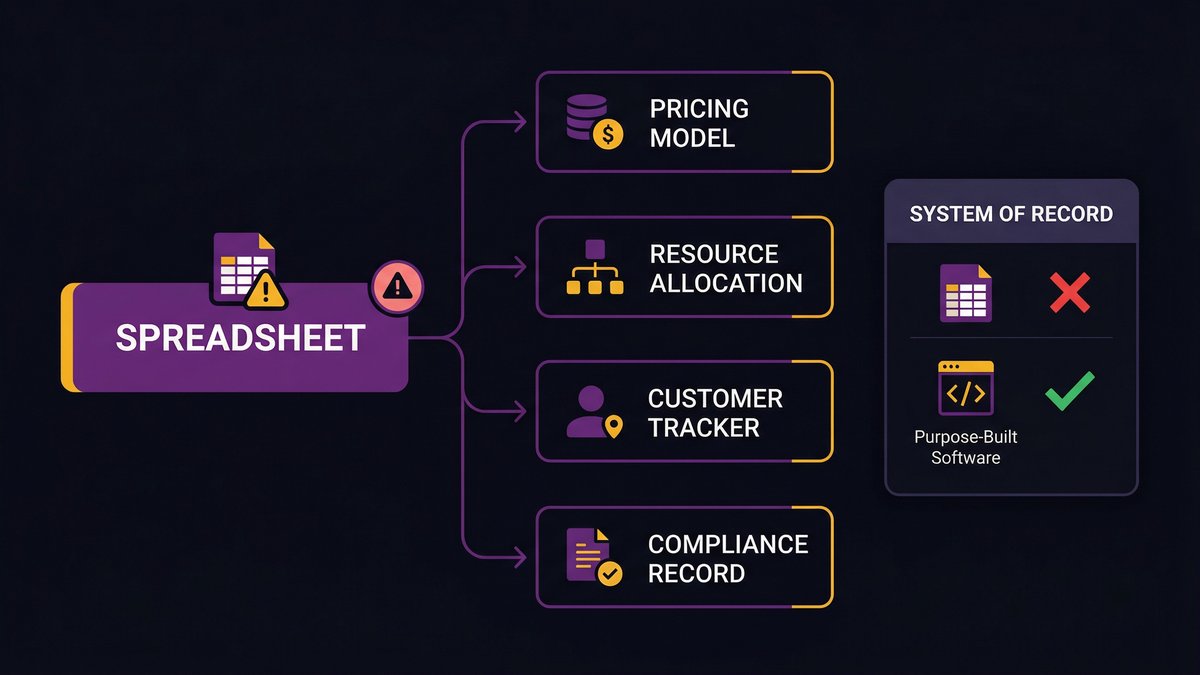
The tipping point is when the spreadsheet starts driving downstream decisions. A pricing model that finance trusts. A resource allocation sheet that three department heads reference every Monday. A customer status tracker that the sales team treats as the CRM, the CRM doesn’t actually handle.
Once a spreadsheet drives decisions, it’s a system of record. It just doesn’t behave like one. It has no access controls. No audit trail. No version history that means anything. No automated alerts when data is missing or out of range.
According to Forrester Consulting (commissioned by Thomson Reuters, October 2025), 48% of organizations cite legacy technology as their primary operational roadblock. The spreadsheet is almost always part of what they mean.
software architecture assessment
What “Breaking at Scale” Actually Looks Like in Operations
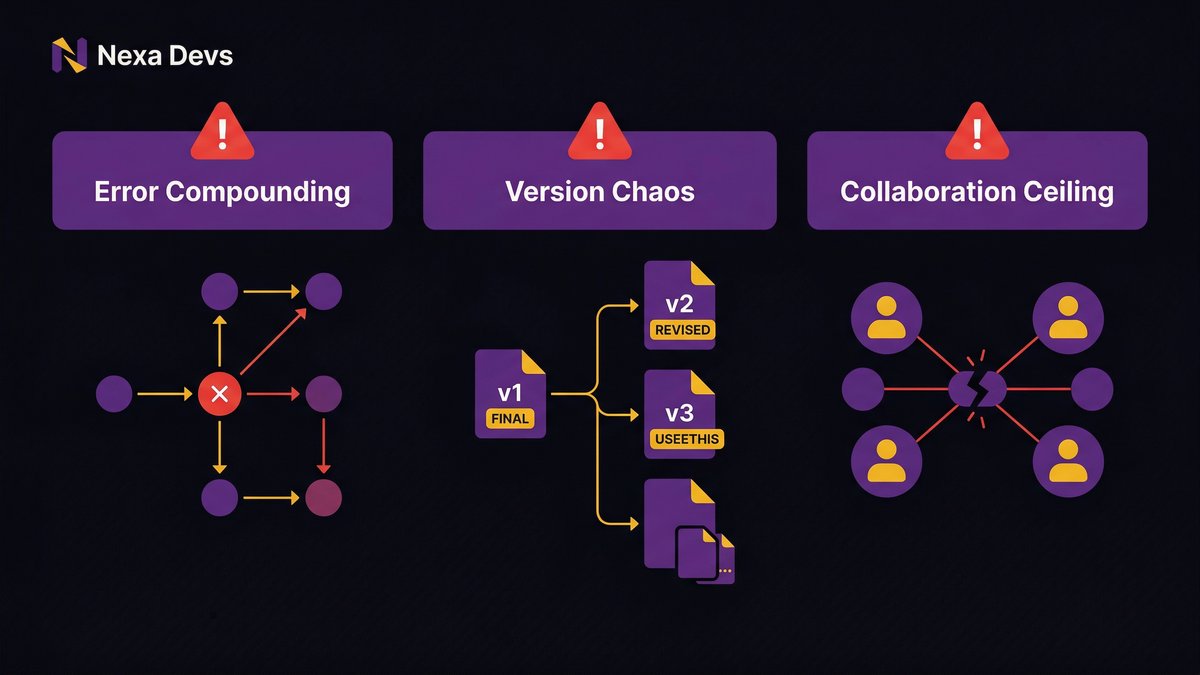
Scale pressure on a spreadsheet-dependent operation produces three failure modes. Not abstract risks. Concrete, operational breakdowns that COOs at growth-stage companies recognize immediately.
Error compounding: how one wrong cell multiplies across departments
A single transposed digit in a pricing spreadsheet is entered into a contract template, which is then fed into the billing system, which produces an invoice that the client disputes three months later. By the time the error surfaces, it’s touched six documents and two external relationships.
According to Oracle, an electricity transmission company lost $24 million due to a misaligned spreadsheet row in a single cut-and-paste error. That’s not an outlier. It’s a known failure mode with a known mechanism.
Research cited by Qashqade estimates that 9 out of 10 spreadsheets with more than 150 rows contain at least one error. Your most important operational spreadsheet almost certainly has more than 150 rows.
Version chaos: which file is correct when six people saved their own copy?
“Operations_tracker_v3_FINAL_JAN_revised_USEETHIS.xlsx” in someone’s local drive. A different version in the shared folder. A third copy was emailed to a VP last Tuesday. Which one has the correct numbers?
Version chaos isn’t a workflow problem. It’s a decision-making problem. When no one fully trusts the numbers, decision-making slows. Leadership asks for reconciliation before acting. Reconciliation takes time. Decisions that should happen Tuesday happen Thursday, or don’t happen at all.
According to Forrester Consulting, 55% of organizations report that disjointed workflows lead to excessive time spent on time-tracking across platforms. Version chaos is the spreadsheet expression of this exact problem.
The collaboration ceiling: why real-time coordination fails in Excel
Excel was designed for a single user working alone. The collaboration model in modern spreadsheet tools is better than it used to be, but it’s still built around a file, not a workflow. You can’t assign a task, set an approval gate, or trigger an automated notification from a cell value. You can’t enforce a business rule. You can’t give a new employee the right access without giving them the whole file.
When your operation needs real-time coordination across functions, a spreadsheet creates a collaboration ceiling. The team works around it, more meetings, more Slack messages, more manual handoffs. The workarounds accumulate until the system underneath them is invisible.
The Hidden Cost Most COOs Never Fully Add Up
The direct failure events get attention. A $24 million loss from a cut-and-paste error is a story someone tells. What doesn’t get added up is the daily cost that compounds silently.
Staff hours lost to manual reconciliation and report prep
According to Forrester Consulting (commissioned by Thomson Reuters, October 2025), 42% of workers spend excessive time searching for and requesting data they need to do their jobs. In a spreadsheet-dependent operation, most of that searching is the job. Someone has to pull the data from three sources, reconcile the mismatches, and build the report that leadership needs for Monday’s meeting. Every week.
One mid-market operations team documented 30 hours per month spent on manual report preparation. Not because they were inefficient. Because the system required it.
Multiply 30 hours per month by the fully-loaded cost of the people doing it. Then multiply by 12 months. Then ask how many months of custom software development that number would buy.
Decision latency: what delayed data costs in fast-moving operations
When your operational data lives in a spreadsheet that’s only updated on Fridays, you make Monday’s decisions on week-old information. In a stable business, that’s inconvenient. In a fast-moving one, it’s strategic exposure.
Decision latency is the gap between when something happens in your operation and when the decision-maker has accurate information about it. The spreadsheet maximizes that gap. Purpose-built software closes it.
The audit and compliance exposure nobody talks about
An auditor asks for the history of changes to a contract pricing model. You open the spreadsheet. There is no audit trail. The formula in column R has been modified eleven times by four people over two years, and there is no record of who changed what or when.
This is not a theoretical compliance risk. It’s a common outcome of using spreadsheets for processes that require auditability. Healthcare operations, financial services, legal workflows, procurement approvals, all of these carry audit requirements that spreadsheets structurally cannot meet.
A manufacturer incurred an $11 million error in employee severance packages due to a spreadsheet typo, according to Oracle. The financial exposure was the headline. The compliance exposure from the lack of an audit trail was the quieter risk sitting beneath it.
The Key-Person Risk Nobody Puts on the Risk Register
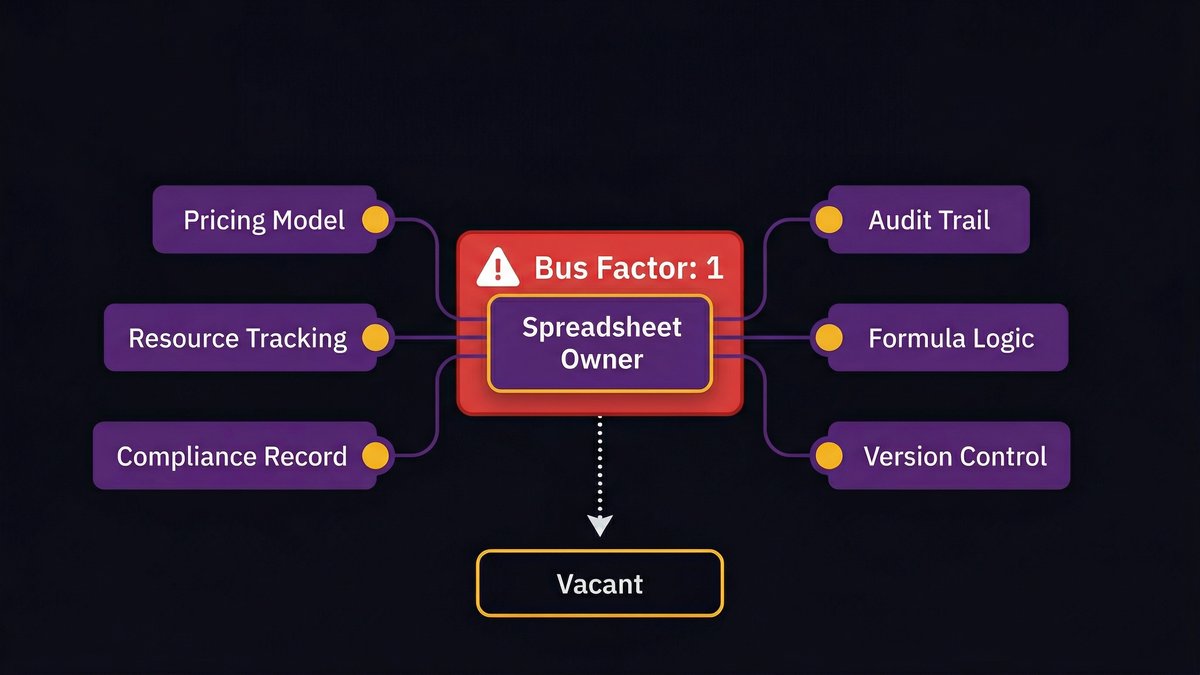
Here’s the failure mode no competitor’s content covers: the spreadsheet itself isn’t the single point of failure. The person who built it is.
When the spreadsheet owner leaves, the operation stalls
Every COO knows who this person is. The one who built the master tracker. The one who understands why row 47 has a manual override and what happens if you delete it. The one who gets called when the numbers don’t add up.
When that person leaves, for a better offer, for a life change, for any of the hundred reasons people leave, the operation doesn’t just lose a contributor. It loses institutional knowledge that was never written down anywhere.
Research from ClearlyAcquired found that replacing high-level operational talent costs 150 to 400% of an employee’s annual salary and delays projects by 6 to 12 months. That’s before accounting for the specific cost of reconstructing an undocumented spreadsheet system from scratch.
The same pattern shows up in software teams: MySQL and PostgreSQL, two of the world’s most-used databases, each have a bus factor of 2, according to analysis by JetBrains’ Bus Factor Explorer. That means those entire systems depend on two contributors. Your operations spreadsheet, realistically, has a bus factor of 1.
How institutional knowledge gets locked inside formulas
The formula in column Q isn’t just a formula. It encodes a business decision someone made in 2021 about how to calculate a margin adjustment for a specific product category. The person who made that decision understood why. The formula doesn’t explain it. The spreadsheet doesn’t document it. The next person to touch it either keeps it without understanding it, or breaks it trying to update it.
This is how institutional knowledge gets locked inside spreadsheets. Not maliciously. Incrementally. Each formula that encodes a business rule without documenting it adds another layer of dependency on the person who wrote it.
Custom internal software doesn’t automatically fix this. But software built with documentation as a standard deliverable, and designed around your actual workflow rather than someone’s mental model of it, closes the gap in a way no spreadsheet can.
Why “Just Switch to a SaaS Tool” Is the Wrong Prescription
Every COO who’s been in this situation has tried the SaaS migration. You know what happens. The tool doesn’t quite fit. The workaround in the spreadsheet gets rebuilt as a workaround in the new platform. Three months later, you have the old problem plus a new tool license.
Off-the-shelf tools are built for average workflows, not yours
SaaS tools are built for the average version of your use case. Your use case isn’t average. It’s the specific operational workflow your business has developed over years of dealing with your specific customers, your specific product mix, and your specific approval structure.
A generic project management tool doesn’t know that your approval workflow has a carve-out for contracts over $50,000 that need a second sign-off. A generic CRM doesn’t know that your customer success team tracks a custom lifecycle stage that your sales cycle depends on. A generic inventory system doesn’t know that your SKU numbering convention maps to a legacy system you can’t replace yet.
So you customize. And you layer on the customization. And eighteen months after the SaaS migration, the tool is as complicated to maintain as the spreadsheet was, except now you’re paying a monthly license fee and dependent on a vendor’s roadmap for every change.
The SaaS migration that recreates the same problem in a new platform
The deeper problem is structural. Off-the-shelf tools are built to serve as many customers as possible. Your workflow is an edge case. The tool serves the middle of the distribution. Your operation lives at the edge.
This is why SaaS migrations so often recreate the original problem in a new container. The workflow doesn’t fit the tool. The team adapts to the tool instead of the tool adapting to the workflow. The adaptation creates friction. The friction creates workarounds. The workarounds accumulate. The spreadsheet comes back, now it’s a companion to the SaaS tool, not a replacement for it.
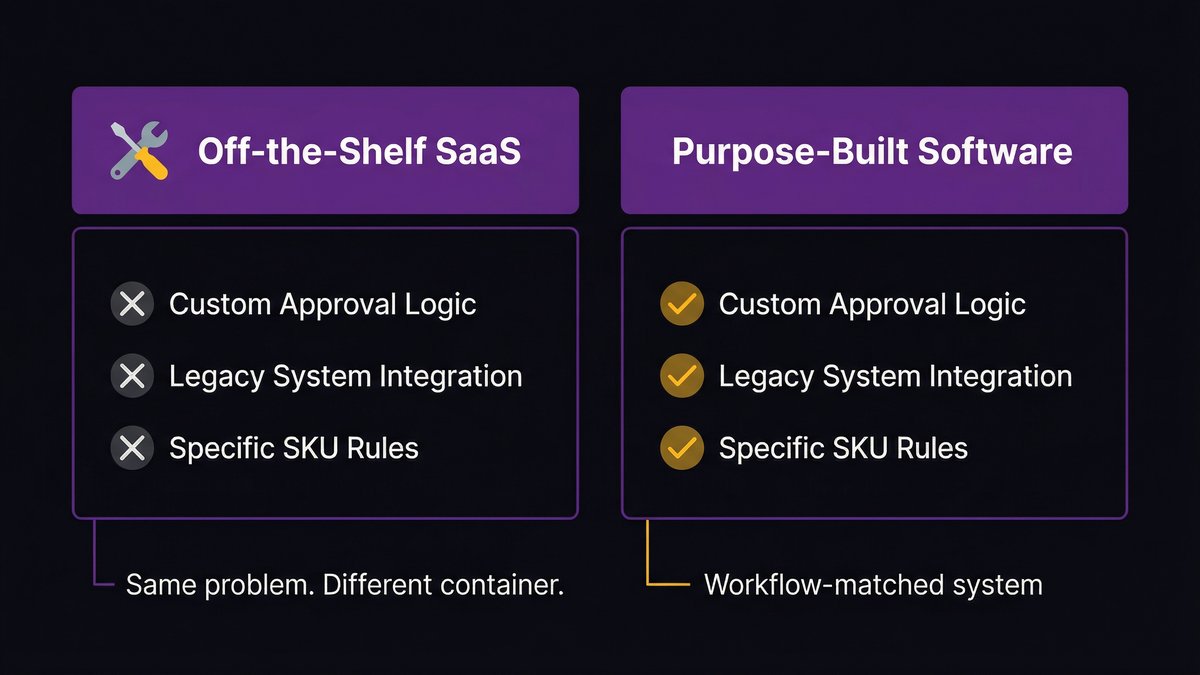
The right answer here is the one most mid-market companies haven’t seriously considered: purpose-built internal software designed from the start to match your actual workflow. Not a generic product reshaped to approximate it.
The Structural Fix: Software That Matches How Your Operation Actually Works
Purpose-built internal software isn’t a new concept. Large enterprises have been building it for decades. What’s changed is that the cost and timeline barriers that made it inaccessible to mid-market companies no longer apply the way they used to.
What purpose-built internal tools look like versus off-the-shelf alternatives
A purpose-built internal tool starts with your workflow, not with a product category. It’s designed around the specific data your team works with, the specific approval structures your organization uses, and the specific integrations your systems require.
It has the audit trail your compliance team needs. It has the access controls your security policy demands. It has the reporting views your operations leadership actually uses. Not approximations of these things. The actual things, built to your specification.
The result isn’t a polished consumer product with a generic feature set. It’s a working tool that fits your operation the way a custom solution fits its problem. The people who use it adopt it because it’s easier than the spreadsheet they used to use, not because they’re required to.
Where to start: mapping the spreadsheets that are doing the most damage
Not every spreadsheet needs to be replaced. The goal isn’t to eliminate Excel. The goal is to identify which spreadsheets are load-bearing, driving decisions, managing compliance-sensitive data, coordinating cross-functional workflows, and replace those with systems that can actually carry the load.
A practical starting point is a spreadsheet dependency audit. List your ten most-used spreadsheets. For each one, answer four questions: What decisions does it drive? Who owns it? What happens if that person is unavailable for two weeks? What would a compliance audit surface if it reviewed the change history?
The answers identify your highest-risk dependencies. Those are the workflows that should become purpose-built software first.
How nearshore AI-augmented development makes custom software viable at mid-market scale
The barrier that has historically blocked mid-market companies from custom internal software is cost and timeline. Enterprise-level custom development is expensive and slow. The ROI calculation didn’t work for a 200-person operations team.
That calculation has changed. Nearshore development teams, operating in U.S. time zone alignment at significantly lower cost than U.S.-based teams, have made the economics viable at mid-market scale. AI-augmented development processes compress timelines further: AI-assisted requirements analysis, sprint planning, and code generation mean that workflows that would have taken six months to build now take two or three.
The result is custom internal software that fits your operation, built at a cost that makes sense for your revenue tier, delivered in a timeline that doesn’t require a multi-year commitment before you see results.
At Nexa Devs, we build purpose-built internal tools for mid-market B2B operations teams using this exact model. AI across every phase of the development lifecycle. Complete documentation delivered and owned by you at close. A post-launch support partnership that doesn’t disappear when the project does.
If you’re running critical workflows on spreadsheets your operation can’t afford to lose, we should talk. Book a discovery call
What to Expect: Signs You’ve Outgrown Your Spreadsheets (and What Comes Next)
Not every operations team is at the same point in this progression. Some are at the early stage of spreadsheet dependency, where the risks are manageable. Others are already at the point where a single bad week could surface a failure they can’t recover from quickly.
The 5 signals that indicate your operation is spreadsheet-constrained
If three or more of these describe your operation, you’re spreadsheet-constrained:
You have a spreadsheet that only one person fully understands. Key-person dependency is the clearest signal. If that person left this month, how long would it take to reconstruct the system?
Reconciling reports before leadership meetings takes more than two hours per week. Manual reconciliation is a symptom of disconnected systems. The spreadsheet is almost always at the center of it.
You’ve had a significant error traced back to a spreadsheet in the past twelve months. One event is a warning. Two is a pattern.
Your team uses a spreadsheet to manage a workflow that touches compliance, contracts, or customer commitments. If it needs an audit trail and doesn’t have one, it’s a liability.
A new employee takes more than a week to understand how a critical spreadsheet works. Onboarding friction this high means the system’s institutional knowledge is already locked in the formulas.
A practical first step: the spreadsheet dependency audit
The audit takes about a half-day for an operations director who knows the business. The output is a ranked list of your highest-risk spreadsheet dependencies, scored by operational impact, key-person exposure, compliance risk, and replacement complexity.
That ranked list is your starting point for a software investment conversation. Not a full system map. Not a technology roadmap. Just a clear answer to: which spreadsheet, if it failed tomorrow, would hurt us the most? Start there.
Learn how we build internal tools for mid-market operations teams
The Bottom Line on Replacing Spreadsheets With Software
Nearshore beats offshore for most mid-market operations teams needing custom internal tools. Here’s why: U.S. timezone overlap means your operations team can actually work in real time with the developers building their system. That’s not a minor convenience. It’s the difference between a tool built around your actual workflow and one built around a specification written at the start of a project and never revisited.
The spreadsheet isn’t going away. It’s useful. It should stay useful for analysis, one-time calculations, and the things it was designed to do. What it shouldn’t be is your single source of truth for an operational workflow that your business depends on.
If you’ve identified a spreadsheet that fits that description, you already know what needs to happen. The question is whether you do it before something breaks, or after.
Ready to map your highest-risk spreadsheet dependencies? Talk to a Nexa Devs team member about a spreadsheet dependency audit for your operations workflow.
FAQ
What are the risks of using spreadsheets for business operations?
The main risks are data errors that compound across departments, version chaos from multiple copies, key-person dependency when one employee owns a critical file, and compliance exposure when workflows require audit trails that spreadsheets can’t provide. Single errors have caused documented losses of $11 million and $24 million in real business cases.
What are the limitations of using a spreadsheet model for operational workflows?
Spreadsheets lack access controls, audit trails, automated validation, and real-time collaboration for large teams. They don’t enforce business rules, scale to high-volume cross-functional workflows, or protect against single-point-of-failure knowledge dependencies when one person understands the underlying logic.
What do people use instead of Excel for business operations?
Teams use purpose-built internal software for complex, compliance-sensitive, or operationally critical workflows. They use off-the-shelf SaaS tools for standard workflows that fit a known product category. Mid-market teams with highly specific workflows often find SaaS tools recreate the same problems in a new platform.
What is an example of an operational risk incident caused by a spreadsheet?
An electricity transmission company lost $24 million when misaligned spreadsheet rows from a cut-and-paste error went undetected. A manufacturer separately incurred an $11 million severance error from a spreadsheet typo. Both lacked automated validation, an audit trail, and safeguards against human input errors.
When should you invest in custom software instead of managing spreadsheet risk?
When a spreadsheet drives decisions, manages compliance-sensitive data, or coordinates cross-functional workflows, it’s a system of record without the controls it needs. At that point, purpose-built internal software designed around your specific workflow is almost always the right replacement over a generic SaaS tool.